Tag Archives: Antivirus

Cybersecurity: An Opportunity For Digital Transformation

pandasecurity-digital-transformation-1

Although it is not a buzzword quite yet, the reality is, digital transformation is already impacting our professional and personal lives. Not a day passes without the media telling us what “it” is, why “it” is necessary, while bombarding us with examples of companies that are immersed in “it”.

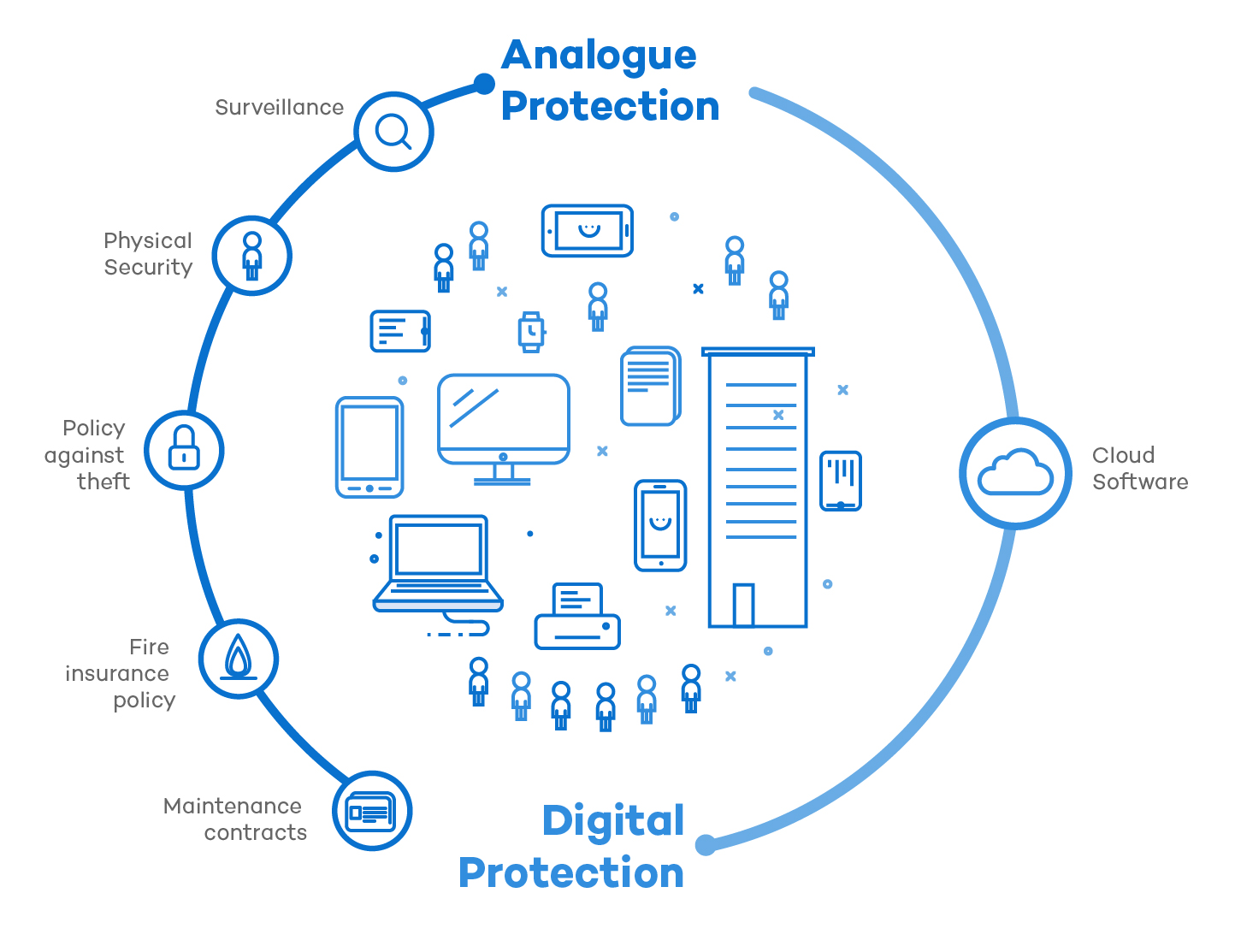
It’s a fact that our lives are becoming more digital. We buy, we work, we store information, and we even communicate with other people through media and digital platforms. Just as we protect our analogue lives, we must protect our online lives.

pandasecurity-digital-transformation-2

Security plays a key role as a facilitator for Digital Transformation. 64% of managers recognize that cybersecurity is one of the pillars of this transformation, and not without reason.

There are two ways we can see this challenge: as a threat or as an opportunity. To approach Digital Transformation as if it is a threat is exaggerated….apocalyptic. We don’t want to downplay these threats… of course they are real, they really are! But fortunately, everyday there are more and better tools to protect businesses and their digital lives.

The cyber-security industry offers a plethora of services and products that are cheap, accessible and effective, and as a result, users are going to be better protected during their Digital Transformation. The cloud has been a great facilitator by implementing this change, protecting all kinds of businesses, regardless of size and sector.

And the same happens with cyber-security in the framework of digital transformation. 43% of executives consider security as the first challenge to address when implementing digital transformation. After all, we cannot really be digital without being protected. Knowing how to take on these changes in a positive way is, without a doubt, a competitive advantage for any organization.

And how do we protect ourselves?

While the technology that positively impacts us grows, so does malware and cyber-threats. These developing threats have a high human component and adapt to the various changes and stoppers that the cyber-security industry has put into action to fight them.

Therefore, in order to fight these threats, human response is absolutely necessary. As humans, we have a great ability: we are adaptable (yes, although we are talking about digital transformation we must remember that we are people). Fortunately there are cyber-security solutions for your business that support last generation technology and are capable of combining adaptability and human component, while allowing you to achieve an extremely high level of security.

Whether we like it or not, digital transformation is creating a new era… changing how we do things, how we live … and we are already fully immersed into it. We have a great opportunity to be more effective, efficient, fast and agile. The technology is there. Let’s take the bull by the horns and learn to protect ourselves like we already do in our analogue life. We will not regret it.

The post Cybersecurity: An Opportunity For Digital Transformation appeared first on Panda Security Mediacenter.

Project Abacus: The End Of All Passwords

pandasecurity-abacusGoogle wants to kill passwords. They have developed Project Abacus, a system that aims to make passwords obsolete and secure your devices ten times more than a fingerprint sensor. So what’s the downside? This new privacy system comes at the expense of knowing absolutely everything about the smartphone’s owner. Its new security system is also… a creepy one.

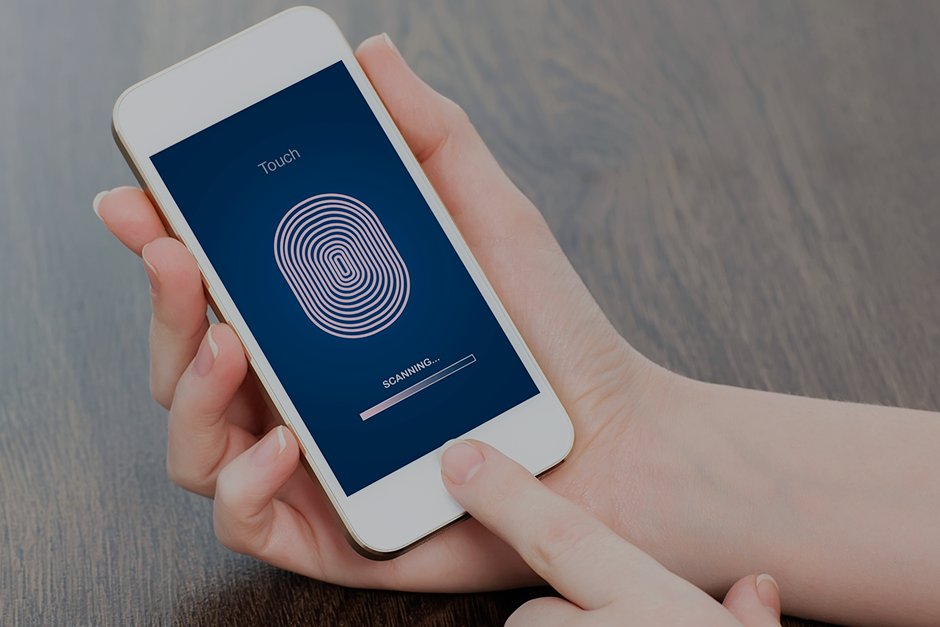
To get rid of unlock patterns, passwords, or fingerprint readers on smartphones, Google has proposed a “trustworthy score” that will be calculated using your personal mobile devices, and deciding whether or not the terminal should be unblocked.

To obtain this score, the smartphone will use all of the user’s information: movement habits, typing speed, location and even biometric data, like voice or facial recognition. In summary, by using the combination of this information, the smartphone will know if the person attempting to unlock it is its owner.

To achieve what it aims to do, Google must constantly keep track of our smartphone use. Your employees will be spied on 24/7 from their personal devices while Project Abacus makes their digital life more secure and comfortable. With Project Abacus, all of your personal information is in Google’s hands.

When Your Apps Spy On You…

The search-site’s plan does not only happen to use this system to unlock Android devices, but it goes far beyond that: the company has announced that it will launch an API so that developers can use Project Abacus as an identification method in third-party applications. The days are numbered for stored passwords and two-step verification. Not only will Google have access to employee information, but any company that uses Project Abacus will be able to use it as a security system.

The problem with Project Abacus is not only the fact that Google and other businesses would have access to the data collected from the phones, but they could also spy on us in real-time. Passwords would no longer be the objective for cyber-attacks. The new goal for cyber-criminals would be to obtain the huge amounts of personal information that would be available about your company and its employees.

Google is taking measures that could be a good compliment to a computer security system, but it is important to remember that they are also increasing the likelihood of a cyber-attack by accessing so much personal data from users. Cyber-criminals are constantly reinventing themselves and putting your at risk, so it is essential to protect your company with the most advanced cyber-security solutions.

The post Project Abacus: The End Of All Passwords appeared first on Panda Security Mediacenter.

Do Your Employees Download Pirated Software? How To Prevent It:

pandasecurity-software-1There are many popular programs that might be available on a user’s home computer, but that are not available at their workplace. A popular image editing program like Photoshop, or Microsoft Office, might be too expensive for a small or medium-sized company that could opt out for more affordable, or even free, software solutions.

However, some employees are unwilling to conform to using these less popular tools, and often, they try to install pirated versions on their computer at work (that are unauthorized on their company computers). The consequence of downloading pirated versions goes far beyond the obvious legal repercussions, which can be very serious for companies. Pirated software is one of biggest entry doors for malware to enter companies.

Pirated software is one of biggest entry doors for malware to enter companies.

To prevent employees from using unlicensed software, which has the potential to compromise your company’s computers, it is essential to establish a proper software management policy (SAM).

pandasecurity-software-2

First of all, businesses should maintain an updated inventory of all active software (i.e., a list of all licensed programs and the workers who use them). Overall, this will serve to detect the programs that are necessary for employees’ work, and which ones should resign.

It is also important to control the detailed information associated with these licensed programs: when the program was bought, when it needs to be renewed, if there are any updates or patches that have not been downloaded yet; this will prioritize our resources so we are able to control budgets and facilitate decision making.

Businesses should maintain an updated inventory of all active software in order to better manage budgets and facilitate decision making.

It is also important to educate and sensitize workers about good practices in relation to software. Unfortunately, on many occasions the company technical departments are unaware of the programs that their colleagues are installing without permission. In fact, around 30% of employees use tools that their bosses don’t know about.

The problem is bigger than it may seem. In 2015, according to a study by the Business Software Alliance (BSA), 39% of software installed on computers worldwide are unlicensed. Those companies using unlicensed software programs are basically drilling holes for cybercriminals, giving them a way to enter their systems and allowing them to endanger their company with malware.

Downloading pirated software increases the likelihood of having a cyber-attack. It is important that you protect your business with advanced cyber-security solutions, like Adaptive Defense 360.

The post Do Your Employees Download Pirated Software? How To Prevent It: appeared first on Panda Security Mediacenter.

Beware of Online Invoices! A Newly Discovered Threat Has Already Crossed Borders

endesa 4

Just a few days ago we received an alert from Endesa, a Spanish electricity company, warning us of a new online scam targeting victims through fraudulent emails. The cyber-criminals send out fake invoices to Spanish users, using the Endesa name, and then the attack hits soon after. Unfortunately, the cyber-criminals were successful in their first attack and have expanded to other countries. It is very difficult to estimate the number of people who have received the email and who have fallen victim to this scheme.

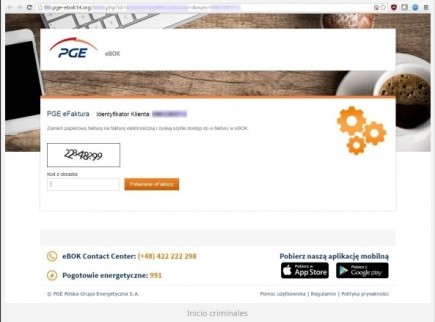
In the past few hours, a similar attack has arisen. The state-owned electric company in Poland, PGE, has fallen into this cyber-criminal network, amplifying this attack-method to an international level. Just like the incidents in Spain, important and sensitive information, belonging to both companies and individuals, have been infected after opening an infected file with the supposed electricity bill (which is really high, by the way).

We are facing a massive fraud that has transcended borders with a very lucrative goal: forcing you to pay a ransom to reclaim your personal files.

In both cases, the campaign has worked in a very similar way: by sending false invoices using the name of an electricity company, while infecting the computers of naïve victims with a locky computer virus. Although the malware has only reached Spain and Poland, it’s quickly growing and your country could be hit next.  Here are some tips to help you combat this threat:

The Online Invoice Scam, Step-by-Step.

  1. In both of the analyzed cases, the email in question reaches the spam mailbox and in the subject box is the name of an electricity company that corresponds to the country.
  2. It appears as though the fake invoice is the same in both countries. After carefully analyzing the PGE situation, we see that the message may appear somewhat messy, with Polish characters inserted into the text at random.
  3. When the user wants to learn more about the factitious bill, they will click on the button with the text “See Your Invoice and Consumption” that appears below the energy consumption summary. But by then, it is too late. After clicking the fake button, the ransomware that is contained inside the Zip file is executed and a malicious Java code script begins to run on the system.
  4. In this case, the schemers continue to trick their target by asking them to complete a Captcha to gain access to the Zip folder. This makes users think that they are carrying out a safe action, but in reality, their cyber-security is being controlled by a very powerful ransomware.
  5. Once the malicious program has been executed, the user will be blocked from accessing personal files. Locky is an aggressive kidnapper and will only return the personal information once a ransom has been paid.

Endesa 3

Don’t fall into a Scam That Is Tailor-Made for You

Each time, there are more detailed and customized attacks. Their creators are getting away with their wrong-doings using the names of prestigious companies, making it easy to fall into this trap.

One thing is clear: if you are not protected against this type of ransomware, your personal and company files are at risk of being abducted.

Avoiding this situation will free you from paying a ransom and will prevent giving up important information and time to the internet’s predators. There is one solution on the market that is able to control any and all types of threats, including Cryptolocker: Adaptive Defense 360.

When you receive an electric bill, you should only worry about how much energy you have consumed. Here at Panda, we will continue on our mission to detect and neutralize all threats and protect all of our customers.


The post Beware of Online Invoices! A Newly Discovered Threat Has Already Crossed Borders appeared first on Panda Security Mediacenter.

Learn how to protect your information on International Archives Day

The entire world population generates and saves enormous amounts of essential information every day. We do so not only to remember and look back on the past, but also, our companies and institutions need this information to run efficiently and transparently.

That is why today, on International Archives Day, we wish to stress the importance of safe and responsible preservation for all kinds of files and, in particular, those which contain personal information belonging to people and companies. Do not forget: although an application, a program or an operating system can be re-installed, corporate or personal information is unique and should be a top priority.

Here are some tips to keep them from falling into the clutches of cybercriminals:

Backup Files

Now more than ever, ransomware is the greatest threat for companies and individuals, which is why backups are the most fundamental tool (and the last resort). They keep us from losing valuable information in the event of a cyber-attack. It is highly recommended to keep at least two backups: one stored in the cloud and a physical one (in an external hard disk, a pen drive, etc.)

Encryption

Before uploading files to the cloud, save them in a storage device or send them by e-mail. It is recommended that you encrypt the most sensitive information, at least, so that they will not be accessible if they fall into the wrong hands. An attacker who gains hold of your files will not be able to read their contents if this person lacks the encryption key, something that only you will have the power to.

Continuous Updating

Always keep your operating system, browser and applications updated to the latest version that is available. This allows you to protect the malware that usually takes advantage of the latest vulnerabilities. Operating your computer with an older version of software makes your most confidential information at risk for theft.


Do Not Use Unknown Computers or Networks

If you go on a trip and you plan on using a computer that is not yours, or connecting your mobile device to public Wi-Fi (such as at a coffee shop or at an airport…), make sure you avoid as much as possible accessing private and sensitive files. If you connect to an open Wi-Fi and you are forced to send personal or confidential information, make sure that it is encrypted and use a virtual network (VPN). Learn how to do so, here.

Install a Good Anti-virus

At Panda, we know how important your photos, videos and other files are for you. That is why we offer file encryption, backup and information protection with our anti-virus superstar: Panda Protection Service. With Panda, nobody can hijack your data! Enjoy the rest of your day.


The post Learn how to protect your information on International Archives Day appeared first on Panda Security Mediacenter.

Billion Dollar Sting: A Financial Corporation’s Worst Nightmare

Banks panda security

For years cybercriminals have had their focus on money, and most specifically in the financial system. For more than a decade they have been mainly targeting the weakest link in the chain: the final user that uses online banking services. This approach has some benefits for these cybercriminals: poor security in the end user, small money thefts that can go undetected for some time, etc. However it also has some cons: need of money mules, being able to find (infect) a victim that is using one of the targeted banks, avoiding antimalware software, etc.

In other words, they can make a lot of money, but at the same time it will require a lot of effort from their side.

Where is the big money? Financial institutions themselves. There is no discussion about this. However it is hard to break into them, and even more complicated to understand how their specific internal systems work in order to be able to fully compromise them, take the money and leave without leaving a trace. It requires a great investment to gather all the intelligence needed for this kind of heist, it is not easy to perform and it might require several months, if not years, of careful planning. Anyway it is worth it if 1 billion dollars can be stolen in just one hit.

This is basically what happened in February at the Bangladesh Central Bank, where attackers infected their system with malware specifically created for this attack and tried to make fraudulent transfers totaling 951 million dollars. That money was in the account Bangladesh Central Bank had at the Federal Reserve Bank of New York. Gladly most of the transfers could be blocked, and “only” 81 million dollars were stolen. But this was not the only case.

Tien Phong Bank, a Vietnamese bank suffered a similar attack in the last Quarter of 2015. That time cybercriminals also tried to make transfers through SWIFT, although the bank could realize in time and could halt the 1 million dollars transfers already on route. And a few months earlier, in January 2015, a bank from Ecuador –Banco del Austro –was hit in a very similar way, and 9 million dollars were stolen.

banks-sting-illustration

What are the similarities among the three cases? Malware was used to perform the attack, and all the money transfers were made using the SWIFT network. SWIFT (Society for Worldwide Interbank Financial Telecommunication) is a cooperative society formed by thousands of financial institutions around the world. Founded in 1973, it provides different services to their members.  The secure transfer of money among banks is one of the services offered and processed by the SWIFT network.

The biggest concern was if the SWIFT network, that was believed to be secure, had been compromised. If this was the case the entire financial system could be at risk. It looks like this was not the case and SWIFT has issued a press release where it clearly states this: “the SWIFT network, core messaging services and software have not been compromised.”

However, that depends on the point of view: cybercriminals successfully used the SWIFT network to perpetrate these heists. And they took a similar approach as the one described in the beginning of this article: target the weakest link in the chain. SWIFT provides a safe environment, but at the end of the day, each financial institution has its own internal system that communicates with the SWIFT network. In the same way cybercriminals were targeting final customers with banking Trojans, now instead of going after the SWIFT network, they are going after the banks connected to it. This means that, while we can say that the SWIFT network is safe so far, we can also say that there are potentially thousands of holes that exist, as many as financial institutions connected to them.

How did these attacks happen exactly?

There are still many unknowns, and some of them won’t ever be solved. These criminals have covered their tracks. In fact, the main purpose of one of the malware pieces used in the heist was to delete these tracks. One thing we know for sure: malware was used. How did it enter? For this we have two different options: there was help from an insider, or it was an external attack through Internet. Both seem plausible, even more so after we learned that the security infrastructure at the Bangladesh Central Bank was obviously not good enough.

If we take a deeper look at the Bangladesh incident, it was a highly sophisticated attack targeting specifically the Bangladesh Central Bank, but the way the malware is structured (using an external configuration file, which makes no sense if this was just a one time job) points out that we’ll find new victims. They will go after banks that have flaws / weaknesses in their security model, such as those that do not monitor the execution of software in their network, and so far the information we have on the other attacks confirm this hypothesis.

In their customer communication SWIFT tells all the banks that their first priority should be to ensure that you have all preventative and detective measures in place to secure your environment.

So that’s easy, right? How can we ensure that? Is there anything at all that can be done to completely prevent any new heist?

Criminals will keep trying, and eventually they may succeed. Anyway we know what they are after (money) and what computers they want to target (those connecting to the SWIFT network). Access to the SWIFT network is highly restricted, it can only be performed from certain computers and only certain users are allowed access to them. Those computers have to be highly fortified, and of course we are not just talking about having updated software and use an antimalware solution.

Only pre-approved software should be let executed in those computers. All executed processes have to be monitored in real time, logging everything that happens and looking for abnormal behaviors. It does not matter if the attack comes from the Internet or with the help of an insider. No unauthorized software can be allowed to be executed in those terminals, and the allowed one has to be protected with anti-exploit technologies and monitored in real time in case some abnormal behavior takes place.

Of course, if some person has physical access to a target computer, at some point they could disable any security solution, which is not a problem by itself if you can get an alert about it on the console used by the security team. Is there any better indicator of compromise than someone tampering with the security software installed in a critical system?

How to avoid these cyber-attacks

One of the most frustrating things that victims have to go through is the lack of knowledge of how the incident happened. How did it happen? When did it start? For how long? What did they do once the computers were compromised? Was there any confidential information leak? As an example, in the Bangladesh Central Bank case, three pieces of malware could be recovered after the incident, but that’s what there was left. Attackers probably used many other tools that were deleted and the victim won’t know anything about them.

Knowledge is power: being able to know how a security incident happened will help you fix any security weakness in your environment.

There are only a few solutions that are capable of delivering this level of service, Panda created Adaptive Defense for these type of cases and we already have financial companies, governments, and big corporations in different verticals (health, hotels, insurance, public utilities, etc.) actively using Panda Adaptive Defense. All of them suffer not just the regular cyber-attacks, but really targeted attacks against their assets. We have shown some of them, such as the one targeting a luxury hotel chain a few weeks ago or the one against oil tankers.

Our conclusion after studying these attacks is that If those banks would have had Panda Adaptive Defense in their SWIFT connected terminals, the heist could have been stopped in time.

The post Billion Dollar Sting: A Financial Corporation’s Worst Nightmare appeared first on Panda Security Mediacenter.


Wearable Technology: You’ll soon be able to project your Smartwatch onto your Wrist

wearables_FOTO1Smart watches and fitness bracelets are joining millions of people on the mission to be healthier and more active.  These devices are becoming part of our daily lives, and expanding the functions that we already use on our Smartphones.


According to the consulting firm IDC, in the first quarter of 2016, wearable technology sales have already increased, mostly due to the smart devices that monitor health and exercise. This sales increase has lead to a decrease in cost; the price of these watches, bracelets and other wearables has gone down this year. Now, there is an intelligent accessory for every budget.


With companies like Fitbit, Xiaomi, Garmin, Samsung, and Apple in the lead, this market is said to be one of the most profitable sectors for years to come. In fact, the number of wearable technology users has already doubled in the last two years, according to a study from PwC


So far, Christmas 2015 has been the biggest expansion period for wearables.  But as the sector grows and more options are available on the market, the array of choices could actually hurt the sale of wearables.  To add, many users have already become bored of their wearables after using them for only a few months.


We will soon be able to project wearable screens onto human skin


One of the main disadvantages for most wearable technology is the small size of their screens (when they have them), but soon there will be a solution to this problem. There is now technology that allows for wearables to project onto human skin, converting the user’s arm, or any other part of the body, into an extension of the screen. But as always, with new advances in technology there are other limiting factors and in the case of wearables, it is their wavering cyber-security.


Yes, these devices track personal activity data like user movements and heart rhythm, but any personal information that gives cybercriminals insight into our personal lives is interesting data for them to steal.  A number of researchers and experts have even warned us of the large number of vulnerabilities that exist in these smart accessories, like the ones in smart watches. This means that if an attacker manages to exploit these devices, there is a large possibility that they could discover a credit card PIN number.


An attacker could use your Smart Watch to find out your credit card PIN number.


Wearables are not as “fit” as we think, in fact, they are weak when it comes to cyber-attacks. Protecting your wearable accessory is just as important as any other device and fortunately, there are specialized security companies, like Panda Security, that will help you protect your wearables and private information that are at risk.

The post Wearable Technology: You’ll soon be able to project your Smartwatch onto your Wrist appeared first on Panda Security Mediacenter.
Have they hijacked your browser? Here’s how to fix it

hijacking2We’re sure your browser has been hijacked before. Say you decide to download a program you need from a seemingly reliable website (like Softonic), and you click “install” to begin downloading without really thinking about it. When it finishes downloading, you go back to the browser and you realize that one or more toolbars have appeared or that the home page is no longer Google. The search engine hasn’t changed too much in appearance, but it is not the same one as before.

This is very common and is called browser hijacking. Why has the start-up browser page changed and how can I fix it? A malicious program—or at least an unwanted one—has corrupted your computer. Another example: While installing part of the software, your browser’s options change without your permission. The way it changes varies, but the end result is usually the same: more advertisements.

You have changed the start page or have toolbars that you have not installed voluntarily.

The “kidnapper” is earning money thanks to this practice (which is sometimes harmless but always very bothersome). Depending on the malware that is installed on your machine, it can be more or less difficult to get rid of. Don’t forget to take precautions.

In this case, there is a measure that almost never fails: installing antivirus software and keeping it updated. Good security solutions are able to recognize the malicious programs and prevent them from getting into your computer.

What if it’s too late?

If it is too late and your browser has been kidnapped (ex. it runs slower than usual, displays advertising for unusual sites, you see toolbars that you didn’t install, the home page has changed or your searches are redirected), then you have no other option than to restore the configuration to get everything back to normal.

For the most popular browsers, including Google Chrome, Mozilla Firefox or Internet Explorer, you can restore the configuration using the simple instructions online.

The post Have they hijacked your browser? Here’s how to fix it appeared first on Panda Security Mediacenter.
Happy Geek Pride Day! Here are Five Security Gadgets for your SME…

PandaGeekPride_ENG_800x800gif

Happy Geek Pride Day!  To celebrate our special day, we’re sharing with you some of the most innovative security gadgets to help your businesses stay protected and grow.  Technology is fundamental for any modern business. You might be thinking that IT security is far out of reach for your small to medium-size enterprise because of a limited budget. Wrong! You can protect against the constant threats that lurk in the web without breaking your budget.

With just a few bucks and some basic knowledge, there are many things us geeks can do to ensure the safety of our SMEs. Today is the day we rejoice in our shared love for technology and innovation.  Here are five cheap tools that will reinforce your company’s security:

Access Control

…the key that opens the doors of tomorrow.  The future of password identification is biometrics.  We’re sure you have noticed that it has been  increasingly popular for offices to use fingerprint readers, especially for entrances, to make sure that only the employees, and those invited, have access to the facilities. Protect entry to your business, or geek lair, with a smart lock.  Gadgets using Bluetooth, NFC, RFID or even Photonics Technology – can fulfill the same purpose.

Security Cables

Are you a geek that isn’t fluent in computer?  No problem.  Here’s a more hands-on solution.  Look to see if your laptop has a round slot, possibly close to the USB ports or the charger socket.  Maybe you’ve never noticed it but its more possible that you’ve been wondering what it is used for.  This is a Kensington Security Slot, a small hole that allows you to install a lock to block access to your machine.  Your roomie won’t be able to “borrow” your laptop anymore.  Although they won’t exactly strengthen the security of your laptop, security cables are cheap, tried and true.  They will definitely prevent future annoyances for your SME.

Cheap Alternatives for Video Surveillance Systems

The Internet of Things has opened up a world of possibilities for SMEs with small budgets. Now, we can set up surveillance systems using cameras that communicate with Smartphones. Piper, Canary or Nest Cam are some of the most popular and accessible systems.

The USB condom that protects your smartphone

Is your Smartphone your life? If your one of those entrepreneurs that sweats bullets as soon as you hit low-battery mode, then you’re probably accustomed to recharging your phone in public places like airports, cyber-cafes, or other similar charging stations, which in many instances, are massive hacking zones for cyber-criminals. A USB condom is inserted into the USB connector on your smartphone, tablet or computer, and disables the port’s data pins. The idea is that you insert it into your device before using free charging stations at less than trustworthy places. Once your charged-up, the device will eject and the USB port will operate as normal. You can find these devices in various models.

U2F

We have already chatted about two-step verification.  By now, you have probably grown tired of entering your password twice to confirm your identity for services or sites you access on the daily (like email accounts, for many of us). For less than €6, you can buy U2F Security Keys, which replace that second authentication factor.  As a safety guarantee, this special USB key does require you to enter on your computer that you, and only you, will try and access the computer.

USB KEY

The above-named gadgets can take your SME to a new level of protection, but you shouldn’t forget that hardware insurance is of little use if it is not accompanied by a good security software. With the Panda Antivirus, small and medium-sized enterprises won’t have to spend much time or money to defend their most valuable digital assets in the best possible way.

The post Happy Geek Pride Day! Here are Five Security Gadgets for your SME… appeared first on Panda Security Mediacenter.

A Kidnapping Survival Guide: How to Combat Digital Ransomware (Part 2)

ransomware2

You have already read some of our tips to help prevent the most feared and common cyber-threat of the moment, ransomware; it can hijack your computer and all the computers in your company. Its main strength is that it is able to block computers and encrypt files, and the only one who is able to decrypt it is the cyber-criminal that created it, which is why so many victims are paying the ransom demanded by these attackers.


When an attack is this sophisticated, the only way to combat it is by taking precautions. Any recommendations you may have can help you, but there is a key measure that is worth mentioning: the backup copies are your best allies to resist the escalation of a cyber-abduction.


In the second part of this guide, we will explain what is essential and how you can handle a ransomware attack.


First of all, ransomware does not block everything. If your devices have been infected, the first thing you should check is that the information is really encrypted. There are mediocre cyber-criminals that are taking advantage of the success of better-prepared, cyber-crime mafias. They do these second-rate jobs in order to simulate attacks that in reality don’t actually hijack your files, and then they reap the benefits. If you do not know how to distinguish a real threat from an imposter, make sure to consult an expert before forking the cash over to the bad guys.


Another important thing to consider: Do you have a backup? After you have verified that the attack is in fact a legitimate ransomware, the first thing you need to ask any security professional is if your company has backup copies of everything that is important. It is the only effective defense. If you have backups, you can eliminate the infected system completely, load your backups, and then everything will be back to normal.


Uses reliable tools. Not all programs are equally effective in creating backups. Unfortunately, many organizations have found that the software used to create a backup is not able replace the detailed information exactly the same as it was before the ransomware attack. Choose your work team carefully and protect your files. Good security solutions offer reliable tools.


For security reasons, it is better to keep your backups offline. In addition to this, if you want to keep ransomware from dragging you down, do not store backups on a shared disk. The more isolated your backups are from the network that is possibly infected, the more likely you are to survive and retrieve your sensitive information from them.


Make several different copies. Even if you are the most careful while carrying out these procedures, there is always a fragile moment. Those few minutes when the disk guarding your backup is copying the data, and is connected to the rest of the network. In that precise moment you are vulnerable to a cyber-criminal. In order to prevent infection, it is advisable to backups in several periods: in real time (if resources permit it), daily, weekly and monthly. They must be separate backups, and at least one of them should be disconnected from the rest of the network.

The post A Kidnapping Survival Guide: How to Combat Digital Ransomware (Part 2) appeared first on Panda Security Mediacenter.