Dennis Fisher and Mike Mimoso discuss Facebook’s moves toward encrypted notifications and SHA-2 usage, the audit of GitHub SSH keys and the awesome OpenSesame garage door hack from Samy Kamkar.
Tag Archives: Encryption
Facebook Is Getting More Secure Thanks to OpenPGP
In order to achieve this goal Facebook just announced in a blog post that is now offering you the ability to encrypt e-mails via OpenPGP, an email encryption system.
“To enhance the privacy of this email content, today we are gradually rolling out an experimental new feature that enables people to add OpenPGP public keys to their profile; these keys can be used to “end-to-end” encrypt notification emails sent from Facebook to your preferred email accounts. People may also choose to share OpenPGP keys from their profile, with or without enabling encrypted notifications”, says Facebook
So basically the social network will allow you to give it your public key so that mails you might receive from Facebook (for example password resets) will be encrypted. You can also enable encrypted notifications: Facebook will then sign outbound messages using your key so that you can be sure the emails are genuine.
The encryption system Facebook is using is OpenPGP where the PGP stands for “Pretty Good Privacy”. It’s one of the most popular standards when it comes to protecting email and should really serve its purpose well. Read this article if you want to find out more about Public Key Cryptography and PGP – it really will make the whole technique easier to understand.
The post Facebook Is Getting More Secure Thanks to OpenPGP appeared first on Avira Blog.
Facebook Bolsters Message Security, Adds OpenPGP
Facebook announced early Monday that has adopted OpenPGP encryption and will let users post their public keys on their profile.
Weak Homegrown Crypto Dooms Open Smart Grid Protocol
Researchers in Europe have published research examining weak, homegrown cryptography used in the Open Smart Grid Protocol.
Mozilla Moving Toward Full HTTPS Enforcement in Firefox
The Mozilla Foundation announced yesterday that it is in the process making HTTP connections incompatible with its popular Firefox Web browser.
Second Crypto Bug in Networking Library Could Affect 25,000 Apps
A few weeks after the developers of the AFNetworking library that’s popular among iOS and OS X app developers patched a serious bug in the library that enabled man-in-the-middle attacks, another, similar flaw has surfaced. The new vulnerability is related to how the AFNetworking library handles domain name validation for certificates. As it turns out, the library […]
Crypto ‘Front Door’ Debate Likely to Go On For Years
SAN FRANCISCO–Encryption is the hot new topic in security at the moment, as it has been any number of times in the last few decades. And, as in the past, the notions of key escrow, mandated legal access to encrypted systems and other ideas for helping governments defeat cryptosystems have followed right along with the latest crypto […]
Google Moving Toward Encrypted Ad Services
Google engineers have spent the last several years moving many of the company’s online services to encrypted links. Gmail is HTTPS by default, and Google search is done over SSL for much of the world. Now the company is working to move its ad-serving and ad-buying platforms to HTTPS, as well. Google’s ad networks are pervasive […]

Wi-Fi Security feature foolproofs your network connections both in public and at home

Protect your Wi-Fi connections using Avast’s Wi-Fi Security feature.
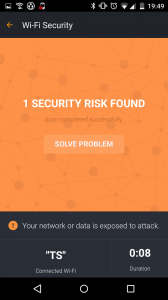
Wi-Fi Security is a feature that is available for Android users within the Avast Mobile Security app as well as within Avast SecureMe for iOS. The feature’s job is to scan Wi-Fi connections and notify you if it finds any security issues including routers with weak passwords, unsecured wireless networks, and routers with vulnerabilities that could be exploited by hackers.
While conducting user testing, we found that 22% of Avast Mobile Security users make use of the Wi-Fi Security feature, making it the 2nd most used feature within Avast Mobile Security.
“Avast SecureMe and Avast Mobile Security offer users a simple, one-touch solution to find and choose safe networks to protect themselves from the threat of stolen personal data,” said Jude McColgan.
Wi-Fi Security scan notifies you of any issues that are detected
From all the users who tested the Wi-Fi Security feature, more than 10% of the scans performed returned some kind of problem, such as the use of non-encrypted passwords or a router that is susceptible to security threats. The Wi-Fi Security feature currently performs checks for the following four key elements:
- Non-encrypted, unsecured wireless networks
- Networks with weak encryption
- Weak router passwords
- Routers with known security issues
What’s the risk that my personal data will be stolen?
If you use unsecured Wi-Fi when you log in to a banking site, for example, thieves can capture your log in credentials which can lead to identify theft. On unprotected Wi-Fi networks, thieves can also easily see emails, browsing history, and personal data if you do not use a secure or encrypted connection like a virtual private network (VPN). See our global Wi-Fi hacking experiment to see how widespread the threat really is.
Wi-Fi Security offers two solutions to defend against malware threats
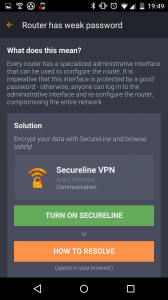
After the Wi-Fi Security feature has scanned your device, you’re presented with two options:
1) Launch Avast SecureLine VPN
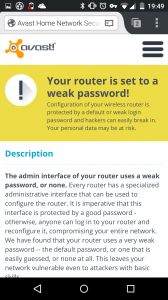
2) Click the ‘How to resolve’ button
The first of the two options is meant to be used when you’re connecting to public networks – it’s ideal for cafes, airports, or hotels. On the contrary, users should opt to resolve detected threats if they’re browsing at home using their own devices. When taking this route, you’re redirected to the Avast website in order to set up your router in accordance with our guidelines.
How do I get the Wi-Fi Security feature onto my device?
Avast SecureMe will soon be available in the iTunes Store. Before its widespread release, we will be conducting an invitation-only public beta test. Please sign up here, and the SecureMe team will contact you. If you have already downloaded Avast Mobile Security for Android then you’re all set to start using the Wi-Fi Security feature (you’ll find the “Wi-Fi Security” button on the app’s dashboard). For those yet to download Avast Mobile Security, it is available now from the Play Store.
DigiCert Offers Continuous Monitoring of Digital Certificates to Defeat Fraud
It’s an interesting time for certificate authorities. On the one hand, interest has never been higher in Web encryption, privacy and transport security, thanks to Edward Snowden. But on the other hand, the last few years has seen a steady stream of compromises of CAs, mis-issued certificates and other problems. CAs hold the security and […]