Tag Archives: Microsoft

Microsoft Wins! Govt Can't Force Tech Companies to Hand Over Data Stored Overseas

Especially after the Snowden revelations of global mass surveillance by US intelligence agencies at home and abroad, various countries demanded tech companies including Google, Apple, and Microsoft to set-up and maintain their servers in respective countries in order to keep their citizen data within boundaries.

The US government has powers to comply US-based tech companies with the court

Critical Print Spooler Bug allows Attackers to Hack any version of Microsoft Windows

Microsoft’s July Patch Tuesday offers 11 security bulletins with six rated critical resolving almost 50 security holes in its software.

The company has patched a security flaw in the Windows Print Spooler service that affects all supported versions of Windows ever released, which if exploited could allow an attacker to take over a device via a simple mechanism.

The “critical” flaw (

Zero-Day Warning! Ransomware targets Microsoft Office 365 Users

If just relying on the security tools of Microsoft Office 365 can protect you from cyber attacks, you are wrong.

Variants of Cerber Ransomware are now targeting MS Office 365 email users with a massive zero-day attack that has the ability to bypass Office 365’s built-in security tools.

According to a report published by cloud security provider Avanan, the massive zero-day Cerber ransomware

Woman wins $10,000 after suing Microsoft over 'Forced' Windows 10 Upgrade

Since the launch of Windows 10 in July last year, Microsoft is constantly pestering users to upgrade their PCs running older versions of the operating system.

However, many users who are happy with Windows 7 or Windows 8.1 and don’t want upgrade to Windows 10 now or anytime soon are sick of this forceful unwanted upgrade.
<!– adsense –>
One of the victims to this unwanted Windows 10

Tech Giants Use Differential Privacy to Extract Your Private Information

pandasecurity-apple-mac

Besides the exciting developments Apple presented at its annual WWDC event in San Francisco, there were also some security related announcements that should not go unnoticed.


The Apple brand talked about a new concept that they are beginning to use in all of their services that they say is the future of how users manage personal information on their platforms: they call it differential privacy.

What does differential privacy consist of?


You may think of Apple as a privacy defender; they are known to favor encryption and implement different measures in order to protect the personal data of their users. But in the age of “big data”, tech companies like Apple are also seeking as many personal details as possible about their users. Like any business, the tech company run by Tim Cook needs to know everything about their customers, both current and future.


How can the tech company seek personal data, while at the same, keep it private? It’s a privacy vs. government race (especially in the United States). Luckily for Apple users, in the realm of user privacy, this multinational giant is in the lead.


Apple has come up with something they call differential privacy. In other words, they extract conclusions about users and groups (or subgroups), while at the same time, ensuring that the information belonging to each one of those individuals is totally private.


Differential privacy lets you gain insights from large datasets, but with a mathematical proof that no one can learn about a single individual


“Differential privacy lets you gain insights from large datasets, but with a mathematical proof that no one can learn about a single individual,” explained Aaron Roth, a profesor of computer science at the University of Pennsylvania, who “[wrote] the book” on differential privacy, according to Apple’s Craig Federighi.

Much More Than Anonymizing Data

This does not anonymize data like many other internet services, which has proven to fail in many occasions. In 2007, for example, a group of investigators demonstrated how they were able to de-anonymize the “anonymous” data published on Netflix.


On the contrary, with their new focus Apple will not pass information from its devices to its servers until the data passes through a transformation process where it will go through various techniques like cryptographic and flow noise functions to ensure that it is mathematically impossible to associate your data with your identity.


They are not the only technology giant that is adopting differential privacy to protect their users’ personal information: other big businesses share this new idea including Google, and Microsoft, whose team of experts even includes some of the concept’s founders.

The post Tech Giants Use Differential Privacy to Extract Your Private Information appeared first on Panda Security Mediacenter.

Microsoft releases tons of Security Updates to patch 44 vulnerabilities

Microsoft has released 16 security bulletins on Tuesday resolving a total of 44 security holes in its software, including Windows, Office, Exchange Server, Internet Explorer and Edge.

Five bulletins have been rated “critical” that could be used to carry out remote code execution and affected: Windows, Internet Explorer (IE), Edge (the new, improved IE), Microsoft Office and Office services;

Breaking: Microsoft to buy LinkedIn for $26.2 BILLLLLION

Breaking News for today:

Microsoft has announced that it is planning to acquire LinkedIn, the social network for professionals, for $26.2 Billion in cash.

Yes, Microsoft announced today that it would buy LinkedIn for $196 per share in an all-cash transaction valued at $26.2 BILLLLLLION.

It is so far the biggest acquisition made by Microsoft, which has made 8 takeovers, including Skype in

7 Secrets in the Windows 10 Anniversary Edition

In this blog, we’ll guide you through seven new and hidden things in the upcoming Windows 10 release so you’re fully prepared for what’s about to come to your PC.

The Windows 10 Anniversary Update comes out in July 2016.  This is both good and bad news for you.

Let’s do the bad news first: On July 29th, Windows 10 will no longer be available as a free upgrade. You will only be able to purchase it as a standalone item (or via the purchase of a new PC or laptop). So if you haven’t got it already, you better act quick and make sure you’ve reserved your free upgrade for all your Windows 7 and 8.1 devices.

The good news: Windows 10 Anniversary Update is more than your traditional Service Pack. Its slightly updated look combines more performance tools, bug fixes, and features than any other update that has come before. Free of charge.

In this blog, we’ll guide you through seven new and hidden things in the upcoming Windows 10 release so you’re prepared for what’s coming to your PC. Note that most of this is already visible if you’re running Windows 10 Insider Build.

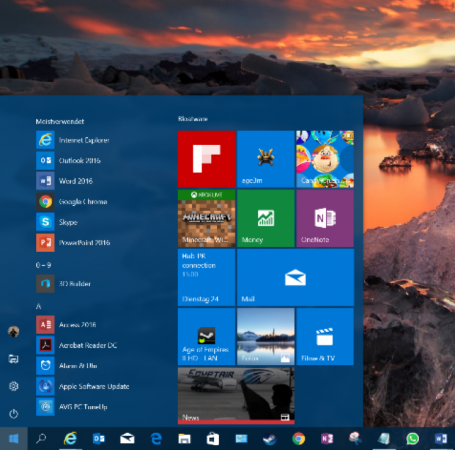
  1. Restarting The Start Button…again?

I can still hear the outcries when Microsoft introduced the Start screen in Windows 8, a full-screen cluster of tiles and that infamously removed the classic Start button and menu combination. Sure enough, they backpedaled with their “Big 10” last year and reintroduced the start menu, much to everyone’s satisfaction. But apparently Microsoft still isn’t quite happy with the Start menu, so they’ve been tweaking things.
/var/www/now.avg.com/18.46.0/wp content/uploads/2016/06/windows0

The three entries All Apps, Power, and Settings have now been reduced to icons – that will make it a bit tougher for beginners to find these. But it leaves more space for the list of apps and your tiles. Also new are interactive tiles. For example, the map tile will not just show you information but also let you interact with it. This is nothing revolutionary, but nice tweaks going forward.

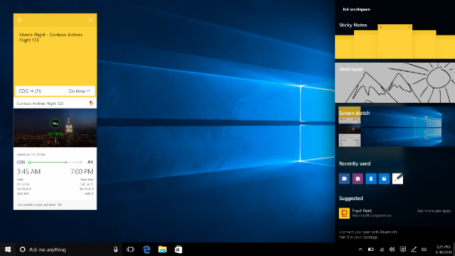
  1. Information Overload: The New Notification Center
/var/www/now.avg.com/18.46.0/wp content/uploads/2016/06/windows1

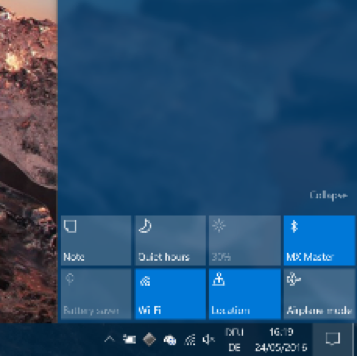
Clicking on the little speech bubble in the lower right corner will reveal a drastically updated notification center, which you can use to pin sticky notes, quickly sketch something, get access to apps you most recently used, and customize quick-action buttons, also in the lower right corner:
/var/www/now.avg.com/18.46.0/wp content/uploads/2016/06/windows2

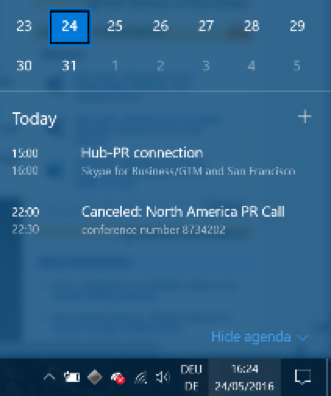
Going forward, this area will also link to your phone to display notifications such as incoming text messages that you can reply to from your PC. Microsoft’s new browser (“Edge”) will show notifications, so you can stay up-to-date on news from your favorite websites. Upcoming calendar appointments will also make an appearance to give you a quick-glance look at what’s happening.
/var/www/now.avg.com/18.46.0/wp content/uploads/2016/06/windows3

  1. Dark Mode

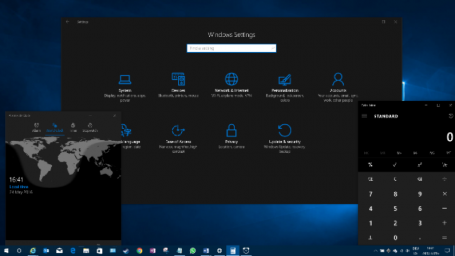
For those dark souls among us: Microsoft has gone “cool”, with a Windows 10 Dark Mode, which “paints” all third-party apps and certain parts of the Windows user interface black. This won’t just look a bit sleeker (to some), but it will also match the color schemes used by many applications (such as our own AVG products or Adobe’s Creative Suite) quite nicely. At the same time, it draws attention to the center of the screen and not Windows itself:
/var/www/now.avg.com/18.46.0/wp content/uploads/2016/06/windows4
Once you have Windows 10 installed, simply head over to the Personalization category in your Windows Settings app and click on Dark!

  1. Linux + Windows = Bash!

For all those (super) tech geeks among you, the new Bash shell integrates a complete Linux command line into Windows. However, it’s not a full blown Linux virtual machine. Rather, it is simply a developer toolset that integrates some useful Linux commands and environments into Windows. All you coders out there using both Windows and Linux developing tools, head on over to Microsoft’s Scott Hanselmann for more information.

/var/www/now.avg.com/18.46.0/wp content/uploads/2016/06/windows5

(Credit: Microsoft)

  1. On the bleeding Edge

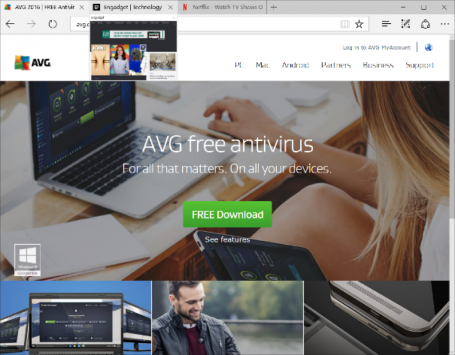
Windows 10’s default browser, Edge, is also getting some welcome improvements that might just make me switch from Chrome or IE. First of all, Edge is being opened to long-awaited plug-ins (extensions), with some software makers getting an (invitation only) head start. Once the Windows 10 Anniversary Update rolls out, we will see what these add-ins are capable of. Many of you can’t live without plug-ins like LastPass in your browser – so it’ll be exciting to see if such plug-ins boost Edge adoption.

Plus, here’s another benefit close to my heart: Edge will pause Adobe Flash content that’s not critical to a website you’re looking at, putting a stop to nonsense advertising or animation that’s slows down your PC’s performance and shortens battery life.
/var/www/now.avg.com/18.46.0/wp content/uploads/2016/06/windows6
Also new in Edge are Tab previews that give you a peek at websites loaded in the background without you having to look away from your current page.

  1. Battery Saver 2.0

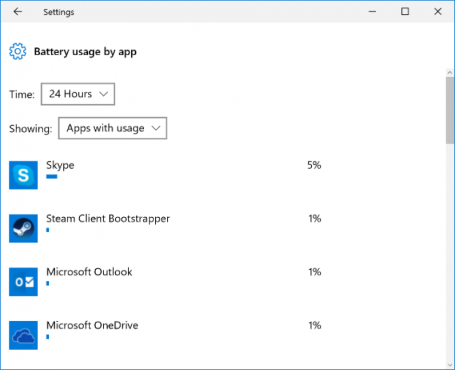
If you’re out and about, the new battery saver in Windows 10 will give you a sneak peek into which apps or traditional Windows programs are draining your battery.
/var/www/now.avg.com/18.46.0/wp content/uploads/2016/06/windows7

To help boost battery life, you can put Windows Apps to sleep using Windows’ own Battery Saver. You’ll find that in the new Windows Settings app under Devices and Battery.  (To get even more life from your battery, we suggest using our own AVG Performance in Economy Mode.)

  1. Smarter Cortana

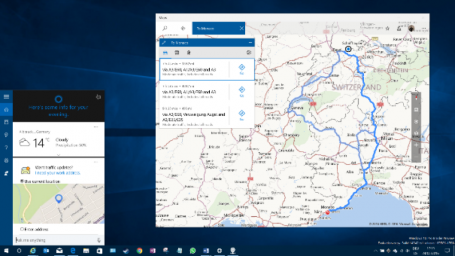
Voice assistant Cortana is getting a major overhaul in Windows 10 Anniversary Update. What was once very limited to local files and online (Bing) search results will now be tied deeply to your default Windows, email, calendar, and Office applications. This will give you more contextual voice commands, such as “Send Joe the Word file I worked on an hour ago”. It will also give software developers the ability to integrate Cortana into their own apps. That would, for example, give you the opportunity to order a pizza via a simple voice command on your PC. Neat. Even in the currently available Windows Insider preview, Cortana works quite well on the desktop. A simple voice command (“Give me directions to Monaco!”) showed me this:
/var/www/now.avg.com/18.46.0/wp content/uploads/2016/06/windows8

In less than a second.

These are my seven highlights for Windows 10. Again, make sure you’re making good use of the free Windows 10 upgrade offer while it’s still available, and have fun checking out the new stuff as it’s rolled out in July or August.

Microsoft creates its own FreeBSD VM Image for Azure Cloud Computing Platform

This year, Microsoft impressed the world with ‘Microsoft loves Linux’ announcements, like developing a custom Linux-based OS for running Azure Cloud Switch, selecting Ubuntu as the operating system for its Cloud-based Big Data services and bringing the popular Bash shell to Windows 10.

Now, the next big news for open-source community:

Microsoft has released its own custom distribution of