Tag Archives: News

Black Friday Sale: 33% off PRO apps for Android

The Black Friday and Cyber Monday weekend can be a great time to take advantage of big discounts on electrical items including smartphones.

If you’re planning on treating yourself or a loved one to a new smartphone this holiday weekend, or even if you just want to look after your existing device, AVG has some great discounts to help you keep your Android smartphone running securely and smoothly.


33% off AVG AntiVirus PRO

AVG AntiVirus PRO for Android is a complete security solution for your smartphone that combines powerful protection tools with useful features that can even help recover your device should it get lost or stolen.

With AVG AntiVirus PRO Android Security you can:

  • Scan apps, files, emails and messages for malware
  • Locate, lock and wipe your lost or stolen phone
  • Kill tasks that can slow down your phone
  • App Lock – password protect app access
  • A Camera Trap – that emails you a photo of anyone who enters an incorrect pass code three timese

Video

AVG AntiVirus PRO

Download AVG AntiVirus PRO now


33% off AVG Cleaner PRO

AVG Cleaner is a FREE app that helps you get more from your Android device. By cleaning out junk files and cache files, AVG Cleaner gives you more space for the files that matter. This holiday weekend get 33% off AVG Cleaner PRO features.

AVG Cleaner FREE allows you to:

  • Remove junk and cache files
  • Automate cleaning for no-hassle performance

AVG Cleaner PRO has these extra features:

  • No advertising
  • Set up custom battery profiles to make your phone run just how you want it to

Video

AVG Cleaner PRO

Electronic voting may not be 100% secure (but neither is traditional voting)

urn

You must start from a base: no voting system is 100% secure. Neither traditional nor electronic. Ballot stuffing is a practice as old as elections themselves and it refers to one of the multiple techniques used throughout history to tamper with election results: submitting multiple ballots per person.

There is also the personation technique, deceased voters who come back to life for one day to vote; and electoral registration fraud, voters registering illegally in a constituency that does not correspond to them. That is not to speak of the buses that pick up people from the villages to take them to the capital to vote, the party obviously covering the expense.

Electronic voting, the essence of so-called “cyber-democracy”, is not safe from fraud. In fact, there is a perception that it is even less secure, easier to tamper with than methacrylate ballot boxes.

For example, a recent study by researchers Dan Zimmerman and Joe Kiniry analyzes the risks of voting via email, one of the methods already being used in various countries, and advise against using it. And quite a few European countries have gone back on their decision to use online voting, due to the controversy that has arisen.

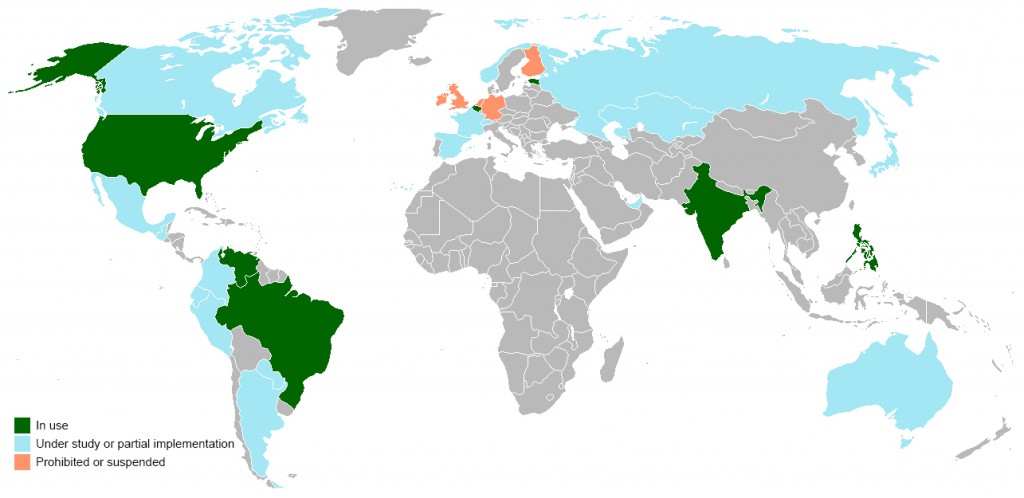
world-electronic-voting

The Netherlands, pioneer in implementing electronic voting (a legal provision being put in place in 1965), decided to go back to using ballot papers in 2008, two years after the publication of a study that revealed a serious security problem in the system.

In 2009, following a long legal battle, the German Federal Constitutional Court ruled electronic voting unconstitutional, as it considered that it did not allow citizens without technical knowledge to supervise the election process. In the same year, Ireland scrapped the online voting system. Finland halted its program in 2010, after invalidating the results of the first pilot test, which was carried out in 2008.

The United Kingdom carried out more than thirty pilot tests between 2002 and 2007, but none of them returned sufficient guarantees for authorities. The Electoral Commission suspended the implementation of electronic voting in 2008.

In Spain, the surprise political party that was successful in the European elections, Podemos, is using an electronic voting system to make internal decisions. It is called Agora Voting and involves three phases: One, the party’s responsibility is to make sure that the person voting is who they say they are; the second and third, registration and counting of the votes, are the shared responsibility of the so-called “voting authorities” (independent observers who certify that no personal interests contaminate the process). All of the software used is free software and after voting, each voter can check the integrity of the vote using an identifier.

podemos-voting

In this case, the largest crack in the system is in the Podemos registration or membership system, which only asks for a national identity card number and phone number. Both of these things, as already proved, can be faked.

To sum up, as Eduardo Robles, cofounder of Agora Voting, said, there is not a big difference between the traditional voting system and the electronic. “Can ballot papers get lost? Of course, but it is very difficult because they are kept guarded. Can ballot boxes be tampered with? Yes.” And the same happens with the virtual ones.

Security mechanisms improve very quickly but so do the techniques used by the attacker. While there is interest in changing the results, ballot stuffing will continue to evolve.

The post Electronic voting may not be 100% secure (but neither is traditional voting) appeared first on MediaCenter Panda Security.

New CryptoLocker variant emerges in Czech Republic

What is ransomware?

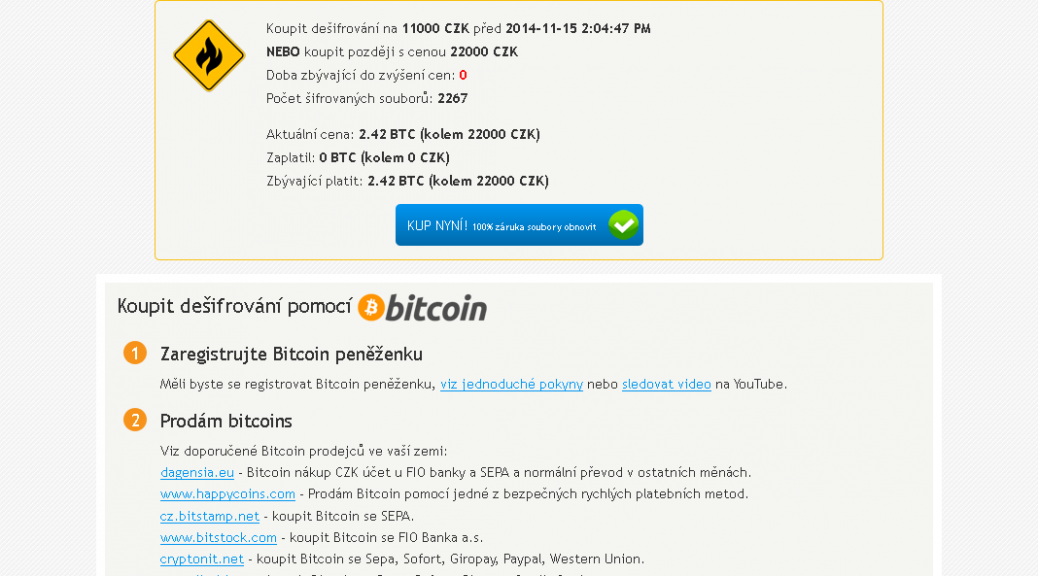
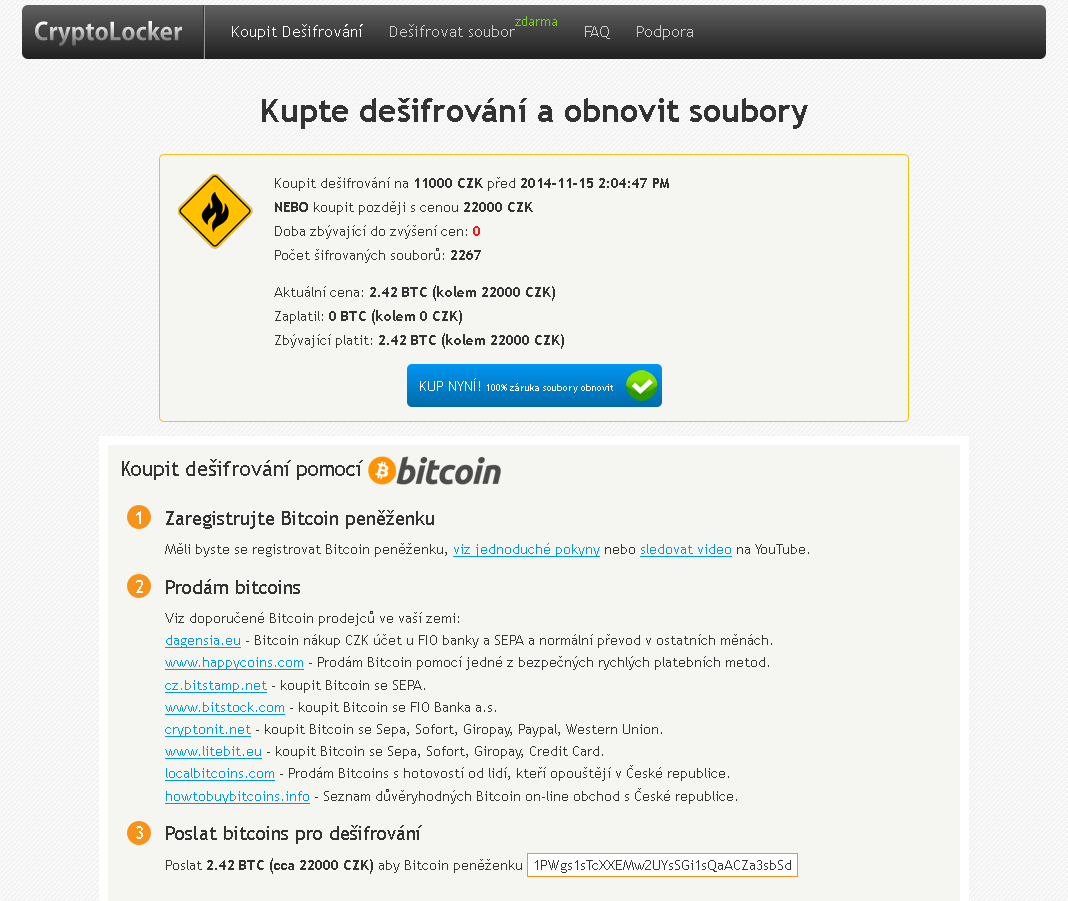
As we witnessed with CryptoLocker earlier this year, ransomware is a type of malware which encrypts certain files on your system and then extorts a ransom to unlock them.

Which files are affected?

Most ransomware does not target important system files but instead looks for user files to encrypt. These can be everything from JPG images to office documents and emails, anything personal that could be a value to the user.

What is new about this variant?

Previous ransomware variants had weak or flawed encryption, which meant that files often could be recovered. This new variant contains a much stronger algorithm and encrypted files are almost impossible to recover without the encryption key, which is only held by the attacker. Interestingly the ransom can be paid in cryptocurrency as well as Czech Koruna.

Is there any way to recover my files without paying the ransom?

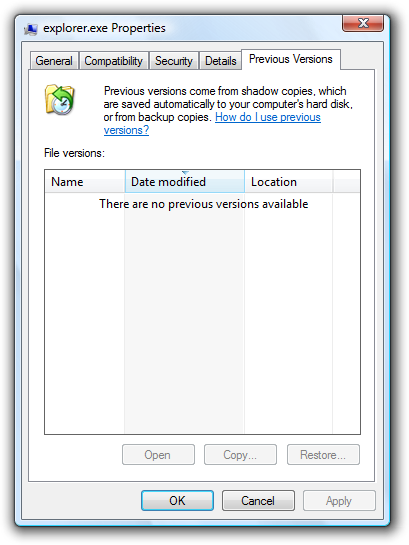
Historically, it has been possible to restore files using Shadow Copy, a tool that allows users to backup parts of their system even while they are in use. Sadly most new ransomware variants are resistant to recovery with Shadow Copy. Always seek advice before taking any drastic action to recover data encrypted by ransomware.

How can you stay protected?

  • Always backup -remember that malware has ability to encrypt files on all disks connected to your computer (including external USB disks, etc.) so be careful of leaving your backup connected to your machine or plugging in a backup to an infected device.
  • Think before you click – If you are unsure whether a link or file is untrustworthy, it is always safer to ignore it and delete it. Never download a file or follow a link from an untrustworthy source.
  • Get protection – As new variants emerge, they are continuously added to the database of definitions maintained by security companies like AVG. Up-to-date virus definitions are your front line protection against malware.
  • Get some Identity Protection tools – Security software like AVG has specially designed tools to protect your personal data from fraudsters and malware.


Story from Tomas Prochazka

WhatsApp encrypts messages for Android users

encrypted-code

After the arrival of the blue double-check to confirm that the message has been read, WhatsApp has set out to clean up their image and transmit the idea that they too safeguard user privacy. To do this, they have just announced a latest update through which they will start encrypting all messages and protecting them against intruders.

At the moment this version is only available to Android users but WhatsApp plans to implement it for the other operating systems.

With this code the messages are encrypted when they leave the sender’s phone. Therefore, the content of these messages passes through the application servers encrypted and cannot be accessed by anyone, except those holding the conversation.

With this move, WhatsApp is trying to make its customers forget its reputation for an unsecure app and recover some of the ground lost to other apps, such as Telegram, which stand out for higher levels of security and privacy of the service.

The post WhatsApp encrypts messages for Android users appeared first on MediaCenter Panda Security.

Reporting from AVAR 2014

Kicking off proceedings was Dr. Andrew Clark from CERT Australia (the Australian Government’s Computer Emergency Response Team) who highlighted the many challenges in cyber crime that the Asia Pacific region faces, and how collaboration with neighbouring countries is helping those efforts.

Industry veteran Graham Cluley reminisced on his more than 20 year career with tales of some of the first viruses and malware, many of which now seem so harmless compared to today’s standards.  He also included an amusing rendition of what he calls the “Anti Virus Industry Song”.

“Why can’t we have a virus called ‘Lumpy Trousers’?”, quipped Graham Cluley at one point in the conference, but there was no shortage of interestingly named threats during the conference – such as Dragonfly, Citadel, and even Chuck Norris.

The topic of the Internet of Things inevitably emerged, including discussion of vulnerabilities affecting hundreds of thousands of Internet router and gateway devices used by homes and businesses globally.  Hardware manufacturers were reminded once again not to build devices with backdoors, and to implement better security by design.

As the two day event concluded, a number of industry veterans took to the stage with their musical instruments to rock into the night, entertaining delegates and proving just how collaborative and supportive the Anti-Virus industry is as we all do our best to protect the world from the scourge of malware and online threats.

Image courtesy @alenkacz


Until next time, stay safe out there.

Update to Lollipop as soon as you can: These are the security improvements included in Android 5.0

Google has now launched the long-awaited Android 5.0, the new version of its mobile operating system. Do you want to know why you should update your smartphone’s software? We give you the first clues here.

lollipop-android

Adrian Ludwig, security engineer at Google, says in the official Android blog that their goal is to “stay two steps ahead of the bad guys” and this is Lollipop’s intention too. “Not only is Lollipop the sweetest update of Android to date, we also built in a rigid (security) Lollipop stick for the core and Kevlar wrapping on the outside—to keep you safe from the bad guys, inside and out.”

One of the most secure ways of keeping data safe is to use the screen lock or pattern. However, Google is aware that many users do not use this measure because, among other reasons, it makes it difficult to use the phone when it is connected to another device.

For this reason, the new operating system includes Smart Lock, which unlocks the phone when it is paired with a wearable or a hands-free device in the car via Bluetooth or NFC.

The phone can also be unlocked using facial expressions. Although this feature was available in version 4.0, in the new version of the Android operating system this application has been improved by constantly analyzing the user’s expressions.

Finally, in order to encourage users to install phone lock patterns and make them more secure, Android has included the option to receive on-screen notifications, even though the phone is locked, and access them more quickly.

Another security measure in Lollipop is related to encryption, which is no longer optional and will be really useful for less experienced users. Device encryption will be automatically enabled when the device is switched on. It uses a unique key that never leaves the device.

However, Google acknowledges that users with older devices that update their version of Android will have to enable the encryption feature manually themselves, which will not happen in devices shipped with this operating system.

Android has always tried to make sure that its apps access as little data on the phone as possible but in this respect its software has never been without its problems. Version 4.2 included Security Enhanced Linux, known as SELinux, which audited and monitored every action and left less room for attack.

SELinux defines the permissions of every user, app, process and file on the system and controls their actions and interactions following a strict security policy. This prevents any file – not even those downloaded from Google Play – from modifying the phone’s essential parameters.

lollipop-screen

Although this service was offered in previous versions, it has now been boosted to respond particularly to enterprise and government environment as, according to Ludwig, the majority of the members of different governments use Android. SELinux currently runs in enforcing mode, that is, all of the security policies are loaded and enabled on the device. It was not the same in previous versions, where the user could choose to use enforcing mode, permissive mode – where the security policies were loaded but not applied – or even turn it off.

Have you ever had your phone stolen? Having Lollipop installed could help you. It has the Factory Reset Protection feature, which disables stolen phones, only requiring the Google password to wipe the phone’s data remotely.

The new version of Android also keeps the device away from malicious websites when the user performs searches in the browser. In addition, it seems that everyone can create multiple user accounts to securely share the device with a friend or do so using guest user mode.

The heads of security at Android claim that the probability of a cyber-crook attacking the device using malicious software is 1 in 1,000. But the main dangers facing users is when the phone is lost or stolen. It is for these cases that the new security measures are designed. What are you waiting for to update your operating system?


The post Update to Lollipop as soon as you can: These are the security improvements included in Android 5.0 appeared first on MediaCenter Panda Security.

How to prevent Apple from knowing where you are and what you’re looking for, after updating to Yosemite

Apple has updated its operating system for Mac, so users can now get the long-sought after Yosemite OS X for free. Even though it has just appeared on the scene, the first alarm bells have already started to ring: Many users are unhappy about handing over even more private information to the technology giants.

The latest upgrade to Apple’s operating system includes an improved version of Spotlight, the search system that simplifies searching for files on the computer. So what’s different about Yosemite? It does the same as before but now it connects directly to the Internet through the Bing search engine and also searches your contacts and emails.

yosemite

This way, your Mac computer runs your search both on your own system as well as on the Web. Spotlight also offers you ‘smart’ suggestions from the App Store, iTunes Store and the Internet in general based on your search history.

The system doesn’t just send information about your habits and location through Bing to Microsoft, it also reports this data in real-time to Apple’s servers. So both companies will have data about any search that anyone does through Spotlight.

Apple claims that it doesn’t receive individualized search details and that Microsoft only collects general search data, which at no time includes personal identification of users or device IP addresses. According to the company, this is because the devices only use a temporary and anonymous session ID, which lasts fifteen minutes and then disappears.

Yet most users are unaware that this latest update implies such a loss of privacy, as the option is enabled by default when updating the OS. So is it possible to evade such surveillance and all those ‘useful’ suggestions? Luckily for users it is.

yosemite-apple


How to prevent Apple from knowing where you are and what you’re looking for, after updating to Yosemite

Just go to ‘System Preferences’ in the Apple menu, where you will see the Spotlight icon. Click it to find a list of different categories including the option ‘Spotlight Suggestions’. Clear the checkbox. Then go through the categories until you find ‘Bing Web Searches’, and ‘Bookmarks & History’, which you should also disable.

If you use Safari, you will have to similarly disable ‘Spotlight Suggestions’ by clicking ‘Preferences’ and ‘Search’. And problem solved! Because if you don’t, Safari will send a copy of your searches to Apple.

To simplify things further, security developer and researcher Landon Fuller has created ‘Fix Mac OS X’, which lets you automate the process of disabling these options with a single click. According to Fuller, Spotlight isn’t the only feature with unnecessary changes that is introduced with the update, and he explains that his application will also fix other settings enabled by default.

apple-yosemite

This way, you can prevent these companies from saving your search data and then offering you certain services or products having analyzed your likes, needs or intentions. You will also prevent annoying, unwanted adverts and safeguard the files on your computer.

For the moment, Apple has declared that the company is wholly committed to protecting user privacy and, with respect to Spotlight, claims that it “minimizes the amount of information sent to Apple”, and even that the search tool “blurs the location on the device”, so the company doesn’t receive the exact location.

More | Panda Antivirus for Mac, compatible with Yosemite

The post How to prevent Apple from knowing where you are and what you’re looking for, after updating to Yosemite appeared first on MediaCenter Panda Security.

Tuning in to Cybercrime

The BBC has begun airing a six-part series, presented by British technologist, writer and “futurist” Ben Hammersley.

Called “Cybercrimes with Ben Hammersley,” the series was produced in partnership with The Open University. It looks at the range of cybercrime – from the scam emails that fill up our inboxes to drugs and guns that can be bought anonymously on what is called the shadowy business of “darknet,” and even governments spying on their own citizens.

Hammersley emphasizes that 2013 was a very bad year for cybercrime in businesses. He notes: “In February, $45 million was stolen from ATMs around the world after cyber criminals hacked credit cards and gave them unlimited withdrawal limits. Then, in November, 40 million credit card numbers were removed from the point-of-sale terminals of US retailer Target.”

Video

Cybercrimes with Ben Hammersley

We’ve chronicled other recent major breeches here. The fact is, major data breaches are occurring at a regular pace now, and are having an impact on our most standard, or reliable, institutions.

The global annual cost of cybercrime has been estimated at several hundred billion dollars. PwC’s 2014 Global Economic Crime Survey found that 7% of US organizations lost $1 million or more due to cybercrime incidents in 2013; furthermore, 19% of US entities reported financial losses of $50,000 to $1 million.

As Hammersly points out, ” Cybercrime affects each and every one of us. Every aspect of our lives is vulnerable to the criminal abuse of our networked world…”

It’s good to see the issue of cybercrime getting more in-depth attention in mainstream venues such as the BBC… I’m hoping there will be a large audience tuning in for what promises to be a very interesting and educational series.  The more educated people are, the better equipped we all will be to protect ourselves online.

Of course, cybercrime is a major issue to us at AVG: Our mission is to secure devices, data and people – and we are always working to give people and businesses the tools and information they need to better protect themselves online.  We haven’t talked about it a lot, but AVG Innovations Lab monitors current trends and develops software and apps to meet the needs of today’s consumer – as well as looks to future vulnerabilities to meet those needs too. In fact, we will be showcasing some of the work of our labs –including solutions to growing threats in mobile and the Internet of Things– during a press-only event we are calling “AVG Experiential Lab,” in San Francisco on Sept. 18.

The secret life of apps revealed

Have you ever noticed that your smartphone has surprisingly little storage space left for things like photos or even the latest updates? Or that battery life and reliability have begun to deteriorate over time? Or perhaps that your monthly data usage is growing inexplicably? Over time, the apps we love and use day in and day out affect our tablets or phones and impact their performance – sometimes while you’re using them, and sometimes completely invisible in the background.


The study

We decided to investigate to see if we could better understand how apps influence devices over time in our first Android App Performance Report.

When it comes to the performance of our phones, we noticed that users care about three things above all else:

  • Storage consumption – how much space do you have left for the files you love?
  • Battery consumption – is your phone making it to the end of the day or not?
  • Data plan consumption – are you constantly hitting your mobile data limit?


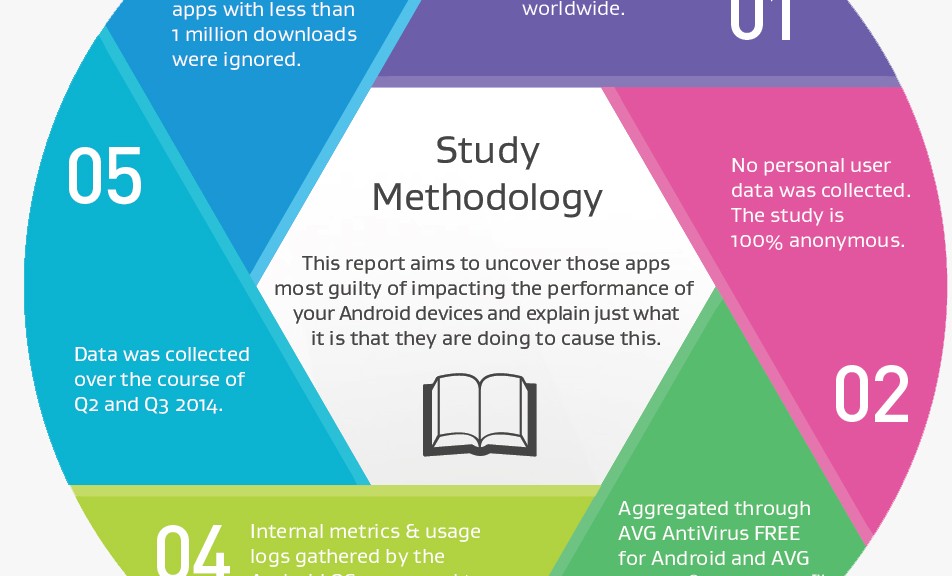
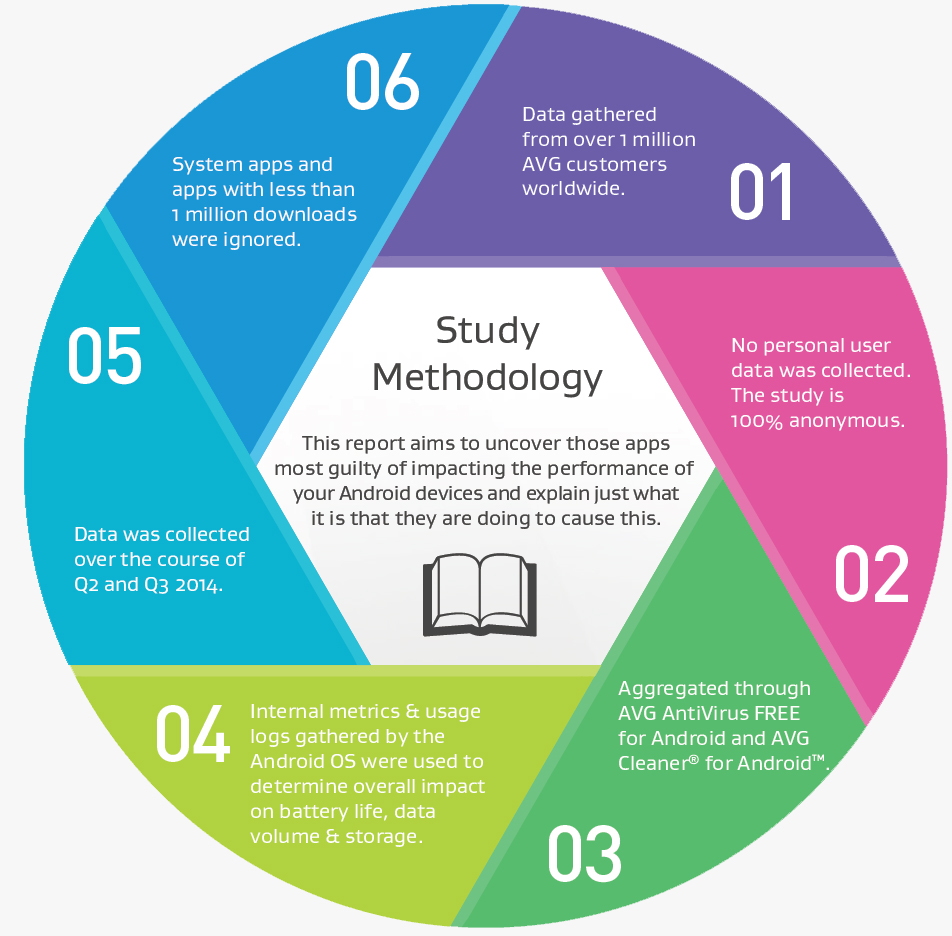
We felt that in order for the report to reflect what is happening to people’s phones out there in the real world, we needed to use data from real devices. Unlike other tests that might conduct benchmarking in a lab environment it was important to us that these results applied to everyday smartphone users.


Methodology


So with that in mind, we analyzed anonymized data from over one million AVG Android app users, so that we could better understand which apps they are using and how those apps affect their devices.

Some of the results were quite surprising.


Key Findings


Pre-installed apps

One of the most interesting learnings we made in the first report is that many devices are still carrying around a lot of apps that were installed by the manufacturer. These can take up a lot of storage space but more importantly can drain battery life – something that is already under strain with the constant use of most smartphones.


Apps with background activity

Another thing that became clear was that as we add more apps to our devices, we seldom remove the ones we no longer want or need. Over time this means that the limited resources of our devices are divided over an ever growing number of apps, affecting performance.

The reason for this is simple: the “always on” nature of apps means that they often-times continue to run in the background to check for notifications, updates or download data which uses valuable battery and data.


Social and News apps

It will come as little surprise that with its constant background notification checks, which run even when the app is not open, the social networking app from Facebook emerged as having the biggest impact on your mobile device when it comes to overall performance. The constant demand and transmission of data makes the app a real drain on both battery life and data use.


App growth

As we ran the report over several months, we observed some interesting behavior amongst apps that are automatically updated. Over time, their storage footprint and battery drain both increased. This is mostly due to downloaded content (songs for Spotify, items in games etc.), but is also in part thanks to automatic updates. With automatic updates enabled, developers can push out new versions and features that take up more space and are more resource heavy without having to ask the users permission. Combine this with the steadily growing number of apps we have on our devices (including those that we’ve downloaded and no longer use) and very soon you begin to observe a noticeable dip in performance.


What can you do to improve your device performance?

One of the most fundamental issues that the report has raised is that keeping your smartphone running in top condition is quite a labor intensive task. Keeping check of which apps are running in the background and removing apps that you don’t use is more than enough for most of us to commit to.

There are products that are designed to make your life easier though like AVG Cleaner for Android which can show you how much data, storage and battery life each of your apps is consuming to help you take the right actions to tackle any issues.


Our full report doesn’t just detail what apps are the most consuming of them all, it also details best practices and helps you get rid of performance hogs on your Android smartphone or tablet.


Full Report

Androidâ„¢ is a trademark of Google Inc. in the US and other countries.

Protection for your family, plain and simple

Sadly, the hassle of managing the family technology is only going to get greater. The number of connected devices in our homes is growing rapidly. In 2013, the average home already had more than five connected devices. Homes like mine, with more than 20 devices, are driving this average up with every passing day.

As we start to realize that our families are spending so much time online, it is our responsibility as parents to ensure that they are doing so safely. Then the long to-do list of Internet safety comes into focus.

Our tablet has run out of space? Has my son set his privacy setting correctly on social media accounts? Is the security software on my own phone updated? What can I do to speed up my wife’s laptop?

As our list of devices continues to grow, so too does the to-do list of the family tech wiz.

There must be a simpler way to manage my family’s devices without having to actually track down each device every time I want to do something.

That’s why for 2015, AVG is launching AVG Protection: the one-stop solution to help me keep my family protected across all our devices—no matter how many—wherever we are.

Video

Welcome To AVG Protection

AVG Protection brings together our best security products for all platforms: AVG Internet Security for Windows desktop, laptops and tablets; AVG AntiVirus for Android smartphones and tablets; and AVG AntiVirus for Mac under a single subscription. Add to this AVG PrivacyFix and AVG Cleaner for Mac and Android, which are free, to complete my protection, performance and privacy needs — the solution is a compelling one.

But most importantly, AVG Protection has AVG Zen to tie them all together. AVG Zen allows me to manage all of our devices from one screen, fix issues, scan machines, and enable protection remotely from my PC or my Android device when mobile. And the alerting system lets me know when something needs my attention so I can rest assured my family is safe online. The days of checking up on each of my direct family or my extended family devices one by one are over.

It couldn’t be easier to start protecting your family using AVG Protection, click here to get started.