Tag Archives: protection

Is It Safe To Give Out your CVV Code?

If you’re a regular online shopper like me, you’re sure to be familiar with your credit card security code – otherwise known as the card verification value (or CVV).

If not, you can find the 3-4 digit code on the back of your VISA/MasterCard (the final 3 digits of the number printed on the signature strip) or on the front of your Amex card (the separate 4 digit code above the card number).
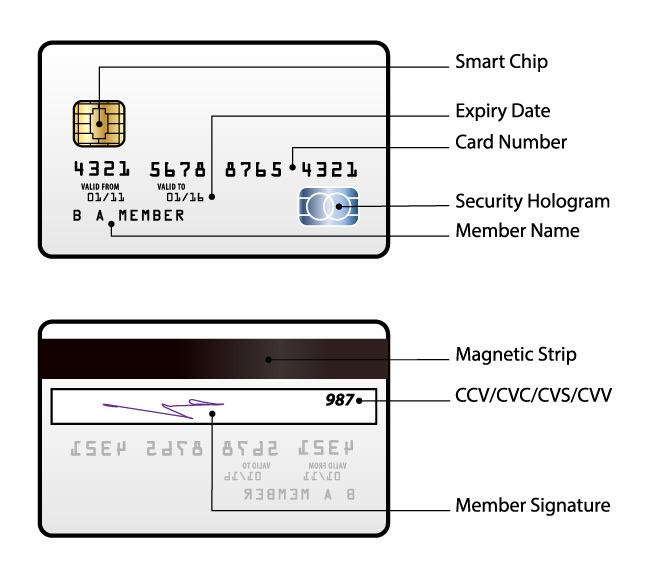
 

The intended purpose of the CVV is to provide added security when making purchases over the internet – it helps to verify that you’re in possession of the card, as the code shouldn’t be known to anyone other than you as the card holder. So it’s essentially a way of counteracting credit card fraud.


Is it safe to give out your CVV?

For online shopping, the answer is generally yes – it’s just simply a good idea to stick with well-known, reputable companies that you trust. You’ll find that most online retailers nowadays do require a CVV for purchases, which is encouraging because it means that they’re actively trying to prevent fraudulent transactions occurring on their site.

You may also be asked for your credit card security code when processing a payment over the telephone. As with online transactions, it’s usually safe to do this – you just need to be sure that no one overhears the details you give out (so avoid public places when doing this).

On the other hand, when purchasing an item or service in person, you should never provide the details of your CVV. In fact, there’s no need for the retailer or service provider to request this – it doesn’t show up when the card is scanned normally and they have other ways of verifying that you’re the authorised card holder (signature or another form of identification) should they need to.

Handing over your CVV for purchases completed offline serves no purpose other than providing someone with the opportunity to steal the information. Because if they were to do this, they’d have everything they need to go ahead and make a bunch of fraudulent online transactions – on you!  

Tips for staying safe

To avoid any issues with security or credit card fraud, there are a few things you can do:

  • Only transact with reputable websites that you trust. And when you do, follow our 10 golden rules for safe online shopping.
  • Install internet security software on your PC, tablet and/or smartphone. Doing this will help you steer clear of malware and phishing messages that could lead you to fake websites designed to steal your personal details.
  • Always keep a close eye on your bank statement to identify any charges that haven’t been authorised.   
  • Never read out the full details of your credit card in a public place, or write them down anywhere for someone else to find.
  • Avoid making payments over the phone with a credit card, unless you make the call directly and obtain the number from a trusted source. Scammers have been known to cold call victims and convince them that money is owed immediately for a problem that doesn’t exist!
  • Don’t provide your CVV when processing a payment in person. It should never be required and if someone tells you otherwise, it’s a reason to be highly suspicious!   

Have you had any dramas when using your credit cards online? Share your story with us below.
AVG’s Top Blogs of 2014

2014 was a big year for the security industry and a busy one for AVG. There were high profile security breaches, some incredible new apps for our smartphones and huge game releases that pushed the performance of our devices to the limit.


Threats:

Heartbleed was arguably the most significant security story of the year after a crucial vulnerability was found in Open SSL, the technology used to encrypt data online. Potentially, OpenSSL estimate that as many as 66% of all websites were vulnerable.

Our blog post on how to stay safe from Heartbleed was our most popular post of the year and a follow up post later in June showing that many websites were still vulnerable comes in at number two.

One of the year’s most prevalent malware breakouts, known as GameOver Zeus was also amongst our top stories. GameOver Zeus picked up a lot of media coverage as experts gave a two week countdown until a massive suspected cyber-attack would be unleashed.


Mobile:

AVG had a big year for mobile with exclusive deals to protect Sony Xperia devices and we even created custom apps specifically designed for the Amazon Fire Phone’s ‘Dynamic Perspective’.

We also sealed the acquisition of Location Labs which has brought powerful security and device management features to millions of people.

In November, we release our first ever Android App Performance Report which detailed the secret ways that the apps we use can affect our smartphones. How much space they take up, how much battery they use and how much data they send.


Gaming:

Gaming also enjoyed a big year in 2014 with the release of many big name titles including Watch Dogs, where you play a hacker in a beautifully rendered open world. Our performance expert Sandro Villinger’s Ultimate Watch Dogs performance guide for the PC was our third most popular post this year.

Sandro also created a simple nine step guide to maximizing PC gaming performance which helped users of all abilities squeeze the most out their machines whether top of the range or 3 years old!

If you are a gamer, check out Sandro’s Ultimate performance guide to

Gaming looks set to have another big year in 2015, keep an eye out for Sandro’s GTA 5 performance review coming soon!


2014 was a great year at AVG and we’re looking forward to bringing you more big stories in 2015.

Happy New Year!

Top Threats to Business Data in 2015

Around 1,000 delegates at the NexGen Cloud Conference in San Diego last week heard Tony Anscombe give some valuable insight into the partner opportunity for the Internet of Things.  The good news for our service provider partners is the opportunity is huge. Our recent Monetization of IoT study shows that around three fifths (62 percent) of small businesses has budget specifically assigned over the next 12 months for the development of IoT solutions.

On this evidence 2015 is shaping up to be an important year for IoT investment.  Engaging with IT providers on NextGen Cloud matters is just one component of what’s to come. The other part concerns the immediate future for their small business customers and the ever changing threat landscape.

With that in mind, here are my top threats to watch for in 2015:-

More ransomware

The latter part of 2013 was notable for a spate of ransomware attacks on small businesses. This has continued in 2014 and we are likely to see more instances in 2015. Ransomware, like the infamous CryptoLocker, encrypts or locks personal files on your machine and extorts a ransom to recover them.  To avoid falling victim, businesses should use reputable antivirus software, avoid risky downloads, educate staff and keep security software/operating systems regularly patched and updated.


Advanced Persistent Threats (APTs)

Cybercriminals are increasingly focusing their attacks on small businesses.  APTs are a relatively new class of malware developed by cybercriminals to steal passwords, logins and customer data.  They are purposely designed to gain a foothold in the business and remain there undetected for a prolonged period of time.  To counter this businesses require an equally sophisticated approach to defense that includes protection from risks in mobile communications and Cloud services as well as traditional networks.


Password-related breaches

As Cloud services and the Internet of Things become part of everyday business life password management is going to become a hot issue.  We saw a good example of this in the news last month where streaming images from thousands webcams and CCTVs around the world ended up on a Russian website simply because they had default passwords or no log-in codes at all.   Many of the images were taken from business CCTV equipment.  Until companies learn to manage their passwords efficiently we can expect to see a lot more of this kind of incidents.


Mobile threats

Not so long ago it was probably quite natural for your Apple®-loving colleagues to congratulate themselves for using the relatively threat-free Macintosh platform. But the tide is turning.  The prevalence of iPad® and iPhone® mobile devices in the office has turned the Apple operating system into a prime target. Last month we saw reports of a new combination of malware that infects Apple’s OS®X and iOS® mobile devices called the OSX/WireLurker Trojan.  Android™ too is subject to attack. You may have seen recent news reports about a new variant of Android malware called NotCompatible that uses spam email blasts and compromised websites to infiltrate secure company networks.


In summary, the outlook for business security threats is one of increasing diversity.  At the same time more IoT devices and Cloud services are coming on stream. Our study strongly indicates that small businesses are ready to spend on ways to simplify how things are kept up to date, secure and monitored in 2015.

iPhone®, iPad® and Apple® are trademarks of Apple Inc., registered in the United States and other countries.
Android™ is a trademark of Google Inc.

German phishing scam spreading globally

In recent weeks, we detected another wave of phishing emails, written in German, pretending to be a billing invoice sent from various well-known companies such as Vodafone. Instead of a real invoice, they contain a link to an archive with a malicious code that can infect users’ PCs. The original wave of this malware campaign was already observed earlier this year primarily targeting Germany. This time, it is spreading worldwide. However, they are still in German, which helps identify them as a scam.

In this post, we give a brief technical description of this threat and provide several tips how to not get caught by similar phishing threats.


Phishing Emails

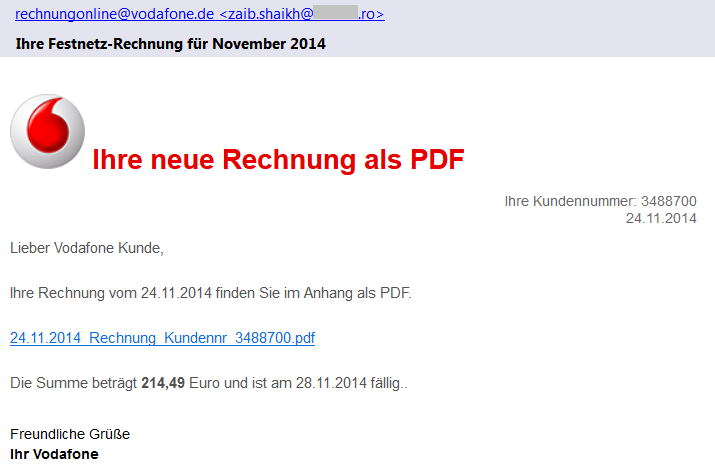
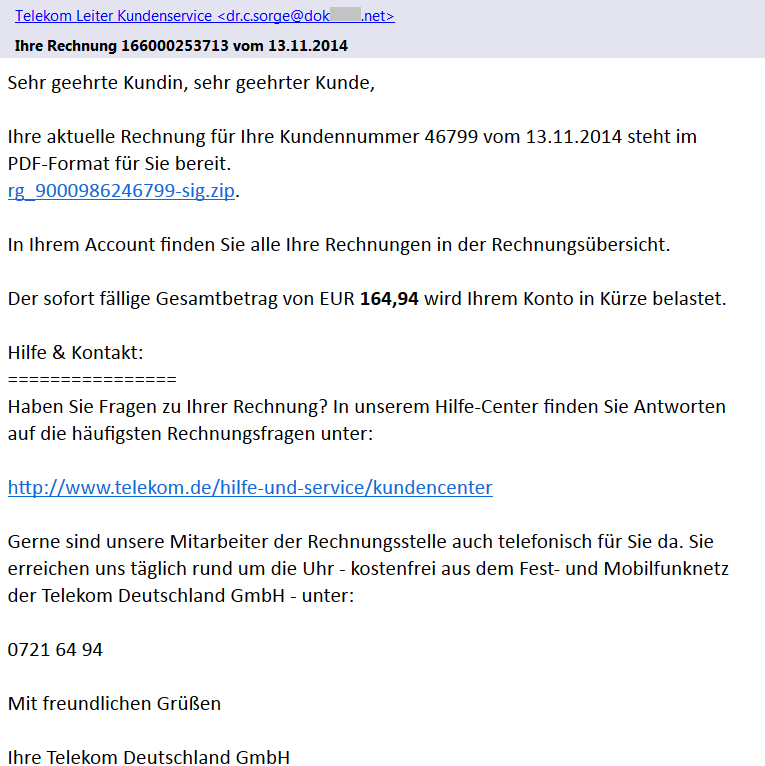
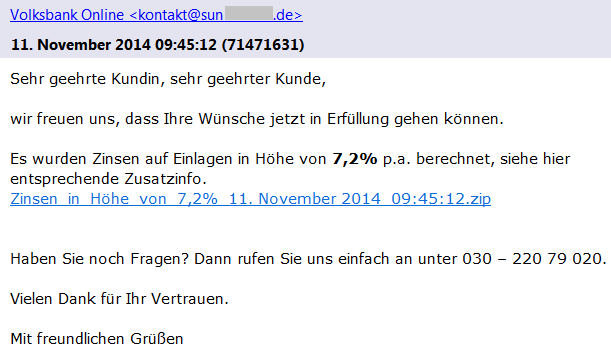
We have found several different versions of these emails that claim to be sent from Vodafone, Telekom Deutschland GmbH, Volksbank, and other companies with a faked sender name (e.g. [email protected]) including the official logos. As we can see in Vodafone’s official statement, these companies are aware of this scam and have already warned their customers. Each version of such email is slightly different and contains the current date, a random customer number and payment amount.

Phishing email - Vodafone

If we look more carefully at the sender’s email address, we can see that the true author did not bother with faking the sender’s email address. This should immediately alert the recipient as an email from German Vodafone would hardly be sent from an unrelated Romanian domain.

In the latest scam, the emails do not contain any attachment, which is different to the other recent phishing campaigns. The proclaimed bill (a PDF file) is available online via a given link (also unique for each version) that actually leads to a ZIP archive stored on one of the hacked sites. These archives contain an exploited/unsecured WordPress instance and they serve as a mule for the distribution of malware to users.

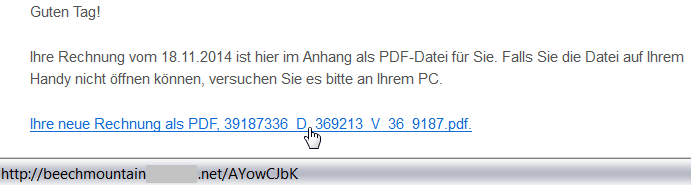
Once again, a user targeted by such an attack should be alerted via a simple inspection of the target location of the link by hovering the cursor over it (but remember to not click on the link). This feature is supported by most browsers and email clients. As we can see from the following figure, the target domain of the link is also very suspicious:

beachmountainXXX.net/AYowCJbK

.

Link to a hacked domain

Malicious Content

The downloaded file (e.g.

2014_11rechnung_K4768955881.zip

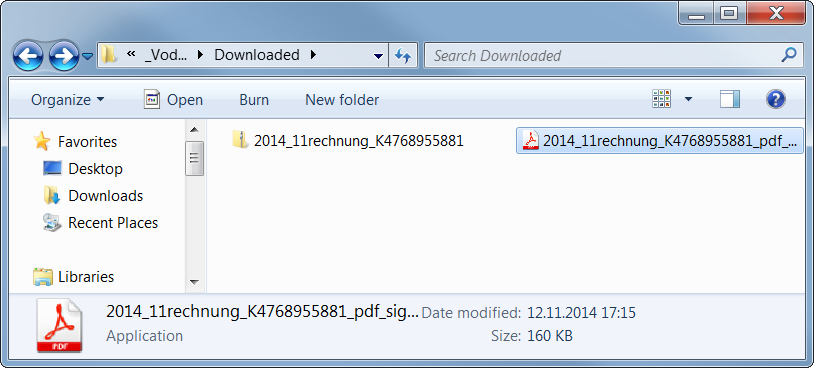
) is a ZIP archive containing an executable file. The user is fooled by the application’s icon (similar to Adobe Reader) to think that it is a PDF file, which is yet another well-known trick used by malware authors.

Icon of the executable file

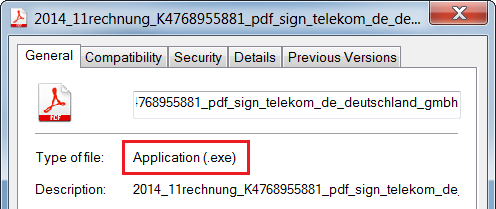
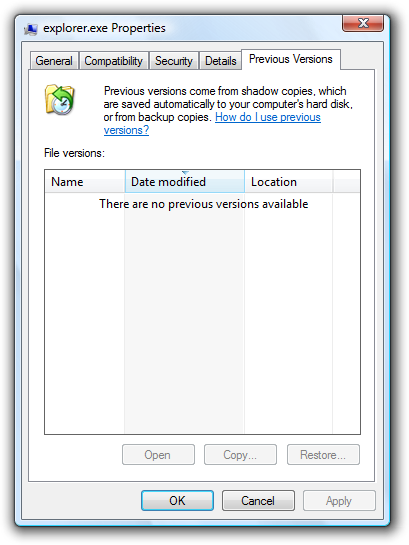
If you are not sure about the real file type, you can see the file properties.

For the following analysis of the malicious content, we use a sample with the MD5 checksum

b0a152fe885a13a6ffb0057f6f21912f

. It is an executable file downloaded from one of these links, likely originally written in C++ by using MFC.

First Stage

The (unwanted) execution of this file starts the first phase of the malicious behavior.

The file itself is 160 kB large, but most of its size is stored within the resource file masked as the following GIF image (109 kB).

The author of this sample used steganography because 99% bytes of the image content represents an encrypted code. This code is decrypted first and the control is passed to this decrypted code.

Furthermore, WinAPI functions are called indirectly (via functions

LoadModule()

and

GetProcAddress()

) and names of these functions are obfuscated and decoded during run-time on the application’s stack in order to make analysis more difficult.

Afterwards, it creates a new process with the same name and fills its sections with the decrypted code from the GIF image (via the

WriteProcessMemory()

function).

This new process copies the original file into 

C:Users%USERNAME%AppDataRoamingIdentitiesqwrhwyyy.exe

(as a read-only system file), registers itself to be run at system startup (registry key

HKCUSoftwareMicrosoftWindowsCurrentVersionRun

), and deletes the original file by using a generated batch file.

Once the file is executed from this new location, it behaves differently:

It checks whether it is analyzed or virtualized via the following techniques.

  • Detection of a loaded Sandboxie module 
    SbieDll.dll

    and detection of running processes 

    VboxService.exe

    (VirtualBox) and

    vmtoolsd.exe

    (VMware).

  • It also uses the
    GetTickCount()

    function to detect whether it has really started during the startup and also to detect debuggers.

  • If any of these is detected, the executable file stops its malicious activity.

Afterwards, it extracts and decrypts another executable file on stack from the aforementioned GIF image and injects it into other processes, such as

explorer.exe

,

firefox.exe

. This starts the second stage of infection. Note: some versions of this malware try also to check a working Internet connection via a DnsQuery of www.microsoft.com before starting the second stage.

Second Stage

This extracted file is relatively small (52 kB) because it is packed by the UPX packer (version 3.08).

After its run-time unpacking, it uses the same anti-debugging tricks as the previous sample.

The main body of this file can be described by the following decompiled code:

CreateMutexA(0, 1, mutexName); // "qazwsxedc"
Sleep(1800000);                // wait for 30 minutes
WSAStartup(0x202, &WSAData);   // initiate Winsock
seconds = getLocalTimeInSeconds(0);
if (GetTickCount() < 1920000 /* 32 minutes after startup */ &&
	GetTickCount() > 1000) {
	while (1) {
		malicious();           // the main functionality
		gStateInactive = 1;
		Sleep(300000);         // wait for 5 minutes
	}
}

  • For synchronization between the first and second stage, the mutex 
    qazwsxedc

    is used (e.g. another variation of classical

    qwert

    or

    asdfg

    names).

  • Afterwards, the malware waits for 30 minutes to remain stealthy. After that, it also checks whether no more than 32 minutes have passed since the system startup (i.e. whether it was started during the first two minutes after startup).
  • In its main loop, it follows the malicious behavior described in the remaining paragraphs (function
    malicious()

    ). After each iteration, it makes a 5 minutes break before the next action.

In this function, the string

DC85CCC4C4CCC7CED385C6CE919F9F98

is decrypted at first by using the fixed XOR key

0xAB

. The resulting string

w.googlex.me:443

represents a remote address of the command-and-control (C&C) host and its port. The second one is

m.googlex.me:53

. At first, the sample tries to check connection with these servers by using the Winsock functions. The other samples contain different lists of C&C servers:

ahokcjidanptacyu.eu
gctrbwqyxxyamcnn.eu
ggcrguelfhvtuxdb.eu
gkkelsrkypraqhto.eu
gunvpvqhnwxxgjsn.eu
gvlmoefoqapvrvec.eu
mcfpeqbotiwxfxqu.eu
...

Afterwards, it obtains information about the local computer, such as:

  • computer name;
  • version of operating system;
  • processor information and number of cores;
  • memory information.
English (United States) // local settings
TEST-PC                 // PC name
Windows 7 Professional  // Windows version
4096 MB                 // memory      
Intel(R) Xeon(R) CPU E5-1620 v2 @ 3.70GHz | CORE 8 // CPU
2014-10                 // malware version

Afterwards, this information is encrypted and send as a registration to a C&C server from the aforementioned list. The reply from the server is encrypted by the same algorithm. The very first byte of the reply message specifies an action (i.e. a control code) to be performed. To date, we have identified the following codes:

  • 18, 19, and 20 – open a specified page in Internet Explorer (with minor differences).
  • 16 and 17 – download and execute a file specified within the message. The file is downloaded via the
    URLDownloadToFile()

    function, stored with a random name, e.g.

    %TMP%mibww.exe

    and executed via the 

    WinExec()

    function.

  • 6 – terminate the process (itself).
  • 5 – inactivate itself for a specified time.
  • 2, 3, and 4 – these codes imply different types of online communication with other systems (e.g. for downloading other malware modules, communication with other infected systems, attacking specified targets). The communication is executed via a server-specified number of threads running the following built-in functions. Arguments to these functions are also sent within the messages from a C&C server. All of these functions are based on Winsock functions.
    • Sending a message to a given IP address (or host name) and port.
    • Communication with a remote server on ports 21 and 22.
    • Sending multiple types of HTTP GET requests to specified servers.
GET %FILE% HTTP/1.1
Accept: image/gif, image/x-xbitmap, image/jpeg, image/pjpeg, application/x-shockwave-flash, application/vnd.ms-excel, application/vnd.ms-powerpoint, application/msword, */*
Accept-Language: en-us
Accept-Encoding: gzip, deflate
User-Agent:Mozilla/4.0 (compatible; MSIE %VERSION%.0; Windows NT %VERSION%.1; SV1)
Host: %HOST%:%PORT%
Connection: Keep-Alive

GET %FILE% HTTP/1.1
Content-Type: text/html
Host: %HOST%
Accept: text/html, */*
User-Agent:Mozilla/5.0 (X11; U; Linux i686; en-US; re:1.4.0) Gecko/20080808 Firefox/%VERSION%.0

GET %FILE% HTTP/1.1
Referer: http://%ADDR%:80/http://%ADDR%
Host: %HOST%
Connection: Close
Cache-Control : no-cache

GET %FILE% HTTP/1.1
Content-Type: text/html
Host: %HOST%
Accept: text/html, */*
User-Agent:Mozilla/4.0 (compatible; MSIE %d.00; Windows NT %d.0; MyIE 3.01)

Those actions are constantly executed until the process is terminated by the C&C server (unlikely) or by user (e.g. system shutdown). However, this process is started once again during the system startup.

As we can see, it is up to the attacker to download and execute other malicious modules, such as password stealers, bankers, or to include the infected PC into a botnet.

Conclusion

Although, the analyzed phishing emails are far from perfect (download links and sender addresses are suspicious, the text of email is only available in German, etc.), it is still possible to fool a user into executing the malicious file. This file is powerful enough to infect the user’s machine and turn it into an unsafe place.

Here are some basic tips, that we’ve previously shared about how to detect a phishing email:

  • Check the spelling and grammar – it is unlikely that your bank or service provider will send you an email with such mistakes.
  • Sender’s name and email address can be spoofed, do not rely on them.
  • Look at the target address of the link – different domains than the official ones are highly suspicious.
  • Do not panic and do not do any action in haste. The attacker often tries to threaten you and make a time pressure on you.
  • Do not open suspicious attachments or links. If you really need to open a file, check its file type before double-clicking it. The file name and icon can be easily crafted to look like a picture or document.
  • If you are not sure about the email’s origin, try to contact that company directly (e.g. call official customer care), but do not respond to such email and never ever send your credentials in this way.
  • And as always: use AVG to stay protected.

Black Friday Sale: 33% off PRO apps for Android

The Black Friday and Cyber Monday weekend can be a great time to take advantage of big discounts on electrical items including smartphones.

If you’re planning on treating yourself or a loved one to a new smartphone this holiday weekend, or even if you just want to look after your existing device, AVG has some great discounts to help you keep your Android smartphone running securely and smoothly.


33% off AVG AntiVirus PRO

AVG AntiVirus PRO for Android is a complete security solution for your smartphone that combines powerful protection tools with useful features that can even help recover your device should it get lost or stolen.

With AVG AntiVirus PRO Android Security you can:

  • Scan apps, files, emails and messages for malware
  • Locate, lock and wipe your lost or stolen phone
  • Kill tasks that can slow down your phone
  • App Lock – password protect app access
  • A Camera Trap – that emails you a photo of anyone who enters an incorrect pass code three timese

Video

AVG AntiVirus PRO

Download AVG AntiVirus PRO now


33% off AVG Cleaner PRO

AVG Cleaner is a FREE app that helps you get more from your Android device. By cleaning out junk files and cache files, AVG Cleaner gives you more space for the files that matter. This holiday weekend get 33% off AVG Cleaner PRO features.

AVG Cleaner FREE allows you to:

  • Remove junk and cache files
  • Automate cleaning for no-hassle performance

AVG Cleaner PRO has these extra features:

  • No advertising
  • Set up custom battery profiles to make your phone run just how you want it to

Video

AVG Cleaner PRO

Ten Online Shopping Tips For Cyber Monday

Cyber Monday, the start of the digital holiday shopalooza, has occupied its role for nearly 10 years – starting in 2005. Though it still trails brick-and-mortar shopping on Black Friday in popularity, Cyber Monday shoppers spend more! According to an AOL study in 2013, Cyber Monday shoppers spent an average of $468 versus $309 spent on Black Friday.

Another data point of interest: Cyber Monday is an increasingly popular shopping experience for Boomers.  Nielsen research found the percent of customers aged 50-64 who visited online retail sites increased 20.5% and for age 65+ it was up 40% from 2011 to 2012.

In 2014 millions of consumers, and not just online shoppers, were affected by a series of major data breaches, along with malware, phishing, and identity theft. It’s enough to dampen the holiday shopping spirit. But there are ways to stay safe, shop online, and get the great deals offered on Cyber Monday.

Here are 10 tips to keep you safe when shopping online:

  • Be aware. There are unbelievable deals on Cyber Monday and the weeks before Christmas. But if it sounds too good to be true then it probably is. Beware of suspicious online ads and even emails or social media messages that seem to come from friends promising free products or unheard of discounts.
  • Be secure. Make sure you’re logged into a secure Wi-Fi.  Shopping online in a public place could compromise your financial accounts and personal privacy. Anyone can download software that picks your credit card numbers off the airwaves.  Wait until your home or on a secure network to do your shopping!
  • Look for the https:// – The “s” stands for secure. Also look for a lock or similar icon to indicate you are on a safe site.

  • Avoid malicious websites by shopping at well-known and trusted sites where you’ve shopped before. Keep in mind it’s possible for even legitimate sites to have been hijacked and to serve up malicious code to your computer. So make sure your online security software includes link-scanning technology. Such as our own AVG AntiVirus FREE
  • Do your research. If a site is unknown to you, check it out with the Better Business Bureau to see if it is accredited by the group. The National Retail Federation’s CyberMonday.com also has a list of legitimate retailers offering Cyber Monday discounts.
  • Always make sure that you have a unique username and password for each online account. And of course, make your password complicated! Use a mix of symbols and upper and lower case letters. Watch this video for more details:

Video

Never Use The Same Password Twice


  • Keep your software up to date! As with any guide to online security, make sure that you’re operating system, browser and antivirus software are up to date.
  • If you’re curious about an order, contact the retailer directly via their site or phone number. Many phishing scams come in the form of emails from Amazon, UPS, FedEx, or other large retailers. Don’t click on the link in the email, even if it looks legitimate.
  • Use one dedicated email and credit card account. Preferably a card with a low limit. This makes it easy to detach and get your money back should your account or the retailer be compromised. Don’t use ATM or debit cards as you could temporarily lose access to cash in the event of theft.
  • Take action immediately if you suspect identity theft! Contact your credit card company, your bank, all three credit-reporting agencies and the police.


Cyber Monday is a great way to get a jump on the holidays and avoid the crazy crowds of Black Friday. Just stay safe and enjoy!

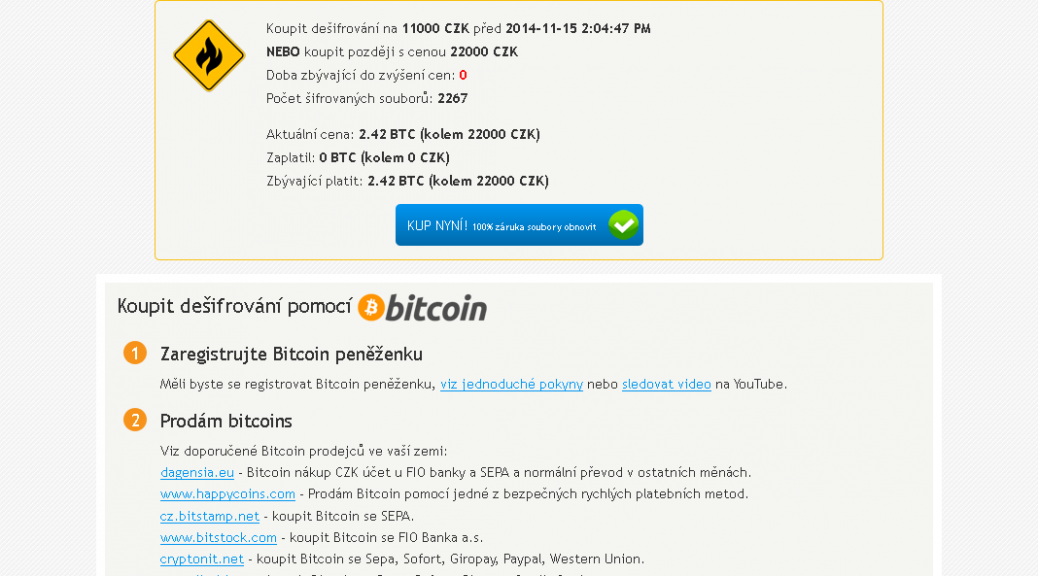
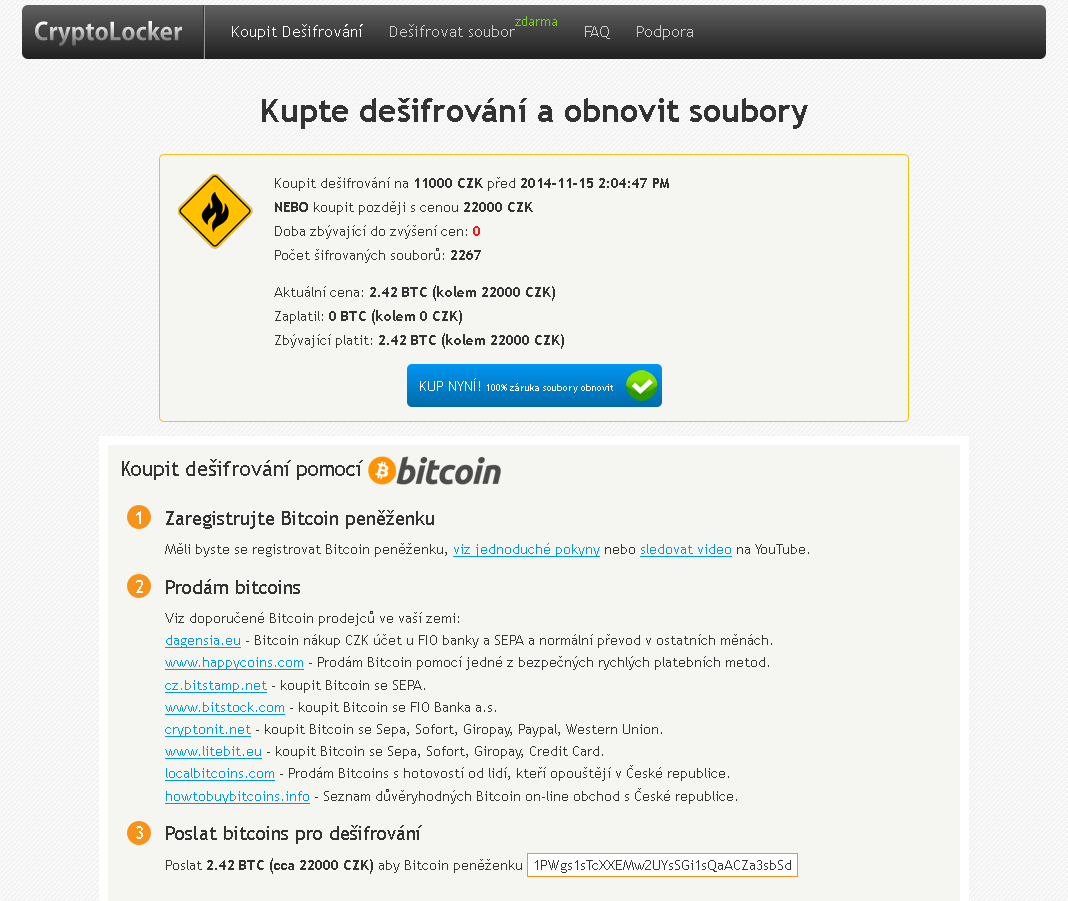
New CryptoLocker variant emerges in Czech Republic

What is ransomware?

As we witnessed with CryptoLocker earlier this year, ransomware is a type of malware which encrypts certain files on your system and then extorts a ransom to unlock them.

Which files are affected?

Most ransomware does not target important system files but instead looks for user files to encrypt. These can be everything from JPG images to office documents and emails, anything personal that could be a value to the user.

What is new about this variant?

Previous ransomware variants had weak or flawed encryption, which meant that files often could be recovered. This new variant contains a much stronger algorithm and encrypted files are almost impossible to recover without the encryption key, which is only held by the attacker. Interestingly the ransom can be paid in cryptocurrency as well as Czech Koruna.

Is there any way to recover my files without paying the ransom?

Historically, it has been possible to restore files using Shadow Copy, a tool that allows users to backup parts of their system even while they are in use. Sadly most new ransomware variants are resistant to recovery with Shadow Copy. Always seek advice before taking any drastic action to recover data encrypted by ransomware.

How can you stay protected?

  • Always backup -remember that malware has ability to encrypt files on all disks connected to your computer (including external USB disks, etc.) so be careful of leaving your backup connected to your machine or plugging in a backup to an infected device.
  • Think before you click – If you are unsure whether a link or file is untrustworthy, it is always safer to ignore it and delete it. Never download a file or follow a link from an untrustworthy source.
  • Get protection – As new variants emerge, they are continuously added to the database of definitions maintained by security companies like AVG. Up-to-date virus definitions are your front line protection against malware.
  • Get some Identity Protection tools – Security software like AVG has specially designed tools to protect your personal data from fraudsters and malware.


Story from Tomas Prochazka

Reporting from AVAR 2014

Kicking off proceedings was Dr. Andrew Clark from CERT Australia (the Australian Government’s Computer Emergency Response Team) who highlighted the many challenges in cyber crime that the Asia Pacific region faces, and how collaboration with neighbouring countries is helping those efforts.

Industry veteran Graham Cluley reminisced on his more than 20 year career with tales of some of the first viruses and malware, many of which now seem so harmless compared to today’s standards.  He also included an amusing rendition of what he calls the “Anti Virus Industry Song”.

“Why can’t we have a virus called ‘Lumpy Trousers’?”, quipped Graham Cluley at one point in the conference, but there was no shortage of interestingly named threats during the conference – such as Dragonfly, Citadel, and even Chuck Norris.

The topic of the Internet of Things inevitably emerged, including discussion of vulnerabilities affecting hundreds of thousands of Internet router and gateway devices used by homes and businesses globally.  Hardware manufacturers were reminded once again not to build devices with backdoors, and to implement better security by design.

As the two day event concluded, a number of industry veterans took to the stage with their musical instruments to rock into the night, entertaining delegates and proving just how collaborative and supportive the Anti-Virus industry is as we all do our best to protect the world from the scourge of malware and online threats.

Image courtesy @alenkacz


Until next time, stay safe out there.

AVG Extends Global Partnership with ALCATEL ONETOUCH

AMSTERDAM and SAN FRANCISCO – November 18, 2014 – AVG Technologies N.V. (NYSE: AVG), the online security company™ for 188 million active users, today announced that it has extended its partnership with ALCATEL ONETOUCH, a leading smartphone brand  to provide AVG’s flagship AVG AntiVirus PRO for Android™ app on its latest Android mobile devices. This agreement will help ALCATEL ONETOUCH’s mobile customers stay safe online from the moment they turn on their new devices for a safer and simpler online experience out-of-the-box.

This marks the latest milestone in the partnership which has been in place since 2011. The AVG pre-loaded devices will be available across ALCATEL ONETOUCH’s global customer base, including a number of fast-growing, emerging markets such as India, Russia, Brazil and Mexico. Customers get a free 90-day trial of AVG AntiVirus PRO for Android, after which they can either purchase an annual subscription to retain its enhanced security features or choose the default AVG AntiVirus FREE for Android option to ensure their smartphone or tablet remains protected.

“Going online via a smartphone is fast becoming a standard activity for mobile users, and understandably our customers want peace of mind to know that they are browsing safely,” said William Dowie, Global Portfolio Director at ALCATEL ONETOUCH. “We continue to be committed to providing them with the best protection possible on our devices and our ongoing partnership with AVG demonstrates our investment in this.”

“We know that the emerging markets account for a large proportion of those going online for the first time – and that mobile often provides the means for doing this.  ALCATEL ONETOUCH is one of the world’s leading smartphone brands with a large presence in these markets, and we believe our combined offering is a cost-effective and smart option for new users there,” said David Ferguson, General Manager Consumer & Mobile, AVG Technologies.

AVG AntiVirus FREE for Android was the first mobile security application to exceed 100 million downloads on the Google Playâ„¢ Store. With the launch earlier this year of AVG Zenâ„¢, an application for Windows PCs and Android smartphones and tablets, AVG has expanded its mobile portfolio to help consumers retain control over their privacy, protection, and performance when using a connected device to get online.

The roll out of AVG AntiVirus PRO for Android is effective immediately.

About AVG AntiVirus PRO for Android

Protect & Keep Safe:

  • App Scanner: Helps stop, remove and prevent the spreading of viruses, worms, and trojans
  • File Scanner: scans your phone for viruses and removes them with a simple click, ensuring your contacts, bookmarks, text messages, music and videos are kept safe.
  • Safe web surfing: actively checks web pages in real-time before you land on that page. If it detects something suspicious, it prevents you from visiting the site.
  • App Lock: protects your privacy by enabling you to lock your apps, thereby securing them from being accessed by other people using your phone.

Find & Protect Your Phone:

  • Phone Locator: helps you locate your phone if lost or stolen. Locate it quickly via Google Maps or enable the SHOUT function which maximizes the volume of your ring tone even if your phone is on “Silent”
  • Phone Locker: keeps outside parties from accessing your personal information by allowing you to lock your phone remotely via SMS or from controls managed from the Anti-Theft service.
  • Camera Trap: if AVG Anti-Theft records 3 failed attempts by an intruder to unlock your phone, it takes a photo of them with the phone’s front-facing camera. The photo is then emailed to you with an alert to the attempted break-in.
  • Remote Wipe: helps preserve your privacy by enabling you to wipe all contacts, photos, and calendars, your text messages, browsing history and SD Card.
  • SIM Lock: locks your phone when the SIM card is replaced.

Enhance Performance:

  • Improve Performance: optimize battery, storage and mobile data usage.
  • Task Killer: shut down apps that may affect device performance.
  • Improved Battery Consumption: get notified when the battery is below the level you set. Use the new Power Save button to turn off device functions that consume your battery or use Auto Power Save to turn off several features that consume battery automatically when the battery power reaches the level you set.
  • Data Usage: keep track of your 3G/4G mobile data usage by getting notifications as you approach your monthly data limit.
  • Storage Usage: uninstall apps that you think use too much storage to free up space on your device.
  • App Backup: helps you back up all your apps to your SD Card so you never get caught without your favorite games, utilities or feeds.


###


About AVG Technologies (NYSE: AVG)

AVG is the online security company providing leading software and services to secure devices, data and people. AVG has over 188 million active users, as of September 30, 2014, using AVG’s products and services including Internet security, performance optimization, and personal privacy and identity protection. By choosing AVG’s products, users become part of a trusted global community that engages directly with AVG to provide feedback and offer mutual support to other customers.

All trademarks are the property of their respective owners.

www.avg.com


Contacts:

US

Katie Han

Waggener Edstrom for AVG

[email protected]

+ 1 (212) 551 4807

UK

Samantha Woodman

Waggener Edstrom for AVG

[email protected]

+ 44 (0)20 7632 3840