Tag Archives: Security

Mobile apps: The privacy insanity

Security expert Troy Hunt took a look at three apps (one of them being the Paypal one) and the results are shocking: While they were all way too invasive most of the tested apps had serious security issues as well.

When it comes to your privacy especially Paypal seems to want far more information from you than necessary. Hunt took the time to point out the extra personal requests on his blog:

  1. BSSID: This is the unique device ID of my home router which is the same as the MAC address. Google got themselves into hot water for siphoning this up via their mapping vehicles a little while back because that one unique ID ties back to my precise device.
  2. Device model and name: You could argue that comparable information is sent via your browser courtesy of the user agent, but that would only apply to the model and not the name of the device which is explicitly not passed in requests. This is private – it’s my device name.
  3. Internal IP address: The internal address assigned to my iPhone via the router when it associated to the network. This can give a sense of how many devices are on the network.
  4. Location: There’s my lat and long again and for all the same reasons I don’t really want to share it with Aussie Farmers, I also don’t really want to share it with PayPal.
  5. SSID: We’re talking about the name of my internal network here. I name mine in a non-identifying fashion because frankly, I want to keep it somewhat private and that’s from those in my immediate vicinity, let alone those on the other side of the world.
  6. Storage space: Ok, so it’s a 128GB iPhone, do they really need to know that? Back to the user agent comparison, this is not the sort of stuff that’s typically “leaked” by generic requests to the web because it’s an internal metric of no external consequence.”

In addition to that the security of two of the tested apps was so bad that he concluded: “Perhaps I should just stick to the browser that doesn’t leak this class of data yet one would assume is still sufficiently secure.”

Do you want to find out more? Then take a look at the whole in-depth article.

The post Mobile apps: The privacy insanity appeared first on Avira Blog.

Regular expressions and recommended practices

Whenever a security person crosses a vulnerability report, one of the the first steps is to ensure that the reported problem is actually a vulnerability. Usually, the issue falls into well known and studied categories and this step is done rather quickly. Occasionally, however, one can come across bugs where this initial triage is a bit more problematic. This blog post is about such an issue, which will ultimately lead us to the concept of “recommended practice”.

What happened?

On July 31st 2014, Maksymilian Arciemowicz of cxsecurity reported that “C++11 [is] insecure by default.”, with upstream GCC bugs 61601 and 61582. LLVM/Clang’s libc++ didn’t dodge the bullet either, more details are available in LLVM bug 20291.

Not everybody can be bothered to go through so many links, so here is a quick summary: C++11, a new C++ standard approved in 2011, introduced support for regular expressions. Regular expressions (regexes from here on) are an amazingly powerful processing tool – but one that can become extremely complex to handle correctly. Not only can the regex itself become hideous and hard to understand, but also the way how the regex engine deals with it can lead to all sorts of problems. If certain complex regexes are passed to a regex engine, the engine can quickly out-grow the available CPU and memory constraints while trying to process the expression, possibly leading to a catastrophic event, which some call ReDoS, a “regular expression denial of service”.

This is exactly what Maksymilian Arciemowicz exploits: he passes specially crafted regexes to the regex engines provided by the C++11 implementations of GCC and Clang, causing them to use a huge amount of CPU resources or even crash (e.g. due to extreme recursion, which will exhaust all the available stack space, leading to a stack-overflow).

Is it a vulnerability?

CPU exhaustion and crashes are often good indicators for a vulnerability. Additionally, the C++11 standard even suggests error return codes for the exact problems triggered, but the implementations at hand fail to catch these situations. So, this must be a vulnerability, right? Well, this is the point where opinions differ. In order to understand why, it’s necessary to introduce a new concept:

The “recommended practice” concept

“Recommended practice” is essentially a mix of common sense and dos and don’ts. A huge problem is that they are informal, so there’s no ultimate guide on the subject, which leaves best practices open to personal experiences and opinion. Nevertheless, the vast majority of the programming community should know about the dangers of regular expressions; dangers just like the issues Maksymilian Arciemowicz reported in GCC/Clang. That said, passing arbitrary, unfiltered regexes from an untrusted source to the regex engine should be considered as a recommended practice case of “don’t do this; it’ll blow up in your face big time”.

To further clear this up: if an application uses a perfectly reasonable, well defined regex and the application crashes because the regex engine chocked when processing certain specially crafted input, it’s (most likely) a vulnerability in the regex engine. However, if the application uses a regex thought to be well defined, efficient and trusted, but turns out to e.g. take overly long to process certain specially crafted input, while other, more efficient regexes will do the job just fine, it’s (probably) a vulnerability in the application. But if untrusted regexes are passed to the regex engine without somehow filtering them for sanity first (which is incredibly hard to do for anything but the simplest of regexes, so better to avoid it), it is violating what a lot of people believe to be recommended practice, and thus it is often not considered to be a strict vulnerability in the regex engine.

So, next time you feel inclined to pass regexes verbatim to the engine, you’ll hopefully remember that it’s not a good idea and refrain from doing so. If you have done so in the past, you should probably go ahead and fix it.

Avast for Business adds 75,000 new customers in just two months

Avast for Business

Luke Walling, GM of Avast for Business, had confidence in the Avast for Business product all along. But the explosion of new customers has surprised and delighted even him.

Avast for Business is the industry’s first free, easy to use, cloud-managed security offering that protects small-to-medium-sized business (SMB) from cyber attacks and data breaches.

The new product has been available for two months, and already more than 75,000  SMB owners have enthusiastically selected Avast for Business to protect their companies.

The new, cloud-managed solution has specifically been adopted by IT consulting, education, and non-profit sectors. Early results also show a strong uptake in managed service providers, who make up 12 percent of Avast for Business’ total installed device count and 2.5 percent of its new users.

A reason for it’s booming success is because most start-ups, small businesses, schools, and nonprofit organizations lack the IT infrastructure to install costly and complex on-premise security solutions. Avast for Business provides the ideal solution. It’s easily scalable and managed from anywhere. Additionally, Avast for Business starts at a price everyone can afford: free, making it a natural fit for small-to-medium-sized businesses and organizations worldwide.

Avast for Business is free for as long as you want it and for an unlimited number of admins and devices. Protect your company with Avast for Business.

Avast for Business

Avast for Business replaces expensive, complicated security solutions for SMBs.

WordPress 4.1.2 Security Release

WordPress 4.1.2 is now available. This is a critical security release for all previous versions and we strongly encourage you to update your sites immediately.

WordPress versions 4.1.1 and earlier are affected by a critical cross-site scripting vulnerability, which could enable anonymous users to compromise a site. This was reported by Cedric Van Bockhaven and fixed by Gary Pendergast, Mike Adams, and Andrew Nacin of the WordPress security team.

We also fixed three other security issues:

  • In WordPress 4.1 and higher, files with invalid or unsafe names could be uploaded. Discovered by Michael Kapfer and Sebastian Kraemer of HSASec.
  • In WordPress 3.9 and higher, a very limited cross-site scripting vulnerability could be used as part of a social engineering attack. Discovered by Jakub Zoczek.
  • Some plugins were vulnerable to an SQL injection vulnerability. Discovered by Ben Bidner of the WordPress security team.

We also made four hardening changes, discovered by J.D. Grimes, Divyesh Prajapati, Allan Collins and Marc-Alexandre Montpas.

We appreciated the responsible disclosure of these issues directly to our security team. For more information, see the release notes or consult the list of changes.

Download WordPress 4.1.2 or venture over to Dashboard → Updates and simply click “Update Now.” Sites that support automatic background updates are already beginning to update to WordPress 4.1.2.

Thanks to everyone who contributed to 4.1.2: Allan Collins, Alex Concha, Andrew Nacin, Andrew Ozz, Ben Bidner, Boone Gorges, Dion Hulse, Dominik Schilling, Drew Jaynes, Gary Pendergast, Helen Hou-Sandí, John Blackburn and Mike Adams.

A number of plugins also released security fixes yesterday. Keep everything updated to stay secure. If you’re a plugin author, please read this post to confirm that your plugin is not affected by the same issue. Thank you to all of the plugin authors who worked closely with our security team to ensure a coordinated response.

Already testing WordPress 4.2? The third release candidate is now available (zip) and it contains these fixes. For more on 4.2, see the RC 1 announcement post.

How to tell if an app has in-app purchases

News emerged recently of a California woman suing Google for the return of thousands of dollars taken without her knowledge via in-app microtransactions.

After upgrading a free app via the Google Play store, hackers got hold of Susan Harvey’s details and between March 2013 and August 2014 ran up thousands of dollars across 650 in-app purchases without any alerts and notifications being sent to the victim.


Checking for in-app purchases

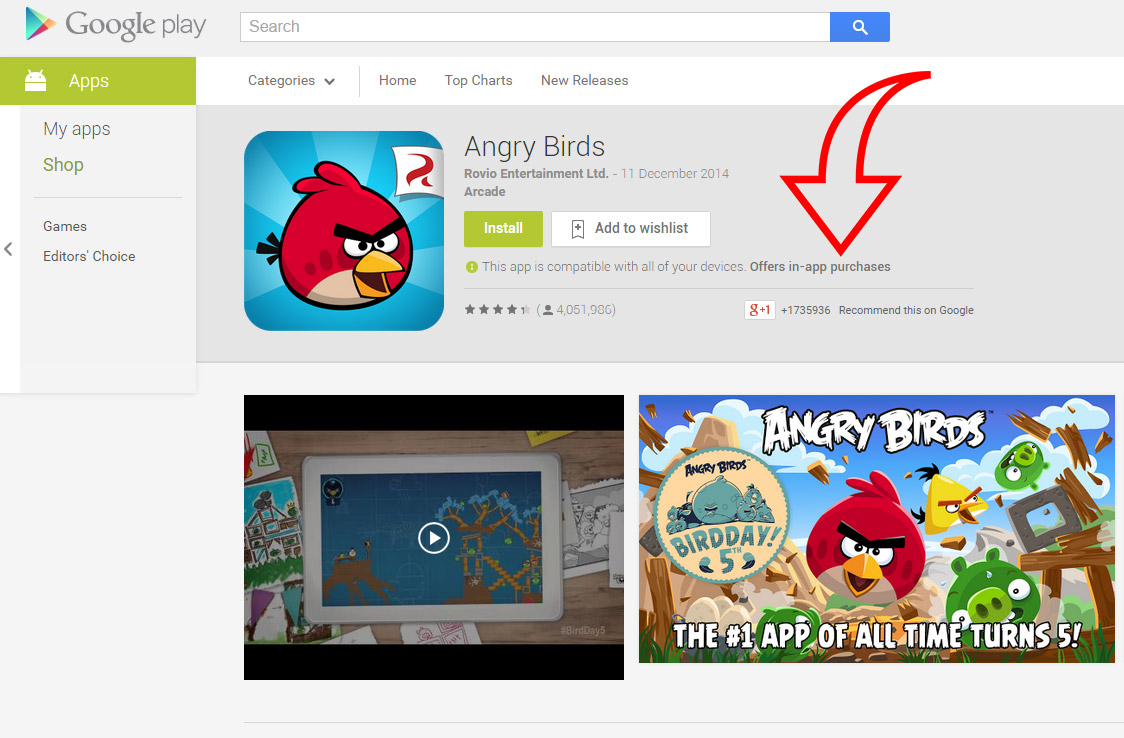
It’s easy to see if an app allows in-app purchases, just visit the Apple App Store or the Google Play Store.

Google Play Store

Android


Apple App Store

iOS


While it is not yet determined who is to blame for this attack, one thing we can all do to help keep ourselves safe from fraud or mobile attacks is to carefully check the permissions of any apps we install on our devices.

Check out this video for tips on which permissions to look out for when installing a new app.

Video

Make Sure You Check These Permissions


In the video, Michael highlights these top permissions to check when installing an app:

  • Check the app store that the app contains in app purchases
  • Access to the internet
  • Access to phone and call information
  • GPS and precise location
  • Access to photos/media/files
  • Camera and microphone access


Is Hotel Wi-Fi Safe?

Recently, a new authentication vulnerability was identified in the firmware of routers that are used in hotels around the world.

This means that new files can be written to the routers and then potentially all connected machines (meaning hotel guests) could become infected.

Public Wi-Fi is not a new risk as these networks are unencrypted and send all your data in clear text, unless of course the web site you are visiting offers encryption.

Why does it matter that your data is unencrypted? Imagine all your regular post arriving at home written on postcards so that anyone in the delivery chain could read them. It would be a huge invasion of your privacy and unacceptable.

The risk of similar but you just can’t see that it was all sent for others to read, should they be so inclined.

Stay safe while using public Wi-Fi

  • When using public Wi-Fi in café’s, airports, hotels or even when visiting a place of work that has guest Wi-Fi you should always be cautious on which services you use while connected.
  • Where possible use a virtual private network (VPN). This will encrypt the data being send over the public Wi-Fi network that you are connected to, or put another way it will put your mail back in envelopes.
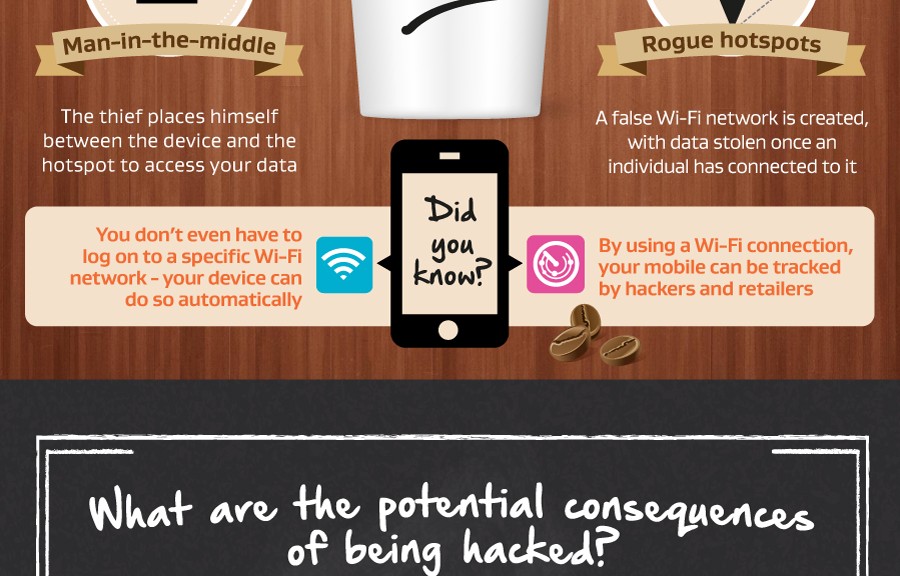
  • Many scammers set up fake Wi-Fi networks to conduct what is known as a man in the middle attack. If you are in a hotel or airport, make sure you are using the legitimate free Wi-Fi  service.

For more tips on keeping your data safe while using public Wi-Fi, check out the infographic below.

WiFi

JOSE – JSON Object Signing and Encryption

Federated Identity Management has become very widespread in past years – in addition to enterprise deployments a lot of popular web services allow users to carry their identity over multiple sites. Social networking sites especially are in a good position to drive the federated identity management, as they have both critical mass of users and the incentive to become an identity provider. As the users move away from a single device to using multiple portable devices, there is a constant pressure to make the federated identity protocols simpler (with respect to complexity), more user friendly (especially for developers) and easier to implement (on wide range of devices and platforms).

Unfortunately older technologies are deeply rooted in enterprise environments and are unsuitable for Internet (Kerberos), or are based on more or less complicated data serialization (e.g. OpenID 2.0 or SAML). Canonicalization, whitespace handling and representation of binary data are among the challenges that various serialization formats face.

OpenID Connect

Another approach to the problem of serialization of structured data in context of identity management is to use already widespread and simple JSON in combination with base64url encoding of data. The advantage in context of federated identity management is obvious – while being sufficiently universal, they have almost native support in web clients. Getting this level of simplicity and interoperability is very compelling, despite these having some shortcomings in e.g. bandwidth-efficiency.

This approach is taken by an upcoming standard OpenID Connect, a third revision of OpenID protocol. The protocol describes a method of providing identity-based claims from identity provider to relying party, with end user being authenticated by Identity Provider and authorizing the request. The communication between client, relying party and identity provider follows OAUTH 2.0 protocol, just like in previous version of the protocol, OpenID 2.0. Claims have a format of JSON key-value hash and the task of protection of integrity, and possibly confidentiality, is addressed by JSON Object Signing and Encryption (JOSE) standard.

JOSE

The standard provides a general approach to signing and encryption of any content, not necessarily in JSON. However, it is deliberately built on JSON and base64url to be easily usable in web applications. Also, while being used in OpenID Connect, it can be used as a building block in other protocols.

JOSE is still an upcoming standard, but final revisions should be available shortly. It consists of several upcoming RFCs:

  • JWA – JSON Web Algorithms, describes cryptographic algorithms used in JOSE
  • JWK – JSON Web Key, describes format and handling of cryptographic keys in JOSE
  • JWS – JSON Web Signature, describes producing and handling signed messages
  • JWE – JSON Web Encryption, describes producting and handling encrypted messages
  • JWT – JSON Web Token, describes representation of claims encoded in JSON and protected by JWS or JWE

JWK

JSON Web Key is a data structure representing a cryptographic key with both the cryptographic data and other attributes, such as key usage.

{ 
  "kty":"EC",
  "crv":"P-256",
  "x":"MKBCTNIcKUSDii11ySs3526iDZ8AiTo7Tu6KPAqv7D4",
  "y":"4Etl6SRW2YiLUrN5vfvVHuhp7x8PxltmWWlbbM4IFyM",
  "use":"enc",
  "kid":"1"
}

Mandatory “kty” key type parameter describes the cryptographic algorithm associated with the key. Depending on the key type, other parameters might be used – as shown in the example elliptic curve key would contain “crv” parameter identifying the curve, “x” and “y” coordinates of point, optional “use” to denote intended usage of the key and “kid” as key ID. The specification now describes three key types: “EC” for Elliptic Curve, “RSA” for, well, RSA, and “oct” for octet sequence denoting the shared symmetric key.

JWS

JSON Web Signature standard describes process of creation and validation of datastructure representing signed payload. As example take following string as a payload:

'{"iss":"joe",
 "exp":1300819380,
 "http://example.com/is_root":true}'

Incidentally, this string contains JSON data, but this is not relevant for the signing procedure and it might as well be any data. Before signing, the payload is always converted to base64url encoding:

eyJpc3MiOiJqb2UiLA0KICJleHAiOjEzMDA4MTkzODAsDQogImh0dHA6Ly9leGFtcGxlLm
NvbS9pc19yb290Ijp0cnVlfQ

Additional parameters are associated with each payload. Required parameter is “alg”, which denotes the algorithm used for generating a signature (one of the possible values is “none” for unprotected messages). The parameters are included in final JWS in either protected or unprotected header. The data in protected header is integrity protected and base64url encoded, whereas unprotected header human readable associated data.

As example, the protected header will contain following data:

{"alg":"ES256"}

which in base64url encoding look like this:

eyJhbGciOiJFUzI1NiJ9

The “ES356″ here is identifier for ECDSA signature algorithm using P-256 curve and SHA-256 digest algorithm.

Unprotected header can contain a key id parameter:

{"kid":"e9bc097a-ce51-4036-9562-d2ade882db0d"}

The base64url encoded payload and protected header are concatenated with ‘.’ to form a raw data, which is fed to the signature algorithm to produce the final signature.

Finally, the JWS output is serialized using one of JSON or Compact serializations. Compact serialization is simple concatenation of comma separated base64url encoded protected header, payload and signature. JSON serialization is a human readable JSON object, which for the example above would look like this:

{
  "payload": "eyJpc3MiOiJqb2UiLA0KICJleHAiOjEzMDA4MTkzODAsDQogImh0dHA6
              Ly9leGFtcGxlLmNvbS9pc19yb290Ijp0cnVlfQ",
  "protected":"eyJhbGciOiJFUzI1NiJ9",
  "header":
    {"kid":"e9bc097a-ce51-4036-9562-d2ade882db0d"},
     "signature":
     "DtEhU3ljbEg8L38VWAfUAqOyKAM6-Xx-F4GawxaepmXFCgfTjDxw5djxLa8IS
      lSApmWQxfKTUJqPP3-Kg6NU1Q"
}

Such process for generating signature is pretty straightforward, yet still supports some advanced use-cases, such as multiple signatures with separate headers.

JWE

JSON Web Encryption follows the same logic as JWS with a few differences:

  • by default, for each message new content encryption key (CEK) should be generated. This key is used to encrypt the plaintext and is attached to the final message. Public key of recipient or a shared key is used only to encrypt the CEK (unless direct encryption is used, see below).
  • only AEAD (Authenticated Encryption with Associated Data) algorithms are defined in the standard, so users do not have to think about how to combine JWE with JWS.

Just like with JWS, header data of JWE object can be transmitted in either integrity protected, unprotected or per-recipient unprotected header. The final JSON serialized output then has the following structure:

{
  "protected": "<integrity-protected header contents>",
  "unprotected": <non-integrity-protected header contents>,
  "recipients": [
    {"header": <per-recipient unprotected header 1 contents>,
     "encrypted_key": "<encrypted key 1 contents>"},
     ...
    {"header": <per-recipient unprotected header N contents>,
     "encrypted_key": "<encrypted key N contents>"}],
  "aad":"<additional authenticated data contents>",
  "iv":"<initialization vector contents>",
  "ciphertext":"<ciphertext contents>",
  "tag":"<authentication tag contents>"
}

The CEK is encrypted for each recipient separately, using different algorithms. This gives us ability to encrypt a message to recipients with different keys, e.g. RSA, shared symmetric and EC key.

The two used algorithms need to be specified as a header parameters. “alg” parameter specified the algorithm used to protect the CEK, while “enc” parameter specifies the algorithm used to encrypt the plaintext using CEK as key. Needless to say, “alg” can have a value of “dir”, which marks direct usage of the key, instead of using CEK.

As example, assume we have RSA public key of the first recipient and share a symmetric key with second recipient. The “alg” parameter for the first recipient will have value “RSA1_5″ denoting RSAES-PKCS1-V1_5 algorithm and “A128KW” denoting AES 128 Keywrap for the second recipient, along with key IDs:

{"alg":"RSA1_5","kid":"2011-04-29"}

and

{"alg":"A128KW","kid":"7"}

These algorithms will be used to encrypt content encryption key (CEK) to each of the recipients. After CEK is generated, we use it to encrypt the plaintext with AES 128 in CBC mode with HMAC SHA 256 for integrity:

{"enc":"A128CBC-HS256"}

We can protect this information by putting it into a protected header, which, when base64url encoded, will look like this:

eyJlbmMiOiJBMTI4Q0JDLUhTMjU2In0

This data will be fed as associated data to AEAD encryption algorithm and therefore be protected by the final signature tag.

Putting this all together, the resulting JWE object will looks like this:

{
  "protected": "eyJlbmMiOiJBMTI4Q0JDLUhTMjU2In0",
  "recipients":[
    {"header": {"alg":"RSA1_5","kid":"2011-04-29"},
     "encrypted_key":
       "UGhIOguC7IuEvf_NPVaXsGMoLOmwvc1GyqlIKOK1nN94nHPoltGRhWhw7Zx0-
        kFm1NJn8LE9XShH59_i8J0PH5ZZyNfGy2xGdULU7sHNF6Gp2vPLgNZ__deLKx
        GHZ7PcHALUzoOegEI-8E66jX2E4zyJKx-YxzZIItRzC5hlRirb6Y5Cl_p-ko3
        YvkkysZIFNPccxRU7qve1WYPxqbb2Yw8kZqa2rMWI5ng8OtvzlV7elprCbuPh
        cCdZ6XDP0_F8rkXds2vE4X-ncOIM8hAYHHi29NX0mcKiRaD0-D-ljQTP-cFPg
        wCp6X-nZZd9OHBv-B3oWh2TbqmScqXMR4gp_A"},
    {"header": {"alg":"A128KW","kid":"7"},
     "encrypted_key":
        "6KB707dM9YTIgHtLvtgWQ8mKwboJW3of9locizkDTHzBC2IlrT1oOQ"}],
  "iv": "AxY8DCtDaGlsbGljb3RoZQ",
  "ciphertext": "KDlTtXchhZTGufMYmOYGS4HffxPSUrfmqCHXaI9wOGY",
  "tag": "Mz-VPPyU4RlcuYv1IwIvzw"
}

JWA

JSON Web Algorithms defines algorithms and their identifiers to be used in JWS and JWE. The three parameters that specify algorithms are “alg” for JWS, “alg” and “enc” for JWE.

"enc": 
    A128CBC-HS256, A192CBC-HS384, A256CBC-HS512 (AES in CBC with HMAC), 
    A128GCM, A192GCM, A256GCM

"alg" for JWS: 
    HS256, HS384, HS512 (HMAC with SHA), 
    RS256, RS384, RS512 (RSASSA-PKCS-v1_5 with SHA), 
    ES256, ES384, ES512 (ECDSA with SHA), 
    PS256, PS384, PS512 (RSASSA-PSS with SHA for digest and MGF1)

"alg" for JWE: 
    RSA1_5, RSA-OAEP, RSA-OAEP-256, 
    A128KW, A192KW, A256KW (AES Keywrap), 
    dir (direct encryption), 
    ECDH-ES (EC Diffie Hellman Ephemeral+Static key agreement), 
    ECDH-ES+A128KW, ECDH-ES+A192KW, ECDH-ES+A256KW (with AES Keywrap), 
    A128GCMKW, A192GCMKW, A256GCMKW (AES in GCM Keywrap), 
    PBES2-HS256+A128KW, PBES2-HS384+A192KW, PBES2-HS512+A256KW 
    (PBES2 with HMAC SHA and AES keywrap)

On the first look the wealth of choice for “alg” in JWE is balanced by just two options for “enc”. Thanks to “enc” and “alg” being separate, algorithms suitable for encrypting cryptographic key and content can be separately defined. AES Keywrap scheme defined in RFC 3394 is a preferred way to protect cryptographic key. The scheme uses fixed value of IV, which is checked after decryption and provides integrity protection without making the encrypted key longer (by adding IV and authentication tag). But here`s a catch – while A128KW refers to AES Keywrap algorithm as defined in RFC 3394, word “keywrap” in A128GCMKW is used in a more general sense as synonym to encryption, so it denotes simple encryption of key with AES in GCM mode.

JWT

While previous parts of JOSE provide a general purpose cryptographic primitives for arbitrary data, JSON Web Token standard is more tied to the OpenID Connect. JWT object is simply JSON hash with claims, that is either signed with JWS or encrypted with JWE and serialized using compact serialization. Beware of a terminological quirk – when JWT is used as plaintext in JWE or JWS, it is referred to as nested JWT (rather than signed, or encrypted).

JWT standard defines claims – name/value pair asserting information about subject. The claims include

  • “iss” to identify issuer of the claim
  • “sub” identifying subject of JWT
  • “aud” (audience) identifying intended recipients
  • “exp” to mark expiration time of JWT
  • “nbf” (not before) to mark time before which JWT must be rejected
  • “iat” (issued at) to mark time when JWT was created
  • “jti” (JWT ID) as unique identifier for JWT

While standard mandates what are mandatory values of the claims, all of them are optional to use in a valid JWT. This means applications can use any structure for JWT if it`s not intended to use publicly, and for public JWT set of claims is defined and collisions in names are prevented.

The good

The fact that JOSE combines JSON and base64url encoding making it simple and web friendly is a clear win. Although we will definitely see JOSE adopted in web environment first, it does have ambition to become more general purpose standard.

The design promotes secure choices, e.g. use of unique CEK per message, which makes users default to secure configurations while still giving option to use less secure methods (“dir” for encryption, “none” in JWS). Being a new standard authors did seize the opportunity to define only secure algorithms. This is certainly good, but as the advances in cryptography weaken the algorithms, ability to deprecate algorithms (with backwards compatibility always being an issue) will be more important in the future.

The bad

Despite the effort to keep the standard simple, some complexities inevitably slipped through. One obvious comes from a different serializations. JOSE standards support two serializations – JSON and Compact. JSON serialization is human readable and gives the users more freedom as it supports some advances features like multiple recipients. However, since single recipient is a much more common case, standard also defines a variant called flattened JSON serialization. In this type nested parameters from nested fields (like “recipients”) is moved directly to top level JSON object, making multiple recipients with flattened serialization impossible.

The compact serialization is created, according to the standard, for “space constrained environments”. The result of the serialization is comma separated concatenation of base64url encoded segments of the original JSON object. For example for JWS the serialization is constructed as follows:

BASE64URL(UTF8(JWS Protected Header)) || '.' ||
BASE64URL(JWS Payload) || '.' ||
BASE64URL(JWS Signature)

Astute readers notice that compact serialization further restricts the available features of JWS, e.g. it is not possible to include unprotected header anymore. The space saving comes from dropping the keys that denote the parts of JSON object (“payload”, “signature” etc.). On the other hand, base64url encoding expands the length of the cleartext data (i.e. unprotected header), so in extreme example compact serialized JWS might actually be longer that JSON serialized one if the header contains enough data (to compensate inefficiency of specifying keys in the object) and is stored as unprotected header. Of importance is also the number of dot separated sections, since their number is the only method of differentiating between compact serialized JWE and JWS. Other proposed extensions, such as Key Managed JSON Web Signature (KMJWS), must take this into account.

The standard also still contains several ambiguities, e.g. JWK defines a JWK Set and states that “The member names within a JWK Set MUST be unique;”  without specifying what member name actually is.

The ugly

The JOSE standard is already incorporated in OpenID Connect standard. As the standards evolved side by side, OpenID Connect standard is based on older revisions of JOSE. More importantly, 15.6.1. Pre-Final IETF Specifications section of OpenID Connect states:

“Implementers should be aware that this specification uses several IETF specifications that are not yet final specifications … While every effort will be made to prevent breaking changes to these specifications, should they occur, OpenID Connect implementations should continue to use the specifically referenced draft versions above in preference to the final versions …”

The compatibility issues are always bane of cryptographic standard and this decision to prefer pre-final revisions of JOSE standard might force implementations to make some hard decisions.

Future

The JOSE standard seems to be quickly approaching the final revisions and we will most probably see more of it on the web. Implementations for most of the popular languages are in place and we will see whether the decision to award Special European Identity Award for Best Innovation for Security in the API Economy to JOSE will also stand the test of time.


Heartbleed: One Year On

When news of the Heartbleed vulnerability broke this time last year, it was a watershed moment for the Internet and especially for security.

OpenSSL, the fundamental layer of encryption used by major websites around the world, was found to be flawed. Through a specific type of attack, a victim’s personal data including passwords, financial credentials could be stolen.

While the discovery of a vulnerability in OpenSSL didn’t come as much of a surprise to those who work in the security industry – after all, completely secure code is a rarity. Instead, the shock was the extent of the vulnerability, with around 60% of the entire web at risk.

Now, a year on, I’d love to be able to say that we’ve learned many lessons from Heartbleed and that the web is now a more secure place. Sadly, it’s not as simple as that.

Public awareness remains a major issue for Internet security. Recent research from password security developer Dashlane indicates that a year on, 86% of American’s have not heard of Heartbleed.

Dashlane spoke to AVG’s Chief Strategy Officer, Todd Simpson, about their results.

Video

The State of Online Security One-Year After Heartbleed


However, awareness is just one issue. Months after Heartbleed broke, I wrote of several further vulnerabilities in OpenSSL that had also emerged. Although each vulnerability discovered is theoretically a vulnerability fixed, it highlights the fact that this is still much work to be done. This is particularly true of open source software.

Open source software has several major benefits and will be around for a long time yet, but vulnerabilities such as Heartbleed demonstrate that there is risk and responsibility for all of us to protect the systems we have come to rely on.

Why has there been so little progress in securing OpenSSL and similar open source systems since Heartbleed appeared?

In my opinion, the issue lies within the very nature of open source software. OpenSSL is incredibly useful and has been adopted throughout the world, but how many people pay for OpenSSL, or donate time and money to keep it functional and secure? Not so many.

The OpenSSL Project does a great job finding and fixing vulnerabilities when they appear but in order to truly move the dial for Internet security, we need more investment.

Right now, the hands of the world’s online safety is in the hands of only a few coders working in small teams. That simply won’t do.

In April last year I wrote a blog highlighting a number of ways that we can all work together to improve the security of open source software.

Ultimately, it comes down to the fact that vulnerabilities will always exist; it’s up to all of us to take responsibility for our security.

Not your father’s antivirus protection

avtest_certified_homeuser_2015-02

Avast received the AV-Test certification for home use products.

Do I really need security on my computer anymore?

Over the years, web standards have improved and the security of operating systems and browsers have become better. Because of these advances, some people question whether they need security protection at all. But you need to remember that in parallel to positive advances in protection, cybercrooks have improved their skills and become more stealthy and targeted.

Hackers are no longer mischievous kids breaking into government agencies because they can. “These days, cybercrooks have to make business driven-decisions like the rest of us because their resources are limited,” said Ondrek Vlcek, COO of Avast.

Current malware is often disguised as legitimate applications, malicious Android apps sneak by protocols of the huge download sites, and home and business networks are being attacked via weakly protected routers.

“Threats are no longer just targeting devices, but accounts and routers. A recent example is the iCloud hack where cybercrooks stole personal photos of more than 100 celebrities, including Jennifer Lawrence and Kate Upton,” said Vlcek. “This attack happened via their account and can as well be the result of a router hack. No matter which device you use, all Internet traffic flows through your router so you have to make sure it is secure. You don’t have to be Jennifer Lawrence to be attacked.

Not your father’s antivirus protection

Antivirus protection has come a long way since it scanned individual files. Avast has taken modern virus protection to a high art with real-time updates and heuristic scans that detect new threats it’s never even seen before.

Avast performs so well in protecting against “real-world” threats such as Trojans, worms and viruses as well as web and email threats, that it just received the AV-TEST certification for our home user products.

Avast scored perfectly in the detection of widespread and prevalent malware discovered in the last 4 weeks, and had very little incidence of disruptions caused by false positives. Our consumer products have basically no measurable impact on the performance of the computer while doing things that the average user does on a daily basis: Visiting websites, downloading software, installing and running programs and copying data.

How safe are one-time passwords?

Most people have dozens of passwords, for dozens of online accounts.  At times it can be tricky to remember them all, as best practice says they should all be slightly different.

If you’re one of these many people, Yahoo’s recent announcement may get you excited. Earlier in March, Yahoo revealed an innovative idea that would mean we never have to remember a password again.

The concept is very simple. By selecting to use one-time passwords in your account settings, the next time you login it will send a password to your phone that you can use to login in with via a SMS.

While this seems very convenient, is it secure?

Generally speaking, there are three types of authentication in use today

  • ID and Password
  • ID, Password, Verification Code (using SMS)
  • Two Factor authentication using ID, Password and another device providing a unique password

The Yahoo solution seems to be half way between the least secure option A and Option B.

Sending a password on demand to a device is a step in the right direction, but there may be other security risks involved when transmitting data over SMS and to a potentially unprotected device.

The phone may not have a passcode and could be infected with malware that reads the SMS. This could mean the email account and all the data inside gets compromised.

If you do want to enable one-time passwords, I would recommend you have both of these: a passcode and AVG AntiVirus for Android on the phone to keep yourself protected.


What would I do differently?

Using the mobile device to add another layer of security is a smart idea as most people have one. Most of us also use apps regularly and if you’re a Yahoo user then you probably have the Yahoo app.

I would change the delivery method of the password from SMS and instead deliver it, in an encrypted format, via their own app.

On top of this, the Yahoo app with this one-time passwords enabled should require the device to have PIN security.

This would mean that an attacker would need the ID, the phone and the PIN in order to access the account. The app could even go further and check for the presence of an Anti-Virus product to ensure that it’s being scanned regularly.

It could be that there are currently technical limitations with one-time passwords, and that in the future we’ll see a lot more secure and comprehensive process.

My top advice right now though is if you’re going to use this service then be sure to have a security app and a PIN on your phone so you can help ensure that the password is being sent to a secure device.

Follow me on Twitter @tonyatavg