Tag Archives: Social Media

Facebook ads. How to avoid them?

facebook

Have you ever wondered why the advertisements that appear on your Facebook feed offer you the exact product and service that you are supposedly interested in? Have you also stopped to think about what information Candy Crush holds on you, or do you just click play anyway?

Facebook offers you information on your privacy, although it’s like that few users have ever reviewed it. Hardly surprising when you consider that it would take it 76 days to read all of the terms and conditions of the services that we use over the course of a year, according to a study carried out by the Carnegie Mellon University.

It’s likely that lots of workers include information relating to their role in the company on their Facebook profile, so both you and they could benefit from a better level of privacy control on the social media site. Here are a few tips to make it harder for companies to follow your tracks online.

Stop giving away personal information to applications

Every time that you install an application from Facebook it tells you what information you will share with it. In that moment, you can edit the information you wish to share. Seeing as you’ve probably ignored this or have logged into Facebook from the external website, we’ll explain to you how to restrict the details that you give away to the apps.

  • The first thing you have to do is click on the lock in the top right part of the Facebook page. Click on “see more” form the expandable menu and access “settings and privacy tools”.
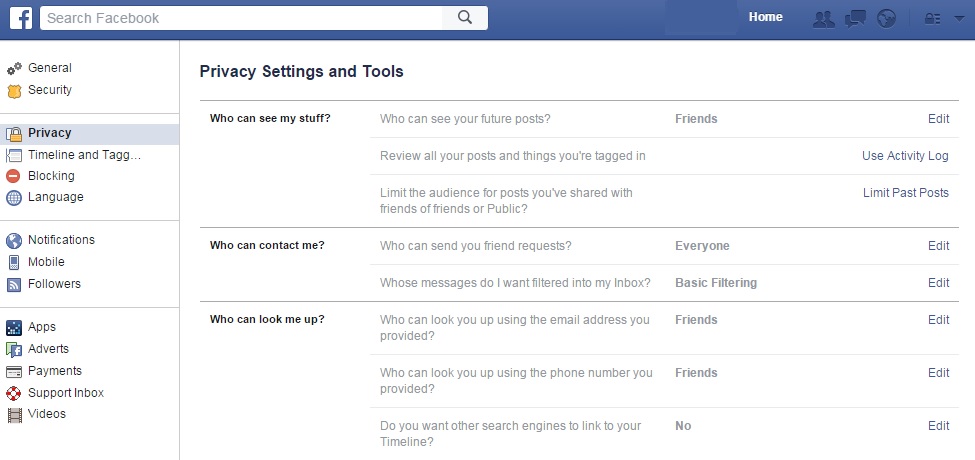
facebook privacy settings

  • Then, search the left column for the button marked “applications” and click on “see all”. We bet you never expected to see so many websites associated with your Facebook page! Now, it’s time to organize it all.
  • You can click beside each application to delete it from your account, or you can click on the pencil icon to edit the information that each app keeps on you. Keep in mind that there may be some details that are obligatory and you can’t keep them hidden.
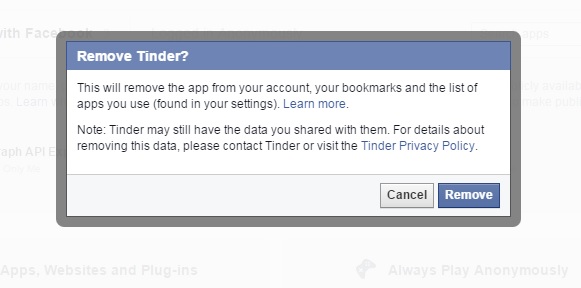
facebook remove

  • When you’ve finished this process, go to the bottom of the page where you’ll find two very interesting options. The first of these is the option to activate “always play anonymously” and the second is to edit the information on Facebook that others can see in the apps that you use by clicking on “applications used by others”.
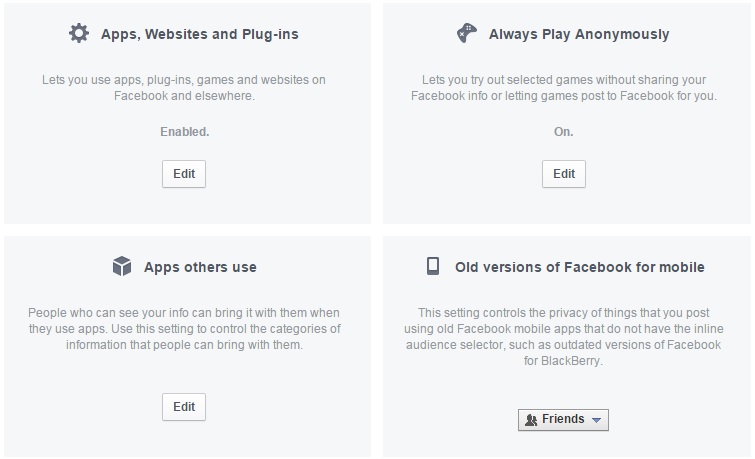
facebook apps

Repel the advertising

If you want to stop Facebook from using your personal information to show you predetermined advertisements, then there are a few ways you can go about it.

  • The first is click on the arrow at the top of the page, beside the lock icon, and access the part for “settings”. In the left column you’ll see “adverts”. From there you can deny Facebook the right to use your actions (for example, things you indicate you like) to offers ads to your friends and that you don’t receive ads based on their preferences either.

To do this, you need to click on the “edit” option for both “other websites” as well as “adverts and friends” in order to change the default setting from “only friends” to “nobody”.
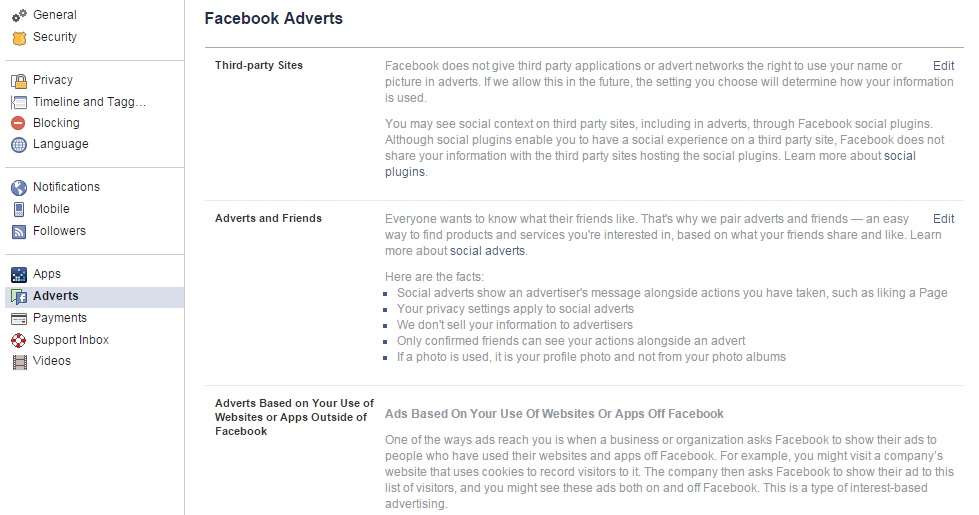
facebook adverts

You can also use other tools to avoid this personalized advertising such as Facebook Disconnect or Adblock Plus. So, if you want to improve your privacy on Facebook and control what businesses can analyze from your information, you know what to do. It is also recommended that you read the policy of the company so as you know what you’re getting yourself into.

The post Facebook ads. How to avoid them? appeared first on MediaCenter Panda Security.

No, Tiffany is not giving away diamond rings on Facebook

Diamond rings and an Audi R8 can be mine just for the simple actions of liking and sharing on Facebook. NOT!

In the past week, three fake giveaways have come across my Facebook newsfeed – two of them today! These were shared by otherwise intelligent friends, so that makes me think all kinds of other people are falling for the scam. I’m sharing these with you, so you’ll know what to look out for.

Each scam promises that you could win a valuable prize just by liking and sharing the post. This one is for an Audi R8 V8, and every time I’ve seen it, it’s originates from a different page. The instructions are always the same – for a chance to win, you must like the page, request your desired color in the comments, and share the post with your friends.

Audi R8 Facebook like-farming scam


This type of social engineering scam is called like-farming. It is designed to gather many page likes and shares in a short amount of time, and since Facebook’s algorithms give a high weight to those posts that are popular, they have a high probability of showing up in people’s newsfeeds. Scammers go to all this trouble for two purposes: The pages can later be repurposed for survey scams and other types of trickery that can be served to a large audience. And pages with large numbers of fans can be sold on the black market to other scammers with creative ideas.

All that glitters…

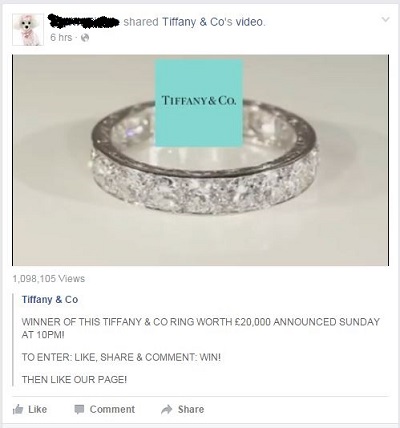
Two posts for beautiful jewelry appeared in my newsfeed just today. One was from the famous jewelry company, Tiffany & Co. The post shows a video of a sparkling diamond band and asks for a like, share, and comment to win this ring.

Tiffany Facebook like-farming scam

Click on the link and it takes you to a fake Tiffany & Co Facebook page.

There are two things to notice about the page; one, the Co in the name of the company does not have a period at the end. And two, the page does not have the blue Verified Page check mark beside the name. That mark is Facebook’s way of guaranteeing the authenticity of the company.

fake Tiffany Facebook page


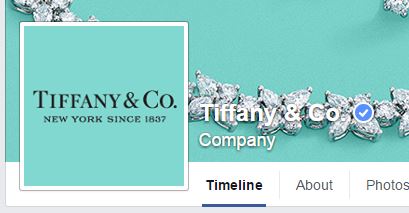
Here is the real Tiffany & Co. Facebook page with the verified page check mark.

real Tiffany & Co. Facebook  page


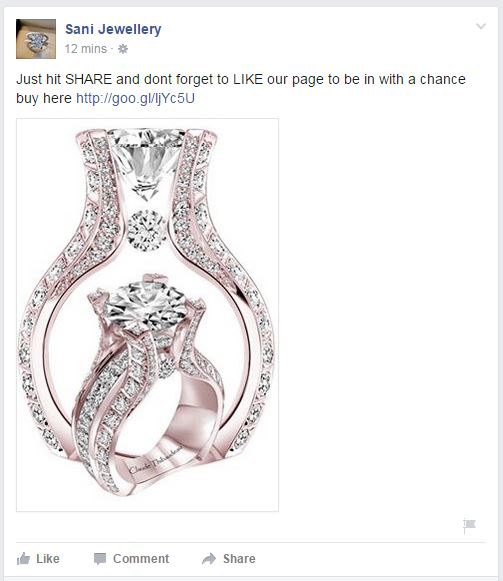
The other jewelry scam came from a page called Sani Jewellery. The scam is the same as the one from the fake Tiffany page; users can win just for liking and sharing the post on their Facebook page.

Sani Jewellery Facebook scam


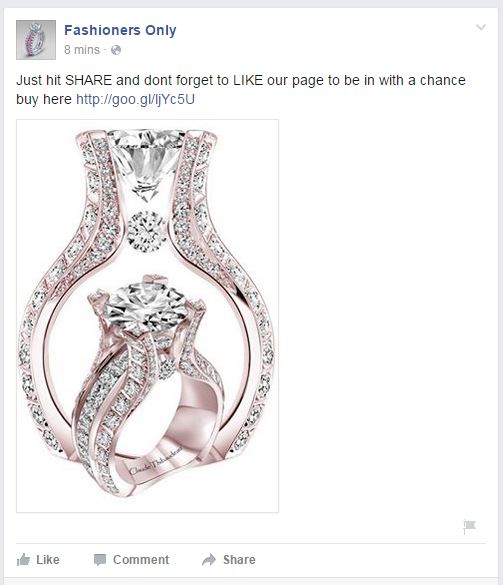
These scammers own another Facebook page called Fashioners Only, and run identical like-farming scams.

Fashioners Only Facebook scam

How to avoid like-farming scams on Facebook

  • If you suspect that someone has shared a fake page with you, do not click on it or participate in the giveaway.
  • Politely inform the person who posted it that the Facebook page they shared is a like-farming scam. You can even send them to this post.
  • Report the page to Facebook by hovering over the top right corner of the post. Click the arrow and choose Report post.


Follow Avast on FacebookTwitterYouTube, and Google+ where we keep you updated on cybersecurity news every day.

‘InstaPolicing’: Police departments are monitoring social media

The golden rule of social media is ‘think before you post.’ In the age of Instagram and living in the moment online, people sometimes forget how that one digital moment can now and forever be captured.

It happens to the best of us – and it is also happening to the worst of us, sometimes with real consequences.

In terms of the latter, social media has become a tool for law enforcement to fight crime almost since its inception. Now, Instagram photos have become a popular mechanism for helping police to track criminals who, you might say, are ‘selfie-incriminating’ themselves on social media.

The San Francisco Police Department, for example, has dedicated resources for monitoring Instagrams to track individuals of interest, and the program has yielded results.  Officer Eduard Ochoa, who has been SFPD’s “Instagram Officer” for a number of years, has monitored and tracked individuals who were on probation and observed them doing things in violation of their probation. In one case, a minor on probation posted photos of himself in possession of a firearm. The Instagram spottings allowed officers to perform a probation search, and in the course of the investigation firearms were found.

Recently, an appeals court ruled that those Instagram photos of the incident were admissible even though no one who was present when the photographs were taken testified. (You can read the court ruling here.) The individuals involved were also wearing the same clothes as they were in the Instagram photos when police arrived, which no doubt helped seal the deal.

The SF Police Officers Association’s newsletter singled out Ochoa and other officers for performing “an extremely intensive investigation using the most modern techniques provided by our new electronic age” to locate the suspect in a shooting.

“If the criminals are getting smarter and more tech savvy, so should the police department,” SFPD spokesman Officer Albie Esparza told a reporter for Marketwatch.

The Instagram officer is only one example of police using social media to fight criminals. Many departments across the country now use Facebook, YouTube and Twitter in police work. According to a 2013 social media survey from the International Association of Chiefs of Police, 96% of police departments were using social media in their policing, and more than 80% said it was helping solve crimes. (Of course, it works both ways, and the defense can find evidence of alibis on social media as well.)

Indeed, while social media usage is now commonplace in law enforcement, one item of concern is that guidelines and procedures to govern it may be lagging. According to a November 2014 study by LexisNexis, “Social Media Used in Law Enforcement,” 52% of the law enforcement agencies surveyed lacked procedures governing social media use. Further, Government Technology research found there is little training when it comes to social media usage by law enforcement departments.

Policies and guidelines for law enforcement using social media seem critical. As Police Chief Magazine reported in a 2013,  “Written policies will ensure that agency executives know what their employees are doing and why they are doing it, as well as protect citizens’ privacy and civil rights and liberties…Many agencies already have policies to protect civil rights and civil liberties. Agencies should include references to agency privacy protections when drafting social media policies to collect intelligence and investigate crimes.”

In Minnesota, where police used Instagram photos to make indictments in a weapons-for-sale scheme, ACLU executive director Chuck Samuelson noted: “The law has not caught up with social media and other technology used to share and gather personal information and even law-abiding citizens should be aware that their personal information is being collected by all sorts of organizations and can be used against them.”

It would seem, as in many aspects of our digital lives, vigilance and ongoing work needs to be done to keep pace with the technology innovation, in order protect us all – our rights, our privacy and our security.

(Note to Hollywood: There’s plenty of material here to create a new series, CSI InstaPolice.)

The lessons we’ve learnt from the Ashley Madison leak

Ashley Madison

The shockwaves that were caused by the massive leaking of user information from the online dating site Ashley Madison can still be felt. The attack that was inflicted upon the Canadian company has left both users and the general public stunned. As the dust settles there remains one large question still hanging in the air – in whose hands are we leaving our confidential information?

Looking beyond the debates on privacy that have been caused by the Ashley Madison saga, there are a few lessons to be learnt about cybersecurity and massive data theft. The companies themselves must take advantage of this scandal to learn some things and avoid being the protagonists of the next leak:

  • Security is of utmost importance. When you’re managing information belonging to clients at the same level as that of Ashley Madison, it is extremely important that you protect their confidentiality. However, all companies, in one form or another, work with third-party information so there is no gray area here – your company must look for a security tool that adequately protects the information.
  • Make it difficult for the cybercriminals. In the case of Ashley Madison, the information was kept for years and the user IP addresses were directly linked to their email accounts. The management of information is a sensitive job and it should be stored for shorter periods of time and in a more anonymous manner.

big data security

  • Protect your digital empire. It isn’t just third-party information which is at risk, but also your own company’s private data. In fact, a second leak made public the source code of Ashley Madison, which will allow other cybercriminals to search for new weaknesses.
  • Cyber insurance has arrived. The dating website has lost, after the cyberattack, the closest possible to jump into the world market. Its credibility has hit rock bottom and its future is in doubt. In situations like this, companies that could suffer heavy losses after a cyberattack should consider the possibility of having a cyber-insurer, as many US and European companies already do.

In addition to the advice that every company should follow in light of the Ashley Madison incident, employees can take precautions and act accordingly. Thus, one should take extra care to avoid landing your company in a future scandal when registering with a compromising service:

  • Avoid using a corporate email account. Every employee (including directors) should avoid using their company email account to register with an online service. A case like Ashley Madison is sufficient to call into question the name of companies, political parties and institutions that have been affected by the leak.

company email

  • Separate private and work life. Not only is it recommended that employees of your company don’t use their work email for certain personal matters, but it would be even better if they avoided using the office computers. At the end of the day, even if they don’t use the corporate email account, the IP could be identified, just like what happened in the United States Congress – thanks to his clumsiness, an employee has put the name of his employee at the center of the storm.
  • More valuable than gold. Information theft is like the gold rush of the 21st century and it must be treated with extreme care. All employees should be aware of how important it is, even more so following the Ashley Madison scandal. It’s not only their privacy which is at risk, but sooner or later it is inevitable that a third-party’s information could be put at risk – it is something which is inescapable in business.
  • Be wary of everything. For certain things, it is best not to rely too much on the Internet. Each employee can do what they see fit in their private life, but if you use computers and corporate mail accounts, someone should explain to them the dangers of doing so. On the one hand, cybercriminals are always lurking and, secondly, scams are the order of the day. Beyond data theft, not everything was as clear as it seemed with Ashley Madison – there were false accounts to attract customers and a note in the small print which stated the company renounced any responsibility in the event of a leak.

The storm caused by the leaking of information in the Ashley Madison case will pass, but these lessons will remain valid and essential for all companies. Information theft is a real issue and it’s vital to protect yourself, your business, and others.

The post The lessons we’ve learnt from the Ashley Madison leak appeared first on MediaCenter Panda Security.
How to keep your Facebook business page secure

Managing the security of your Facebook business page is important to maintain a good reputation.

Nowadays we can hardly imagine a successful business functioning without digital marketing. When we say digital marketing Facebook comes to mind immediately. The most popular social platform with more than one billion users all over the world is a massive communication platform not only for the individuals, but also for brands and their consumers.

Community managers update Facebook for their company

Everyone working with your company Facebook page should know how to keep it protected.

Freelancers, owners of small local businesses, and large corporations; all of them use Facebook to promote their products and talk with their customers. In this blog post we will show you how to keep your Facebook page safe from the bad guys.

Manage the managers

Even if you are a small business, managing all your social media efforts by yourself can be difficult. Don’t try to control everything, it’s impossible and you will end up with micromanagement overload with unnecessary work. Instead, control the roles of your co-workers and educate them!

Follow our tips to avoid basic security mistakes:

  1. 1. Make sure that you have always more than one admin. In case you are the admin and your Facebook account has been blocked, you can lose control over your page.
  2. 2. Control the level of rights. For example, your support person doesn’t need publishing rights and colleague from the Business Intelligence department will be perfectly fine with only Analytical rights. Check out what kind of levels are available and manage your managers accordingly!
  3. 3. Update section Page roles regularly. You might forget that you once gave page access  to a graphic designer to upload a new cover image, or that your community manager who has left the company six months ago still has access to your page. Make sure that your Facebook page managers are always up-to-date.
  4. 4. Educate your staff members about secured login into their personal accounts. At the end of the day they use their profile to access your Facebook page.
  5. 5. If you cooperate with an agency or freelancers, use third party applications to moderate Facebook conversations. In this way no one will have direct access to your Facebook page and you can better control what kind of content is being published on your behalf.

Manage the apps

As Facebook grows in popularity, competition among brands grows. Everyone wants to attract more fans and engage with more potential consumers. One of the ways is to offer different kinds of contests. You can also connect your social media profiles, such as Twitter, Instagram, Pinterest or others using a special app. All those apps require access to your Facebook page. Make sure you use only well known, secure applications. Regularly go to your page Settings – Apps and check which one should still have access to your page. Learn more about apps security directly on Facebook.

Content is a king

Producing and distributing good content is a key to success. You want to avoid the unpleasant surprise of discovering posts on your Facebook page that should not appear there. Consider using one of many publishing platforms that allows you to control and filter outgoing content. If you can’t afford a third party social media management tool, then regularly monitor your page. Pay attention to who is posting on your page behalf (Facebook shows the author of the post to the admins) and use pre-scheduling options. If you plan your communication ahead, not only you will save some time, but you can control it better.

Secure your mobile social apps

If, like millions of other Facebook users, you and your team access your page via mobile, you should consider installing an application that will block access to Facebook. This is handy in case your mobile is lost or for simply preventing your friends from joking around and posting something on your behalf, while you leave your smartphone unattended. Avast Mobile Security protects your Facebook for free with a security code.

Stay tuned for more social media security and privacy tips!


Follow Avast on FacebookTwitterYouTube, and Google+ where we keep you updated on cybersecurity news every day.

Understanding tech companies’ privacy policies and their effect on users

Tech companies’ privacy policies have the ability to help or hinder users.

When was the last time you sat down and read through the entirety of a tech company’s privacy policy, even if you visit the site every day?

In an article recently published by TIME in collaboration with the Center for Plain Language, a selection of the world’s leading and regularly visited tech websites were ranked in a list in relation to their privacy policies. In short, they rated the companies based on the manner in which they communicated with the public while walking them through their privacy policies. In this case, it wasn’t the actual data that these companies collect from current and potential new users that was being analyzed. Instead, this study looked at the way in which that information is brought to the attention of these users.

When picking apart a company’s policy, it’s important to think about how users can actually benefit from taking the time to read it. While that may sound obvious, we’ve all come across our fair share of unfortunate company pages (such as T&Cs, FAQs, or even About Us sections) that add up to a bunch of unintelligible language that we ultimately digest as gibberish. Regarding the level of clarity in a company’s policy, TIME writes:

Does the policy, for instance, make it easy for people to limit the ways in which the company collects their personal information? Or are instructions about opting out obscured in the policy’s hinterlands with no hyperlinks?

In addition to Google, within the list are three social media platforms that many of us use on a regular (if not daily) basis: Facebook, LinkedIn and Twitter. When taking a closer look at these four websites’ policies, it becomes clear that they approach the issue of individuals’ privacy and personal information in very different ways:

1. Google: Unsurprisingly, Google does a great job of spelling out their policies using language that users can easily understand – hence, it came in first place in this study. The Center for Plain Language concluded that by reading through Google’s privacy policy, users’ trust in the company can actually increase. Impressive, considering that most people’s trust in Google is already considerably high to begin with.

2. Facebook: While certain policies simply acknowledge that they store and analyze user information, Facebook’s “What kinds of information” section takes it a step further, breaking down each kind of interaction users have while using the site and clearly explaining which information is collected and stored while those interactions are being executed.

Photo via TIME

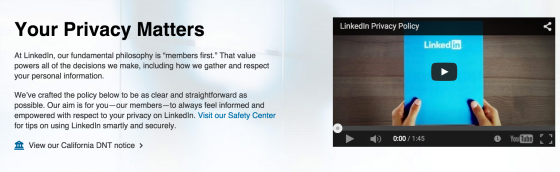
3. LinkedIn: Coming in at number three on the Center’s list, LinkedIn is an example of a company with a privacy policy that is mediocre in its clarity and messaging. However, LinkedIn does claim to have crafted “the policy to be as clear and straightforward as possible”, so the company’s third place rating could be a bit of subjective judgement call.

Photo via TIME

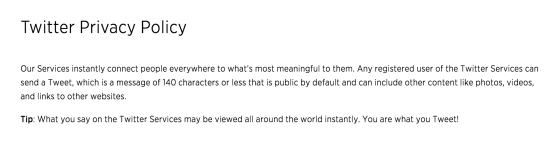
4. Twitter: Jump down to the second to last place on the list, and that’s where you’ll find Twitter. In a series of long and hard-to-read paragraphs, users are left wondering what it was that they just read when trying to pick apart Twitter’s privacy policy. This social media channel is a good example of what not to write when attempting to be transparent with audience members.

This study goes to show that it’s not only privacy policies that are crucial – it’s also important to pay attention to the way in which these policies are written and shared with users. Users should always be able to feel that they understand how and why their personal information is stored, analyzed, and/or shared on websites that they frequently use. Read the full report from the Center for Plain Language for a complete privacy policy analysis.


Follow Avast on FacebookTwitterYouTube, and Google+ where we keep you updated on cybersecurity news every day.

5 tips for protecting your YouTube account

youtube

Videos, videos, and more videos! The millions of YouTube users are probably unaware of the dangers when surfing the platform looking for the next viral hit. However, this Google service is in the eye-line of many cybercriminals.

Through phishing attacks, they try to obtain passwords to access information such as bank data associated with your YouTube channel. The problem may be even greater if the account you use is owned by the company for which you work.

So, in the event that you have a YouTube channel which you use frequently, take note. Carelessness can end up being very expensive taking some precautions will serve you in the long run.

5 tips to protect your YouTube account

1. Be careful with shortened links

To begin with, be wary of any shortened link that reaches you, no matter where it comes from. While most are safe, some hide nasty surprises, like a malware that is automatically downloaded to your computer to steal information. Before clicking, make sure you know where the link will lead you to.

password

2. Use secure passwords

A key aspect in preventing a phishing attack is to have a strong password. It should include a mix of uppercase, lowercase, numbers, symbols and the maximum number of possible. In addition, it is recommended to change your password every three months if you can. This way you’ll be able to ensure that the cybercriminals are stopped in their tracks.

3. Change your  password frequently

As if it needs to be repeated, but be cautious with your password – do not use the same one you use on other platforms and don’t have it written down. We must tread warily in the digital world, but the physical world can be just as dangerous.

4. Don’t give your information away via email

You shouldn’t trust emails that you receive that request the password with which you access your YouTube account. In fact, if it comes from Google itself, be extra wary – an attack uncovered a few months ago shows that a malicious URL, in the guise of a company link, could make users enter their information without realizing it.

5. Fill out the recovery form on Google

It is important that you fill out the recovery form on your Google account. Although you may not like the idea of ​​giving your phone number to the company, it is a good way to avoid bigger issues if you discover that someone tries to enter your account – you’re the only one who has access to the recovery code on your phone.

In short, common sense and some thoughtfulness when creating your password can save you some massive headaches later. Just check carefully where you enter your personal details and this will stop cybercriminals from getting their hands on it.

The post 5 tips for protecting your YouTube account appeared first on MediaCenter Panda Security.

The bots on Twitter aren’t harmless – cybercriminals use them to steal your information!

tuit

They are everywhere and are one of the main negatives of Twitter. The bots, an army of fake accounts that has invaded the social media site, can actually pose a serious risk for users.

They reached the height of their infamy thanks to a fight between politicians to see who could get the most followers on Twitter. This showed, rather humorously, that the network of bots is a double-edged sword. On one hand, they allow you to inflate the number of followers that you have, but on the other hand they can also lead to an embarrassing situation if you’re caught with your hand in the cookie jar.

Nevertheless, this is the harmless side to the bots because, in reality, this coordinated network of fake accounts could put the security of other users at risk. This is because in the hands of a cybercriminal, a network of bots could steal your personal information.

Even if they are most famous for spreading spam, the robots on twitter are also a powerful tool that are used for spreading different types of malware. All it takes is a few hundred false accounts and a shortened URL to infect your computer.

spam

That means that a shortened linked that is tweeted by a large groups of these bots could be a trap to steal user information via phishing, or even a Trojan which could gain access to your bank details.

This is how cybercriminals make a profit from creating fake accounts on Twitter. By stealing user information, they can make money by selling the information or, in extreme cases, stealing directly from your bank account.

Careful with shortened links

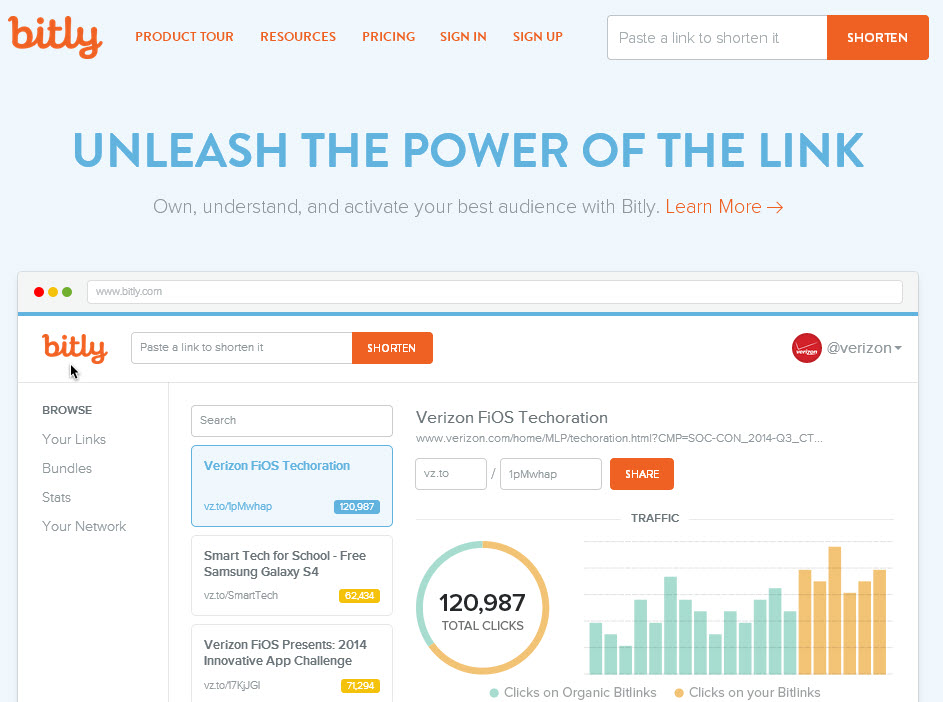
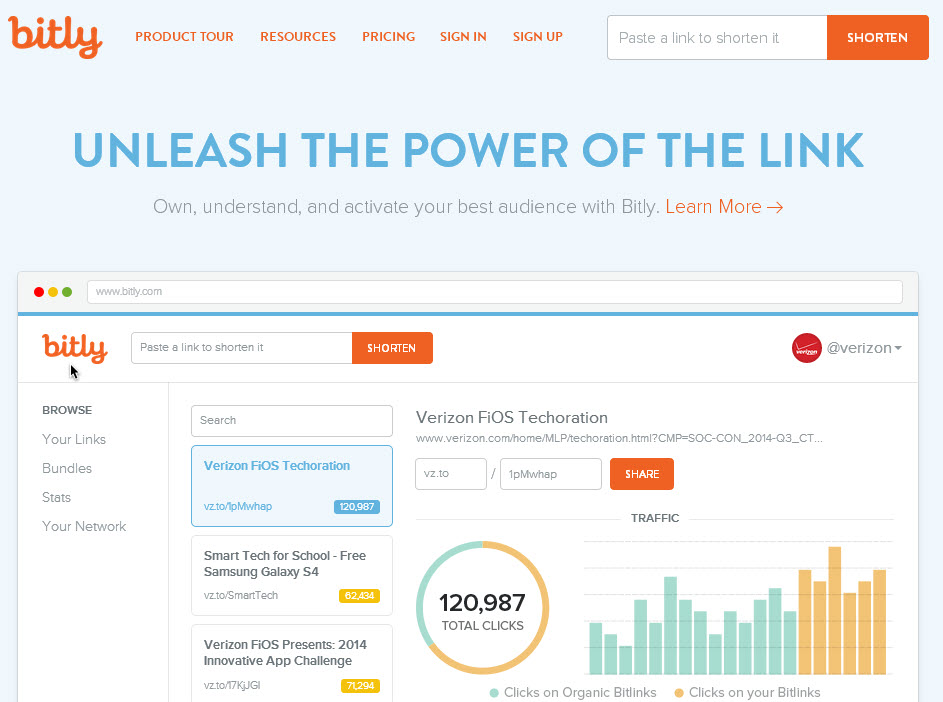
It’s important to remind users to be wary before clicking on a shortened link and to follow some advice to be sure that a link is safe. These include checking to see if it has been tweeted by a trusted account or by taking a look at its statistics and web page by adding the “+” symbol to the URL. This is a quick and easy way to avoid a nasty surprise.

bitly

Apart from being wary of the shortened links that come from unknown sources, users of Twitter should also be careful with hashtags, which are also becoming a way to spread malicious software.

Bots that are created and coordinated by a cybercriminal can take advantage of the tags on twitter to easily spread malware. This means that you need to keep an eye on trending topics as they are the most dangerous – the cybercriminals know that this is an easy way to take advantage of careless users.

It has to be repeated that the spreading of spam is not the worst thing that these bots can do – if they manage to rob from you via Twitter then that is a far more worrying prospect. In order to avoid this scenario, be wary of every Tweet before opening the content that is contains and, where possible, avoid really popular hashtags. You never know which of them has been infiltrated by an army of bots with bad intentions.

The post The bots on Twitter aren’t harmless – cybercriminals use them to steal your information! appeared first on MediaCenter Panda Security.
The bots on Twitter aren’t harmless – cybercriminals use them to steal your information!

tuit

They are everywhere and are one of the main negatives of Twitter. The bots, an army of fake accounts that has invaded the social media site, can actually pose a serious risk for users.

They reached the height of their infamy thanks to a fight between politicians to see who could get the most followers on Twitter. This showed, rather humorously, that the network of bots is a double-edged sword. On one hand, they allow you to inflate the number of followers that you have, but on the other hand they can also lead to an embarrassing situation if you’re caught with your hand in the cookie jar.

Nevertheless, this is the harmless side to the bots because, in reality, this coordinated network of fake accounts could put the security of other users at risk. This is because in the hands of a cybercriminal, a network of bots could steal your personal information.

Even if they are most famous for spreading spam, the robots on twitter are also a powerful tool that are used for spreading different types of malware. All it takes is a few hundred false accounts and a shortened URL to infect your computer.

spam

That means that a shortened linked that is tweeted by a large groups of these bots could be a trap to steal user information via phishing, or even a Trojan which could gain access to your bank details.

This is how cybercriminals make a profit from creating fake accounts on Twitter. By stealing user information, they can make money by selling the information or, in extreme cases, stealing directly from your bank account.

Careful with shortened links

It’s important to remind users to be wary before clicking on a shortened link and to follow some advice to be sure that a link is safe. These include checking to see if it has been tweeted by a trusted account or by taking a look at its statistics and web page by adding the “+” symbol to the URL. This is a quick and easy way to avoid a nasty surprise.

bitly

Apart from being wary of the shortened links that come from unknown sources, users of Twitter should also be careful with hashtags, which are also becoming a way to spread malicious software.

Bots that are created and coordinated by a cybercriminal can take advantage of the tags on twitter to easily spread malware. This means that you need to keep an eye on trending topics as they are the most dangerous – the cybercriminals know that this is an easy way to take advantage of careless users.

It has to be repeated that the spreading of spam is not the worst thing that these bots can do – if they manage to rob from you via Twitter then that is a far more worrying prospect. In order to avoid this scenario, be wary of every Tweet before opening the content that is contains and, where possible, avoid really popular hashtags. You never know which of them has been infiltrated by an army of bots with bad intentions.

The post The bots on Twitter aren’t harmless – cybercriminals use them to steal your information! appeared first on MediaCenter Panda Security.
5 steps to secure your Facebook account login

Facebook on mobile phone

Secure your Facebook account against unwanted guests

Social networks have become an integrated part of our lives. Facebook is not just a simple communication channel anymore but an important source of daily news, information about brands, as well as a selling platform. Thanks to mobile apps, we access it everywhere and anytime we want. As active consumers we should take even better care of our security while using the service.

How to set up a secure login for your Facebook account

1. Set up double verification, or so called Login Approvals to achieve your desired security level during the login process. Every time you  login into your account, Facebook will send you a newly generated code via SMS to enter to finish login process. Login approval will allow you to better control who can access your account.  Detailed instructions how to set it up can be found here.

2. Select so-called  trusted contacts. This should be three or four people, who can be contacted by Facebook, in case access to your account is blocked. The selected person will be given an access code, which should be passed to you, so you can restore your account credentials. Therefore choose trusted contacts carefully, so you can easily get in touch in case it’s needed. In order to choose trusted contacts go to Settings -> Security and select friends. If you want to learn more about this setting go here.

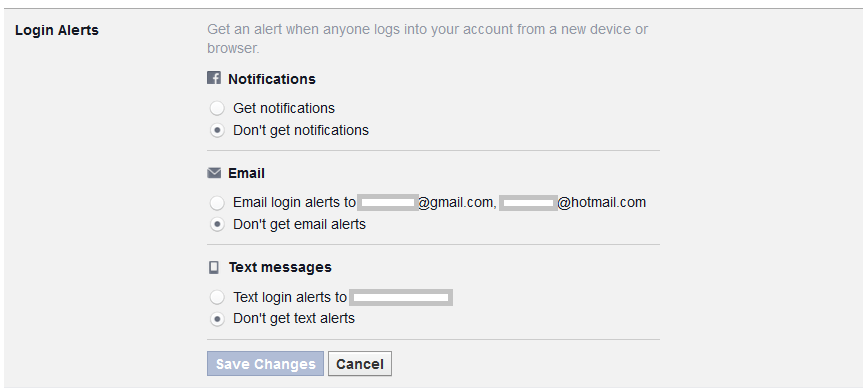
3. Set up Login alerts, to be notified in case Facebook spots a suspicious login attempt to your account; for example from an unknown computer or smartphone. A login alert will be delivered to you as a text message, email, or Facebook notification. You decide which format is the most suitable for you. In case you suspect that someone tried to break into your account, Facebook will help you to reset your password and set up a new one. Just as other safety settings you will find login alerts in the Security section. Detailed instructions can be found here.

Facebook login alerts

4. Protect yourself from Phishing and Spam. Cybercrooks try to take over your personal data and login, by creating URLs which look just like Facebook. Please bear in mind that the social network will never send you an email, requesting your credentials or any other personal or financial data. In case you receive such an email, redirecting you to a webpage deceptively resembling Facebook, never ever submit your data. Learn more about Phishing on Facebook here.

On the other hand, if your friends spam you with suspicious messages, or simply bother you with invitations to the “farm games”, it’s possible that they became victims of a malicious app. It can post on their behalf without their knowledge and spread malware further. You can report it to the social network by clicking on the arrow symbol in the right top corner next to the message. Read more in Spams on Facebook section.

5. Last but not least, secure your Facebook mobile app. If, like other millions of Facebook users, you access the social network on mobile, you should consider installing an application that will block the access to Facebook. This is handy in case your mobile is lost or for simply preventing your friends from joking around and posting something on your behalf, while you leave your smartphone unattended.

Avast Mobile Security protects your Facebook and other social networks or banking apps with a security code for free. Download it for free from Google Store

Stay tuned for more social media security and privacy tips!

Follow Avast on Facebook where we keep you updated on cybersecurity news every day.