Tag Archives: Social Media

Digital Diaries: Teens are Photoshopping their images before sharing

Our latest  Digital Diaries research shows that more than two in ten children said they had edited photos of themselves before posting them online. Photoshopping at age 11 -13? Twenty-two percent of kids surveyed reported they had. Why?

Globally, thirty percent of the kids who altered their photos said they did so to make them look better.  Thirty four percent (34%) said they edited to make the photo look like more fun. And girls (21%) were more prone to do the editing than boys.

In the age of Facebook and Instagram, this definitely ties into the pressures we place on kids as a society to look perfect – and unrealistic beauty standards perpetuated by models and movie stars (many of whom are often Photoshopped).

Here in the U.S., did you know that one of the options now offered for school photos is to Photoshop your kid’s photo? You can take care of any imperfections like braces, blemishes and teeth whitening that might make the photos appear less than perfect.

In 2010, when The New York Times reported on the emergence of the phenomena, some of the leading school portrait photography companies reported up to 10% of elementary school photos were being altered. What kind of message does this photo altering send to kids?

“If we encourage kids to want to erase their imperfections when they’re very young, how will they ever be able to handle acne…or wrinkles?” wrote a young blogger who has written about the negative effects of Photoshopping on young people—specifically girls on social media.

Which brings us back to digital parenting…There’s a lot here for us to continue to ponder as we and our families live more and more of our lives always on and online.

It’s important for parents to show their children that what they see online or in the movies isn’t always real. The digital doctoring of images in the pursuit of ‘perfection’ can have damaging consequences for the self-image and confidence of young girls and boys.

The digital world holds a host of opportunity and excitement for our children, but as parents, grandparents, uncles and aunts, it’s our job to guide them and educate them in the pro’s, con’s and deceptions that it can bring with it.

Trolls on Twitter. How to avoid them

twitter birds

“We suck at dealing with abuse and trolls on the platform”, said Dick Costolo, former CEO of Twitter, as he stepped down July 1, at the beginning of the year. This statement showed what any user of the social network already new: that Twitter regrettably fails to control harassment.

A recent study carried out by Pew Research Center showed that 40% of the Internet users surveyed claimed to have been victims of cyber harassment. That’s why, one of the purposes of the social network is implementing the necessary tools so that the users do not suffer the abuses of those who are hiding behind anonymity to insult and attack others.

The most recent attempt from Twitter to minimize its impact was allowing users to share with their friends their lists of blocked tweeters. Thus, you can already block several trolls at the same time. Mass-blocking.

“You can now export and share your block lists with people in your community facing similar issues or import another user’s list into your own account and block multiple accounts all at once, instead of blocking them individually”, explained from the social network’s blog.

lista

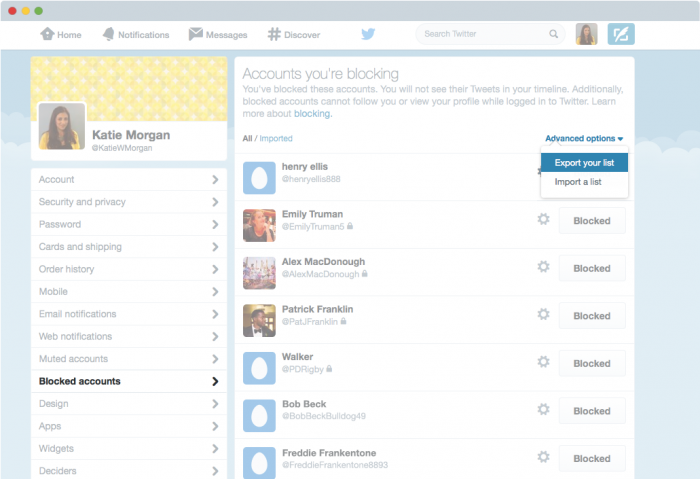
To use this new feature to import and export lists of blocked users, tweeters who want to avoid harassment on Twitter just need to follow a few simple steps, starting from the ‘Blocked accounts‘ section of the settings on Twitter:

How to export a block list on Twitter

  1. In the ‘blocked accounts settings’, click on ‘advanced options’ and select ‘export your list’.
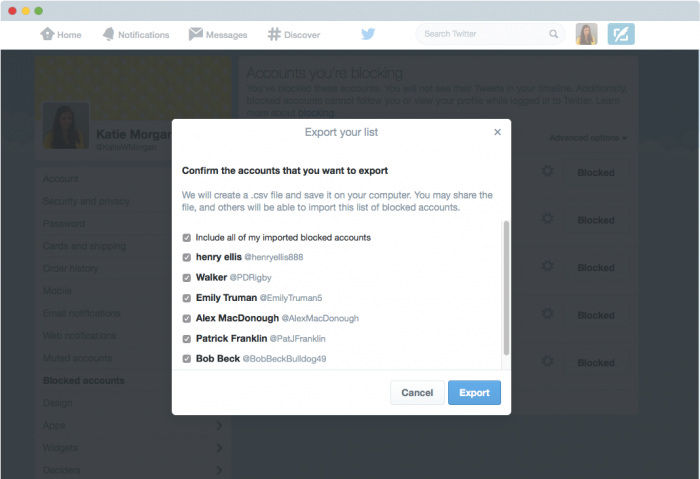
  2. Twitter will ask you to confirm which accounts you want to export. In this intermediate step, you have two options: select all the accounts that you have blocked with a single click or uncheck those that you don’t want to share.
  3. Once you have selected the accounts that you want to incorporate to the file, click ‘Export’. It will generate a .csv file that will be downloaded automatically on your computer and which you can share with who you want.

exportar

How to import a block list on Twitter

  1. Before starting, you must have received from a contact the .csv file corresponding to their list of blocked accounts on Twitter.
  2. With the file already downloaded on your computer, go to ‘advanced options’, in the ‘blocked accounts settings’, and there select ‘Import a List’.
  3. In the pop-up, click on the paperclip icon on the option ‘attach a file’ to upload it. From there, you must select the .csv file you had downloaded.
  4. It will display the list of accounts blocked by your twitter friend that shared the file with you. It will be then when you will have to select if you want to block the whole list (with just one click) or if you prefer to give some of them a chance. To do so, you will have to uncheck those accounts which you don’t want to block.
  5. Click on ‘Block’ to confirm your selection and automatically, the marked accounts on that list will no longer be among the potential stalkers who someday may decide to attack you on Twitter.

With these simple tools, the lists of blocked users will be shared very easily, so that Twitter users may clip with hardy any effort the wings of several trolls simultaneously (and by recommendation the contact who has shared with us his list).

The post Trolls on Twitter. How to avoid them appeared first on MediaCenter Panda Security.

The Dawn of Privacy-Driven Social Networks

As Avira focuses on privacy and security issues, and social networks now play a major role in people’s lives, CNET journalist Laura Hautala caught my attention yesterday with her article “Non-creepy social networks make it to your smartphone” (CNET, 15 June 2015).

Partly in response to outrage (in the wake of Edward Snowden’s disclosures) over government surveillance abuses and companies selling personal data from their customers to the highest bidders, a few companies are now attempting to disrupt the dominant paradigm – i.e. to provide private, encrypted alternatives to Facebook and other networks that the public perceives as being more concerned about profit than the privacy of their customers.

Meet the innovative Minds

Manhattan-based Minds, which has run an alternative social media website for two years, just launched a lightweight social-network app for mobile (for Android and iOS) that encrypts all communications – so they are secure and anonymous (able to be read only by the intended recipient). According to the company, Minds is the first social network with an encrypted app and it’s all based on open-source code to ensure that any attempts to read what shouldn’t be read will be transparent to developers.

According to Co-Founder and CEO Bill Ottman, the app launched this week with a two-year base of 30,000 people already using its social website. As Hautala points out, it’s not a number that will cause Facebook any pain (with its near 1.4 billion users), but the IT world can and often does change rapidly.

In addition to encryption of the data going through the app, Minds collects none of its customers’ data. So even if intelligence agencies demand users’ data, the company has nothing to give them.

As for earning revenue, Minds plans to give up traditional ad sales (which it has used on its website version) and instead offer ‘VIP services’ for points, which can be either purchased outright or earned free via interaction. Such services include being able to expand the reach of your content beyond your personal connections.

Others en route

With a focus on similar principles – namely, data privacy, anonymity, and seeing customers are more than just numbers – the Vermont-based social network Ello also plans to launch a mobile app for iOS, Android, and Windows devices. More will come.

While I have personally suggested to friends and colleagues that ‘privacy’ may have been a short-lived concept in human history (and is in fact already gone from our lives in the way our grandparents knew it), it seems that companies led by freedom-loving people continue to rise up against privacy’s seemingly increasing absence.

While writing this, I downloaded the iOS version of the Minds app myself. I’ll activate an account later today and, if I find it to be a promising social experience, maybe I’ll see you there.

The post The Dawn of Privacy-Driven Social Networks appeared first on Avira Blog.

Facebook shields your messages: even the notification email will be encrypted

key closing door

If we were not aware of the eyes that watch over us on the Internet, Edward Snowden confirmed two years ago that American authorities monitor all our conversations. The former contractor at the NSA revealed that agents of the intelligence services roam freely in our private inboxes.

Then, many technology companies reassured their users and took some actions, but there are still things to do in order to ensure the total security of the conversations. One of the companies that seems ready to settle any suspicion about a possible intrusion is Facebook. According to the latest undertaken actions, everything points to the fact Mark Zuckerberg’s team wants to make it even more difficult for those who intend to snoop around others people’s conversations.

All the users’ connections with Facebook’s servers, including sent and received messages, are already transmitted via secure HTTPS protocol. As if this isn’t enough, the social network has also launched a Tor network service for the reassurance of their most demanding users with respect to privacy.

However, besides the connections that users establish through the service itself, there are other communications which are made via Facebook indirectly, via email. They are the notifications that you receive, for example, when a friend sends you a direct message (unless you have disabled this service).

Since the safety of these messages was not so assured, Facebook has announced that, from now on, all users – if they so decide – may receive them protected by the popular encryption Pretty Good Privacy (PGP). PGP hides the emails from potential intruders with a code system based on a public one (which the sender must have) and a private one (which only the receiver has).

mark zuckerberg

The Setup process is simple:

  • Access your profile
  • Click on the ‘Information‘ section
  • Go to ‘Basic and contact information’. From now on you can also introduce here your PGP public code (if you don’t know what it is or how to get it, the best thing you can do is to read a tutorial), which will be displayed in your profile, available to anyone who wants to send you an encrypted email.

Below the panel you will see a box on which you will have to click if you want all the notifications that Facebook sends you, from now on, also to incorporate this security layer.

like facebook

So whenever the encryption is used, it is very important to remember the code you established to protect your email with PGP. If one day you forget it, you won’t be able to read the notifications from Facebook, and you could lose your account on the social network.

How could you reach this far? Imagine that you had to use, for any reason, the typical Facebook password recovery email: the email would arrive encrypted, and you would only be able to read it and restore the ‘password’ if you can decode it. If you have forgotten our PGP private code in addition to your Facebook password, then you have a problem.

But don’t worry: it gets worse for the cybercriminal who tries to assault your account using the password recovery procedure. This trick will never be useful again. If he doesn’t have the PGP private code which decodes the emails that you receive, he would not be able to restore the password, even if he has access to the Facebook’s mail, because it will be encrypted.

It is a great security measure, without a doubt, which Facebook has just implemented. Now we will just have to wait to see if Zuckerberg’s network is an exception or other social networks decide to make a commitment to the safety of their users.

The post Facebook shields your messages: even the notification email will be encrypted appeared first on MediaCenter Panda Security.

Tinder, the app where you can have your heart stolen, but also your information and your pictures

tinder contact

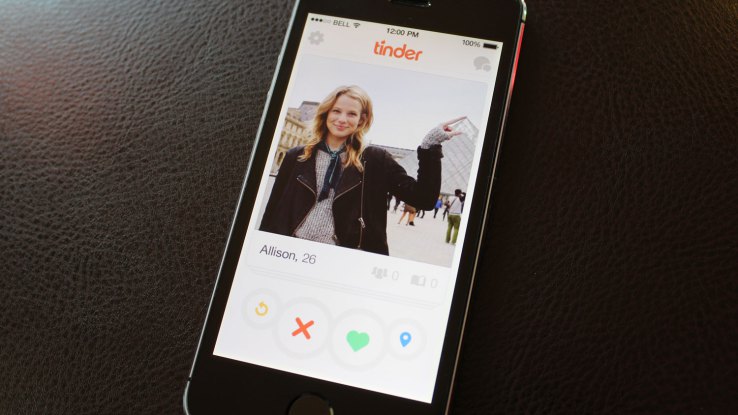
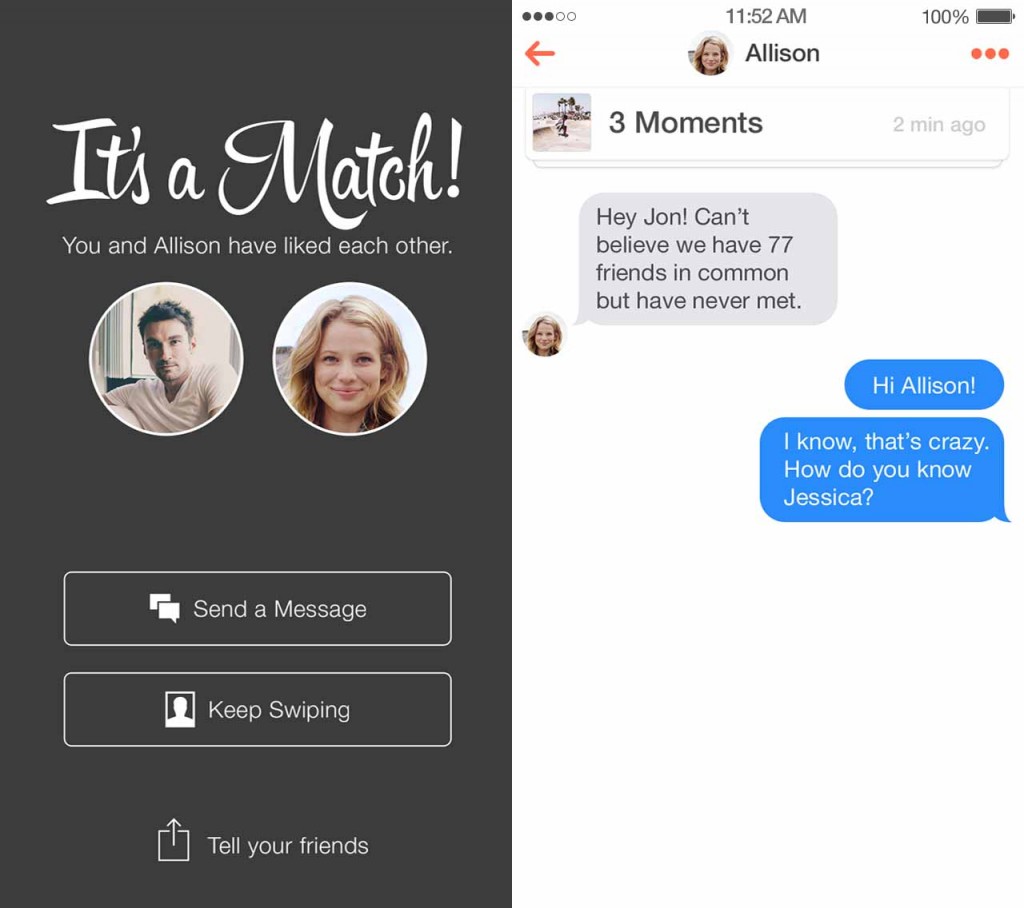
To find a ‘match’ in Tinder we have to share personal information with other users. If you don’t have at least one picture and you don’t describe yourself a bit, how will anyone know if they are interested in you? The same happens when you visit other profiles.

However, each person can decide what to make public and what not. At least in theory, because a recent study by the University of South Australia questions the privacy of the eight most popular dating apps in Google Play, including Tinder and Grindr.

The research done by these computer security experts shows how easy is to access the data stored in these tools (hidden from the rest of the community), as email addresses and private messages exchanged with other users.

The first thing they did was to create a fake profile on each of the dating apps and from a cell phone try to steal other users’ information. They became cyber thieves for research purposes intercepting the network’s traffic data and tracking the apps supposedly private directory.

For major concern, they discovered that all these apps had huge security gaps which made them vulnerable to these kinds of attacks, achieving their goal: they obtained personal information of many profiles and saved it in their phone.

tinder match

In Tinder, which has over 50 million customers, they stole the pictures of all the profiles they visited with their fake account. In addition, they obtained their Facebook ID (a different sequence of numbers and letters assigned to each person), and with it they were able to identify every one of the accounts in the social network and access them.

If we take a look at Grindr, the findings are even more alarming. The research team amassed amounts of personal information of the different users they had visited with their fake account; from their birthdate to the distance between them and the owner of the last profile they viewed, through a complete record of all sent and received emails and their email account.

In light of the results, the authors warn us to be careful with the applications we choose for meeting people. They also recommend developers to add more strict security measures to prevent attacks, like the ones the researchers performed without many difficulties.

In addition, they claim that the cell phone is the cybercriminals’ main target: most users, regardless of their age and sex, have one. In them we store personal information which not even friends or family know.

This is not the first time a research questions Tinder’s security level. In 2013, another research team founded that is possible to know the longitude and latitude where a user is due to another vulnerability in the tool.

The post Tinder, the app where you can have your heart stolen, but also your information and your pictures appeared first on MediaCenter Panda Security.

Wise up and get smarter with your data

Most of us can agree that we don’t want our personal data falling into other people’s hands. This may seem like an obvious concept, but with the amount of data we regularly share online, it’s not such an uncommon occurrence that our information is wrongfully passed onto others. In this clever video published by Facebook Security, we learn how to nip scams in the bud and prevent others from tricking us into sharing personal information.

// <![CDATA[
(function(d, s, id) { var js, fjs = d.getElementsByTagName(s)[0]; if (d.getElementById(id)) return; js = d.createElement(s); js.id = id; js.src = “//connect.facebook.net/en_US/sdk.js#xfbml=1&version=v2.3”; fjs.parentNode.insertBefore(js, fjs);}(document, ‘script’, ‘facebook-jssdk’));
// ]]>

Ever had someone approach you online saying they are a foreign prince and asking for your personal information? Watch…

Posted by Facebook Security on Monday, May 18, 2015

In order to keep your personal data secure, make sure to practice the following:

  • Shred all personal documents before throwing them away. This is especially important when dealing with bank statements and bills.
  • Be mindful of what you post on social media and other online forums.
  • Choose your passwords carefully. Keep them diverse and don’t use the same password for each of your accounts.
  • Use security software on all of your devices and make sure that it’s up to date.

How to spot a hacker before it’s too late? As the video’s narrator warns, “Beware of anyone requesting your personal data or money, whether over the phone, via email or online. They may pretend to be a romantic interest, a family member in trouble, or even a foreign prince – odds are, they’re not.”


This is how Facebook, Twitter or LinkedIn fight to protect your security

social networks

Probably when you were reading about the privacy policy on Facebook or Twitter, you skipped the part of ‘how to protect yourself from cyber attackers’. Each time you download a new application you agree to its terms and conditions, and we are sure that you don’t stop to read them and never worry about how the applications manage your sensitive information.

Social networks strive to inform you on how they protect your information and what can you do to contribute to this task. That’s why they offer the information in the most understandable possible way.

Facebook the most complete

Facebook just had its guide to security redesigned and in the ‘How to Keep Your Account Secure’ section offers new recommendations on how to prevent cyber-attacks through interactive graphics. And to assure everyone can read these tips, they are available in 40 languages and you can share them on your profile.

The recommendations “focus on the tools we make available to help you secure your account, the steps we take to keep your information secure, and the ways you can recognize and avoid attempts to compromise your information” explained Melissa Luu-Van, product manager at Facebook. Van-Luu added in the same post that already millions of people have read the new privacy settings launched last November.

like facebook

Click on ‘help’ if you think your account might have been taken over by someone else, explain you that you have to log out if you are not using your habitual computer or inform you that you can report suspicious profiles and posts are some of the features included in the new security collection.

The guide also warns you of the possibility of a phishing attack. Facebook will never send you an email asking for your password, so if you ever receive an ‘email’ requesting this information could come from a cyber-attacker who created a fake web site to steal your information.

LinkedIn the less organized

Facebook isn’t the only social network which has improved its security information recently. LinkedIn has also a new ‘Security Blog’ with helpful guidelines. “We’ll use this site to share some of our security research, whitepapers on how we handle data and the security features and diligence we’ve built into our products. If you are responsible for information security at an enterprise that uses LinkedIn’s products” says Cory Scott, LinkedIn’s Information Security Director.

This professional network explains how your information is used and protected. For example, inform that they can hire third party companies to provide their services with limited access to your information. In addition its support center offers advice on how to better protect your account: changing your password regularly, check the privacy settings or activate the two-step verification to prevent phishing attacks, that many users have suffered in the last few months.  Nevertheless, this information is less organized than in Facebook, so you will have to dive deeper to find what you want.

Twitter the one that offers personal tips

Twitter also wants to show you its way of protecting your information. If you are interested to know more details, in their help center there is a wide security and protection section, you can access it from the tab of ‘help and support’ in your profile.

twitter

Here you can find out some tips on how to maintain secure account (similar to other social networks), or how to inform Twitter if you find your account has been violated. The company pays special attention to cyberbullying and includes custom security tips for teens, parents and teachers.

What about Google?

But not only social networks detail their security policy; google has been doing it for a while. A complete manual is included in the web ‘How to stay safe and secure online’ where explains how to prevent cyber-attacks protecting your passwords, checking your Gmail’s settings or verifying the emails’ sender if you think it might be a scam.

You can also dig through all the security and privacy tools offered, like two-step verification or who to browse through Chrome without your computer recording it in your browsing history.

So, if you ever wonder how the services you trust every day protect your information against cyber-attacks now you have no excuse, the answer is here!

The post This is how Facebook, Twitter or LinkedIn fight to protect your security appeared first on MediaCenter Panda Security.