Tag Archives: Threats

Storing passwords

Storing passwords

a key and a door, with a lock

Passwords may look to you like doors and keys:
they just have to match…
a list of names

…but a system (website, network…) has to store the passwords of many users!

a closed treasure chest

If a system stores all the users passwords
in their original form, like a secret in a chest,
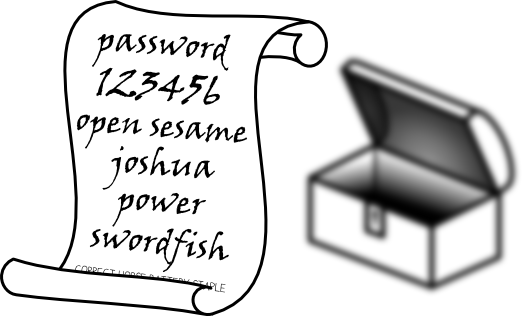
a password list in front of an opened chest

…then once the chest is opened,
all passwords are instantly known!

The weakness:
a security risk warning

So you probably guess that there is a huge potential security risk,
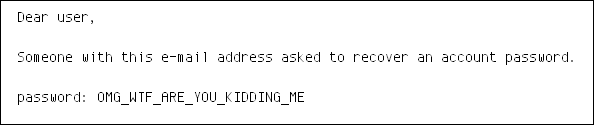
an email showing an actual password

and when you receive an e-mail mentioning your actual password…
…then it means that the system actually knows your original password!

So, in a single attack, someone could just open the chest, and instantly get the password of every user.

This means only one thing for the security of such a system:

fatality

The solution:

So, you want to check if an entered password is correct, yet you need to store many passwords without leaking them.

There’s one answer:

Maths FTW!!

Instead of storing passwords, you store a key that is derived from the password: this makes it possible to authenticate the user without actually storing the password:

  1. take the entered password
  2. calculate the key
  3. compare with the key generated with the original password

For example, a bcrypt-derived key of “password” is “$2a$10$3BY0wQ3rgzBf6VlG0YFLoekcGrrHKYdSUdSSrN37TqClNg7Oouzey“.

It’s much longer, and in practice, it’s very difficult to determine the original password that it was derived from.

Why not using just any complex hash function to derive the keys?

Because such key derivation functions are specifically designed to prevent an attacker to generate in advance a list of keys from all standard passwords, or better, a well-organised table.

Conclusion

not passwords, but keys

To prevent the risk of an instant and complete leak, one should never store passwords, but only derived keys, generated via dedicated algorithms.

key = math(password)

These keys are mathematically derived from the entered passwords.
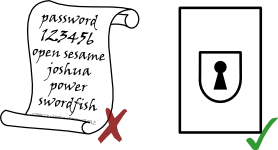
no password list

That way, you have a real strong authentication system without a vulnerable list of passwords.

For a multi-user system, storing passwords is a big risk !

In a next blog post, we can show how that influences Windows security…

The post Storing passwords appeared first on Avira Blog.

Microsoft patches FREAK for Windows, IE, Office

The FREAK flaw itself resides in the SSL protocol, so Microsoft has fixed with this patch (MS15-031) its own implementation of the protocol, which is used in all its proprietary software (workstation, server, IE Office).

The release contains fixes for 14 new bulletins in total, five of which are rated as Critical, nine as Important.

The bulletins address vulnerabilities residing in both the consumer and server editions of Microsoft Windows, Internet Explorer, Office, SharePoint Server, and Exchange Server. Most of them may disclose information, bypass security features or would allow an attacker to elevate privileges.

What should you do?

Once your Windows computer signals the availability of the updates don’t wait too long to apply it and reboot your system.

The post Microsoft patches FREAK for Windows, IE, Office appeared first on Avira Blog.

Apple fixes FREAK flaw in OS X and iOS

What is FREAK?

By exploiting the Factoring RSA Export Keys vulnerability in SSL (FREAK), an attacker could intercept the network traffic between entities running any implementation of the vulnerable protocol and decrypt the secure communication. In other words, the attacker is able to act as a man-in-the-middle and decrypt the secure traffic between the client and the server.

The well known OpenSSL library, Apple’s Secure Transport, and Microsoft’s Secure Channel (which is impacting all supported versions of Windows) have all been found vulnerable to this type of attack.

IMG_0059The flaw resides in the fact that the SSL/TLS encryption was forced to use a weaker cipher suite (so called “export grade”) with a 512-bit key that could be broken with today’s technology in a few hours.

Apple is describing the affected area as a “Secure Transport vulnerability which allows an attacker with a privileged network position to intercept SSL/TLS connections”.

The security update 2015-002 which fixes FREAK is available for OS X Mountain Lion v10.8.5, OS X Mavericks v10.9.5, and OS X Yosemite v10.10.2.

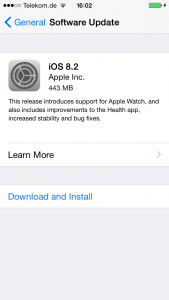
The iOS 8.2 is available for iPhone 4s and later, iPod touch (5th generation) and later, and iPad 2 and later.

What should you do?

Apple’s security update for MacOS also includes mitigation for arbitrary code execution by leveraging flaws in iCloud Keychain recovery, IOAcceleratorFamily and IOSurface and the Kernel (OS X Yosemite).

For the iOS, Apple patched bugs in CoreTelephony, which caused the device to restart and buffer overflows in iCloud Keychain which allow an attacker with a privileged network position to execute arbitrary code.

Even if CVE-2015-1067 also known as FREAK is more theoretical than most vulnerabilities affecting the SSL protocol and its implementations (Heartbleed, Poodle), it is strongly advisable to apply the update.

Usually, the update comes over the wire, so follow the known procedures for each device to apply it:

  • iOS: go to Settings ->General -> Software Update
  • Go to Updates (or Software Updates for older versions) and click Update All.

The post Apple fixes FREAK flaw in OS X and iOS appeared first on Avira Blog.

FREAK: All Windows versions are affected too

We wrote about the new SSL vulnerability called FREAK – Factoring RSA Export Keys – affects around 36% of all sites trusted by browsers and around 10% of the Alexa top one million domains, according to computer scientists at the University of Michigan.

Android, iOS and a lot of embedded devices that make use of the affected SSL clients (including Open) are in danger of having their connections to vulnerable websites intercepted.

The two most used operating systems for smartphones, tablets, laptops and embedded devices  are in good company. Yesterday, Microsoft made known that all its supported Windows versions are also affected due to the presence of the vulnerability in the Windows Secure Channel (SChannel) – the Microsoft own implementation of SSL/TLS:

  • Windows Server 2003
  • Windows Vista
  • Windows Server 2008
  • Windows 7
  • Windows 8 and 8.1
  • Windows Server 2012
  • Windows RT

Microsoft published an TechCenter an advisory where the problem is analyzed and solutions are offered. Also a patch is promised to fix all supported operating systems.

What does it mean for the user?

It means that if you are in Windows and make use of the vulnerable SSL libraries delivered by default, your connection to the affected servers can be intercepted. If you use Internet Explorer to visit www.freakattack.com you will be surprised to see this:

FREAK vulnerability
What should the users do?

We do not recommend messing up with the standard cryptography settings of Windows (or any operating systems) unless you know what you are doing (and there is a just hand full of people that actually do). You should try a browser that is not affected (like Chrome, which was updated in the meanwhile) and apply the patches for operating system and browsers that will come in the next few days.


The post FREAK: All Windows versions are affected too appeared first on Avira Blog.

Security experts are FREAKing out: new OpenSSL vulnerability

As any good and mind blowing (for most people) vulnerability, it has a nice name – FREAK, a CVE number – CVE-2015-0204  and a dedicated website https://freakattack.com/ .

FREAK – Factoring RSA Export Keys – affects around 36% of all sites trusted by browsers and around 10% of the Alexa top one million domains, according to computer scientists at the University of Michigan.

This time, the vulnerability can allow hackers to perform a Man In The Middle(MITM)  attack on traffic routed between a device that uses the affected version of OpenSSL and many websites, by downgrading the encryption to an easy to crack 512 bits (64KB).

A connection is vulnerable if the server accepts RSA_EXPORT cipher suites and the client either offers an RSA_EXPORT suite or is using a version of OpenSSL that is vulnerable to CVE-2015-0204.

To be affected, devices must use the vulnerable version of OpenSSL. The problem is that OpenSSL is embedded sometimes in the firmware of the device like those running Apple’s iOS, Google’s Android. This makes the patching anything else than trivial. IfApple and Google will hurry up to patch their devices, not the same is going to happen with embedded devices that have the affected OpenSSL library in a firmware burned in a chip.

How is the attack happening?

If an attacker can monitor the traffic  flowing between vulnerable devices (that is, running the vulnerable OpenSSL) and websites (that use the same vulnerable OpenSSL) they could inject code which forces both sides to use 512-bit encryption, which they can then crack in a matter of hours using the power of cloud computing.

It would then be technically pretty straightforward to launch a MITM by pretending to be the official website.

OpenSSL released a patch to the problem in January 2015, while Apple plans to do so next week and Google has released one to its Android partners.

As you can see, it is not trival to perform the MITM attack: special skills, a special environment and special tools are required to make use of this vulnerability. So, this makes FREAK a more theoretical vulnerability.But, this doesn’t mean that it is less dangerous.

However, as many times in the past, good intentions are badly implemented and the page freakattack.com is generously helping attackers to find which servers are affected. On that page the researchers from University of Michigan have published the top 10K domains listed by Alexa.com website.

Who is affected?

Websites that support RSA export cipher suites (e.g., TLS_RSA_EXPORT_WITH_DES40_CBC_SHA) are at risk to having HTTPS connections intercepted.

You can check whether a website supports RSA_EXPORT suites using the SSL FREAK Check available at this page.

The post Security experts are FREAKing out: new OpenSSL vulnerability appeared first on Avira Blog.

The phishy side of text messaging

Email is still a massive form of electronic communication, but the trend towards text messages and text messaging apps can’t be ignored. Younger generations in particular are ditching email in favor of these kinds of solutions. And you better believe that the hackers are aware of this trend, too.

When we focus on text messages in particular, you’ve probably noticed that companies are starting to utilize text messaging as a way to communicate with you. If you haven’t received text messages from outside companies yet, then you’ve probably at least received them from your mobile carrier for alerts about billing, bandwidth usage, and so on.

The unique thing about these messages is that they’re so simple. They usually come from a short number, they’re only a few lines long, and sometimes they include a link. This is a format that we’ve come to expect from text messages of this sort, but it’s a dream come true for hackers.

Just think about how hard hackers have had to work to send believable phishing messages through email that contain images and formatting that seem like the real thing. Many computer users have been trained to identify a fake email message, but all of that training goes out the window when it comes to text messages. Since the format and expectations are so different, people who don’t fall for phishing over email could fall for it through text messaging.

This is especially dangerous because it can be incredibly easy for a hacker to compose a text message for phishing. A recent article from CNNMoney showed how AT&T text messages in particular can be faked without much trouble. Hopefully more people will be trained to think twice about believing every text message, but until then…

It’s open season for hackers and text messaging

.

The post The phishy side of text messaging appeared first on Avira Blog.