Tag Archives: Threats

3 social media dangers to avoid

Included below are three different social media dangers that can become a problem from time to time.

Fake Influence – That Twitter account with tens of thousands of followers must be legitimate and interesting, right? Not always. While follower counts can sometimes indicate influence, they’re not a perfect measuring stick. Scammers or companies trying to promote their products in deceptive ways can create fake accounts and then buy followers in a way that’s just about as easy as buying something from Amazon. Try to look beyond the follower count to see if someone or something is really worth following. For example, who follows them, and what are they posting about? Also, how long has the account been active?

Trolling – An online troll can basically be described as someone who’s trying to cause problems online. This can sometimes just prove to be an inconvenience, but in many cases, the activity crosses over into harassment that can be very hurtful. We’ve all seen comments on social media that demonstrate this behavior. Many times they come from people who are deliberately trying to hide their real identity. It can be tempting to respond to these posts, but there’s a saying that says that you shouldn’t feed the trolls, which means that you shouldn’t fall into their trap by responding because it only gives them more to work with.

Catfishing – This refers to the practice of creating a fake identity online in order to try and trick someone into a a romantic relationship. People who do this could be seeking revenge, they might have no self-confidence, or they might just enjoy the entertainment value of it. Either way, if you’re starting to form a romantic relationship online, it’s important to get proof that the person you’re talking to is actually who they say they are.

Those are just three of the problems that can be lurking on social media, but if you know what to watch out for, then you can have a better experience with social media.

The post 3 social media dangers to avoid appeared first on Avira Blog.

Internationalization and the Internet

The Internet is a child of the United States of America, so it does not come as a surprise that only Latin letters and some scientific characters were used when the systems and the software (then called ARPANET) were designed. In today’s world, where roughly half the global population, with its different letters and alphabets uses the Internet, things look different.

The Need for Internationalization

You might have seen a so-called IDN before. IDN stands for internationalized domain name and all it boils down to, is a web address with special characters. This can be of great help for Internet users that live in regions where the primary alphabet in use is not Latin-based or is extended with special characters. Take Swedish for instance: the letters ä, ö and å augment the standard Latin alphabet. Without the support of IDNs, you would have to agree on a different (Latin) character for domains – like a or aa instead of å. Instead of visiting the website of your favorite Swedish bakery with www.pågen.se, you would have to go to www.pagen.se. This is okay until another company with the name Pagen appears and wants to claim that domain name. It becomes confusing very quickly for the visitors.

Wait…IDN what?

The Domain Name Service (short: DNS), which is used to translate a web address to something the computer understands, only accepts Latin characters. To make internationalized domains work, a system called punycode is used. A complete explanation of the algorithm is way out of scope for this article, but here is a short one. Whenever you enter an address like pågen.se, punycode prepends xn--, skips all non-Latin characters of the domain (å) and appends a dash to the remaining characters (pgen). So far, the result is xn--pgen-. Now, some black magic (finite state machines and generalized variable length integers) is used to represent the location and the identity of the skipped characters. In the end, the result looks like xn--pgen-qoa.se. This is the domain that your browser will access. You, as a user, will not feel any difference as this is done transparently by your browser. Arguably the first internationalized domain (rather subdomain in this case) was http://räksmörgås.josefsson.org.

How it affects you?

There are alphabets which contain letters similar to the ones in other alphabets. Take the Cyrillic script for instance: the Cyrillic letter а resembles the Latin character a. In a so-called IDN homograph attack, a cyber-criminal uses exactly this resemblance to mimic trusted websites. Imagine the domain in the following pictures.

Internationalized version of a domain. The first a is Cyrillic, not Latin

Internationalized version of a domain. The first a is Cyrillic, not Latin

From the looks of it, it is paypal.com. You would almost have to be psychic to note that the first a is a Cyrillic letter. Now the attacker only needs to design a page that looks exactly like PayPal’s and send the login credentials to his or her email address – Mission accomplished.

If the domain is considered suspicious, modern browsers will show the punycoded variant

If the domain is considered suspicious, modern browsers will show the punycoded variant

Not all is lost

Fortunately, it is not that simple to deceive unsuspecting users anymore. Modern day browsers indicate that you are browsing an internationalized website as the image below shows.

Internationalization feature of Internet Explorer: shows a small icon in the address bar

Internationalization feature of Internet Explorer: shows a small icon in the address bar

In contrast to typosquatted URLs, where you might be able to spot phishy URLs by looking at them twice, IDNs can pose a real problem. You have to rely even more on a strong Web protection. It shows that common sense does not protect you from everything on the Internet and that it is crucial to have an up-to-date antimalware solution on all your devices.

Recommended Reading & Resources

Internationalized Domain Name
Punycode
Internet Usage Statistics
Internet
Homograph Attack
DNS

The post Internationalization and the Internet appeared first on Avira Blog.

On Neuroscience and Phishing Attacks

All kinds of fun facts bounce around the internet. You might have seen the one about contextual reading: It deson’t mttaer in waht oredr the ltteers in a wrod aepapr, you can sitll raed it wouthit pobelrm. See how this neuro-scientific peculiarity helps phishing criminals earn lots of money and what simple things you can do to protect yourself.

Why are URLs so important?

As I work in the URL detection team of Avira’s Protection Labs, you might not be surprised by me saying that URLs are a very important part of our daily lives. In ancient times, ten or fifteen years ago that is, data was shared through floppy disks, which were still in heavy use back then. (You know, the legacy industrial equipment that looks like the ‘Save’ button in your applications.) Times have changed and so has the industry. In today’s world, files are distributed over the Internet. File hosting services, like Dropbox and OneDrive, flourish like never before. The Internet actually consists of many subsystems like email, file sharing and the Word Wide Web. Also known as just the Web, the latter represents what you usually do in your browser: click on links, enter URLs in the browser bar, search the web; those are all examples of how you use URLs to access the Web.

What is a domain?

domain

Avira’s domain entered in a web browser

Domains exist because they are easier to remember than IP addresses (which domains point to). They operate pretty much like a phone book. You do not remember the phone number of a person to call, you look them up in the phone book. This establishes the connection between person and callable number. While you still have to enter the number yourself on the phone, your browser will take that burden off of you. So, when you enter www.wikipedia.org in your browser, it will look up and redirect you to the proper IP address of the web server that hosts the site. If you enter www.wikkepedia.org, you will not be redirected to the site you intended to visit but rather receive a browser warning, stating that the website does not exist – just like the well-known “The person you’ve called is temporarily not available” message you hear on the phone when you dial the wrong number.

Some typos are intentional

“Where does the neuroscience bit come into play?”, you might ask. Cyber criminals are able to register this domain and host advertisements. Once you accidentally enter the wrong URL, you will be redirected to this so-called typosquatted domain and thus will have accessed ads. This in turn generates money for the advertiser. Check out my other article about online advertisements for further information. The important thing to remember is, that this is possible not due to careless surfing. It works because the human brain operates with contextual sections.

Some just want to make a few bucks by registering a misspelled domain in order to sell it back to the brand owner. One could register www.citybank.com and sell it to www.citibank.com, as this is a common misspelling.

From Malware to Phishing
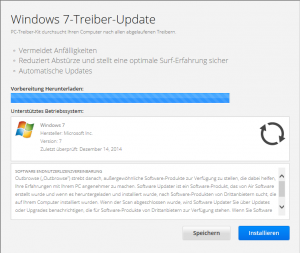
01_outbrowse_landing_page

Landing page of misspelled Wikipedia URL

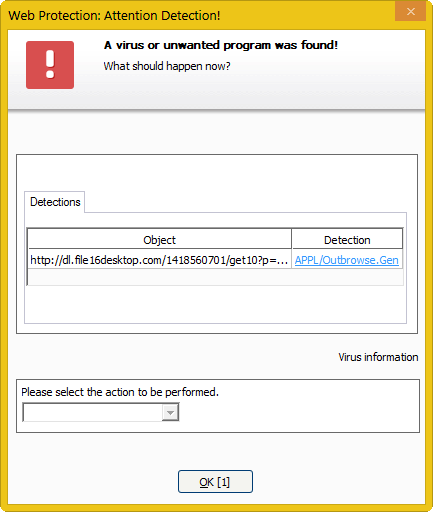
Other unfair practices include redirection to potentially unwanted applications (abbreviated PUA). Your browser will typically show a warning about the state of your computer – telling you it might be infected, your drivers might be out of date or that you have won a million dollars. To give you a practical example: I found this software recommending driver updates for my computer while going through misspelled Wikipedia links (I omit the direct URL for obvious reasons). A click on “Installieren” (region-specific, as I am browsing from Germany), tries to install the software that I do not actually intend to have on my PC. Fortunately, I am one of the lucky people having Avira security products installed. The Web Protection kicks in and saves me from accidentally installing PUA on my PC.

What to do about it?
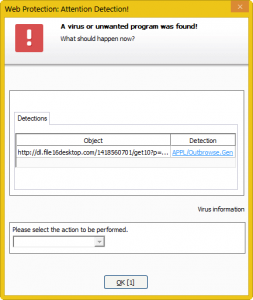
02_avira_detection

Avira detects potentially unwanted applications (PUA)

No antimalware solution will ever give you 100% security. They are considered to provide you with something in between base and enhanced detection of malicious software on your PC. Nowadays, those programs also include effective web protection like cloud-based scanning of URLs. Avira offers both traditional antimalware solutions and an unobtrusive browser plugin to protect you against most of it. However, you should never solely rely on software to protect you. It helps a lot to know about the risks. You just might look twice the next time. ;)

Resources and recommended reading

Breaking the Code: Why Yuor Barin Can Raed Tihs
Typosquatting
We knew the web was big…
How Big Is The Internet?
TypoSquatting – Malicious Domains Malware Domains

The post On Neuroscience and Phishing Attacks appeared first on Avira Blog.