Tag Archives: Threats

How to Prevent Holiday Shopping Hacks

As the holiday times approach, many of us increase our online shopping. But if the 2014 year taught us anything, it is that online criminals have figured out that hacking into the IT systems of retail stores is an easy way to make money. This year there were no fewer than a dozen major retail stores whose customer data was stolen or whose POS systems (Point of Sale systems… their electronic cash registers) were compromised in order to steal customer credit card numbers.

You’ll recognize most of these retailer brands whose customer databases have been breached this year:

  • Home Depot (56,000,000 customer records stolen)
  • Target (40,000,000 records stolen)
  • Michaels Art Supplies (2,600,000 records stolen)
  • Neiman-Marcus (1,100,000 records stolen)
  • Goodwill Stores (868,000 records stolen)
  • UPS Stores (105,000 records stolen)
  • K-Mart (unknown; investigation continues)

In addition, several major retailers have had their POS systems hacked:

  • Dairy Queen (400 stores hacked)
  • Jimmy Johns (200 stores hacked)
  • SuperValu (180 stores hacked)
  • F. Chang’s (33 stores hacked)
  • Staples (unknown; investigation continues)

The burden of security ultimately rests on your shoulders. So here are five simple things you can do to protect yourself from holiday shopping hacks:

1. Shop at trusted online retailers

Search engines will lead you to that perfect present no matter where it is, but if you’ve never seen or heard of the retailer before then think twice before entering your credit card and all your personal information.

2. Don’t shop from the free café Wi-Fi

Public, unsecured Wi-Fi access points can be very easily tampered with; the person sitting next to you could be sniffing and recording every transmission, using simple algorithms to identify credit card numbers and ID information. Use a secured Wi-Fi and/or a VPN for your shopping. Consider also using a dedicated e-mail address just for shopping.

3. Use a credit card instead of a debit card

Credit card companies usually have policies in place to protect users from fraud and limit your personal liability. In addition, many credit card companies offer extended warranties and return policies during holiday shopping season.

4. Be careful where you click

Retailers ramp up their e-mail marketing during the holiday season, but e-mails can be easily spoofed by hackers. Instead of automatically following the URL link from an e-mail offer, consider going directly to the retail vendor’s website and then looking for the product you want. Also be aware of phony emails from UPS and other shippers claiming that “your package could not be delivered.” Often these e-mails contain attachments that install spyware and keyloggers.

5. Patch your computer before you go shopping

If haven’t got around to installing that software patch or antivirus security update, now might be a good time to do it. Most hacks prey on the short window of time between when a vulnerability is discovered and when the software vendors patch the hole. If you are not installing the patch, then the hole is still wide open on your computer and you are just asking for trouble.

If you are worried that your personal identity might have been exposed in recent data breach or hack, you can use Avira’s free Identity Safeguard tool to check: it is included free in both Avira Mobile Security for iOS and in Avira Antivirus Security for Android).

Shopping online is actually safer now than it has ever been before, so just take a few precautions and enjoy the holidays!

The post How to Prevent Holiday Shopping Hacks appeared first on Avira Blog.

The global hacking problem

If you just thought about countries that regularly seem to be in the news about hacking, then you might name China or Russia, and those wouldn’t be bad answers. After all, a lot of hacking activity does originate in those countries, and depending on which statistics you look at, either one of them could be the correct answer. But before we’re quick to jump to conclusions about the regions where hacking activity takes place, it’s important to realize that it’s not always so obvious.

An article published by Bloomberg detailed the author’s experiment with setting up a honeypot to try to entice hackers to make their moves on a fake industrial-control computer. Which country was the source of most of the attacks? Russia was in third place, China was in second place, and believe it or not, the United States was in first place. In fact, the United States housed almost twice as many attacks as China.

This may seem surprising, and it is in certain respects, but as many of you know, by using bots and proxies, hackers can make it look like the activity is coming from a certain place even though it’s not. Even when you account for the impact that might have on the numbers, this experiment still shows that hacking is becoming more of a global problem all the time.

In the case of the United States, whether the hacking attempts came from there or the hackers just wanted it to look like they were coming from there, the numbers give us a clue that the United States could potentially be making more headlines as a hub for hacking. But it’s not just the United States. China and Russia have become synonymous with global hacking, but in the future, who knows which countries we’ll think of first when we think of places where hacking activity comes from.

The post The global hacking problem appeared first on Avira Blog.
Android Malware Steals Credit Card Information

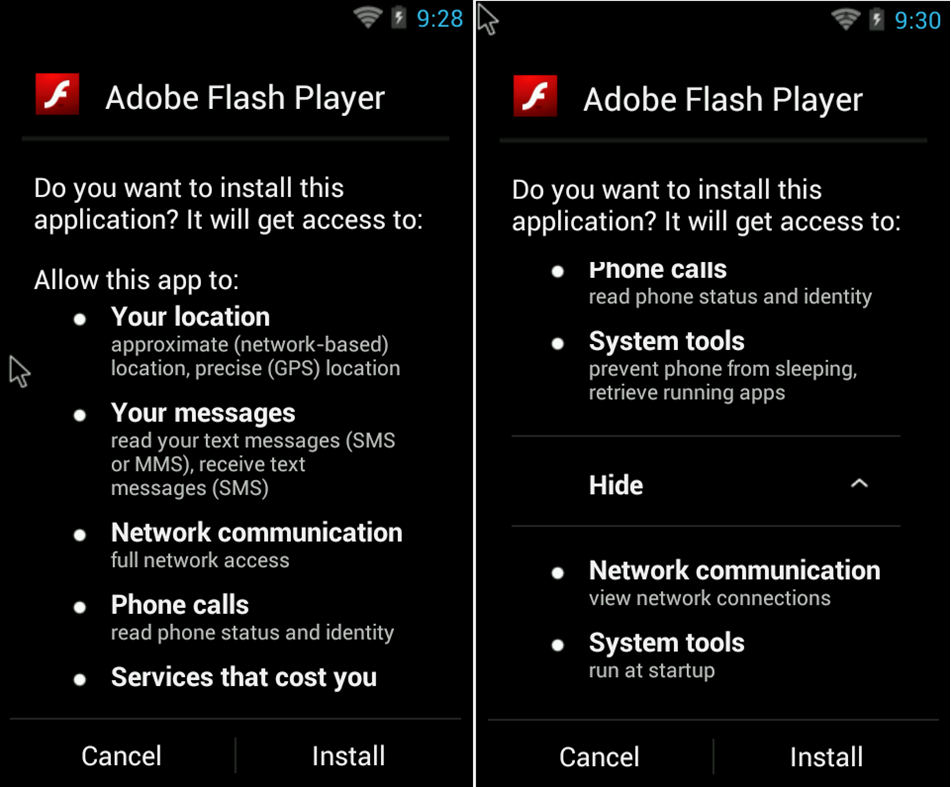
Given my daily work, I recently ran into some interesting Android malware that tries to steal credit card information from users. The malware is cloaked as Adobe Flash Player App: users who want to install the app on their devices end up downloading the malware from an untrusted source.The bad news is that victims might not even recognize it as malware since it looks like the real Flash Player.

Android malware

As you can see in the picture above, although it looks like Adobe Flash Player it actually requests a lot of permissions like access to location data, SMS, phone calls …

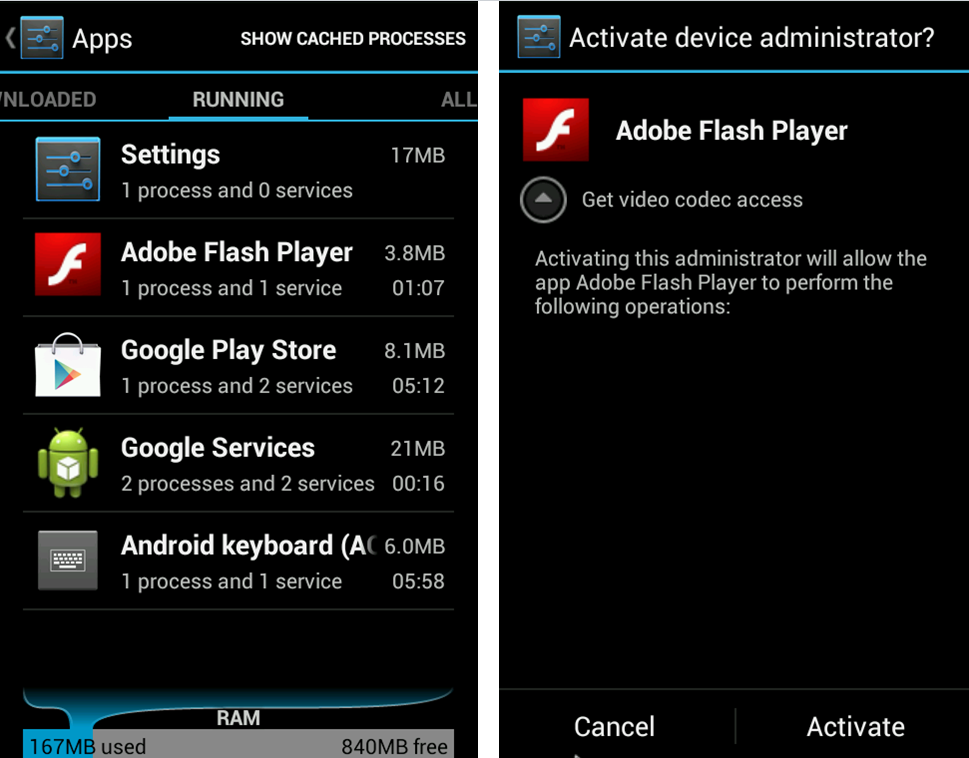
The malware installs itself as a service on the phone and it requests device administrator permissions from the user. It says that it needs the permission to get access to a video codec. Once the user agrees with this request, the app gains full access to everything on the phone.

Android malware

Now everything is set up and I will explain how it is stealing the information. Basically the malware is checking if some popular or often used apps like Google Play Store, Google Music, WhatsApp, Facebook, Twitter, Instagram … are launched on the device. If one of these Apps were started, the malware displays some screens to get the credit card information from the user. It looks like the launched app is requesting this credit card information for payment issues.
android11

As you can see in the screenshots above, all information needed to make a payment is demanded by the malware. It requests credit card number, expiration date,CVC number, the complete owner information with address and the only payment password for the credit card. The dialogue box also includes a checking system to ensure that no wrong numbers etc. are entered. Once all of this information is introduced, the data is sent to a server which collects the stolen credit card information. Authors of this Malware can use it now to make payment transactions with the stolen data.

To prevent you from being affected by such malware we recommend to install only apps from trusted sources like Google Play and always keep an eye on the permissions the app requests from you. Check if it makes sense that the app has this permission and if it is really needed.


The post Android Malware Steals Credit Card Information appeared first on Avira Blog.

Is Government Malware unstoppable?

What is Regin?

According to Virus Bulletin, we are looking at a multi-staged threat (like Stuxnet) that uses a modular approach (like Flame), a combination that makes it one of the most advanced threats ever detected. Researches show that Regin has been used in espionage campaigns for the last 6 years. This sophisticated backdoor Trojan affects Microsoft Windows NT, 2000, XP, Vista, and 7 and it is able to take control of input devices, capture credentials, monitor network traffic, and gather information on processes and memory utilization.

Protection against government malware

In this context, we would like to remind our users that Avira is a founding member of IT Security made in Germany and we pride on providing our customers a guarantee of Quality and Reliability.

We thus committed ourselves, among other things, to:

  • Exclusively provide IT security solutions no other third party can access.
  • Offer products that do not cause the transmission of crypto keys, parts of keys or access recognition.
  • Eliminate vulnerabilities or avoidance methods for access control systems as fast as possible once detected.

Additionally, we would like to clarify our standpoint on malware developed by government. Whenever we discover a new piece of malware, we are adding detection for this for all of our customers, regardless of the source of the malware. It is the case for recently discovered Regin as well, since our Antivirus products already detect all known Reging samples.

We strongly believe that no malware is unstoppable, not even government malware. Users need to make sure that they are protecting all of their digital devices with the latest technology, keeping their operating system, 3rd party applications and of course their antivirus software up-to-date.


The post Is Government Malware unstoppable? appeared first on Avira Blog.

12 ways to boost your router’s security

hns2aWith the increasing number of network security breaches, we need to improve awareness regarding the security of your home network.

We simply need to follow some rules to control and prevent system penetration and also bandwidth theft (and losing money!). Safeguard your valuable information available through your home wireless connection and do not be easy target for hackers!

Here are 12 ways to boost your router’s security:

  1. 1. Install your router in a safe place where the wireless signal is available only inside your own house. Avoid placing it near to a window.
  2. 2. Turn off WPS, the automated network configuration method that makes your wireless password more vulnerable to hacker attacks.Turn on WPA2 encryption and, if you can, protect it with a strong password.
  3. 3. Change the default admin username and password to a strong password. Do not use default passwords because they’re generated from well-known algorithms that makes hacker attacks even easier. Do not use your name, date of birth, home address or any personal information as the password.
  4. 4. Upgrade your router firmware to fix known vulnerabilities of the router.
  5. 5. Don’t forget to log out after managing the router, avoiding abuse of the authenticated browser sessions.
  6. 6. Disable remote management of the router over the internet. In a business environment, if you need this management, it will be safer to use NAT rules allowing SSH or VPN access only.
  7. 7. To prevent CSRF attacks, don’t use the default IP ranges. Change the defaults 192.168.1.1 to something different like 10.8.9.7.
  8. 8. Prevent ROM-0 abuse (i.e., access to the secret data stored in your router: your ADSL login/password combination and WiFi password) of your router and forward port 80 on the router to and non-used IP address on your network. Check how-to here.
  9. 9. Set your router DNS servers to automatic mode (or DHCP) or for a static value that you manually set exactly according to your ISP.
  10. 10. Disable IPv6 on the router or, if you really need IPv6 services, replace the router with a IPv6 certified one.
  11. 11. You can save bandwidth and allow only specific computers or devices to access your WiFi even if they have the security key to enter. Find the computer MAC address (the “physical address” listed with the command line ipconfig/all at a cmd window). Into your router settings, you should look for the Mac filtering settings to add this identifier there.
  12. 12. Use a secure VPN in open/public WiFi hotspots. You can read more on how Avast SecureLine can protect PC, Mac and Android devices in these situations. If you cannot avoid using public WiFi, then try not to log in or enter your credentials (specially banking or credit card ones), but also your email and phone number. If you really need it, always prefer the secure protocol HTTPS (check the browser address bar).

Avast Software’s security applications for PC, Mac, and Android are trusted by more than 200-million people and businesses. Please follow us on FacebookTwitter and Google+.