Category Archives: AVG

AVG

Why you should change your Skype password now

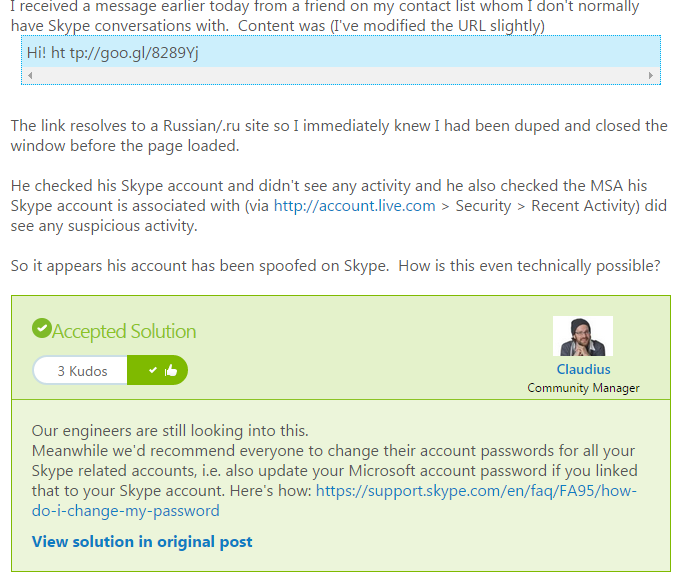
The advice comes as a response to users complaining in the Skype forum that they have been apparently receiving malicious links from friends.

This sort of attack, where attackers either gain access or can mimic an authentic account is known as spoofing and can be very successful due to the level of trust that people have in their own contacts.
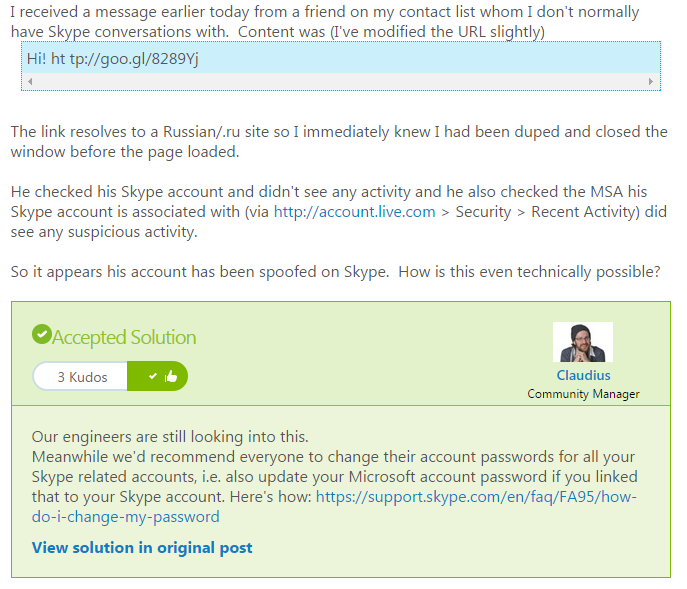
Skype Spoofing


If you think that you or someone you know has been a victim of spoofing, here are three things that you should you do.


Don’t click

Normally, spoofing or phishing emails will contain a link to a site. Don’t click on it, especially if it is a shortened link as seen in the Skype forum example. If you believe it could be genuine, hover over the link and your browser will reveal the final destination of the link.


Get protection

As cyberattacks get ever more complicated and better disguised, it can become difficult to stay protected. That’s why it’s important to get the best possible antivirus solution that can help keep you safe not just from viruses and malware but additional tools like AVG’s LinkScanner technology can scan links and attachments to check whether they are safe even before you click on them.


Changing your password

Just as Microsoft advised on the Skype forums, if you believe you’ve been a victim of any kind of spoofing or account fraud, it’s important to change your password. If someone has access to your account you should put a stop to that as soon as possible.

Take a little time when developing your new password and make sure that it gives you as much protection as possible.

For help doing this, take a look at the graphic below that will help you create a strong, unique password in three simple steps.
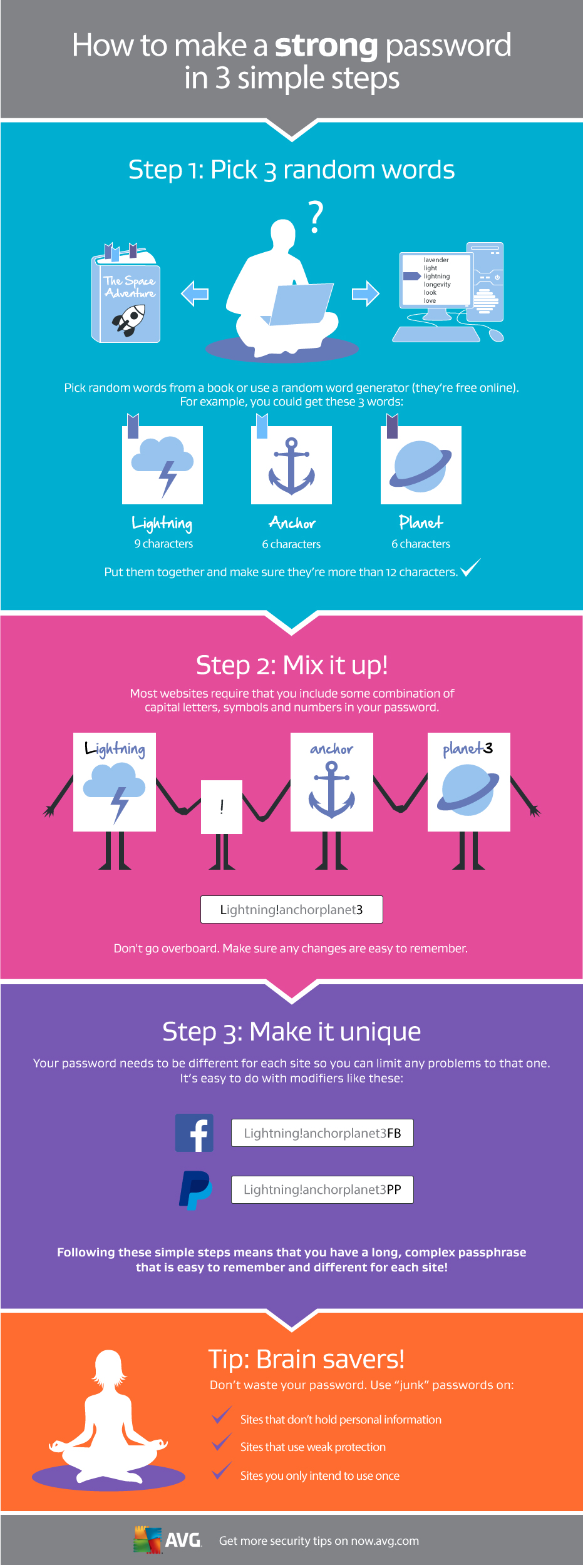
Making a strong password

Managed Service Providers – ‘Raise Your Game’

LONDON – July 21, 2015 – AVG® Technologies N.V. (NYSE: AVG), the online security company™ for more than 200 million active users, today announced that it is the headline sponsor of the Raise Your Game roadshow series aimed at managed service providers (MSPs).

The series of events will be held at various iconic sporting locations across the United Kingdom. The full roadshow schedule takes place during the following dates in July:

  • Monday 20th – BT Murrayfield Stadium, Edinburgh
  • Tuesday 21st – St James’ Park, Newcastle
  • Wednesday 22nd – Old Trafford, Manchester
  • Thursday 23rd – Emirates Stadium, London


The events also sees the involvement of heavyweight industry support too. CompTIA, with more than 2,000 members and 3,000 academic and training partners that focus initiatives on supporting businesses across the full IT channel, lends its support for large and small vendors alike.

Working with a number of organisations AVG Business aims to provide value added resellers and managed services providers with an unprecedented opportunity to learn how they can achieve an efficient and profitable business.

Whether starting out or well versed in the industry, the event will help MSPs to:

  • Use vendor partnerships to meet client business needs
  • Develop and execute a go-to-market strategy to help business develop fast
  • Increase business with optimum sales and technical strategies that achieve high revenue growth

The morning sees a number of companies, including Epson, Infrascale and TigerPaw taking to the stage for presentations, informative panel discussions and Q&As on everything from upcoming trends to marketing tips before having a private stadium tour of the stadium after lunch.

All topics covered are designed to assist MSPs and the challenges they face. As such, Francois Daumard, Vice President Global Channel Sales at AVG Business will also be on hand to discuss which products and services can assist in growth opportunities, including the recently launched AVG Business Managed Workplace 9.1.

“AVG is taking this valuable opportunity to engage with MSPs as they are an integral part of our success and ongoing strategy. Events such as this really give us the opportunity to share learnings from both sides of the table so that everyone can benefit from the best solutions,” said Daumard. ”It is the perfect forum for everyone involved to network with their peers, discuss industry challenges and outline the routes to success in the future.”


Three reasons to be happy that Apple Pay has arrived in the UK

I’ve long been a fan of Apple Pay and the fact that it is finally available in my homeland, the UK, is a good thing.

While most Americans are still using credit card magstripes to make payments, a few early adopters have been using Apple Pay since it was released around a year ago in the US. I am one of them, and I have to admit I’m impressed.

First and most obviously, there’s the convenience of being able to make small purchases quickly and easily using just my phone. No more digging around for my wallet or cash but a quick bleep and I’m done.

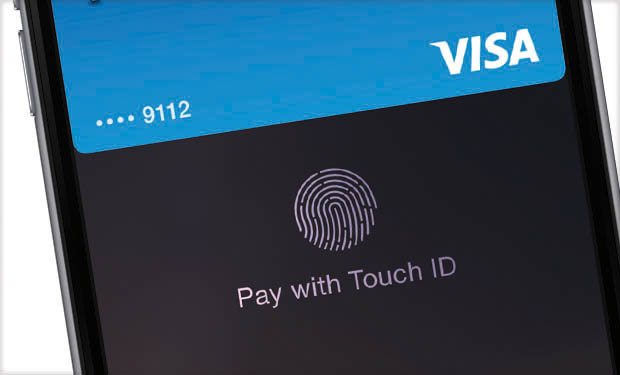
Next is the security. Paying with Apple Pay isn’t just convenient but secure as well. When you hover over the contactless payment point, you use the Touch ID to authenticate the transaction, making it much more secure than the contactless credit and debit cards already in use in the UK which have no authentication at all and can be used by anyone for small purchases.

Touch ID


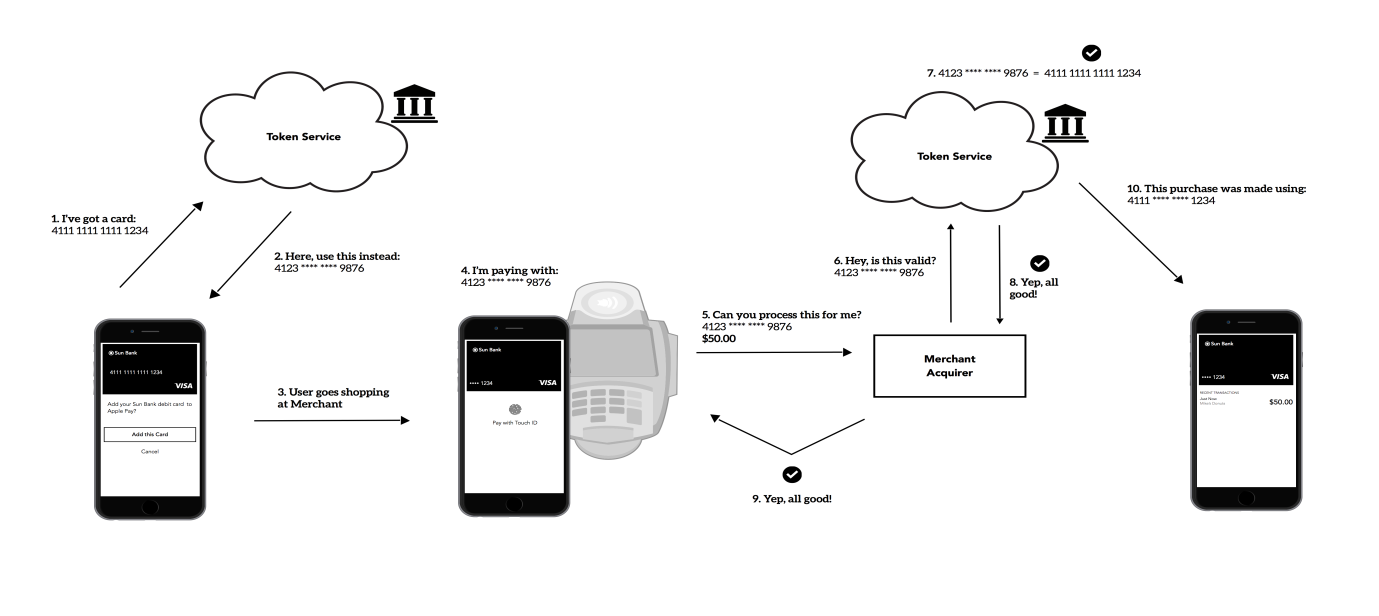
Apple Pay also helps protect your privacy thanks to Apple’s Unique Device Account Number. A system specifically designed for Apple Pay, using a Unique Device Account Number means that Apple never needs to transmit or share your actual card or banking details with the merchant. This adds a significant layer of protection for your payment data.


Apple Pay Diagram

Image source


For more information on how mobile payments work check out this blog from my colleague Judith Bitterli and these three trends from Charlie Sanchez.

In You can follow me on Twitter @TonyatAVG and find my Google+ profile here.

Digital Diaries: Teens are Photoshopping their images before sharing

Our latest  Digital Diaries research shows that more than two in ten children said they had edited photos of themselves before posting them online. Photoshopping at age 11 -13? Twenty-two percent of kids surveyed reported they had. Why?

Globally, thirty percent of the kids who altered their photos said they did so to make them look better.  Thirty four percent (34%) said they edited to make the photo look like more fun. And girls (21%) were more prone to do the editing than boys.

In the age of Facebook and Instagram, this definitely ties into the pressures we place on kids as a society to look perfect – and unrealistic beauty standards perpetuated by models and movie stars (many of whom are often Photoshopped).

Here in the U.S., did you know that one of the options now offered for school photos is to Photoshop your kid’s photo? You can take care of any imperfections like braces, blemishes and teeth whitening that might make the photos appear less than perfect.

In 2010, when The New York Times reported on the emergence of the phenomena, some of the leading school portrait photography companies reported up to 10% of elementary school photos were being altered. What kind of message does this photo altering send to kids?

“If we encourage kids to want to erase their imperfections when they’re very young, how will they ever be able to handle acne…or wrinkles?” wrote a young blogger who has written about the negative effects of Photoshopping on young people—specifically girls on social media.

Which brings us back to digital parenting…There’s a lot here for us to continue to ponder as we and our families live more and more of our lives always on and online.

It’s important for parents to show their children that what they see online or in the movies isn’t always real. The digital doctoring of images in the pursuit of ‘perfection’ can have damaging consequences for the self-image and confidence of young girls and boys.

The digital world holds a host of opportunity and excitement for our children, but as parents, grandparents, uncles and aunts, it’s our job to guide them and educate them in the pro’s, con’s and deceptions that it can bring with it.

App developers still need to win the trust of older generations

It is, perhaps, natural to think about apps as a young person’s playground.

Though much research shows that 50+ are one of the fastest growing markets for mobile devices, there is a dearth of mobile apps for our generation.

This may soon change as the number of apps offering real value to the 50+ age group continues to grow. This was underscored by news from the recent AARP 50+ Live Pitch event, held in May in Miami Beach. Entrepreneurs were more focused than ever on mobile apps to help 50+ generations.

Not surprisingly, a key focus in mobile app development for Seniors was health. Nearly half of the 15 products presented at the AARP 50+ Live pitch were in the mobile health category.

In terms of physical health, most of us are aware there are a large array of mobile health apps that can help all of us (regardless of age) track our health – ranging from Fitbits to apps with more serious medical applications.

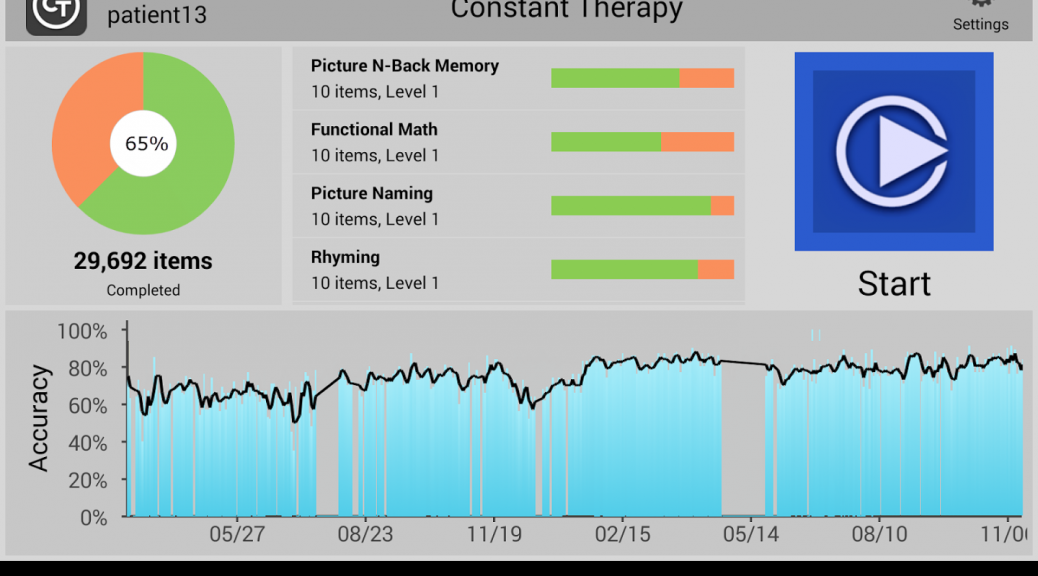
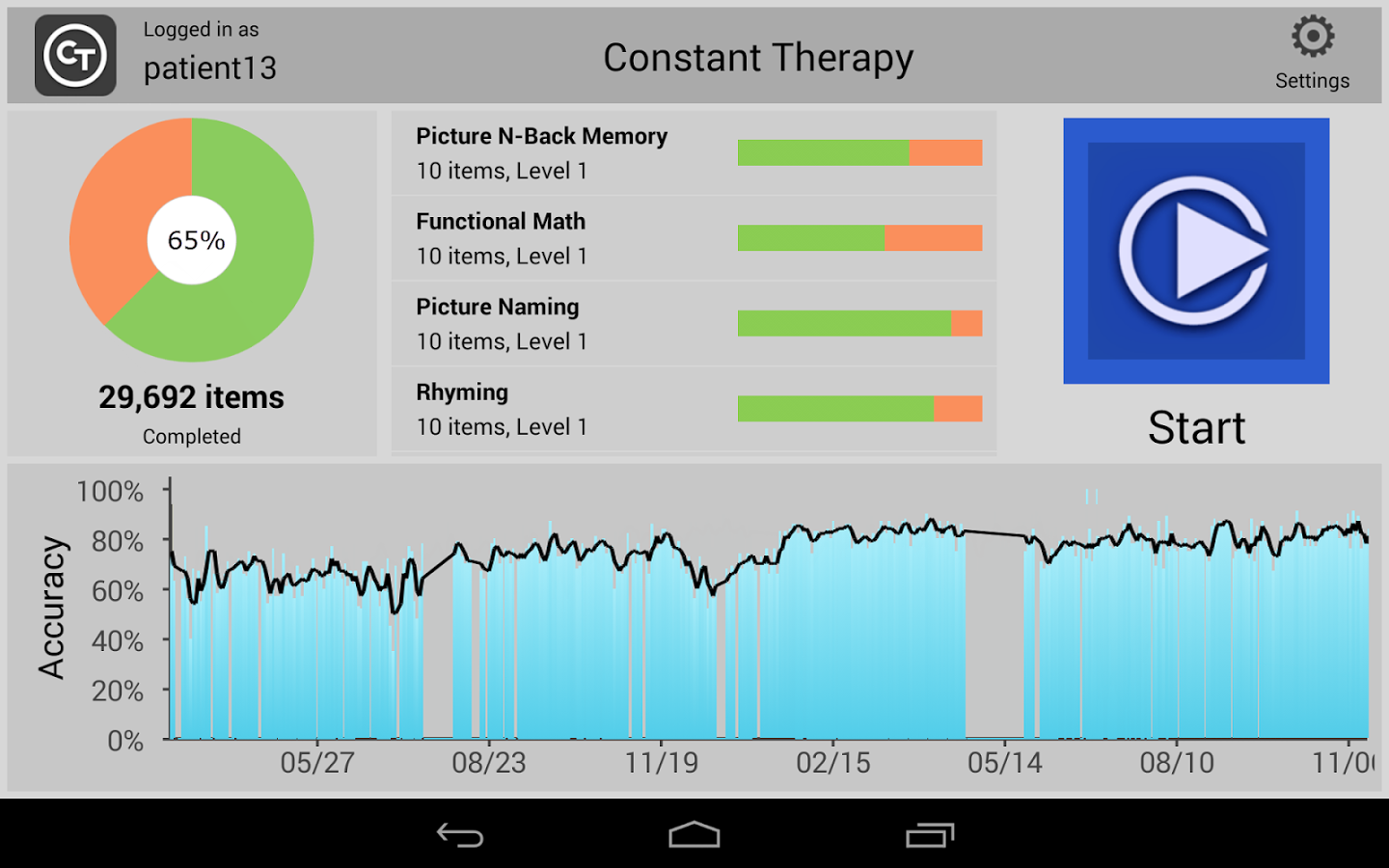
There is a growing number of apps are out there that can help Seniors stay mentally sharp. In fact, the winner of the audience award at the AARP 50+ Live Pitch entrepreneurs’ event was Constant Therapy, a brain game app for those suffering from strokes or dementia.

Constant Therapy


Most people have heard of apps like Lumosity that train your memory and attention with games, but this new class of apps like Constant Therapy and clevermind are aimed to help at those who have already begun experiencing medical problems.

Independent living is another important area that apps can add real value to seniors. I recently ran across Seniorly, a product of a San Francisco startup, which allows seniors to find affordable and like-minded independent or assisted living housing, when people aren’t able to live by themselves anymore.

(I also think this start-up is admirable because it was started by two Millennials, and it’s a great sign that the younger generation has its eye on our market.  After all, all of us are aging, and it’s nice to know that there will be apps to help us along the way!)


Seniors don’t download as many apps

All of this positivity and development is fantastic but there’s a major hurdle that the app industry needs to overcome – seniors are less likely to download apps than others.

There are many reasons for this, but research (including ours) points to concerns about privacy and security, as being chief among them.

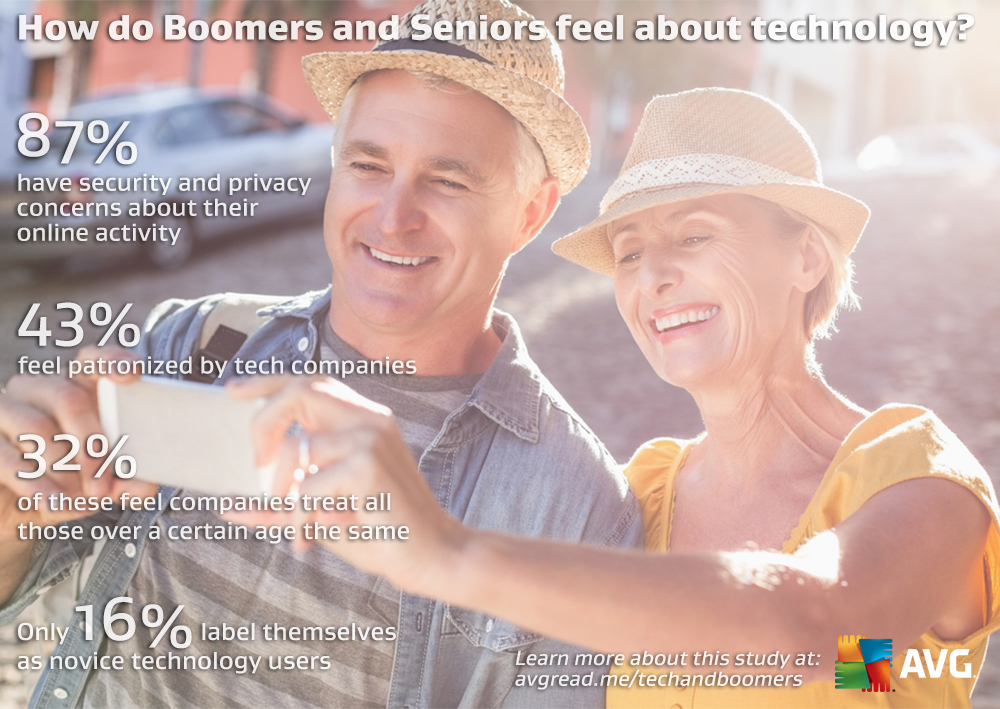
Our own recent AVG surveys show that 50+ generations have concerns about

  • Security of data and files (70%)
  • Keeping data private (48%)


Boomers and Tech


In general, our AVG research also found nearly 50% of consumers surveyed say a lack of trust limits the amount of apps they download. More than one-in-seven mobile media users are uncomfortable sharing personal data, such as location or contact details…

Is it little wonder that Seniors are concerned? We’ve all seen the rise in security breaches in the news in the past year (impacting major brands we use like Target and Sony to name a few), where millions of people’s credit card info has been put risk… But this is particularly troubling with healthcare info breaches such as those experienced Anthem and several BlueCross providers.  Healthcare data is among our most sensitive information.

As I noted in my recent AVG blog on the topic, IT security has to be a priority for all businesses, but particularly when it comes healthcare, where the stakes are so high and the impact has the potential to go well beyond financial!

How to tell if an online review is trustworthy

When it comes to planning a purchase online, customer reviews can be a great source of information and a crucial part of the decision making process. But with cases of businesses doctoring their online reviews emerging, how can you be sure that the review you’re reading can be trusted?

Here are some signs to watch out for to make sure you don’t get the wool pulled over your eyes.


Check out the reviewer

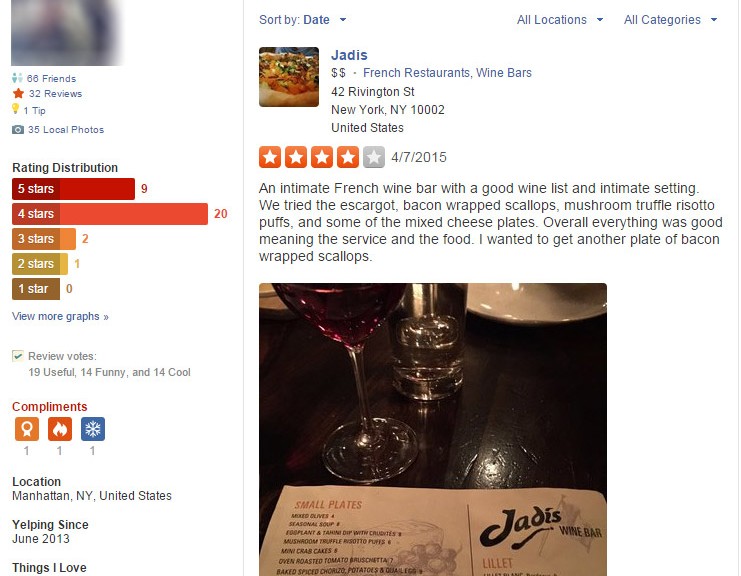
Your first point of reference should be the person who left the review. They are more likely to be a legitimate person if the following checks out:

  • They have been using the site for a long time before leaving the review
  • They have left reviews for other products
  • They have friends or belong to a network (on Yelp for instance)

All of these point to the behaviors of a real person who can be deemed impartial. If the review has only just joined the site or only left a review for the product or service in question, then you may want to consider basing your purchase on their advice.

Profile


Verified customers

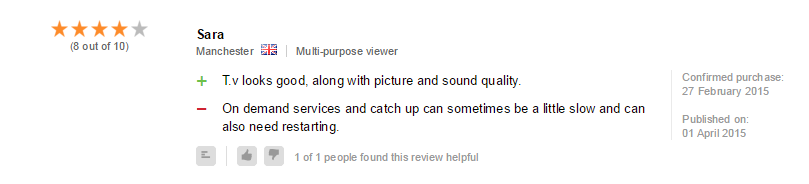
Many websites run employ services such as Revoo to help provide transparent and authentic feedback on their products. The review is actually part of the purchasing process so that you can be sure that only those that actually purchased the product have left a review.

Confirmed Purchase


Shop around

If you’re shopping for a big ticket item or booking at a pricey hotel, it is definitely worth checking reviews on many different sites and even social networks.

If something has great reviews on Yelp or Google Reviews, may have a bad rating on Trip Advisor, Amazon or another service. If the reviews differ significantly, it is certainly worth investigating a little further into them.

A quick search on Facebook or Twitter doesn’t hurt either. Check out any mentions of the product name or if a restaurant or hotel, visit their Twitter page to see how people are engaging with them. If there’s a lot of angry customers complaining, you may want to think twice before booking!

Do you have any tips to get trusted review online? Let me know on Twitter or on Facebook.

Tinder introduce verified profiles

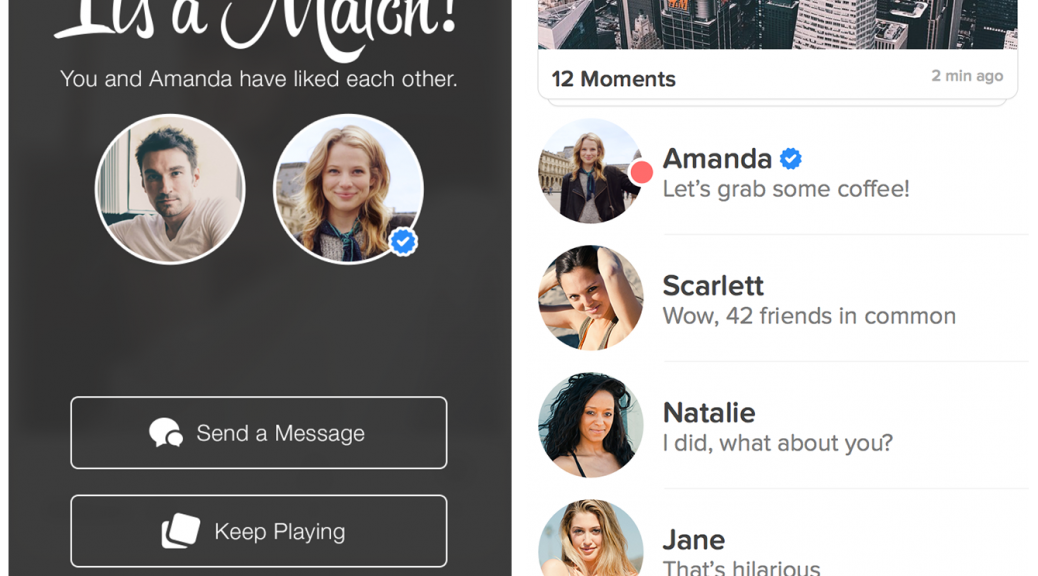
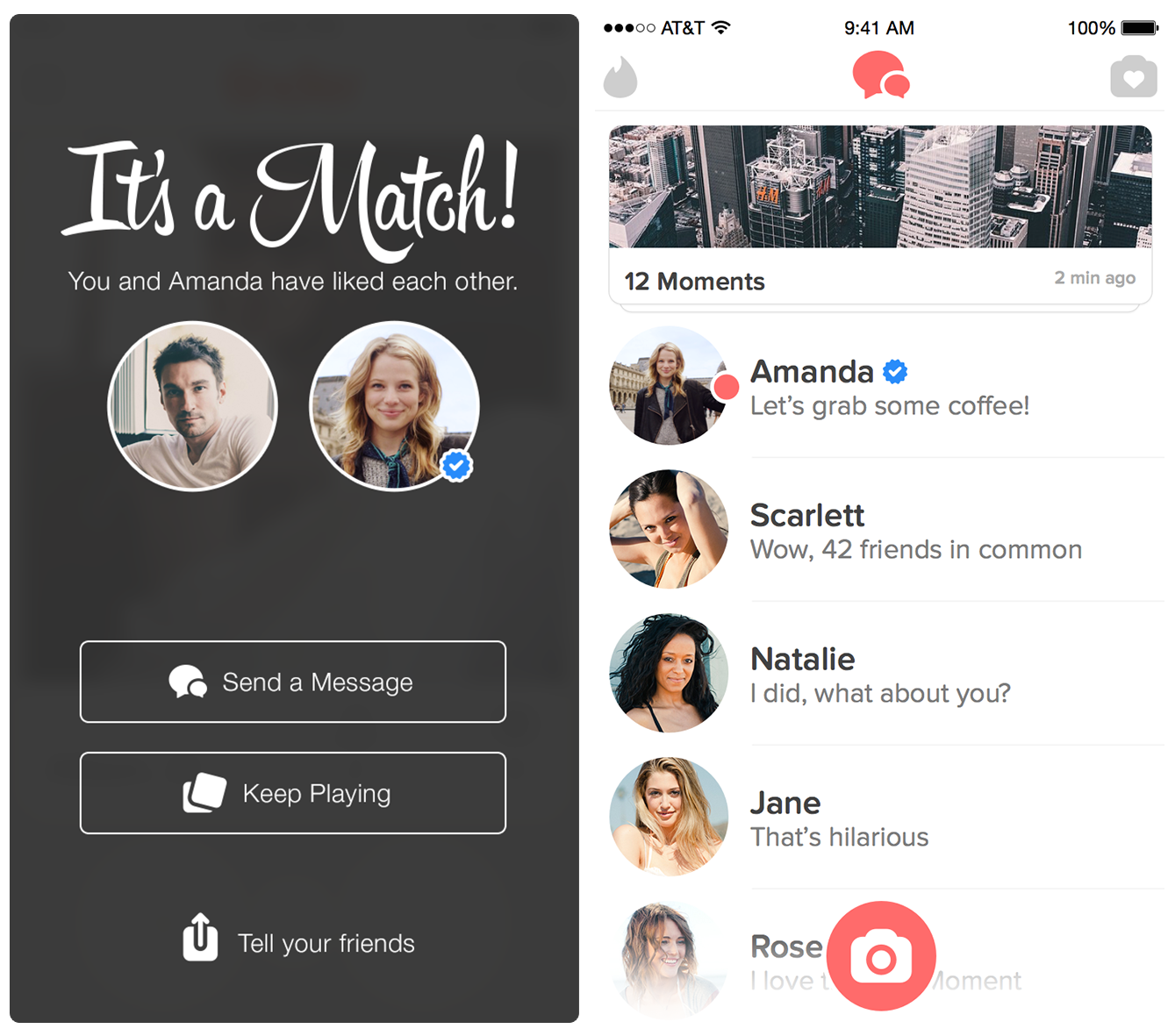
Many of us are already familiar with the little “check mark” found on social networks that signifies that an account is legitimate. Most often seen with celebrities or famous sports personalities, it’s a simple way of letting everyone know that the account holder is the person they claim to be.

Now, mobile dating app Tinder has followed suit by introducing verified accounts to their service and we’ll no doubt see blue check marks next to Lindsay Lohan and Katy Perry who are apparently fans of the app.

Tinder Verified Profiles


Here are three quick tips to help you have fun and avoid scandal while dating online.

Use throwaway accounts: Some dating apps require an email or a Facebook account to log in. If you want to use one of these sites, it may be smart to create a new account just for dating. That way you can close them down easily if you need to.

Use secure messaging in app: Don’t rush to move to off-app communications (email, phone, etc). Take your time and communicate through the app, there are measures in place to help you stay private and get support when you need it.

Be wary of fake accounts: Just like we’ve said in this article, online dating services can have a lot of fake dating profiles, known as Catfish scams. You can help protect yourself and your data by not giving out any personal details unless you are sure you’re talking to a real person.

Be careful what you share: Remember that anything you upload to an app will likely become their property, so don’t be surprised if you log in to find your picture on the homepage as “hot date of the week” or even used in promotional material! Make sure you’re happy for anything you share to be seen publicly.

If you want to meet, tell someone where you’re going: Common sense rules that you shouldn’t rush out to meet someone you don’t know in the middle of the night. Meet in a public place during the day and make sure someone knows you’re going and check in from time to time to let them know everything is ok.

Undo Send: a Gift to Email and the Workplace

The Internet, email and mobile devices are the most essential connectors in today’s workplace.   Between meeting alerts, necessary attachments, and up-to-date correspondence, most of us depend heavily on email in our work-a-day world.

And most of us also have sent embarrassing or regrettable emails: whether in the heat of the moment, when tired, or with an inadvertent ‘Reply All’ – or even, in some cases, hitting send to the wrong person entirely.

These days, when we’re all on tablets and smartphones we’re even more apt to make a mistake with our emails, when writing on the go or “trying” to multitask…and the email autocorrect kicks in. You probably have your own favorite funny and cringing email mistakes due to the ‘helpful’ autocorrect feature in email.

Humor aside, misplaced or poorly worded emails are a major issue for the workplace. One study by an enterprise email provider in 2013, found that 64% of people blamed unintended email for causing anger or confusion in the workplace; 43% found that this communication tool also was the most likely (above phones, IM, and text, for example) to cause resentment between senders and receivers.

Just this past month, Google officially launched its “Undo Send” feature for users of its Gmail accounts. The delete-that-email feature had been available for the past year in beta, housed in its Google Labs section.

If you tried Undo Send via Gmail Labs, your Undo Send setting now will be on by default.

Otherwise, you will find that you can easily enable the Undo Send feature in your Gmail settings. You can even set your system to have up to thirty seconds to review your message before you send.  For details, go here.

For many years, users of Microsoft Exchange Server-based email systems have had the opportunity to recall and replace their emails. But most home and personal email users, and many small business accounts do not use Microsoft Exchange. And, in order, to recall your message, the recipient of the e-mail message that you want to recall also must be using an Exchange account. You can’t recall a message sent to an outside email system, such as someone’s POP3 e-mail account.

There are an estimated 900 million Gmail users, and almost 25% say they use the service during work hours. Some estimates place the number of mid-sized business users of Gmail at 60%. You can do the math and see that the new Undo Send feature of Gmail will be a valuable tool to the workplace.

Unsend? I’m all for it!  But, of course, we should all still review our emails before we hit send…

How to set up your smartphone killswitch

With over 3 million smartphones stolen annually in the USA, and more than 300 each day on the streets of London, smartphone theft is sadly now an everyday occurrence.

These days, losing a smartphone means costs us so much more than the device itself. Our personal information, messages, emails, contacts and social networking profiles are all at stake. When you add banking and shopping apps, the financial costs can also escalate.

One of the most effective defenses against stealing and misusing your device and data is a killswitch functionality with reports suggesting killswitches can halve the number of smartphone thefts. It is so effective, that starting on July 1 2015, the state of California has ruled that all new smartphones must be shipped with killswitch functionality.

Once activated, a killswitch prevents a smartphone from being used or reprogrammed through a factory reset, making it very difficult for phone thieves to sell-on a working device.

The good news is that both Google and Apple rolled integrated killswitches for their smartphones in 2014, meaning that most smartphone users have access to basic level of protection.

Working with Qualcomm, AVG is developing a much more robust solution that is integrated directly into the hardware making it resistant to any number of attacks including factory resets or a SIM swap.


How to activate kill switch on Android

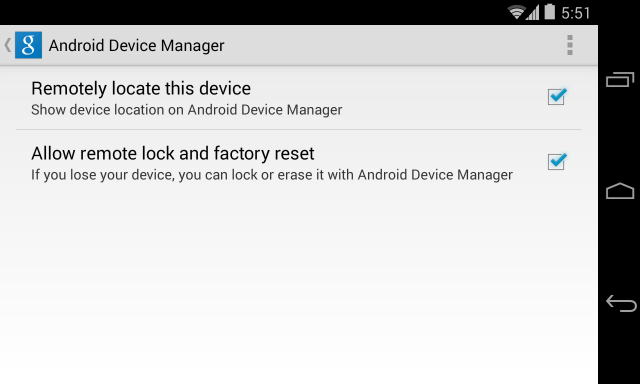
Step One: Set up remote access

  • Go to Google Settings > Android Device Manager
  • Grant permission to both ‘Remotely locate this device’ and ‘Allow remote lock and factory reset’
Android Device Manager


Step Two:

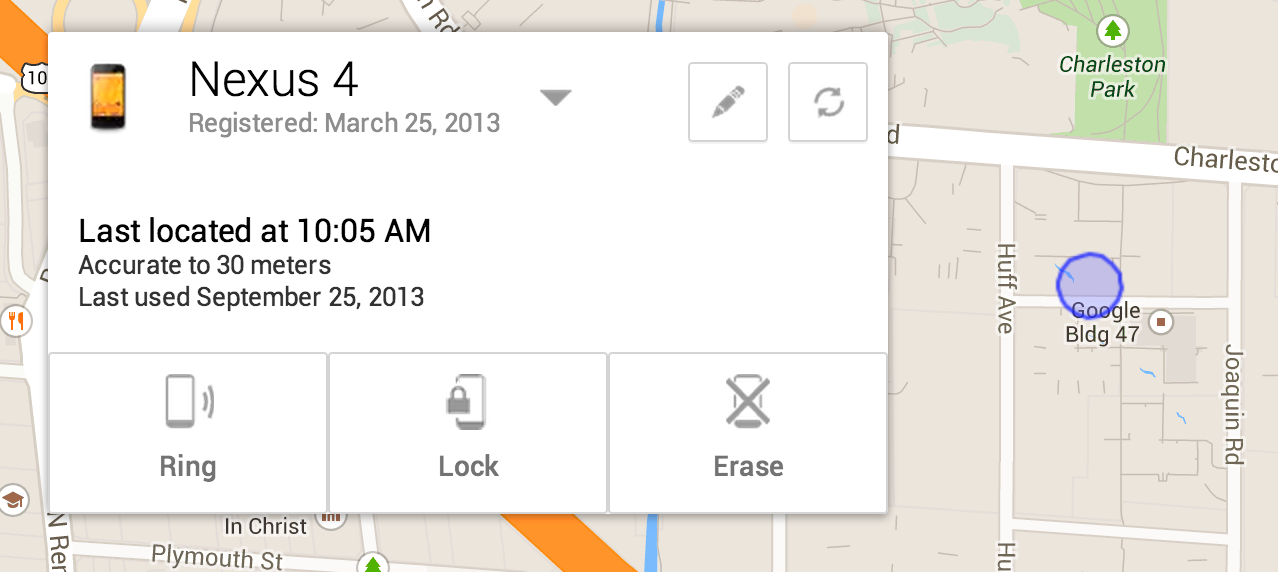
If your device is lost or stolen, go to any web enable device, log into Google and access the Android Device Manager Panel.

You will now see your device location on a map and have options to ring, lock and erase.

Nexus 4


How to activate kill switch on iOS.

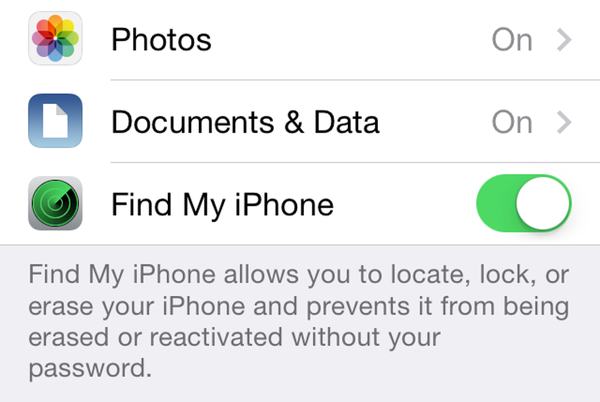
Step One: Enable Find My iPhone

  • Go to Settings>iCloud
  • Sign in with your Apple ID
  • Enable Find My iPhone

Lost My iPhone


Step Two: Enabling Lost Mode

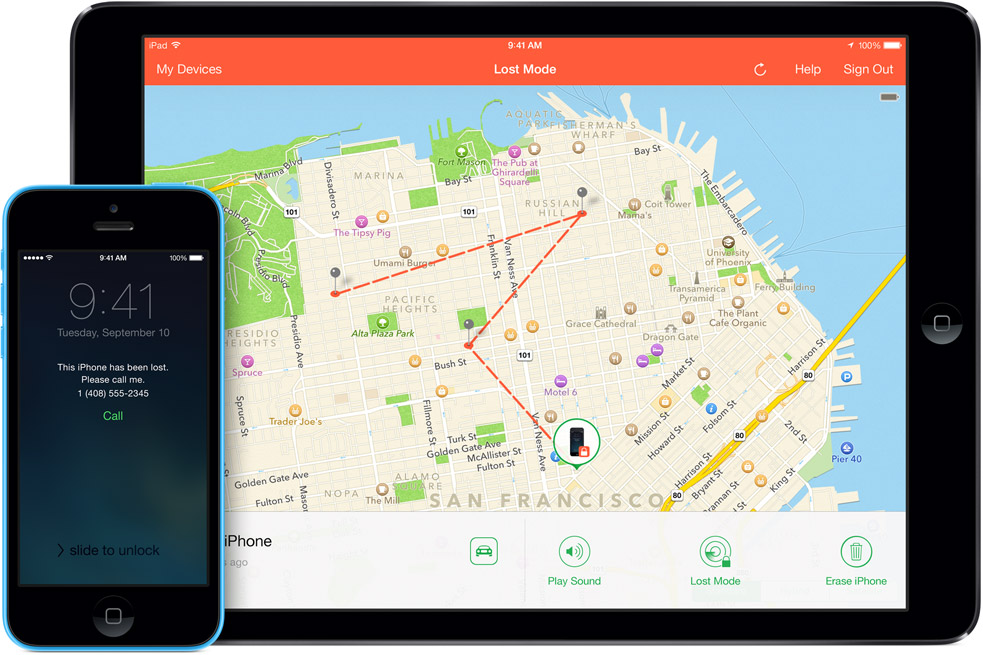
If you believe your device is lost or stolen you can activate the killswitch known as “Lost Mode”.

To do this, go to icloud.com/find from a Mac or PC, or alternatively you can use the Find My iPhone iOS app from another device.

This will bring up the Lost Mode dashboard which should pinpoint where your device is on a map and also give you the option to make it ring, lock it down or erase the data.

There is an option to customise the lock with a contact number for the safe return of your device. If you retrieve the device, you can safely return it to normal using your Apple ID login.

iOS Lost Mode

10 Tips to stay safe online this summer vacation

I recently got back from a family holiday in Yellowstone where there was no Internet connection at all. For me it was a blissful digital detox but my son didn’t take so kindly to it. He would jump onto any public network that appeared, regardless of its security, in an attempt to get himself back online where he could game and chat with his friends.

It got me thinking that, from start to finish, there were a lot of things during a summer vacation that could lead to some risky online behavior.

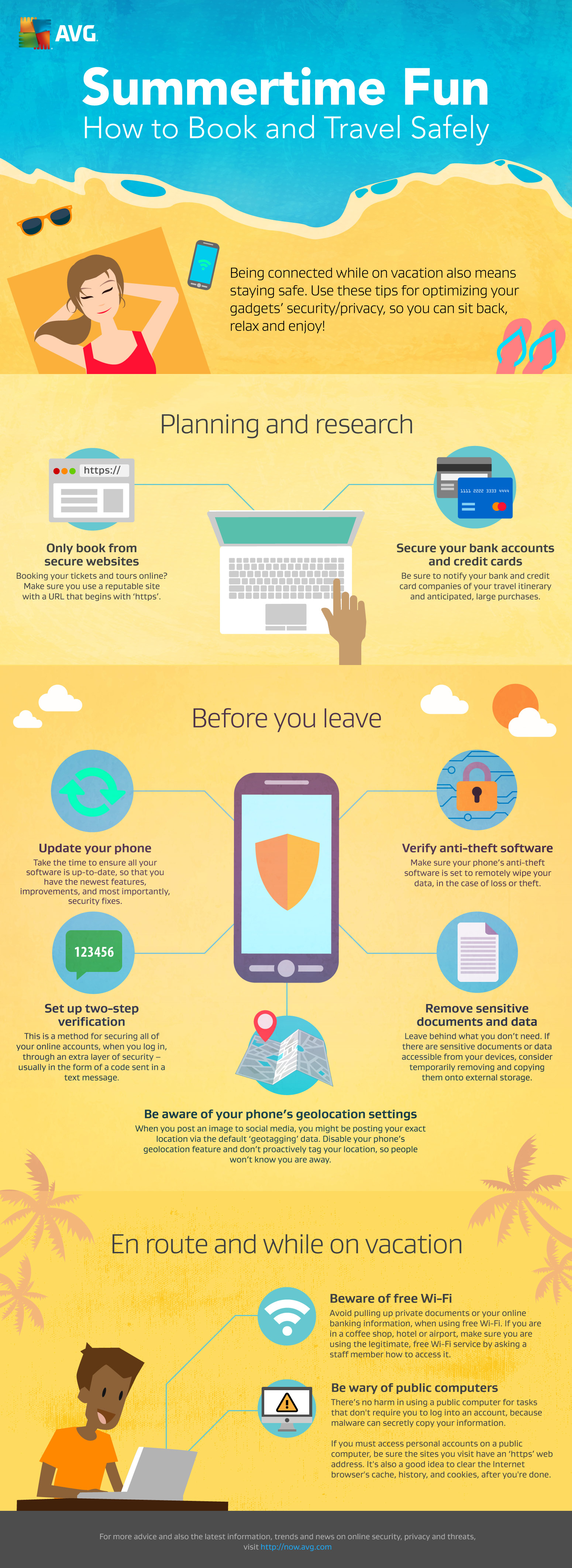
With that in mind, I’ve put together my 10 tips to help you and your family stay safe while booking, travelling and enjoying your vacation.


Summer Travel Tips


Read more

For full details on all the above tips and more, check out my simple fact sheet.