If You Use Autofill, You Might As Well Give Away Your Info For Free


The autofill feature that many browsers offer is a useful time-saving tool that saves you from having to manually fill out forms with the same information every time. Programs include all the necessary information without the user having to go from one field to another to write information that is often repeated in most forms. However, what at first seems to have nothing but upsides for workers and individuals, does in fact carry with it some security risks.

Autofill can be used by cybercriminals to perpetrate phishing attacks in order to collect user data through hidden fields. When the Internet user allows the browser to fill in the form information, it would also fill in a number of spaces that the screen does not display. In this way, when the individual sends the document, she would also be sending her personal information to cybercriminals without realizing it.

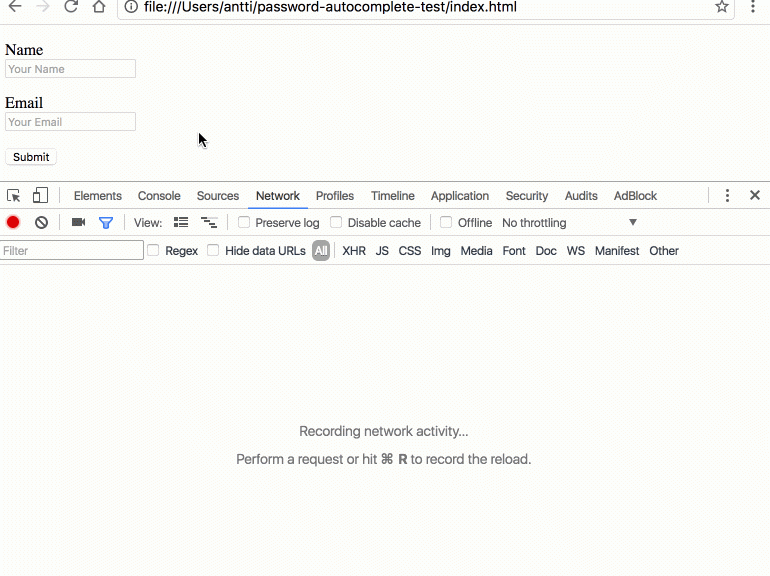
Finnish developer Viljami Kuosmanen has revealed how such attacks work with a practical demonstration. He created a form in which only the fields “name” and “email” can be seen, along with a “send” button. However, the source code of the web page harbors some hidden secrets from the user: there are six other fields (phone, organization, address, postal code, city and country), which the browser also automatically populates if the user has activated the autofill function.
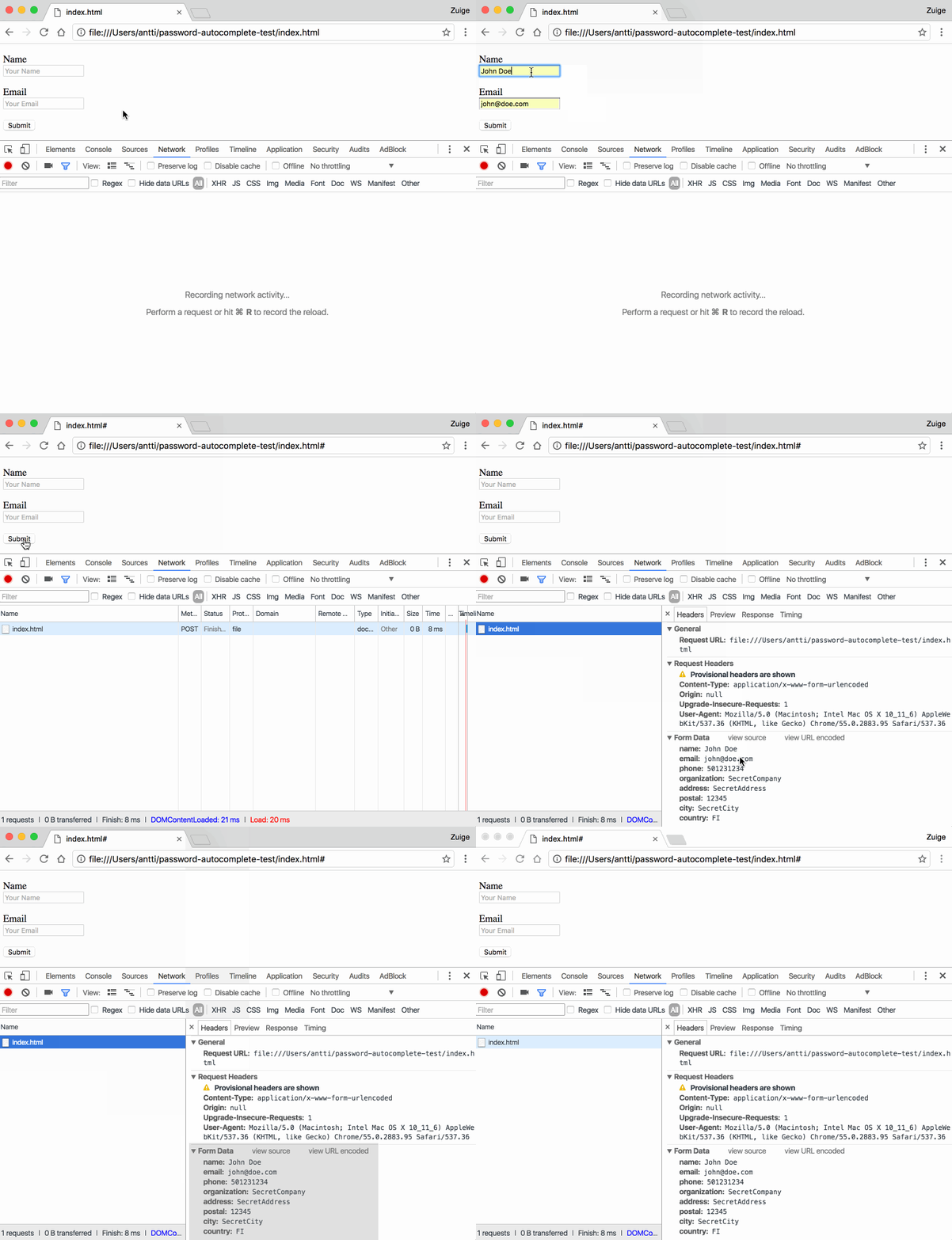
The method is a simple strategy to get all sorts of personal information that, according to Kuosmanen tests, can be used in both Chrome and Safari. Other browsers like Opera also offer the autofill feature and Mozilla Firefox is currently working to implement it.

Fortunately for users, it is possible to disable this option in the program settings without too much difficulty. Browsers have it activated by default without asking permission first, so the only way to turn it off is by taking a moment to change the setting manually.

This is a serious threat to the security of personal and corporate information and is difficult to detect because, unlike other types of attacks, the user does not see any links or other types of samples that might lead her to suspect anything is amiss.

It is therefore advisable to disable the option in your browser, even though this means that you’ll be spending a little more time filling out those pesky forms.

The post If You Use Autofill, You Might As Well Give Away Your Info For Free appeared first on Panda Security Mediacenter.


Delegated Recovery: Facebook gives its security a boost

Facebook boosts up its security systems with Delegated Recovery feature

Traditional 2-factor authentication (2FA) is all about your phone or a physical token. But what happens when you lose your mobile phone or the physical token? Then you’ll have to contact Customer Service and the troubles will start as you work to get account access again. Now there is a new option. Facebook has a smart way to […]

The post Delegated Recovery: Facebook gives its security a boost appeared first on Avira Blog.

This Ransomware Malware Could Poison Your Water Supply If Not Paid

Ransomware has been around for a few years, but in last two years, it has become an albatross around everyone’s neck, targeting businesses, hospitals, financial institutions and personal computers worldwide and extorting millions of dollars.

Ransomware is a type of malware that infects computers and encrypts their content with strong encryption algorithms, and then demands a ransom to decrypt

Compilation of PandaLabs Reports

The following is a compilation of all past PandaLabs reports. It is a complete record of the cybersecurity lab’s highlights.

2016

Q1 Report Q2 Report Q3 Report Annual Report

2015

Q1 Report Q2 Report Q3 Report Annual Report

2014

Q1 Report Q2 Report Q3 Report Annual Report

2013

Q1 Report Q2 Report Q3 Report Annual Report

2012

Q1 Report Q2 Report Q3 Report Annual Report

2011

Q1 Report Q2 Report Q3 Report Annual Report

2010

Q1 Report Q2 Report Q3 Report Annual Report


The post Compilation of PandaLabs Reports appeared first on Panda Security Mediacenter.

CVE-2017-5009 (chrome)

WebRTC in Google Chrome prior to 56.0.2924.76 for Linux, Windows and Mac, and 56.0.2924.87 for Android, failed to perform proper bounds checking, which allowed a remote attacker to potentially exploit heap corruption via a crafted HTML page.

CVE-2017-5012 (chrome)

A heap buffer overflow in V8 in Google Chrome prior to 56.0.2924.76 for Linux, Windows and Mac, and 56.0.2924.87 for Android, allowed a remote attacker to potentially exploit heap corruption via a crafted HTML page.

CVE-2017-5011 (chrome)

Google Chrome prior to 56.0.2924.76 for Windows insufficiently sanitized DevTools URLs, which allowed a remote attacker who convinced a user to install a malicious extension to read filesystem contents via a crafted HTML page.