Fixing bugs is hard – Rosetta Flash is back


software is a long chain

 Software is like a very long chain, made of millions of links.

a link of the chainIt’s more or less impossible to check all links individually in detail. a weak linkSome links are weaker than others and make the whole chain vulnerable.

But they’re needles in a huge haystack.

a vulnerability in the chainWhen a vulnerability is found, it’s critical to fix it. CORRECTLY.

patching a vulnerabilitySo, a patch is created…

Of course, you need to apply the patch to keep your software secure! But most people don’t, choosing instead the “Remind me later” option — unaware that they are leaving themselves open to security holes exploitable by malware writers.

Releasing a patch highlights weaknesses

Once the patch is available, the weak link is now highlighted: it now stands out from the millions of other links in the chain.

Whether the vulnerability is documented or not, whether the patch is documented or not, it’s possible to reverse-engineer the patch and see the changes (there are several advanced tools for that). By checking out the changes, one can determine what is actually fixed rather than what should be theoretically prevented to fail.

a new vulnerabilityBy looking closely where the patch was applied, it’s possible that a related and smaller vulnerability which is still not fixed might be easy to find, thanks to the information provided by the patch.

That is, when comparing the changes introduced by the patch, it’s possible to quickly find what was fixed, and by doing this discover a new vulnerability that is still not fixed. And since patches are usually released once a month, it gives a person an easier 0-day, that could stay unpatched for a complete month!

Fixing bugs is hard

We can see the difficulties of releasing a patch: it has to be done fast, reliably, but it also has to cover more than the initial descriptions or test cases.


In a previous blog entry, we looked at how crafting an Adobe Flash file made of alphanumeric characters enabled an attack on many websites. The initial Proof Of Concept only used 0-9A-Za-z characters.

It's actually possible to make a Flash file only made of printable characters.

It’s actually possible to make a Flash file only made of printable characters.

This is what the patched fixed: checking if the flash file is made entirely of these characters.

However, the risk is more significant than the initial PoC: with the same technique it’s easy to craft a file just by letting it finish with another character ‘(‘. Just changing this last character bypasses the filter implemented by the official patch! This new vulnerability remained unpatched for a whole month (8th July -> 12th August) !

Another CVE was assigned to this new vulnerability, which is now patched, but this shows that releasing a patch is a double-edged sword: you give the defenders a new protection layer, but you also highlight a — previously — weak area for the attackers. Fixing bugs is hard.

Here is small chronology

  1. 8th July: the original Rosetta Flash PoC (made only of alphanumeric characters) is public, along with the patch and announcment (CVE-2014-4671).
  2. The patch is not enough! Just by letting the PoC end with “(” the filter is bypassed. This is way too weak.
  3. 12th August: the 2nd patch is released (CVE-2014-5333).

The post Fixing bugs is hard – Rosetta Flash is back appeared first on Avira Blog.

Apple Foundation NSXMLParser XML eXternal Entity (XXE)

In May 2014, VSR identified a vulnerability in versions 7.0 and 7.1 of the iOS SDK whereby the NSXMLParser class, resolves XML External Entities by default despite documentation which indicates otherwise. In addition, settings to change the behavior of XML External Entity resolution appears to be non-functional. This vulnerability, commonly known as XXE (XML eXternal Entities) attacks could allow for an attacker’s ability to use the XML parser to carry out attacks ranging from network port scanning, information disclosure, denial of service, and potentially to carry out remote file retrieval. Further review also revealed that the Foundation Framework used in OS X 10.9.x is also vulnerable.

Asterisk Project Security Advisory – AST-2014-010

Asterisk Project Security Advisory – When an out of call message – delivered by either the SIP or PJSIP channel driver or the XMPP stack – is handled in Asterisk, a crash can occur if the channel servicing the message is sent into the ReceiveFax dialplan application while using the res_fax_spandsp module. Note that this crash does not occur when using the res_fax_digium module. While this crash technically occurs due to a configuration issue, as attempting to receive a fax from a channel driver that only contains textual information will never succeed, the likelihood of having it occur is sufficiently high as to warrant this advisory.

Asterisk Project Security Advisory – AST-2014-009

Asterisk Project Security Advisory – It is possible to trigger a crash in Asterisk by sending a SIP SUBSCRIBE request with unexpected mixes of headers for a given event package. The crash occurs because Asterisk allocates data of one type at one layer and then interprets the data as a separate type at a different layer. The crash requires that the SUBSCRIBE be sent from a configured endpoint, and the SUBSCRIBE must pass any authentication that has been configured. Note that this crash is Asterisk’s PJSIP-based res_pjsip_pubsub module and not in the old chan_sip module.

Red Hat Security Advisory 2014-1265-01

Red Hat Security Advisory 2014-1265-01 – In accordance with the Red Hat OpenShift Enterprise Life Cycle Policy, the two-year life cycle of Production Support for version 1.2 will end on November 27, 2014. In addition, technical support through Red Hat’s Global Support Services will no longer be provided after this date.

Red Hat Security Advisory 2014-1263-01

Red Hat Security Advisory 2014-1263-01 – Red Hat Storage is software-only, scale-out storage that provides flexible and affordable unstructured data storage for an enterprise. GlusterFS, a key building block of Red Hat Storage, is based on a stackable user-space design and can deliver exceptional performance for diverse workloads. GlusterFS aggregates various storage servers over network interconnections into one large, parallel network file system. A denial of service flaw was found in the way Python’s SSL module implementation performed matching of certain certificate names. A remote attacker able to obtain a valid certificate that contained multiple wildcard characters could use this flaw to issue a request to validate such a certificate, resulting in excessive consumption of CPU.

How to make a backup with avast! Mobile Backup & Restore

howto2_enQuestion of the week: I have lots of photos on my phone from summer vacation. How do I back them up so I don’t lose them?
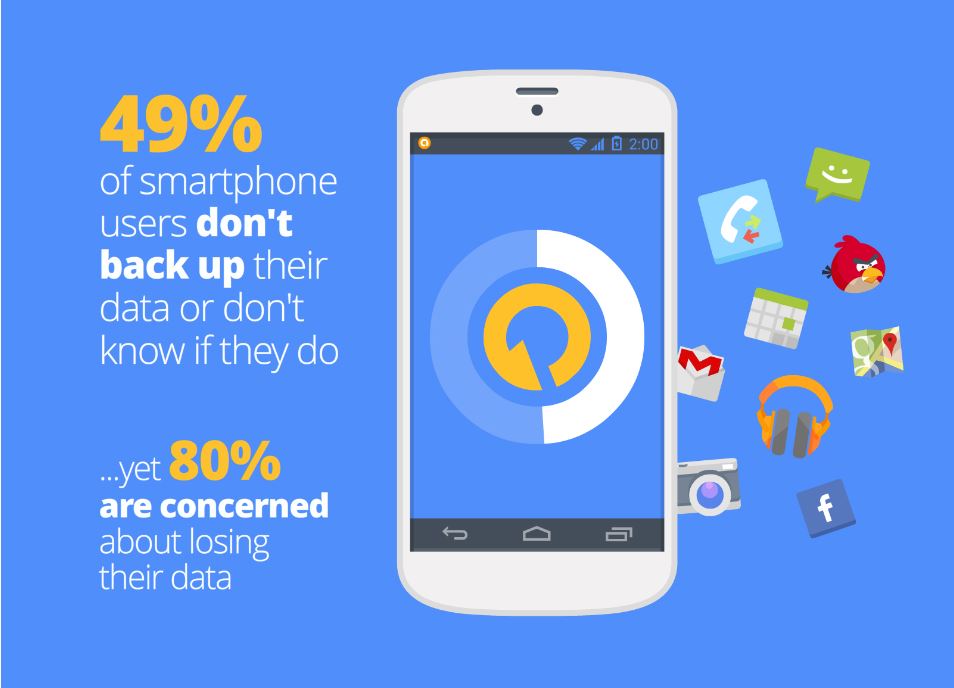
These days we keep everything from photographs, videos and music to messages and contacts on our mobile devices. This makes losing our phones a big headache. Unfortunately, most people don’t think of this until after their phone goes missing or fails. We asked our users if they back-up their data, and a whopping 49% said they don’t back up or don’t know if they do.

backup data

avast! Mobile Backup makes backing up your important data easy for you. In a few easy steps, you can backup all your files from the pictures of your last trip to the contacts and applications you keep in your devices.
Want to know how? Just follow the following steps:

  • Install avast! Mobile Backup & Restore from Google Play.
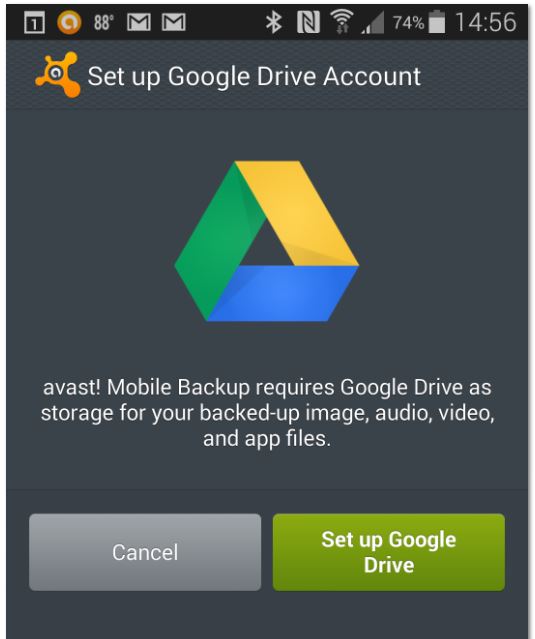
  • Once you have installed avast! Mobile Backup, you’ll need to configure your Google Drive. It’s as simple as clicking on the button “Set up Google Drive Account” and follow the simple steps on the screen to access your Google account. backup
  • Once you’ve set up your Google Drive, you can select items for backup. The free version lets you back up contacts, calls and SMS. The Premium version also allows you to back up all the audio and video files and also all your applications. When you finish the selection, click the “Continue” button.
  • On the next page, “Important Options”, you can select whether you want the backups to be made only through a WiFi connection in order to save mobile data, and configure the maximum size of the files which you want to perform that backup. Once you’ve configured everything, click Finish.
  • You are now ready to perform the backup. Tap the dark square at the top and avast! Mobile Backup will start backing up your files.

If you want to restore your backup when you change your phone, simply reinstall avast! Mobile Backup, click “Browse backup” and then “Restore all.”

Thank you for using avast! Antivirus and recommending us to your friends and family. For all the latest news, fun and contest information, please follow us on Facebook, Twitter and Google+. Business owners – check out our business products.

Software and Security Information