Tag Archives: Privacy

How to change Safari’s default search engine in iOS 8 for greater privacy

With iOS 8, you can – for the first time – switch your Safari browser’s search engine to alternatives such as DuckDuckGo. Find out why you might want to and, in fairness, why you might NOT want to…

The post How to change Safari’s default search engine in iOS 8 for greater privacy appeared first on We Live Security.

Is it time you used two-factor authentication?

Two-factor authentication is an additional security measure that you can add to your online accounts to help keep them safe from attack and fraud.

“Two-factor” simply means that you need something other than your password in order to access your account. This normally comes in the form of a code generated by an app or sent to you in a text or email. Two-factor-authentication means that should your password be compromised, your accounts are still protected.

You may be familiar with two-factor authentication for online banking, where it has been used for a long time to validate logins and safely setting up transactions. Given its security benefits, many of the leading websites and services have enabled two-factor authentication for users. Google, for example, implemented the extra layer of security in early 2011, but many users still don’t realize that it is available.

While logging into accounts with two-factor authentication does require a little extra effort on behalf of the user, the extra layer of security does make it well worth-while.

How to Setup Two-Factor Authentication

In this example I will be setting up two-factor authentication on a Google account but similar instructions can be found for most popular sites such as Amazon, Dropbox and Facebook.

Before setting up two-factor authentication you need to make sure you have two things available. The first is a secure password, something you should already be using, on whichever services you use (Although you should have different password for each service for greater security). The second would be a device or application that can receive a code, most commonly a smartphone.

  1. Go to: www.google.com/settings/security
  2. Click “Set Up” under 2-step verification menu
  3. Chose how you would to receive your codes: SMS or codes
  4. Download Google’s Authenticator app for Android or iOS.
  5. Link your Authenticator app or device to your Google account using the code provided

Google-Authenticator

Once you are setup for two-factor authentication it’s ready to go in the wild. The next time a new device or browser tries to access your account they will need your username and password like before, but then you will need to enter in an access code pin that is either texted to you or synced to the authenticator app. Once the username, password, and pin number are all entered correctly you are logged in.

Two-factor authentication is one of the settings we believe strongly in to help mitigate password hacking because even if somebody does know your password they still can’t get into your account. It is important to remember however there are other methods to get access to your information so just using this helps secure your password login, but won’t guarantee all information is secure.  This is a great step forward to better security and privacy of your data and we highly recommend all users activate two-factor authentication wherever they can.

Week in security: Home Depot speaks, Gmail and Android ‘leak’

American home-improvers haven’t had a great week, with Home Depot once again dominating the security news – and this week, Android and Gmail users have had things to fret over, too. On the home improvement front, not only has Home Depot confirmed that there was a large-scale data breach at the world’s largest home improvement chain, the indefatigable security reporter Brian Krebs uncovered evidence of PIN-protected debit card information stolen in the breach being used for large-scale fraud, due to weak protection against criminals changing PIN codes by phone using basic information such as ZIP codes.

Meanwhile, University of New Haven researchers tormented Android chat app users all week, with a series of videos showing just how leaky chat apps on the platform could be: a dozen apps were shown to have serious privacy issues, including big names such as Instagram, OoVoo, OKCupid and Grindr.

Many Gmail passwords were changed in a hurry, too, as a dump of five million usernames and passwords appeared online. Things turned out not to be QUITE as bad as they seemed, but it might be time to change that dusty old password anyway…

Security news: Home Depot tops the bill, again

The news for anyone who’s shopped in Home Depot’s American stores, and used plastic, started bad, and is just getting worse and worse.

This week, the world’s largest home improvement chain store, Home Depot, confirmed a data breach affecting Home Depot credit cards and debit cards used in stores on the American mainland, which may have continued since April.

Reports by security reporter Brian Krebs broke the even more unwelcome news that large-scale fraud is being perpetrated with stolen debit cards, with $300,000 withdrawn from one bank in under two hours, using what appeared to be debit card numbers used in Home Depot.

In an official release, the company said that anyone who used a payment card at a Home Depot store since April 2014 may have been affected, and the chain is to offer free identity protection and credit monitoring to such customers. Customers who shopped online or in Mexico have not been affected, the chain said in an official release.

ESET senior security researcher Stephen Cobb offers an important reminder about who the real villains are in such hacks: it’s not the beleaguered corporations themselves, but the criminals who install malware in shop POS terminals to steal from the innocent. In a thoughtful blog post, Cobb analyzes where guilt REALLY lies in both the recent leak of celebrity photos and the Home Depot hack.

Gmail: Passwords leaked online, but service ‘not hacked’

Users of Google Mail got a fright earlier this week when a dump of what appeared to be five million username-password combinations for the site appeared online on a Russian Bitcoin security forum.

The truth, however, wasn’t quite as bad as it appeared: although if you haven’t changed your Gmail password in years, it might be worth a quick refresh.

Google pointed out in an official statement that less than 2% of the leaked passwords actually worked – although, as Forbes points out, that’s still 100,000 passwords which do, and that there was speculation that the list had simply been cobbled together from hacks on other sites where Google was used as a login.

ESET senior security researcher Stephen Cobb wrote, “The assumption is that this compromised data is a collection of credentials obtained by phishing campaigns or malware attacks over recent years.”

“A website called isleaked.com appeared during the day purporting to allow people to check if their Gmail address had been compromised. However, as of right now, it does not appear to be functioning correctly and frankly I would not go there. Instead, you can check your email address at this site —Have I been pwned — which is run by Troy Hunt, a trusted Microsoft MVP.”

Chat apps fingered for leaking data

Chat apps on Android are not a particularly good way to have a genuinely private conversation, it seems – University of New Haven researchers spent the week drip-feeding a series of videos showing serious security flaws in everything from Instagram to OoVoo and from OKCupid to Grindr.

With many of the most popular chat apps on Android affected, tech news site CNET calculates that nearly a billion(968 million) users could be putting highly private data in the hands of apps that transmit and store it unencrypted.

Many of the Android apps (the researchers focused on Android rather than iOS, although there is no evidence the iOS apps behave differently), send text wirelessly unencrypted, and store images on servers for weeks without encryption or authentication.

The researchers used PC ‘sniffer’ software such as Wireshark and Network Miner to monitor the data transmitted by the apps, and found images and text transmitted and stored unencrypted – and potentially at risk from snoopers.

Facebook freaks out world… again

A simple case of mistaken identity? Or a dark hint at what Facebook’s algorithms might be able to do? The answer might well be both, after a young data scientist was mistakenly ‘tagged’ in a series of photos he’d posted – of his mother as a young woman.

The case raised several intriguing questions: for instance, if genetic similarities are enough to trigger mistaken identity, could Facebook’s algorithms identify someone who had never used the site?

And could the biometric identification systems in use by law enforcement mistake someoone for a relative?

Fred Benenson, who was mistaken for his (very similar-looking) mother, said that the “oddly compelling” incident “opens the door to larger and more difficult questions,” according to a report in The Verge.

Clearly in this case, they made an error, Fred Benenson, a data scientist at KickStarter, says, but he said the case raises serious questions: “What about the cases where this algorithm isn’t used for fun photo tagging?”

“What if another false positive leads to someone being implicated for something they didn’t do? Facebook is a publicly traded company that uses petabytes of our personal data as their business model — data that we offer to them, but at what cost?”

NEC’s Neoface biometric software is already being used by police forces in the U.S. and the UK to identify people from video footage, as reported by We Live Security.

The post Week in security: Home Depot speaks, Gmail and Android ‘leak’ appeared first on We Live Security.

Facebook tag – fears over “Faceprints” after genetic match

A young man who got an email from Facebook ‘identifying’ him via Facebook tag in a series of photographs which turned out to be his mother as a young woman, says that the “oddly compelling” incident “opens the door to larger and more difficult questions,” according to a report in The Verge.

Specifically, the incident raises questions over what else Facebook’s algorithms can do.

Clearly in this case, they made an error, Fred Benenson, a data scientist at KickStarter, says, but the inadvertent ‘tagging’ shows off that the algorithm currently in use on Facebook to ‘tag’ photos can, in theory at least, trace people’s families via genetic traits translated into their faces.

“What about the cases where this algorithm isn’t used for fun photo tagging?” Benenson said to The Verge via email.

Facebook tag: What can this technology do?

“What if another false positive leads to someone being implicated for something they didn’t do? Facebook is a publicly traded company that uses petabytes of our personal data as their business model — data that we offer to them, but at what cost?”

NEC’s Neoface biometric software is already being used by police forces in the U.S. and the UK to identify people from video footage, as reported by We Live Security.

Facebook’s photo tagging is currently only used within the site, and is an option the user can control. The site has refused to say how they might use this data in future.

Facebook’s faceprints are already controversial. When Facebook extended the reach of its ‘faceprints’ so it could identify people via profile photos, as well as those they were tagged in, the ‘feature’ was banned in Europe.

Controversial technology

Senator Al Franken said in a press release, “How many Faceprints does Facebook have? . “Presumably, this would lead to a significant expansion of Facebook’s faceprint database. It would also likely capture some of Facebook’s least active users—those who are visible in their public profile photo but are not tagged in any other photos. These people are often less active users who may not be aware of Facebook’s privacy changes. I urge Facebook to reconsider this change.”

Facebook has already extended the ‘reach’ of tagging, by allowing brands to reach into people’s news feeds by ‘tagging’ other brands or celebrities, according to Marketing Land, and thus reaching the news feeds of people who did not opt to follow them.

Benenson’s case shows off, The Verge says, the power of such algorithms to identify people by family affiliation, race, and even regardless of age: if someone has posted a picture on Facebook, the site will be able to identify them years later.

Facebook’s current face-matching algorithm is limited in scope, at least compared to an algorithm unvveiled as part of one of the networking giant’s AI research projects.

Deepface was one of these – and can match two previously unseen photos of the same face with 97.25% accuracy – humans can do the same with around 97.5% accuracy, a difference which TechCrunch describes as “pretty much on par”.

Deepface: The alarming ‘next step’

It’s a huge leap forward in the technology, which some see as having potentially alarming implications for privacy.

Although Deepface is a research project, and unrelated to the technology used on the site, it “closes the vast majority of the performance gap” with human beings according to the Facebook researchers behind it (PDF research paper here), and can recognize people regardless of the orientation of their face, lighting conditions and image quality.

Publications such as Stuff magazine describe the technology as “creepy”, saying that were it implemented “in the wild” it should make site users “think twice” about posting images such as “selfies.”

Deepface uses deep learning to leap ahead of current technology – an area of AI which uses networks of simulated brain cells  to ‘recognize’ patterns in large datasets, according to MIT’s Technology Review.


The post Facebook tag – fears over “Faceprints” after genetic match appeared first on We Live Security.

Bitcoin creator – could he be ‘outed’ after email ransom?

Bitcoin creator ‘Satoshi Nakamoto’ – a pseudonym – could be about to have his identity made public, after a series of odd emails from the address that has been his only point of contact with the world after he ‘went dark’ in 2011, according to a report in Forbes.

Someone claiming to be a hacker has access to “[email protected]”, and has posted a threat to Pastebin, saying that he would “de-anonymize” the mysterious Bitcoin creator for a ransom of 25 Bitcoins.

The threat says, “Releasing the so called “gods” dox if my address hits 25 BTC.And no, this is not a scam.” A series of mysterious emails from the Bitcoin creator’s supposed address, reported by Vice.com, have done little to clear up the mystery.

A test email from We Live Security found that the address is now delivering a “mailbox unavailable” error message.

Bitcoin creator: Mystery emails

One colleague received a threat to “hitman” him from the account, which Forbes reports drily as not being in the “usual style” of the cryptocurrency founder.

The identity of ‘Satoshi Nakamoto’ who handed over control of the site to a developer nearly four years ago, has been hot property since Newseek incorrectly identified a man, Dorian Nakamoto, as beeing the mysterious developer of the cryptocurrency.

Forbes reports that the email address has lain dormant since 2011, since ‘Nakamoto’ ceased corresponding with people via the address. The magazine speculates that the GMX.com addresss may have fallen dormant through disuse, and been opened up to another user, as GMX’s terms of service specify that accounts can be “terminated” after that time.

Threat to “hitman” colleague

Things got yet more mysterious when two separate people appeared to correspond with Motherboard at Vice from the same address. One sent a screenshot showing an Inbox with 11,000 emails.

The site writes, “Motherboard was able to communicate with two individuals who have access to Nakamoto’s old email address. The first said he was only browsing Nakamoto’s for fun. The second not only claimed to be the real hacker of the account, but also said the first person we spoke with was Nakamoto himself.”

The series of emails, chronicled by Vice, become increasingly cryptic as the supposed hacker denies he is associated with the Pastebin post.

One of the concluding emails thickens the plot still further. Asked if he is sure that the other individual with access is definitely Satoshi, the hacker replies, “Satoshi is smart and will have tried to put the people looking for him on the wrong path. This is why I can’t be sure.”

The post Bitcoin creator – could he be ‘outed’ after email ransom? appeared first on We Live Security.

Facebook offers a new tool for configuring privacy

privacy facebook

As Facebook is always changing, keeping your profile private and secure is a complicated and time consuming task. The social network therefore, aware that this could put many users off sharing their news with contacts, has developed a new tool to simplify the job.

With this new feature, a friendly blue dinosaur helps you to quickly and simply check which of your contacts can see your latest posts.

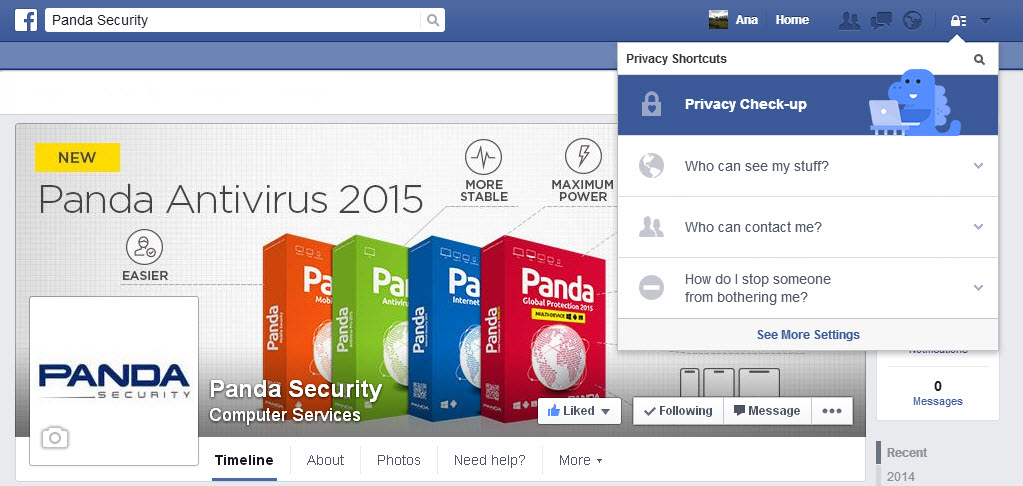
To access it you have to click the padlock symbol in the top right of the screen and select “Privacy checkup

facebook privacy check - up

A dialog box then opens with three simple steps.

How to configure privacy settings in Facebook

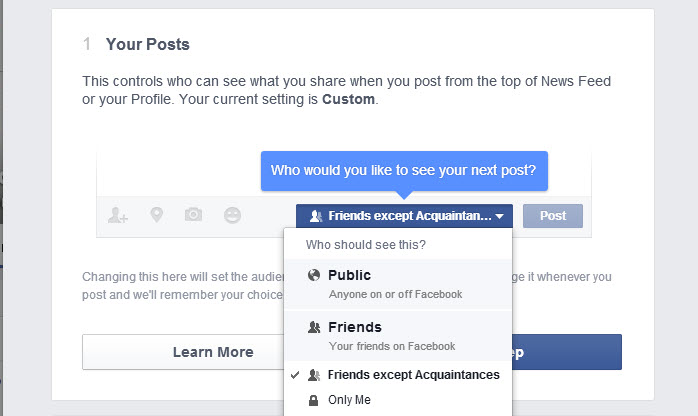
  1. The first option lets you control who can see your posts when you update your status from the news section or from the wall. As well as telling you the current settings, you can also change them to suit your preferences

facebook privacy check - up posts

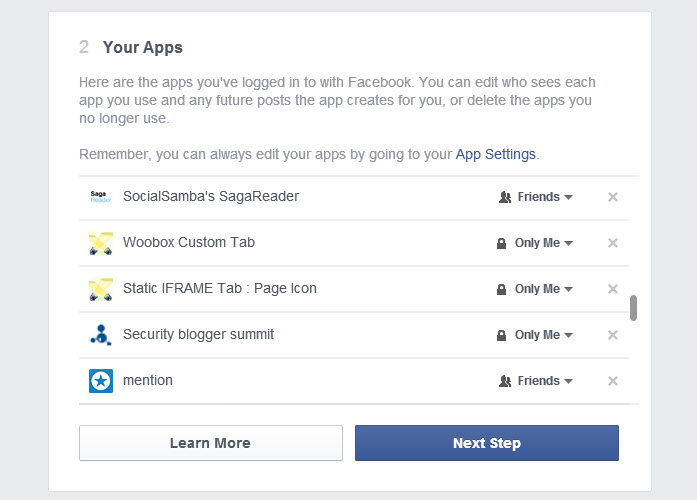
  1. The next step displays a list of all the applications that can access your profile and information. Here you can also prevent this access if you no longer use the application in question. What’s more you can see which of your contacts can see posts that the applications publish ​​in your name.

facebook privacy check - up apps

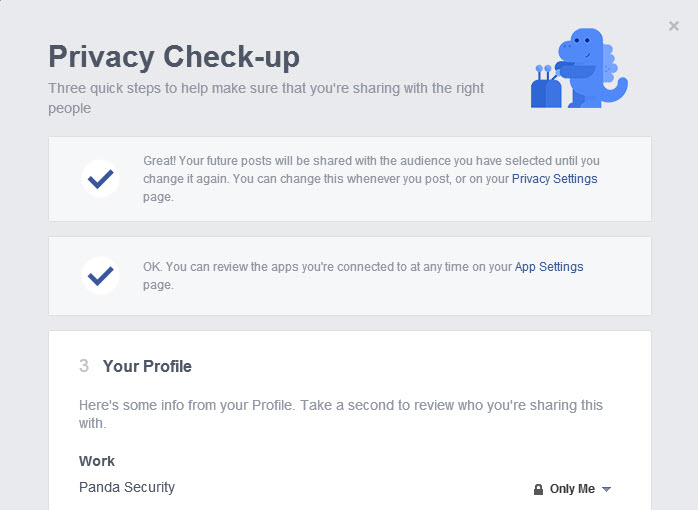
  1. Finally, Facebook helps you check which personal information you’re sharing on your profile: your job, school and college background, where you live … you can add or delete data and restrict access to it.

facebook privacy check - up profile

Although none of these settings prevent Facebook from using your personal information for advertising, it can help you know which contacts can see which posts.

At present this help feature does not include settings for albums or photos as a profile or homepage, which you will have to check directly.

If after meeting Facebook’s new dinosaur you still have questions about the privacy settings of your profile, you can always check our guide.

More | Facebook Privacy Guide


The post Facebook offers a new tool for configuring privacy appeared first on MediaCenter Panda Security.

AVG makes privacy crystal clear with Short Privacy Notice

In our connected world, mobile technology is an integral part of daily living. Apps help us find the stores we are looking for, meet our friends at the right time and place, and keep us safe online. We trust these apps with our personal information in exchange for these services, which are often free. Sometimes we share sensitive information with the app in order to optimize that service. But do we ever think about what these apps do with the data they collect, and do we really know why they collect it?

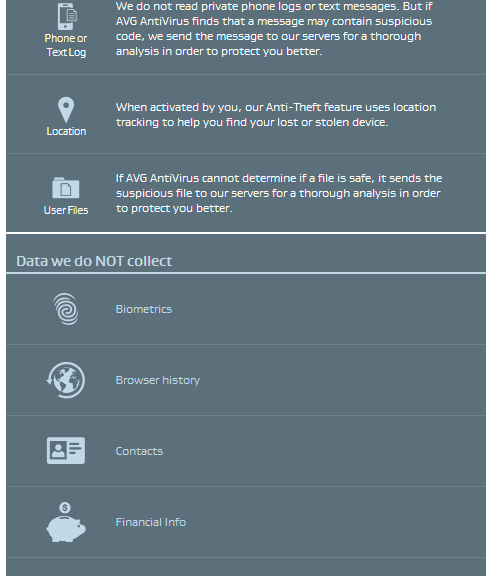
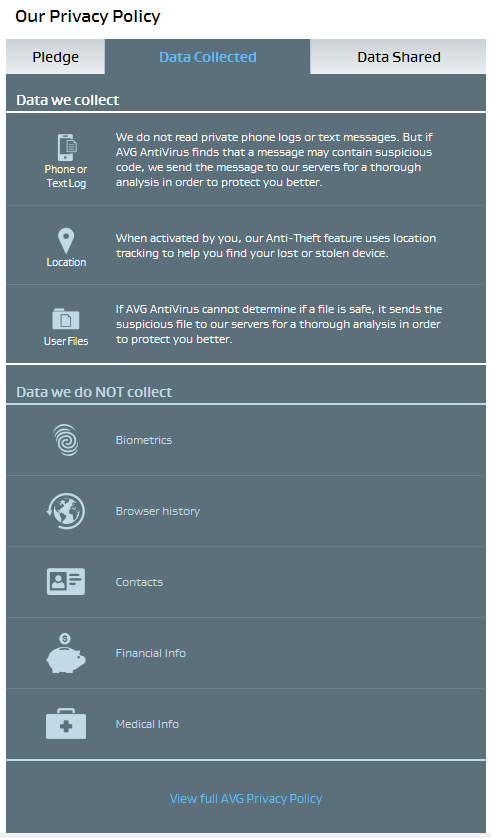
At AVG, we believe that building trust in relationships is important. Transparency is a key element to build that trust which means you have to know what’s going with the data behind the app. The mobile environment is even more challenging because of the limited space and form factor. We’ve been innovating in this area to better show users what data is collected and how it is used. We’ve done this with initially with a Short Data Privacy Notice that tells our customers in a clear, straightforward, and transparent way what our apps collect and share in an easy to read form. Today I am delighted to tell you that the AVG Short Data Privacy Notice has been launched on our following apps:  AVG AntiVirus FREE for Android, AVG Privacy Fix and AVG Cleaner for Android. Overtime we expect this approach will become the standard in mobile and desktop environments.

This simple-to-use feature is accessed from the corner menu of the app main screen. To ensure full transparency for all our customers, we still give quick and easy access to our full privacy policy notice at the bottom of each page of the AVG Short Data Privacy Notice.

spn1

In the video below, AVG’s Chief Legal Officer Harvey Anderson explains how to use the AVG Short Data Privacy Notice and what we disclose to you through it.

Chat apps leak: Billion app users from OKCupid to Grindr at risk

Nearly a billion users of a dozen chat apps for Android including popular apps such as Instagram, Oovoo, OKCupid and Grindr could be at risk from eavesdroppers and snoopers after University of New Haven researchers found serious data leakage problems.

With many of the most popular chat apps on Android affected, tech news site CNET calculates that nearly a billion (968 million) users could be putting highly private data in the hands of apps that transmit and store it unencrypted.

Many of the Android apps (the researchers focused on Android rather than iOS, although there is no evidence the iOS apps behave differently), send text wirelessly unencrypted, and store images on servers for weeks without encryption or authentication.

Chat apps leak: 12 Android apps leak text and images

According to CNET’s report, the following apps sent text, images, location maps and video unencrypted – Instagram, OKCupid, OoVoo, Tango, Kik, Nimbuzz, MeetMe, MessageMe, TextMe, Grindr, HeyWire, Hike and TextPlus.

The site notes that not every app sent every form of media unencrypted, but said that all sent at least some forms, from pictures to text in unencrypted forms.

Others stored media such as images on servers unencrypted and without any form of authentication “for weeks”.

‘Sniffer’ software reveals leaks

The researchers used PC ‘sniffer’ software such as Wireshark and Network Miner to monitor the data transmitted by the apps, and found images and text transmitted and stored unencrypted – and potentially at risk from snoopers.

In the series of YouTube videos, one researcher says, “We recorded network traffic in Wireshark, to see if files remained on the server. For Instagram, we found an image stored in their servers, unencrypted and without authentication.”

“Next, we opened up Oovoo and sent the keyword “Sparklehorse,” and it was picked up in Network Miner. Next we had Oovoo send an image. It was also picked up in Network Miner.”

CNET reports that few of the apps had replied to requests for further information, but that Grindr had said, “We monitor and review all reports of security issues regularly. As such, we continue to evaluate and make ongoing changes as necessary to protect our users.”

The post Chat apps leak: Billion app users from OKCupid to Grindr at risk appeared first on We Live Security.

Private browsing – Americans ‘care deeply’ about privacy

A new Harris survey found that almost all Americans care about online privacy, and 71% said that they ‘care deeply’ about it. The survey found that the service that worries Americans most regarding their privacy is Facebook with 66% of Americans concerned over it, a full 10 percentage points ahead of email (56%) and worries over private browsing (52%).

Worryingly, Americans also voiced concerns about activities governed not by the rules of the open internet, but by employment contracts, such as using social media while at work (16%), and looking up new jobs while at work (9%), according to Help Net Security.

Other technology platforms which worried the adults under survey were search engines (45%) and social photo-sharing apps such as Instagram (35%).

The activities which worried the surveyed adults most were online banking (71%), online shopping (57%), looking up photos of themselves (27%) and browsing pornography according to Business Insider.

Private browsing: What worries us most?

Most of the adults surveyed felt that they should have full rights over their own information online, with 93% believing they should have control over at least some of their private browsing information – and 12% specifying “naked selfies” as an area they would wish to have more control over.

The survey was conducted by WordPress hosting service WP Engine, and found that most web users were concerned about desktop private browsing impacting their privacy.

Mobile apps worried only 30% of those under survey, with online dating apps mentioned by 27% of those surveyed, and instant messaging apps such as WhatsApp mentioned by 23%.

This is despite serious security concerns raised over messaging services such as WhatsApp, recorded by ESET security evangelist Aryeh Goretsky in a detailed blog post. “Security and privacy have gotten off to a slow start in WhatsApp,” Goretsky says.

Private browsing: “Naked selfie” fear

Overall, it was clear that online banking and financial details posed the biggest worries for American web browsers, with a clear majority concerned over the safety of their data.

“With so much personal detail accessible by each other online, it’s more important than ever to be talking about what information is truly respected as private,” said Heather Brunner, CEO of WP Engine.

“99% of Americans say they care about online privacy, so it’s understandably concerning when you consider the sensitivity around some of their data being shared, from bank records to relationship status, in some cases across public platforms.”

The post Private browsing – Americans ‘care deeply’ about privacy appeared first on We Live Security.

Now your LinkedIn account can be better protected than ever before

Let’s be honest. LinkedIn doesn’t have the most spotless record when it comes to security and privacy.

In the past, LinkedIn has been hacked (Who can forget when 6.5 million stolen LinkedIn passwords were found on a Russian web server?)

Or maybe you recall hearing about how LinkedIn was scooping up the contents of iOS calendars, including sensitive information such as confidential meeting notes and call-in numbers, and transmitting them unencrypted in plaintext.

Or how about the time that LinkedIn controversially introduced (and then rapidly withdrew) a widget that meddled with the standard iOS Mail app, with the side effect of compromising the entire security of your email inbox, allowing LinkedIn to read every message you sent or received *outside* of the site?

I could go on, but you get the idea – and, anyway, I like to think that companies can learn. And, on this occasion, LinkedIn has done something that should be applauded.

In a blog post published yesterday, LinkedIn explained that it was introducing three new tools which go some way to boosting security, and granting members more control over their data.

First up, you can now check where (if anywhere) else you are currently logged into LinkedIn.

It’s all very well being logged into your LinkedIn account at home, but are you sure you logged off in the office? Alternatively, is it possible that a hacker has stolen your password and is currently messing around with your LinkedIn account on the other side of the world?

Now there’s an easy way to check.

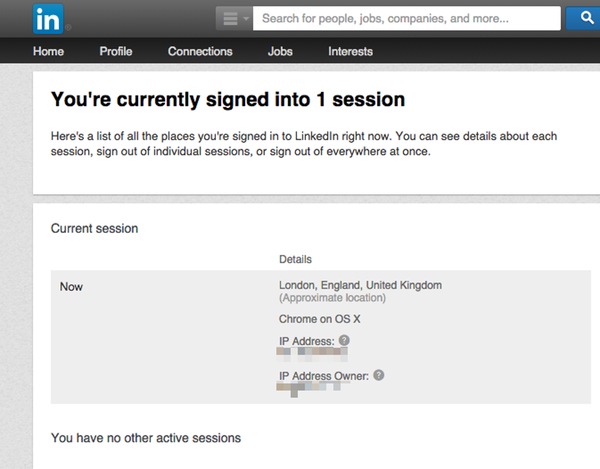
Go to your settings and click on See where you are logged in to view a complete list of the devices that you are signed into the site.

LinkedIn active sessions

In the above screenshot, you can see that I have nothing to fear. There’s only one computer currently logged into my LinkedIn account, and I feel fairly comfortable that that’s me.

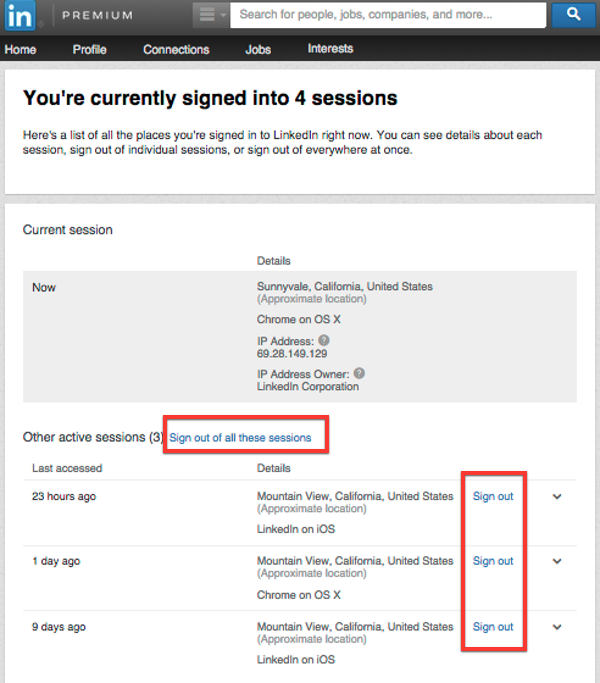
But if there had been additional sessions displayed, I would have been able check what browser and operating system is being used in each case, and the approximate location of the activity. Then, if I chose, logging them out remotely is just a mouse click away.

Multiple sessions

And, of course, if the other sessions were at locations or on devices I didn’t recognise then that might be a good time to consider changing my password and enabling LinkedIn’s two-factor authentication.

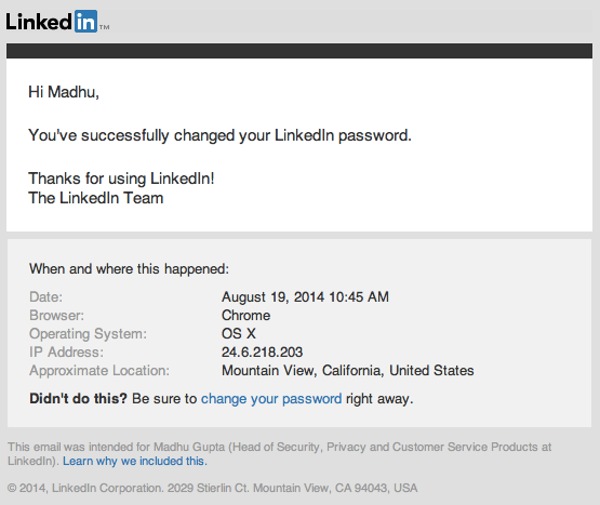
Next up, LinkedIn is offering more information to users in its password change email notifications – telling them, for the first time, when and where an account’s password change occurred.

LinkedIn password change

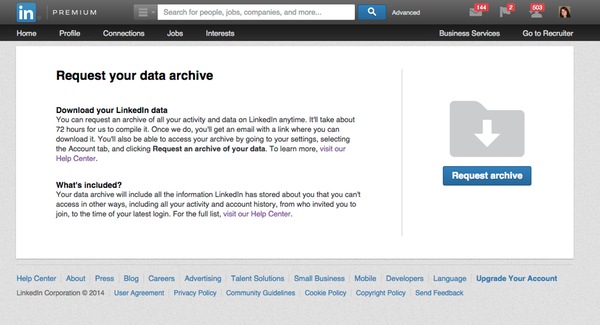
Finally, LinkedIn has taken a leaf out of Facebook and Google’s book and provided a way for users to easily export all of the data that the site stores about you, by requesting your data archive.

Request LinkedIn data archive

Once requested, it takes LinkedIn approximately 72 hours to collate the data that it holds on you, but never fear because you will be sent an email once the data is available for download.

None of these new features can really be considered rocket science, but it’s good to see LinkedIn introduce them and putting more power into the hands of its millions of users, who would feel pretty dreadful if their account was ever compromised.

It’s essential to keep your LinkedIn account out of the hands of fraudsters and internet criminals, precisely because it is the “business social network”.

In the past hackers have taken over accounts and posted poisoned links, and it’s easy to imagine the fraudulent behaviour that could take place if a worker’s colleagues and industry peers believed that it was John Doe communicating with them rather than a malicious attacker.

Of course, there’s no point to these tools if they aren’t actually used in the way that they’re designed.

Read LinkedIn’s blog, ensure that you’re familiar with these new features and the site’s two-factor authentication facility, and you will be better placed to protect both yourself and your fellow workers.

The post Now your LinkedIn account can be better protected than ever before appeared first on We Live Security.