Tag Archives: Security

CWE Vulnerability Assessment Report 2014

Last year is almost three months over and we have been busy completing the CWE statistics of our vulnerabilities. The biggest change from the year before is the scale of the data – CWE report for 2013 was based on 37 classified vulnerabilities, whereas last year we classified 617 vulnerabilities in our bugzilla. Out of them 61 were closed with resolution NOTABUG, which means they were either not a security issues, or did not affect Red Hat products. These still include vulnerabilities which affect Fedora or EPEL packages only – narrowing this down to vulnerabilities affecting at least one supported Red Hat product we end up with 479.

The graph below shows the Top 10 weaknesses in Red Hat software. Note the total sum is bigger than overall number of vulnerabilities, as one vulnerability may be result of multiple weaknesses. The most common case is CWE-190 Integer Overflow or Wraparound causing out-of-bounds buffer access problems.

The top spot is taken by cross site scripting with 36 vulnerabilities last year. However, closer examination reveals that despite the count, it was not very common. In fact, two packages had much more XSS flaws that the average: phpMyAdmin with 13 and Openstack (Horizon and Swift) with 7. The standard recommendation to the developers would immediately be to use one of the modern web frameworks, whether it be Ruby on Rails, Django or others.

The second place is occupied by Out-of-bound Read. Again, the distribution of vulnerabilities is not flat among packages, with xorg-x11-server having 9 and chromium-browser 5 vulnerabilities of this type last year. All of the xorg-x11-server come from a single security advisory released on 2014-12-09, which fixed flaws reported by Ilja van Sprundel. The results of his security research of X, which lead to discovery of the flaws, were presented on CCC in 2013. His presentation is a great intoduction into X security problems and is still available.

From the above we could hypothesize that the statistics are dominated by a smaller set of very vulnerable packages, or that certain packages are be prone to certain kinds of weaknesses. The graph below shows a number of vulnerabilities that affected each of the packages – vulnerabilities which did not affected versions of packages we ship are excluded.

Median value of vulnerabilities per package is 1, however, not all packages are equal. Looking at the top 20, all of the packages contain large codebases, some of which are a separate product of an upstream vendor. We should not make a mistake of misinterpreting this graph as Top 20 most vulnerable projects, as it would be more fair to compare apples with apples e.g. kernel (package) with Openstack (which we ship as a product). More honest interpretation would be to see it as a list of packages that increase the attack surface of the system the most when installed.

If we look at statistics per-product, Red Hat Enterprise Linux dominates just by including vast number of packages. The distribution of weaknesses is therefore very close to the overall one show on the first graph above. However, if we look at the top 5 weaknesses in RHEL 5, 6 and 7, we can see a statistically significant drop in number of use after free types of vulnerabilities.

The root cause of this has been traced back to our source code analysis group and the mass scans performed on the Fedora versions prior to RHEL 7 rebase. These scans were performed using a couple of source code analysis tools including Coverity and cppcheck and the warnings were addressed as normal bugs. This explanation is also supported by the decreasing number of found use-after-frees in Fedora from versions 17 to 19, which served as basis for RHEL 7. Interestingly, other weaknesses like buffer access problems and overflows are unaffected, which is probably combination of a) inherent difficulty of their detection via code analysis and b) large number of false positives, making the developers less inclined to address these types of warnings.

The two most common weaknesses in Openshift Enterprise are Information Exposure and Cross Site Scripting. A closer look tells a different story – 5 out of 6 information exposure vulnerabilities were found in Jenkins, shipped as part of the Openshift product. In fact, surprising 21 out of 60 vulnerabilities that affected Openshift product were present in Jenkins. On the other hand, just 9 vulnerabilities were found in core Openshift components.

Interestingly, the distribution of vulnerable components in Openstack is more flat with no component standing out. CWE-400 Uncontrolled Resource Consumption (‘Resource Exhaustion’) is the most common weakness and all of the vulnerabilities affect core Openstack components. Number of vulnerabilities in Keystone related to session expiration (4) is also surprising, as we haven`t seen many vulnerabilities of that type in other packages last year.

Other products and components also tend to have their specific weaknesses: external entity expansion for Java/JBoss based products, out of bounds reads in Freetype, use after free in Mozilla etc. Overall the depth of the data is much bigger and provides new possibilities for the proactive research. Having more precise data for the feedback loop allowing us to both evaluate past measures and propose future ones is next step towards more efficient proactive security. Unfortunately, the time it takes for any countermeasures to make a dent in statistics is measured in releases, so this data will become much more interesting as they change in time.

Vulnerable Mobile Apps are just waiting to be exploited

The Apple AppStore and Google Play are doing a great job in guarding their mobile users from downloading and installing malicious apps.

By centralizing App distribution, mobile platform owners can prevent hackers from uploading malicious apps and potentially infecting millions of users. This is a great lesson that we learned from the PC days where a decentralized distribution system, and open platform, made it easy for malware to spread.

Can we claim a victory on the hackers?  Not quite yet.

The fact that the AppStore and Google Play managed to control the distribution of malicious apps does not mean there are no vulnerable apps out there.

Hackers are clever; they have found ways to get around stringent app store controls by exploiting existing non-malicious apps that are vulnerable. This can be done either via a different app, by inspecting data on transit or even via the web, while you browse from your mobile browser.


How can an app be vulnerable?

There are three main ways that an app can be vulnerable to hackers.

Data transmission

Almost all mobile apps transmit and receive data between our devices and remote servers. This allows apps to update, send statistics, check licenses, monitor analytics and so on. There are two ways that this leaves app vulnerable:

  • No encryption – if data leaving your device is unencrypted, hackers can ‘look inside’ it and get your passwords, credit card number or any other personal details you many not want to share. This is most common on public Wi-Fi hotspots like those found in airports, malls or coffee shops.
  • Certificate validation – when apps send data to a remote server, it’s important that it is the correct one and not one owned by a hacker. The use of digital certificates on the server can help the app validate the server’s identity. Without these digital certificates, data can be at risk.

Data storage

As we use mobile apps, most of them store data locally on our devices. These often take the form of log files, which record our activities within an app, the strings we typed in it, cached data/reports and more. There are two ways that these files can leave apps vulnerable:

  • No encryption – storing data on the device can greatly improve app performance and user experience. However, leaving private data unencrypted on the device can be dangerous. A separate app installed on the device can potentially have a permission to access such file, ‘look inside’ and retrieve personal data.
  • Files left after uninstall – when we uninstall apps from our devices, many of us expect that all related files (with our private data in them) are also removed. However, this is no always the case. Apps often have permission to create files in various locations on our devices, these can be left behind when apps are removed. Such fragments can later be accesses by other apps to retrieve data.

3rd party components

It’s quite common for app developers to release their products out to the market very quickly. As time is short, developers reuse components (SDKs) from 3rd parties to support the functionality they need. Example of popular development tools and components can be found here – http://www.appbrain.com/stats/libraries/dev

The issue with these toolkits is that they are not always secure. Here are a few examples:

  • Android WebView – many mobile apps display web content. In order to download and render such content on a mobile device, most Android developers use the WebView component. However this component was identified to be vulnerable to remote attacks – CVE-2012-6636.
  • Dropbox Android SDK – when mobile apps would like to integrate its functionality with cloud storage (like photo apps, wallets, vaults etc.) they integrate SDKs from cloud storage providers. The Dropbox Android SDK was found to be vulnerable – CVE-2014-8889. This vulnerability may enable theft of sensitive information from apps that use the vulnerable Dropbox SDK both locally by malware and also remotely by using drive-by exploitation techniques.
  • Configuration and development errors – as long as humans will continue to code software, vulnerabilities will exist. The increasing complexity of operating systems, databases, app logic and platforms, compounded by short development windows makes it very difficult for developers to catch each and every error in their code. Unfortunately this leaves large volumes of untested code that are potentially vulnerable.


Why do apps have these vulnerabilities?

Now that we have identified the main types of vulnerability found within mobile apps, it’s important to understand the root causes behind them. It’s not simply a question of bad coding.

Awareness

Just as with any problem, if you unaware of a risk you won’t pay attention to it. Most developers are trained to deliver functionality, not security.

Small development teams

Unlike PC products, most mobile apps require relatively small development teams. With the ever increasing functionality required and short time to market, the available time to spend on finding vulnerabilities is getting shorter and shorter.

Abandoned apps

Developers have abandoned thousands of apps due to low monetization. These abandoned apps are no longer supported and any vulnerabilities remain indefinitely.

Rush to market

The mobile world is moving faster than ever. Developers need to code and release their apps in almost ‘no time’. While the business demand functionality, that leaves almost no-time to security scanning and audits.


What can developers do to secure their Apps?

It’s not all bad news though, there are several things that app developers can do to improve the security of their apps.

  • Learn about secure coding and vulnerable SDKs to avoid common mistakes and deliver a secure app to your users.
  • Embed security testing in the general quality assurance procedures; from unit testing to continuous integration.
  • Use automated tools to statically and dynamically scan and test for vulnerabilities
  • Remove unneeded functionality from your code or stop the distribution of an app that is no longer supported.


What can App Store and Google Play do?

Still, developers are not entirely responsible for eradicating vulnerable apps. Official mobile stores employ automatic security scanners to identify malicious apps. These can often be very difficult to detect and it requires lots of resources and attention.

However, a lot of improvements can be made to help prevent the distribution of vulnerable apps.  I believe the most progress can be made in improving communication between the app stores and developers when issues arise:

  1. Developers should receive a notice once their app was found to be vulnerable.
  2. Apps that include popular development tools that were found vulnerable should be notified and asked to update the tool/SDK to a safe version.
  3. Developers should have sufficient time to release a fix, otherwise their app should be unlisted.
Reference: A list of top 10 Mobile Risks was published by OWASP group during 2014 : https://www.owasp.org/index.php/OWASP_Mobile_Security_Project#tab=Top_10_Mobile_Risks
 

Avira In Free Security Package By Deutsche Telekom

At CeBIT in Hanover, T-Systems CEO Reinhard Clemens said: “Customers are often unsure when it comes to security software. Since the Snowden revelations, they are also anxious and asking for a ‘made in Germany’ protection solution. Deutsche Telekom wants to make it easy for as many people as possible to secure their smartphones and computers. That is why we are expanding our existing offering to include an easy-to-install package version from Germany.”

Our very own Avira Antivirus will take care of the security part of said package and protect your Windows PCs and Macs, smartphones and tablets with the iOS and Android operating systems, and servers and networks against malware, using an integrated real-time scanner. Thanks to its cloud-based scanning Avira Antivirus achieves unparalleled security and lightning fast performance. Of course it also reliably scans your downloads, folders, and hard disks.

“Avira Browser Safety” will be included in the package as well. The browser extension protects personal information when surfing the internet and blocks malicious websites as well as tracking by advertising networks, so that they can no longer track what a user is searching for or purchasing online.

The free offering is available to download with the market launch in the second quarter this year at www.telekom.de/schutzpaket. A premium version of the offering with additional functions is planned.

Further Information:

The post Avira In Free Security Package By Deutsche Telekom appeared first on Avira Blog.

Five Tips for choosing a Cloud Storage Service

Cloud services are incredibly convenient and can also be a great cost saving measure. But you shouldn’t blindly place trust in cloud services without doing some research first.

If you are considering using a cloud service, I would strongly advise finding the answers to the following questions before signing on the dotted line.

Is it for personal or business?
There are plenty of free options, but you need to determine which is the most reliable and secure, especially if your business will depend on it.

What are you storing and why?
The different cloud services that are currently available offer a variety of features and options that may be better suited to a particular need.

What sort of encryption is available?
Does the cloud storage service offer encryption? If the provider is hacked, your data will be vulnerable. So if they don’t offer encryption then you might want to encrypt your vital documents before uploading

Does the service offer extra security?
Where possible use additional security features like two-factor authentication and login notifications to ensure you have the added layer of security to prevent unwanted breaches.

Do you have adequate backups?
Don’t rely on a single backup, especially for your critical files. You should also backup regularly.

Storing passwords

Storing passwords

a key and a door, with a lock

Passwords may look to you like doors and keys:
they just have to match…

a list of names

…but a system (website, network…) has to store the passwords of many users!

a closed treasure chest

If a system stores all the users passwords
in their original form, like a secret in a chest,

a password list in front of an opened chest

…then once the chest is opened,
all passwords are instantly known!

The weakness:

a security risk warning

So you probably guess that there is a huge potential security risk,

an email showing an actual password

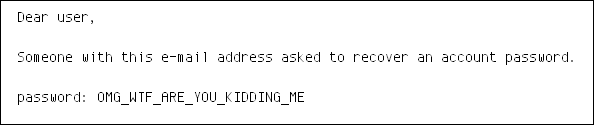
and when you receive an e-mail mentioning your actual password…
…then it means that the system actually knows your original password!

So, in a single attack, someone could just open the chest, and instantly get the password of every user.

This means only one thing for the security of such a system:

fatality

The solution:

So, you want to check if an entered password is correct, yet you need to store many passwords without leaking them.

There’s one answer:

Maths FTW!!

Instead of storing passwords, you store a key that is derived from the password: this makes it possible to authenticate the user without actually storing the password:

  1. take the entered password
  2. calculate the key
  3. compare with the key generated with the original password

For example, a bcrypt-derived key of “password” is “$2a$10$3BY0wQ3rgzBf6VlG0YFLoekcGrrHKYdSUdSSrN37TqClNg7Oouzey“.

It’s much longer, and in practice, it’s very difficult to determine the original password that it was derived from.

Why not using just any complex hash function to derive the keys?

Because such key derivation functions are specifically designed to prevent an attacker to generate in advance a list of keys from all standard passwords, or better, a well-organised table.

Conclusion

not passwords, but keys

To prevent the risk of an instant and complete leak, one should never store passwords, but only derived keys, generated via dedicated algorithms.

key = math(password)

These keys are mathematically derived from the entered passwords.

no password list

That way, you have a real strong authentication system without a vulnerable list of passwords.

For a multi-user system, storing passwords is a big risk !

In a next blog post, we can show how that influences Windows security…

The post Storing passwords appeared first on Avira Blog.

Avast hacks devices at Mobile World Congress

MWC15 Avast logoThe Avast Mobile Security team demonstrated how easy it is to hack smartphones and tablets at the Mobile World Congress.


The sleekest smartphones, the coolest wearable devices, and the best in mobile security were debuted at the Mobile World Congress in Barcelona last week. But it was hacking user’s devices at the Avast booth that had the journalist’s buzzing.

Hacking unsecured Wi-Fi is easy enough for any IT college student

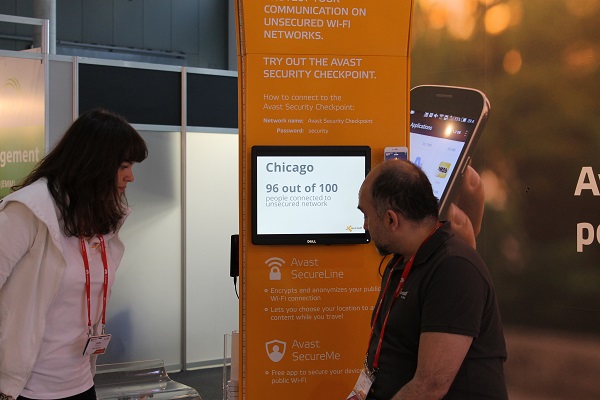
Filip Chytry, a mobile malware researcher that you are familiar with if you visit our blog, set up a wireless hotspot in the Avast booth that allowed visitors to track the online activity of any device that connects.

“The site will let Avast capture passwords, messages and other information people type on the websites, and Chytry can even create dead ringers for Gmail or Facebook sign-in screens – – down to the little green padlock icon that indicates a secure connection…,” reported Bloomberg Business in The Easiest Way to Get Hacked: Use Phone at Phone Show.

The hacking demonstration illustrated what Avast found out during a global Wi-Fi hacking experiment conducted right before MWC.

“The study found that people around the world overwhelmingly prefer to connect to unsecured and unprotected Wi-Fi networks instead of password-protected networks,“ wrote Help Net Security in Global experiment exposes the dangers of using Wi-Fi hotspots.

Avast at MWC15

Most people connect to a completely unsecured public Wi-Fi hotspot without a second thought.

Security experts from Avast traveled to 9 cities on 3 continents, and found that Wi-Fi users in Asia are the most prone to attacks. Chicago and London are the most vulnerable in the USA and Europe. Avast’s spokesperson Marina Ziegler told E&T Engineering and Technology magazine, “…in London we found that 54 per cent of routers were weakly encrypted and easily accessible to hackers.”

“That means that if a hacker walks into a pub, he can access the router’s settings and for example reroute the traffic via another malicious server,” said Chytry. “That’s very easy. Every IT college student can do that.”


CWE update

In the past Red Hat Product Security assigned weakness IDs only to vulnerabilities that meet certain criteria, more precisely, only vulnerabilities with CVSS score higher than 7. Since the number of incoming vulnerabilities was high, this filtering allowed us to focus on vulnerabilities that matter most. However, it also makes statistics incomplete, missing low and moderate vulnerabilities.

In the previous year we started assigning weakness IDs to almost all vulnerabilities, greatly increasing the quantity of data used to generate statistics. This was a big commitment time-wise, but resulted in 13 times more vulnerabilities with assigned weakness IDs in 2014 than the year before. There are a few exceptions – for some vulnerabilities there are not enough information available to decide the types of weaknesses. These almost always come from big upstream vendors. For this reason bugs in mysql or OpenJDK do not have weaknesses assigned and are excluded from the CWE statistics. With the exceptions mentioned, there are always at least references to commits that fix the vulnerability available, so it is possible to assign correct weakness data to vulnerabilities in any open source project.

Part of using Common Weakness Enumeration (CWE) at Red Hat is CWE Coverage – a subset of weaknesses that we use to classify vulnerabilities. As everyone can notice after scrolling through the CWE list there are a lot of weaknesses that are very similar or describe the same issue in varying level of detail. This means different people can assign different weaknesses to the same vulnerability, a very undesirable outcome. Furthermore, this may skew resulting statistics, as vulnerabilities of the same nature may be described by different weaknesses. To counter these effects, Red Hat keeps CWE coverage, a subset of weaknesses we use, to prevent both. The coverage should contain weaknesses with similar level of detail (Weakness Base) and should not contain multiple overlapping weaknesses. However there is a possibility that a vulnerability would not fit into any of the weaknesses in our coverage and for this reason the coverage is regularly updated.

Maintenance of CWE coverage has been tied with the release of new CWE revisions by MITRE in past. Since we started assigning weakness IDs to much larger number of vulnerabilities we also gathered weaknesses missing in the coverage more quickly. Therefore the coverage has been updated and the changes are now included in the statistics. Current revision of Red Hat`s CWE Coverage can be found on the Customer Portal.

Apart from adding missing weaknesses we also removed a number of unused or unsuitable weaknesses. The first version of coverage was based on CWE Cross-Section maintained as view by MITRE. The CWE Cross-Section represents a subset of weaknesses at the abstraction level most useful for general audiences. While this was a good starting point, it quickly became evident that the Cross-Section has numerous deficiencies. Some of the most common weaknesses are not included, for example CWE-611 Improper Restriction of XML External Entity Reference (‘XXE’), which ranked as 10th most common weakness in our statistics for 2014. On the other hand, we have not included considerable number of weaknesses that were not relevant in open source, for example CWE-546 Suspicious Comment. After these changes current revision of the coverage has little in common with CWE Cross-Section, but represents structure of weaknesses usually specific to open source projects well.

Last but not least, all CWE related data are kept public and statistics (even for our internal use) are generated only from publicly available data.The weakness ID is stored in whiteboard of a vulnerability in bugzilla. This is rather cryptic format and requires tooling to get the statistics into a format that can be processed. Therefore, we are currently investigating the best way how to make the statistics available online for wider audience.

Why you need to protect your small business from hackers

Avast Free Antivirus protects small and medium sized businesses for free.

IT pros have used Avast Free Antivirus at home for years. It’s not a huge leap to use free Avast for Business at their place of business.

Small and medium-sized businesses face a challenge when it comes to keeping their data secure. Many companies don’t have the budget to hire a Managed Service Provider (MSP) to take care of their IT needs, and often, they think they do not have enough knowledge or time to handle it themselves, therefore the path of least resistance is to not have any security at all. At the very best SMBs use a consumer version of antivirus software.

But these days, neither of those options is a good idea. Having no protection leaves you too vulnerable, and the problem with using a consumer product in a work environment is whoever is managing the network cannot look across all computers at once and implement policy changes or updates.

Do hackers really target small businesses?

The media coverage of big time data breaches like Target, Neiman Marcus, and Home Depot may have many SMB owners thinking that they are not at risk, but even small and medium-sized businesses need to make sure that their data and that of their customers is protected.

Here’s a statistic that should get your attention: One in five small businesses are a victim of cybercrime each year, according to the National Cyber Security Alliance. And of those, nearly 60% go out of business within six months after an attack. And if you need more convincing, a 2014 study of internet threats reported that 31% of businesses with fewer than 250 employees were targeted and attacked.

Why do hackers target small businesses?

Hackers like small businesses because many of them don’t have a security expert on staff, a security strategy in place, or even policies limiting the online activity of their employees. In other words, they are vulnerable.

Don’t forget that it was through a small service vendor that hackers gained access to Target’s network. Hackers may get your own customer’s data like personal records and banking credentials and your employee’s log in information, all the while targeting the bigger fish.

While hackers account for most of the data lost, there is also the chance of accidental exposure or intentional theft by an employee.

Avast for BusinessWhat can I do to protect my small business?

For mom-and-pop outfits, Avast for Business, a free business-grade security product designed especially for the small and medium-sized business owner, offers tremendous value. The management console is quite similar to our consumer products meaning that the interface is user-friendly but also powerful enough to manage multiple devices.

“Avast for Business is our answer to providing businesses from startup to maturity a tool for the best protection, and there’s no reason for even the smallest of companies not to use it, because it starts at a price everyone can afford, free,” said Luke Walling, GM and VP of SMB at Avast.

Some companies may still opt to pay for a MSP, and in many cases, especially for medical or legal organizations, handing over administration to a third-party may be a good way to go. Either way, our freemium SMB security can be used, and if you use a MSP then the savings can be passed on to you.

Is free good enough for a business?

Many IT professionals have been using free security on their home computers for years. It’s not such a huge leap of faith to consider the benefits of making the switch in their businesses as well.

“I have been using Avast since 2003 at home, with friends, with family. You really come to trust and know a product over the years. It lends itself to business use really well, nothing held back,” said Kyle Barker of Championship Networks, a Charlotte-area MSP.

How do I get Avast for Business?

Visit Avast for Business and sign up for it there.

Factoring RSA export keys – FREAK (CVE-2015-0204)

This week’s issue with OpenSSL export ciphersuites has been discussed in the press as “Freak” and “Smack”. These are addressed by CVE-2015-0204, and updates for affected Red Hat products were released in January.

Historically, the United States and several other countries tried to control the export or use of strong cryptographic primitives. For example, any company that exported cryptographic products from the United States needed to comply with certain key size limits. For RSA encryption, the maximum allowed key size was 512 bits and for symmetric encryption (DES at that time) it was 40 bits.

The U.S. government eventually lifted this policy and allowed cryptographic primitives with bigger key sizes to be exported. However, these export ciphersuites did not really go away and remained in a lot of codebases (including OpenSSL), probably for backward compatibility purposes.

It was considered safe to keep these export ciphersuites lying around for multiple purposes.

  1. Even if your webserver supports export ciphersuites, most modern browsers will not offer that as a part of initial handshake because they want to establish a session with strong cryptography.
  2. Even if you use export cipher suites, you still need to factor the 512 bit RSA key or brute-force the 40-bit DES key. Though doable in today’s cloud/GPU infrastructure, it is pointless to do this for a single session.

However, this results in a security flaw, which affects various cryptographic libraries, including OpenSSL. OpenSSL clients would accept RSA export-grade keys even when the client did not ask for export-grade RSA. This could further lead to an active man-in-the-middle attack, allowing decryption and alteration of the TLS session in the following way:

  • An OpenSSL client contacts a TLS server and asks for a standard RSA key (non-export).
  • A MITM intercepts this requests and asks the server for an export-grade RSA key.
  • Once the server replies, the MITM attacker forwards this export-grade RSA key to the client. The client has a bug (as described above) that allows the export-grade key to be accepted.
  • In the meantime, the MITM attacker factors this key and is able to decrypt all possible data exchange between the server and the client.

This issue was fixed in OpenSSL back in October of 2014 and shipped in January of 2015 in Red Hat Enterprise Linux 6 and 7 via RHSA-2015-0066. This issue has also been addressed in Fedora 20 and Fedora 21.

Red Hat Product Security initially classified this as having low security impact, but after more details about the issue and the possible attack scenarios have become clear, we re-classified it as a moderate-impact security issue.

Additional information on mitigating this vulnerability can be found on the Red Hat Customer Portal.

Common Criteria

What is Common Criteria?

Common Criteria (CC) is an international standard (ISO/IEC 15408) for certifying computer security software. Using Protection Profiles, computer systems can be secured to certain levels that meet requirements laid out by the Common Criteria. Established by governments, the Common Criteria treaty has been signed by 17 countries, and each country recognizes the other’s certifications.

In the U.S., Common Criteria is handled by the National Information Assurance Partnership (NIAP). Other countries have their own CC authorities. Each authority certifies CC labs, which do the actual work of evaluating products. Once certified by the authority, based on the evidence from the lab and the vendor, that certification is recognized globally.

Your certification is given a particular assurance level which, roughly speaking, represents the strength of the certification. Confidence is higher at a level EAL4 than at EAL2 for a certification. Attention is usually given to the assurance level, instead of what, specifically, you’re being assured of, which is the protection profiles.
CC certification represents a very specific set of software and hardware configurations. Software versions and hardware model and version is important as differences will break the certification.

How does the Common Criteria work?

The Common Criteria authority in each country creates a set of expectations for particular kinds of software: operating systems, firewalls, and so on. Those expections are called Protection Profiles. Vendors, like Red Hat, then work with a third-party lab to document how we meet the Protection Profile. A Target of Evaluation (TOE) is created which is all the specific hardware and software that’s being evaluated. Months are then spent in the lab getting the package ready for submission. This state is known as “in evaluation”.
Once the package is complete, it is submitted to the relevant authority. Once the authority reviews and approves the package the product becomes “Common Criteria certified” for that target.

Why does Red Hat need or want Common Criteria?

Common Criteria is mandatory for software used within the US Government and other countries’ government systems. Other industries in the United States may also require Common Criteria. Because it is important to our customers, Red Hat spends the time and energy to meet these standards.

What Red Hat products are Common Criteria certified?

Currently, Red Hat Enterprise Linux (RHEL) 5.x and 6.x meet Common Criteria in various versions. Also, Red Hat’s JBoss Enterprise Application Platform 5 is certified in various versions. It should be noted that while Fedora and CentOS operating systems are related to RHEL, they are not CC certified. The Common Criteria Portal provides information on what specific versions of a product are certified and to what level. Red Hat also provides a listing of all certifications and accreditation of our products.

Are minor releases of RHEL certified?

When a minor release, or a bug fix, or a security issue arises, most customers will want to patch their systems to remain secure against the latest threats. Technically, this means falling out of compliance. For most systems, the agency’s Certifying Authority (CA) requires these updates as a matter of basic security measures. It is already understood that this breaks CC.

Connecting Common Criteria evaluation to a specific minor versions is difficult, at best, for a couple of reasons:

First, the certifications will never line up with a particular minor version exactly. A RHEL minor version is, after all, just a convenient waypoint for what is actually a constant stream of updates. The CC target, for example, began with RHEL 6.2, but the evaluated configuration will inevitably end up having packages updated from their 6.2 versions. In the case of FIPS, the certifications aren’t tied to a RHEL version at all, but to the version of the certified package. So OpenSSH server version 5.3p1-70.el6 is certified, no matter which minor RHEL version you happen to be using.

This leads to the second reason. Customers have, in the past, forced programs to stay on hopelessly outdated and unpatched systems only because they want to see /etc/redhat-release match the CC documentation exactly. Policies like this ignore the possibility that a certified package could exist in RHEL 6.2, 6.3, 6.4, etc., and the likelihood that subsequent security patches may have been made to the certified package. So we’re discouraging customers from saying “you must use version X.” After all, that’s not how CC was designed to work. We think CC should be treated as a starting point or baseline on which a program can conduct a sensible patching and errata strategy.

Can I use a product if it’s “in evaluation”?

Under NSTISSP #11, government customers must prefer products that have been certified using a US-approved protection profile. Failing that, you can use something certified under another profile. Failing that, you must ensure that the product is in evaluation.

Red Hat has successfully completed many Common Criteria processes so “in evaluation” is less uncertain than it might sound. When a product is “in evaluation”, the confidence level is high that certification will be awarded. We work with our customers and their CAs and DAAs to help provide information they need to make a decision on C&A packages that are up for review.

I’m worried about the timing of the certification. I need to deploy today!

Red Hat makes it as easy as possible for customers to use the version of Red Hat Enterprise Linux that they’re comfortable with. A subscription lets you use any version of the product as long as you have a current subscription. So you can buy a subscription today, deploy a currently certified version, and move to a more recent version once it’s certified–at no additional cost.

Why can’t I find your certification on the NIAP website?

Red Hat Enterprise Linux 6 was certified by BSI under OS Protection Profile at EAL4+. This is equivalent to certifying under NIAP under the Common Criteria mutual recognition treaties. More information on mutual recognition can be found on the CCRA web site. That site includes a list of the member countries that recognize one another’s evaluations.

How can I keep my CC-configured system patched?

A security plugin for the yum update tool allows customers to only install patches that are security fixes. This allows a system to be updated for security issues while not allowing bug fixes or enhancements to be installed. This makes for a more stable system that also meets security update requirements.

To install the security plugin, from a root-authenticated prompt:

# yum install yum-plugin-security
# yum updateinfo
# yum update --security

Once security updates have been added to the system, the CC-evaluated configuration has changed and the system is no longer certified. STIG requirements are now being met, however, and the system is more secure. This is the recommended way of building a system: starting with CC and then patching in accordance with DISA regulations. Consulting the CA and DAA during the system’s C&A process will help establish guidelines and expectations.

You didn’t answer all my questions. Where do I go for more help?

Red Hat Support is available anytime a customer, or potential customer, has a question about a Red Hat product.

Additional Reading