Tag Archives: Threats

How to disable IPv6 support in your router settings

Your WiFi network is not secured

Your WiFi network is not secured

After the previous articles you should be convinced that router vulnerabilities are one of the major concerns in network security. As you already know, the new Avast 2015 version includes a security feature called Home Network Security (HNS) which scans your network and router for vulnerabilities and prevent threats.

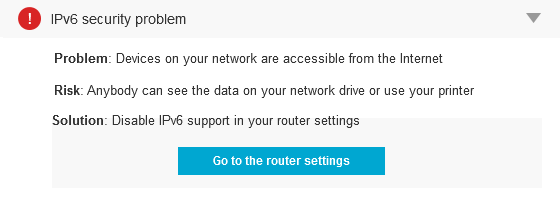
One serious problem occurs when when IPv6 (Internet Protocol version 6) is enabled (both by the ISP and on the router), but there is no IPv6 firewall being used. Which means that anyone on the Internet can access devices on the network (like printers, network disks, etc.). This is often the case because the routers are small, embedded devices that cannot handle IPv6 firewalling.

The main advantage of IPv6 over IPv4 is its larger address space: it allows 2128 or approximately 3.4×1038 addresses (or sites) which is an enormous number! In addition to offering more addresses, IPv6 also implements features not present in IPv4: it simplifies address assignment, network renumbering and packets processing.

In fact, a proper IPv6 firewall requires quite some processing power and RAM, so it’s no wonder that many of the cheap routers don’t have that functionality at all (or it’s not working properly).

The remediation is relatively simple: Just disable IPv6 on the router. In most cases, this shouldn’t have any impact on other services, unless they require IPv6 (in which case, it would be good to replace the router with something better which is IPv6 certified).

Avast Internet Security and Premium products offer full support to IPv6 for your computer on our silent firewall. Take into account that other devices, like network drives connected to the router won’t be protected.


Avast Software’s security applications for PC, Mac, and Android are trusted by more than 200-million people and businesses. Please follow us on FacebookTwitter and Google+.


Driverless cars ‘could be hacked’ warns Institute of Engineering and Technology

Self-driving cars are just around the corner, with the UK government putting up £10 million (around $15.6 million) for cities to pilot trials as soon as next year, but the country’s Institute of Engineering and Technology (IET) today issued stern warnings about the security of the technology.

The post Driverless cars ‘could be hacked’ warns Institute of Engineering and Technology appeared first on We Live Security.

How to change your router DNS settings and avoid hijacking

If your home router is hacked, you have a serious situation on your hands.

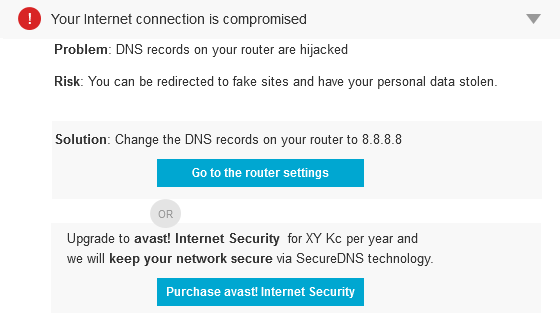
When an Avast Home Network Security scan finds that your router is already compromised, this notification will appear.
Your WiFi network is not secured

Your WiFi network is not secured

This means that the router has been hacked and the DNS settings have been modified to serve hacked contents to a cyberthief. This is a pretty serious situation. When hackers exploit router vulnerabilities, gain access to it, and modify the DNS servers settings, all your Internet traffic can be forwarded to rogue servers. This is called a man-in-the-middle attack.

The DNS or Domain Name System, is the “phone book” of the Internet, and an IP address is what’s listed in the book. DNS names computers, services, or any resource connected to the Internet or a private network. It translates easily memorized domain names, for instance, www.example.com, to the unique numerical IP addresses needed to locate the service worldwide.

What happens when your router is hacked?

Instead of connecting to a clean site or service, when your router is hacked, you’ll visit a rogue and hacked one. It’s obvious that your privacy will be violated, and your banking information could be captured – by the man-in-the-middle mentioned above. Even the usually secure SSL, the HTTPS protocol we have all been instructed to look for to indicate a secure site, won’t assure you’re protected. Instead, you’ll be proxied through malicious servers and the encrypted connection is cut in the middle. This illustration shows what happens.
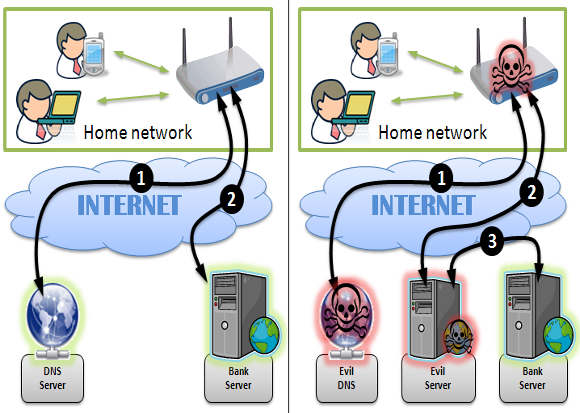
 

Your WiFi network is not secured

Source: http://www.cert.pl//news/8019/langswitch_lang/en

This could also happen if your router is set to default/weak/factory password. So, the worst scenario of hacking is not that uncommon. See the latest news about webcams being hacked because of the owner’s using default passwords. Vincent Steckler, CEO of Avast, told VentureBeat that consumers are notorious for not updating default passwords, just as I’m talking about here. Some 63 percent of wireless routers run with default passwords, says Steckler.

The problem goes further than just one user or one device. The malicious effects can spread to all users in the local network, regardless of the operating system used.

How to protect ourselves against this plague?

First, scan your home network with Avast Home Network Security to verify if your device is compromised. If Avast alerts you, it’s already too late. You’ve already been compromised. You need to manually check the DNS servers in the router configuration.

By default, your router uses DNS servers automatically acquired from your Internet provider. All the devices on your network — PCs, smartphones, tablets, game consoles, and anything else connected to the network — get their DNS server from the router. You can change the DNS server on your router, therefore changing every other device on your network.

There are several good articles on the Internet about changing your DNS. Here’s one from howtogeek.com.

You also need to pay attention to your browser address bar. The HTTPS indicator should be there all the time. If it comes and goes, you may have already been compromised. In these cases, or for any other strange symptom you could be experiencing: Disable your Internet connection immediately and change the router username and password to unique ones (consult the router manual for instructions).

But, be warned, neither of these will be enough because if the router is vulnerable, it will take the attacker no time to change the settings back. Updating the router firmware or even changing it completely – as described in previous article – will be necessary.

Avast Software’s security applications for PC, Mac, and Android are trusted by more than 200-million people and businesses. Please follow us on Facebook, Twitter and Google+.


AT&T Stops Attaching Tracking Files to Mobiles

Wait… AT&T was tracking you with hidden codes?

The secret codes in tracking files, known as ‘header enrichment,’ consist of strings of numbers and letters that are appended to all data traffic that is transmitted from the phone. The header enrichment codes are used to track customers’ website visits and also which apps they use in order to provide advertisers with targeting information. The codes don’t contain personal identity information per se, but because they are unique to each customer and are transmitted along with any personal identity information that a customer voluntarily provides – such as name, address or phone number – together they create a sort of digital fingerprint that could be exploited.

AT&T said it ended the tracking files because its test project has ended. But competing mobile operator Verizon has a similar tracking number system in place, which Twitter’s mobile advertising division uses to target ads.

If you want to know if your mobile carrier is tracking your device, visit this page on ProPublica.org (go there from your mobile device) and click on the box that says ‘Does Your Phone Company Track You?’

Header enrichment technology was developed because traditional web cookies are a challenge for tracking apps on smartphones and tablets. The Open Mobile Alliance adopted an industry standard for injecting the codes in 2010. In response, Google has proposed an alternative Web protocol that prevents such header injections which, of course, the mobile industry is lobbying to defeat.

Avira’s security software for Android and iOS can scan your apps and emails for malware, and also block Trojans and stop Ransomware from restricting access to your data. Check out Avira Mobile Security for iOS or Avira Antivirus Security for Android for free protection.


The post AT&T Stops Attaching Tracking Files to Mobiles appeared first on Avira Blog.

How to upgrade your router with the latest firmware or replace it completely

It’s difficult to accept that we made an unwise purchase or even that a piece of technology has gone obsolete. But when it comes to the security of your home network, it’s time to face up to it.

Last February, Craig Young, a researcher at security firm Tripwire, published research showing that 80% of the 25 best-selling small office/home office (SOHO) wireless router models on Amazon had vulnerabilities. Because some routers, in fact, a lot of them, have so many non-patched vulnerabilities, the easiest way to secure your home network is to replace the router completely with a secure model.

Your WiFi network is not secured

Your WiFi network is not secured


How to update your router

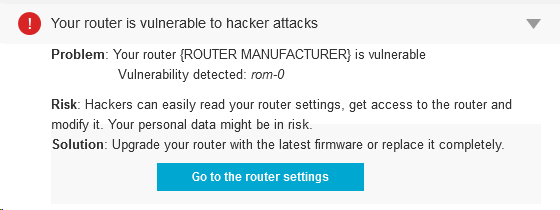
But let’s not spend your money yet. Only four of the reported vulnerabilities were completely new, and many have been patched in later models, so you should first look for firmware updates. Some conscious manufactures release updates for their hardware controls and, if applied, could solve all (or at least some) known vulnerabilities.

Routers do not perform automatic updates, so the process requires appropriate patches to be manually downloaded and installed. Avast 2015 includes a Home Network Security scanner that can help you determine what needs to be done, explain why, and can direct you to the router manufacturer’s website.

Open the Avast user interface, click Scan from the menu on the left, then choose Scan for network threats. Avast will take a look at your router and report back any issues. In most cases, if there is an issue to be addressed, then it will direct you to your router manufacturer’s website.

Yes, Virginia, there is a Santa Claus Router Attack

If you’re not convinced that router attacks are something to be concerned about, then think back on the attack from earlier this year. Attackers remotely altered DNS configurations for more than 300,000 small office/home office (SOHO) routers, subsequently opening up victims to a host of compromises

Among several vulnerabilities around, there is one that is quite common. It’s called ROM-0 and allows the attacker to easily gain control of the whole router and, subsequently, your Internet connection. In short, the attacker could request ROM-0 through HTTP (i.e. http://192.168.1.1/ROM-0) and then he can download all the important and secret data stored in your router: Your ADSL login/password combination, WIFI password and basically all your configuration data.

How to avoid attackers from downloading your Rom-0 configuration file and manipulating your router?

It’s simple (if you are comfortable around computers. Ask a techie to help you, if you’re not):

  • Forward port 80 on the router to a non-used IP address on your network.
  • Enter your router configuration and go to “Port forwarding” configuration.
  • Send all http traffic, of all protocols, to star and end port 80 in a non-used local IP address (something like 192.168.0.xxx, where xxx would be a non-used IP).

There are free guides of “port forwarding” for quite a lot of routers. Check your model here.

Avast Software’s security applications for PC, Mac, and Android are trusted by more than 200-million people and businesses. Please follow us on Facebook, Twitter and Google+.


How to disable access to your router from the Internet

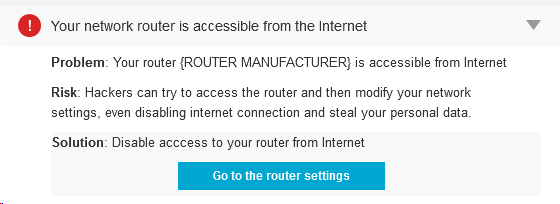
When Avast Home Network Security (HNS) displays the following error: “Your network router is accessible from the Internet” that means that hackers can access your router’s administrative interface.

Your WiFi network is not secured

Your WiFi network is not secured


Although that doesn’t mean imminent threat, the fact that the router is accessible from the Internet is not good. A cybercrook could modify your network settings and even disable your Internet connection or, the worst, steal your personal data.

For sure, if you use the default password in your router, everyone can access your router. However, you won’t do that, will you? If you’re reading this article, we suppose you’re technically educated and will know that using the default password is a serious risk.

hns3Routers, especially Small Office/Home Office (SOHO) wireless routers, are usually quite vulnerable to all sorts of exploits and exposing the admin interface of the router to the Internet is like leaving your door unlocked when you leave home. According to Tripwire, “80% of Amazon’s top 25 best-selling SOHO wireless router models have security vulnerabilities.”

Why should we worry about routers?

“Unsecured routers create an easy entry point for hackers to attack millions of American home networks,” said Vince Steckler, chief executive officer of Avast. “If a router is not properly secured, cybercriminals can easily gain access to an individual’s personal information, including financial information, user names and passwords, photos, and browsing history.”

Set up a strong password

I already explained how to make sure you have the highest level of encryption set on your router. If you missed it, please go back and read my blog, How to turn on WiFi encryption in your router settings.

The next step is to replace thedefault administrator password.Some of the most common mistakes made, not only by common users but also from a significant number of IT professionals, are to use the default administrator password and use the popular WPS and its insecure technology that allows hackers to discover (much easier) the router encryption passphrase.

When creating a new password, make sure it is long and strong, using a mix of numbers, letters and symbols. If you have many visitors to yourhome, it’s a good idea to set up a guest network with a separate password.

Avast 2015 includes a Home Network Security scanner that can help you determine what needs to be done, explain why, and can direct you to the router manufacturer’s website. Read more about it on our blog,  Your home network is at risk of cybersecurity attacks.

Avast Software’s security applications for PC, Mac, and Android are trusted by more than 200-million people and businesses. Please follow us on Facebook, Twitter and Google+.