The internet-cable-television provider Charter Communications recently fixed an issue with its website that was inadvertently leaking the information of tens of thousands of its customers.
Monthly Archives: May 2015
Head-Scratching Begins on Proposed Wassenaar Export Control Rules
Experts point out that the proposed Wassenaar rules in the U.S. leave unanswered questions regarding exploit development and the use of commercial penetration testing tools.
Google introduce new Chrome extension rules to help protect users
Google has just introduced new rules for Chrome extensions to help crack down on unwanted and malicious extensions by only making Chrome extensions available via the official Chrome Store.
According to their blog post announcement, Google’s test phase for the rule saw a 75% drop in users complaining about unwanted extensions. Google wrote:
“We originally did not enforce this policy on the Windows developer channel in order to allow developers to opt out. Unfortunately, we’ve since observed malicious software forcing users into the developer channel in order to install unwanted off-store extensions. Affected users are left with malicious extensions running on a Chrome channel they did not choose.”
The move to a centralized marketplace for extensions is a great way for Google to establish quality control for Chrome extensions, just as it and Apple have with their respective app stores.
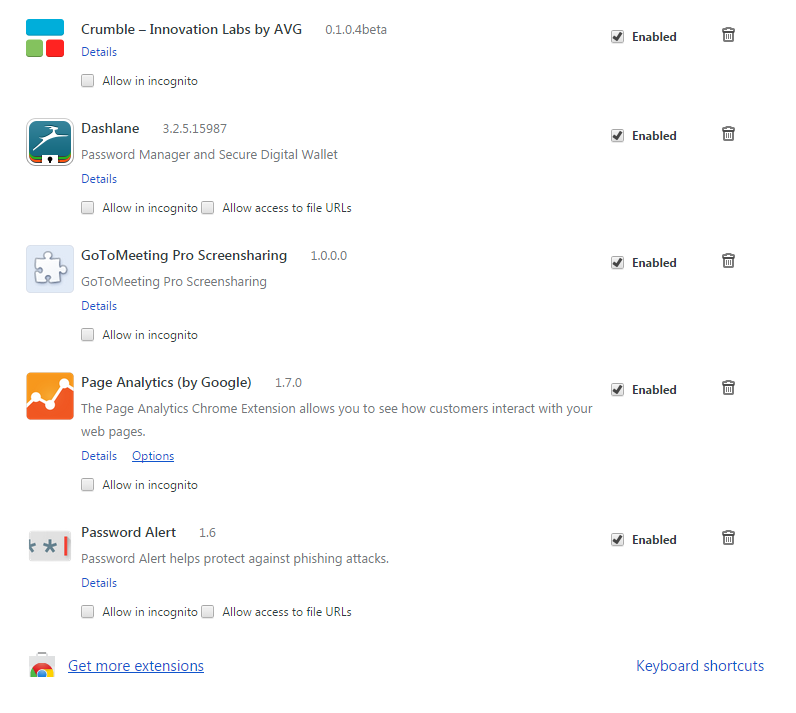
Chrome extensions are a great way to customize and optimize your browsing experience. For example AVG’s Crumble extension blocks online trackers and cookies allowing you to surf without surveillance.
You can install the extension for free from here: Crumble Chrome extension.
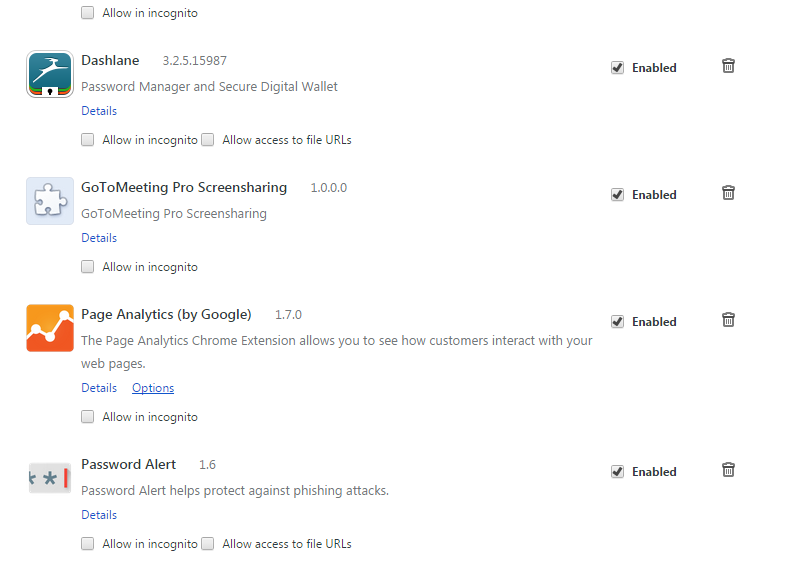
Checking which extensions you are using is very easy to do.
How to check which extensions you are running
Checking which Chrome extensions are active is quick and easy. Within Chrome, open the menu in the top right and select More Tools. Select Extensions from the menu.
Here you can view which extensions are currently running, add and remove extensions.


Google introduce new Chrome extension rules to help protect users
Google has just introduced new rules for Chrome extensions to help crack down on unwanted and malicious extensions by only making Chrome extensions available via the official Chrome Store.
According to their blog post announcement, Google’s test phase for the rule saw a 75% drop in users complaining about unwanted extensions. Google wrote:
“We originally did not enforce this policy on the Windows developer channel in order to allow developers to opt out. Unfortunately, we’ve since observed malicious software forcing users into the developer channel in order to install unwanted off-store extensions. Affected users are left with malicious extensions running on a Chrome channel they did not choose.”
The move to a centralized marketplace for extensions is a great way for Google to establish quality control for Chrome extensions, just as it and Apple have with their respective app stores.
Chrome extensions are a great way to customize and optimize your browsing experience. For example AVG’s Crumble extension blocks online trackers and cookies allowing you to surf without surveillance.
You can install the extension for free from here: Crumble Chrome extension.
Checking which extensions you are using is very easy to do.
How to check which extensions you are running
Checking which Chrome extensions are active is quick and easy. Within Chrome, open the menu in the top right and select More Tools. Select Extensions from the menu.
Here you can view which extensions are currently running, add and remove extensions.


CareFirst data breach leaves 1.1m health insurance customers vulnerable
More than 1.1 million health insurance customers have been left vulnerable by a vast data breach, after criminals gained access to a CareFirst database in a “sophisticated cyberattack.”
The post CareFirst data breach leaves 1.1m health insurance customers vulnerable appeared first on We Live Security.

hardwear.io Call For Papers
hardwear is seeking innovative research on hardware security. If you have done interesting research on attacks or mitigation on any Hardware and want to showcase it to the security community, just submit your research paper. It will take place October 1st through the 2nd, 2015 in The Hague, Netherlands.
Google Study: How Secure are Secret Questions?
Right, I’m talking about the ‘secret questions’ that have long been used as a backup mechanism to reclaim accounts (for example if you have lost your password). It’s a pretty common method used by a lot of services, since they are an easy way to provide an extra layer of security. But now a new study by Google actually questions that. The researcher conducting the study claim that their “analysis confirms that secret questions generally offer a security level that is far lower than user-chosen passwords.”
For the study they analyzed hundreds of millions of secret answers and millions of account recovery claims from Google users and concluded “that in practice secret questions have poor security and memorability […] From millions of account recovery attempts we observed a significant fraction of users (e.g 40% of our English-speaking US users) were unable to recall their answers when needed. This is lower than the success rate of alternative recovery mechanisms such as SMS reset codes (over 80%).”
The security side does not fare much better. If you’d have to guess what an English-speaking user chose for an answer to the question “What’s your favorite food”, pizza would be the way to go: 19.7% apparently have the same taste. In a Spanish speaking country you’d have a 3.8% success rate at answering the “Father’s middle name” one correctly and with only 10 guesses you would be able guess the answer to “City of birth” for 39% of the Korean-speaking users. The fact that some 37% provide fake answers in order to make them harder to guess is of no help either. Apparently their little trick has the opposite effect since they now answer the questions in a predicable way.
The Google researcher conclude that it is almost impossible to find the perfect secret question: One that is both memorable and secure. Google itself prefers SMS and secondary email addresses to confirm a user’s identity but admits that those are not perfect either.
The post Google Study: How Secure are Secret Questions? appeared first on Avira Blog.
DDoS attacks have doubled in a year, says Akamai
Distributed Denial of Service (DDoS) attacks are on the rise, according to cloud service provider Akamai, with more than double the number reported from this time a year ago.
The post DDoS attacks have doubled in a year, says Akamai appeared first on We Live Security.

More protection in the Beta version of Global Protection 2016
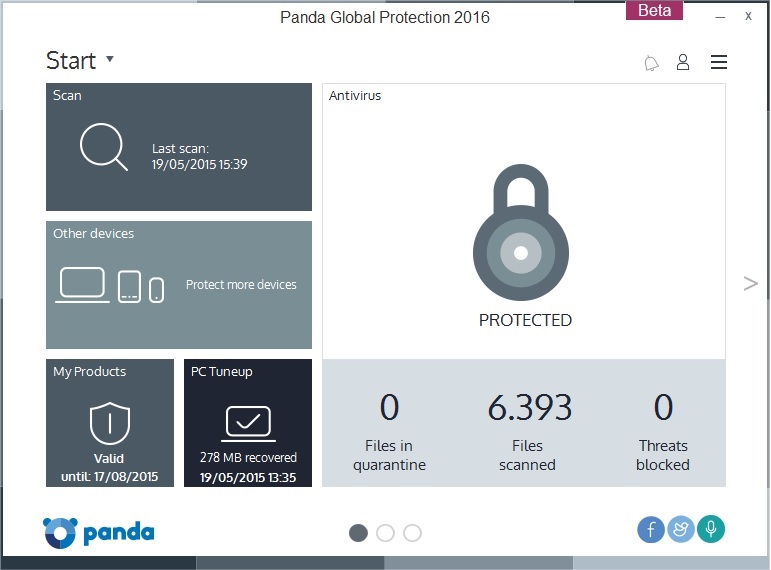
Panda Security announces the beta version of Panda Global Protection 2016, with a more powerful and lighter detection engine. In addition, this version includes Wi-Fi protection and offers recommendations for safeguarding the network from intruders. It also optimizes the PC by deleting unnecessary files and controlling the programs run at startup.
Panda’s new edition of its cross-platform solution for the consumer market also includes compatibility with Windows 10, and enhanced capabilities that make it an easier and more functional product for the user.
Designed to be flexible and intuitive to use, this new version gives the user easier access to its features.
Functionality at the service of complete protection
Panda Global Protection 2016 has been specifically designed to provide total and complete protection. In this respect, the new version includes improvements like the data shield and on-demand USB scanning, features that join the vaccine already included in previous versions.
Try the beta version of Panda Global Protection 2016
Beta testers can now take part in the Panda Global Protection 2016 beta. Anyone who wants to can now try the product and give their opinion, collaborating with their comments on how to improve the product. The beta testers who take part in testing this beta version can win €600 and become the “Beta Tester of the Year”.
To download the beta, click here.
Users can also share their opinion on the beta fórum.
The post More protection in the Beta version of Global Protection 2016 appeared first on MediaCenter Panda Security.
Beware of the ‘Game of 72’! Your child might be involved in this ‘game’!

There is a new game circulating in social networks and it is becoming dangerously viral, it is terrorizing parents and it could jeopardize children’s safety. Dubbed ‘Game of 72’ its alleged rules are simple: when teenagers are challenged they have to disappear without a word for 3 days.
The winner is who creates the greater hysteria among the adults around him. Meanwhile, the youngster has to avoid contacting anyone during those long 72 hours.
Police worldwide has warned of this dangerous game existence, which allegedly travels around social media and which would have originated with the disappearance of a 13-year-old French girl, who went missing for three days and after being found safe, she said that she had taken on a social media dare.
Parents need to be aware of a new “game” traveling around social media involving teens daring each other to vanish for 72 hours #Gameof72
— Revere Police (@reverepolice) Mayo 1, 2015
To this day, there is no evidence of this game really being played. According to the authorities investigating the disappearance of the French girl, she most likely made up the existence of the game to protect the person with whom she had disappeared.
However, hoax or true, this ‘game’ could be understood by youngsters as true and might trigger a boom of real cases of teenagers playing to disappear. Either way, the ‘Game of 72’ or its spreading hoax could become one of the many dangers teenagers face on social media, as are sextortion or cyberbullying.
Parents have to try to avoid this kind of situations or at least to minimize their children’s risk in their journey through social networks. This can be done by educating children on the responsible use of these platforms.
How to educate children on the responsible use of social media
- Control, as far as possible, the sites they visit, by checking the browser history. In addition, there are browsers for children that block inappropriate content.
- Allow them to have their own profile on social networks, when they are old enough. According to the Spanish law, you have to be at least 14 years old, though it is really simple to do it before, they just have to lie about their age. We must be on the lookout and make them comply with the minimum age.

- Initiate them into the privacy world: while adults know more or less what we can share online when it comes to personal information, children have to learn where to draw the line.
- Have your own profile on the social network your children visits. Monitor their actions on the networks can be done not only from a computer screen.
- Try to spend some time with them while they are on the computer, is a good way of knowing what they usually do on social networks. We must talk with them and explain them the dangers of the Internet.
The fact that the ‘Game of 72’ may be a hoax doesn’t mean that social networks are a safe place. If not an absurd challenge to vanish for 72 hours, there are others dangers lurking on the world of social platforms. That’s why, we should educate our children as soon as possible and monitor, as far as possible, their Internet activity could be key to avoid greater evils.
The post Beware of the ‘Game of 72’! Your child might be involved in this ‘game’! appeared first on MediaCenter Panda Security.