Tag Archives: Antivirus

Antivirus firm Avast to Buy its rival AVG for $1.3 Billion

Breaking New for Today:

Antivirus company Avast Software is planning to acquire Dutch rival AVG Technologies for $1.3 Billion in cash.

Avast announced today that it would buy Amsterdam-based AVG Technologies for $25 per share in an all-cash transaction valued at $1.3 Billion in an aim to expand its presence in the emerging markets.

With more than 230 Million users worldwide, Avast provides

Ten Steps That Will Guarantee Cybersecurity in Your Business

pandasecurity-security-tips-1

In a recent study by Panda Security in collaboration with Nielsen, 91% of Spanish SMEs confirmed that they were victims of daily IT attacks. The viruses that wreaked havoc on their systems included Trojans (33%) and spyware (25%). The viruses entered the company systems from unsecure websites (39%), downloaded programs (23%), and email malware (19%).

It is fundamental for both small and medium-sized companies to allocate resources for security and establish security policies, otherwise the losses can be substantial and costly. The losses can include anything from information theft to a temporal IT collapse.

Here are some of the most basic, yet crucial, cybersecurity tips for SMEs:

Protect Your Office

Of course the easiest way to directly attack a company’s systems is by having physical access to the IT equipment. Companies should control who enters facilities with identification cards or some kind of biometric identification. Pay special attention to external personnel (cleaning services, external companies, etc.) and visitors, and make sure that they identify themselves properly. Alarms and video surveillance systems are other great ideas.

Secure Passwords

As a rule of thumb, all of your employees should use passwords that mix capital and lowercase letters, numbers and symbols, and should refrain from using personal information, etc. It is also important that they change passwords frequently, at least once every six months.

Keep Your Software Up-to-Date

In respect to downloading and running programs on company computers, there is an easy rule to follow: if you don’t need it, don’t install it; if you need it and you install it, keep it updated; if you stop using it, uninstall it. If you follow these rules you will save yourself from a lot of headaches.

Don’t let Your Employees Download Pirated Software

As we explained earlier, pirated copies of programs are common entry points for malware. In order to keep these unlicensed programs from threatening your company, it is important to establish an adequate software management policy. This includes keeping an updated inventory, controlling program licenses, and educating your employees.

Be Careful with USBs

Be aware of all external devices that connect to your company’s devices, whether they are external hard drives, memory cards, or anything else that could poke holes into your system and threaten sensitive data. To avoid problems, provide your employees with secured pen drives (the kind that encrypt information and are password protected) and define what information can be transferred using this type of device or should be sent by other means. Likewise, make sure that all appropriate files that come from external devices are tested with an antivirus before they are copied or run on company computers.

Back-up Your Data

Ransomware has grown to be the largest threat to companies. If you want to keep valuable information safe during a cyber-attack, backing-up your files and information is fundamental. We recommend that you keep two backups: one stored on the cloud and another physical copy (an external hard drive, pen drive, etc.).

Invest in Hardware

There are several inexpensive devices that are easy-to-use and will help improve the security in your systems. Some of this hardware includes security cables for laptops, U2F keys, accessories for securely charging up your mobile device in public hot spots. Setting aside sufficient capital for security hardware can save your business money in the long run.

pandasecurity-security-tips-2

Educate Your Employees

The weakest link in your company’s security chain is the people. Training and educating your workforce should be a priority. That alone could save you from fraud and vulnerabilities that begin with phishing and social engineering.

Their Vulnerabilities Are Your Vulnerabilities

Employees may be the weakest link, however, businesses that provide products and services for your company are an even bigger threat. It is important to legally protect yourself from the vulnerabilities that one of these suppliers may have and carry out inspections periodically, in order to ensure that all related businesses respect good security practices.

Install an Antivirus

When using computers or mobile devices, before they are connected to the internet you need to install a good antivirus. This measure is fundamentally important at both home and at work. A cybersecurity solution for businesses will protect your organization’s devices and information in all types of circumstances, even when employees are careless or make errors.

The post Ten Steps That Will Guarantee Cybersecurity in Your Business appeared first on Panda Security Mediacenter.

How to Take Advantage of Your Antivirus

pandasecurity-antivirus-1

The first and most important thing that the majority of people look for in an antivirus service is reassurance: to easily maintain security without it taking up too much time. Discover an easy and proven way to guarantee your security with Panda Protection Service. It is very cost-effective at only €5.99/month with no-strings-attached. You can use the service and then cancel it whenever you want to. Try your first month for free!

Panda Protection Service is more than just a simple antivirus. In addition to protecting your computers, mobile phones and tablets, the purchase of a license includes an infinite number of features. Take advantage of your antivirus in every situation: theft, battery and performance optimization, blocking the Wi-Fi connection, criminals, etc.

Learn what Panda Protection Service is all about!

Eight Amazing Features You Will Want

Keep your Wi-Fi off-limits

Keep cybercriminals and tricksters at bay using the Wi-Fi Protection Mode on your Panda Protection Service. You will see the exact moment your devices connect to the router in the history area. This will make it much easier to detect intrusions and cut off access to your network. This tool analyzes your Wi-Fi and searches for vulnerabilities, then offers tips on how to further increase your IT security.

Locate your stolen device

Antitheft measures are available on Panda Protection Service. The movement alarm will sound if someone touches your computer, mobile phone or tablet. If for some reason your device is stolen or lost, Panda prevents thieves from accessing your private photos and information. You can remotely update your phone’s password and wipe your device clean, and you will even receive an email with a photo and location of the thief if he tries to unblock your phone three times. If you lose your phone, you can send a message to your lost device with your information so the person who finds it can contact you.

pandasecurity-antivirus-2

Manage Your Passwords

With the Password Manager, you can set-up a password for every single account or page and forget about it! All you have to remember is the Master password for the management page and from there you can access everything else you need.

Safely Destroy Documents

A lot of users are unaware that dragging an old document to the Recycle Bin or clicking the “delete” button is not the end. These documents can be recuperated easily. If you really want to eliminate those highly sensitive documents, use the File Shredder. This will come in handy if you decide to recycle, reuse or sell your computer or device.

Parental Control

One of the top priorities for tech-savvy parents is to make sure their kids can safely access the internet. With Panda Protection Service, parents can apply filters to different users to make sure their kids only access trustworthy websites.

Virtual Keyboard

Although a lot of secure websites already use this feature, virtual keyboards are an additional security feature that makes it harder for cybercriminals to hack you. When you are logging into websites, like bank sites, the virtual keyboard pops up on the screen (like an image of a keyboard instead of a physical one). From here, you can enter your password without creating sounds or tones that can be deciphered by black hats.

Encrypt your files

If you are familiar with messaging services like WhatsApp, then you are aware that encryption is highly important. Encryption makes sure your private messages don’t travel to places they shouldn’t. We can also encrypt files and make them unreadable to cybercriminals, thanks to the File Encrypt mode with Panda Protection Service.


The post How to Take Advantage of Your Antivirus appeared first on Panda Security Mediacenter.

Ranking of Attacks Aimed at Businesses: Protect Your Wallet

pandasecurity-attacks-walletIn the first article of our series “Ranking of Attacks Aimed at Businesses”, we’ll introduce you to the top security threats aimed at companies and give you some tips on how you can protect yourself!

Staying up-to-date with security is an undertaking and requires effort and commitment. As technology develops and evolves, it is easy to fall behind. Cyber-criminals, on the other hand, are always ahead of the game and are constantly looking to exploit new vulnerabilities that accompany these innovations.

To protect yourself, it is extremely important to keep up with cybersecurity trends. Every year, the RSA publishes a report on the current state of cyber-crime that summarizes the hacking methods that are trending among cyber-criminals. Being aware of these trends is vital for IT security in companies. (The RSA is a group of American IT security experts that developed the RSA public key cryptography algorithm, and later renamed their computer network and security company the RSA.)

Attacking Your Wallet

Today, it is extremely easy to complete transactions on mobile devices, which is part of the reason this is an area that has quickly gained popularity among cyber-criminals.

More and more companies are setting-up services based from mobile phones. This benefits both customers (e-commerce apps, payment platforms, etc.) and employees, whose work is increasingly dependent on these devices. However, these conveniences also make everyone involved more desirable and attractive to cyber-criminals.

Although these transactions are convenient, there is a lot of fraud associated with these channels. Since mobile devices have not been around as long as other devices, like computers, security technology is not as advanced and they are usually less protected.

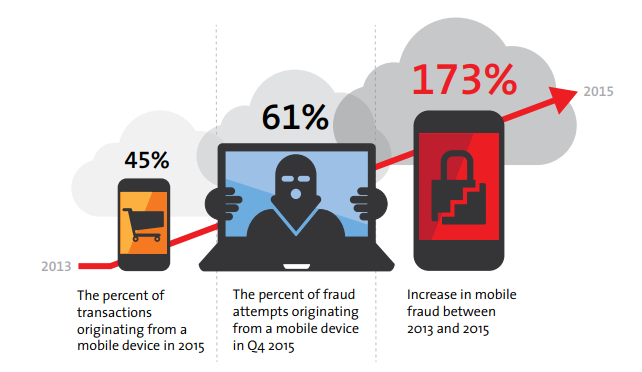
In 2015, the RSA detected that 45% of transactions, and 61% of fraud attempts, took place in mobile devices.

pandasecurity-attacks-wallet-2

In response to this, an interest in biometric identification systems has emerged, which identify users by analyzing some aspect of the body, or physical behavior.

There is an emerging special interest in biometric identification systems

Today, this technology can be found in facial recognition, fingerprint and iris scanners, and less commonly in voice or signature recognition. In addition, it is being investigated how other biometrics can be used for identification like our typing patterns, movement patterns, heart rate, and sweat levels.


According to the report of RSA, more than 90 % of banks are currently exploring the use of biometrics in their mobile applications (or intend to do so) within the next nine to twelve months. Many companies are following the same path. In fact, the future of authentication seems to be a mix of these systems with traditional ones, such as PINs and passwords.

Using a combination of both is the best option to ensure security in the future. More than one billion transactions, both online and offline, were influenced by mobile attacks in 2015.

If you want to boost your business’s cybersecurity, it is fundamental to invest in an advanced cybersecurity solution that will allow you to manage, control and protect your entire technological park from one place.


The post Ranking of Attacks Aimed at Businesses: Protect Your Wallet appeared first on Panda Security Mediacenter.

Panda Security Dissects the “Cyber-Pandemic”

pandasecurity-hospitals-1

Economic gain is the fuel that motivates cyber-criminals. There are thousands of credit cards stolen, infected computers and POS terminals, and kidnapped information that cyber-criminals use in order to make large sums of money. These victims are in the line of fire, and are willing to pay these ransoms in order to get their private information back.

Recently, we have seen particular cases of large scale attacks that are designed specifically for industries, like the hotel sector or certain financial institutions, but can you imagine what would happen if a hospital fell into the hands of a cyber-criminal? PandaLabs, Panda Security’s anti-malware laboratory, presents a new whitepaper, “The Cyber-Pandemic”, with examples of real threats that seem science fictional but can affect us all.

A History of Attacks

The healthcare industry is very technologically advanced but it also has huge security flaws, making it an easy target for cyber-criminals. If we add this to the immense amount of highly sensitive information that is managed by hospitals, pharmacies and health insurance providers, plus the high price that it could be sold for on the black market where a medical history is much more valuable than a credit card, we are able to understand how this was the most attacked industry last year.

A Timeline of the Most Notorious Attacks

2008: The University of Utah Hospital and Clinics announced that the private information belonging to 2.2 million of their patients was compromised. The information was stored on backup tapes belonging to an external employee that was subcontracted, who failed to comply with the established protocols.

2015: One of the most infamous attacks that was aimed at the second largest Insurance company in the United States, Anthem. In this attack 80 million customer records was stolen, including sensitive data such as Social Security numbers.

2016: The cyber-attack that hit the Hollywood Presbyterian Medical Center in Los Angeles left their employees without access to patient medical records, emails and other systems. As a result, some patients could not receive treatment and had to be transferred to other hospitals. What was the ransom? 3.7 million dollars.

pandasecurity-hospitals-2

They Can Hack Our Health

These attacks have demonstrated that these cyber-criminals are capable of shutting down all hospital activity, When we take into account all the medical equipment that is connected to the network, we can imagine how this cyber-pandemic could affect any ordinary person.

In 2013, former U.S. Vice President Dick Cheney revealed that his doctors disabled wireless communication on his pacemaker because they saw that it was highly possible for someone to remotely attack his device if they wanted to. Globally known hackers have demonstrated how it is possible to remotely alter a portable insulin pump that is used by thousands of diabetics or how to remotely manipulate a pacemaker in order to send a life-threatening electric shock.

In a hospital room, everything from the belts that raise your feet to the infusion pump that injects your medicine is connected to a computer. To demonstrate how easy it is to access this equipment, a number of these machines were tested to alter the dose of medicine to lethal levels. This can be done on more than 400,000 of these pumps throughout the world that remain vulnerable.

How Can We Avoid These Attacks?

It is important to take note: paying a ransom does not guarantee that stolen documents or information will be returned. The ransom payment did not secure that the victim got back their documents in any of these examples. It is better to avoid this altogether. Here are some of PandaLab’s recommendations on how you can avoid a cyber-pandemic:

  • Depend on a cyber-security solution that has both advanced protection functionalities and is also able to detect and remedy possible threats.
  • There is something in common in all of the systems that were targeted in the attacks: a lack of control. What would have helped prevent these attacks is a cyber-security solution that is capable of controlling all running processes, in every machine, connected to the network.
  • Revise staff policies and control systems in order to adjust the privacy requirements and adapt them to available technology.
  • Keep all operating systems and company devices updated.

To help the Healthcare sector stay ahead of cyber-crime, Adaptive Defense 360 offers complete security to fight off attacks. Adaptive Defense 360 provides everything that your company may need to remedy known vulnerabilities.

Download this whitepaper and learn how to avoid a “Cyber-Pandemic”, here:

Download

Check out our Cyber-Pandemic Infographic


The post Panda Security Dissects the “Cyber-Pandemic” appeared first on Panda Security Mediacenter.

Fraudulent Emails Threaten Businesses with”Whaling”; A New Scam with a Long History


pandasecurity-whaling

Last year, an undisclosed employee from Pennsylvania based Alpha Payroll was wrongly fired because he fell for a deceptive cyber-criminal’s trap. The company, Alpha Payroll, is known for processing payroll solutions for businesses, but now the company will be remembered as the victim of a very large Phishing scam.

It all started when an employee received an email from the company’s CEO that stated, “send me copies of all the 2015 W-2 forms produced by Alpha Payroll on behalf of its customers.”

Of course, the employee believed the email was legitimate and he fulfilled the CEO’s request. Attentive and obedient, the assistant fulfills his mission.

But the CEO never sent this email, in fact the company had a policy that prohibits employees from sharing W-2 information. But put yourself in the victim’s shoes, a bottom level employee… would you question an email sent to your from the CEO? Unaware that he was victim of a phishing scam, and that his boss was being impersonated, the employee fell for the scam and, later, was fired.

It wasn’t until one of the company’s clients discovered something strange on payrolls and notified the authorities that an investigation was opened. Alpha Payroll was finally involved in the mess but by then it was too late, they were already involved in a cyber-criminal’s Whaling scheme.

Phishing is old-school. It is the most basic form of impersonation without any specific objective. Then spear phishing was discovered, which is more personalized and directed. Now we have what is called whaling, because cyber-attackers are aiming for senior managers exclusively.

How does Whaling work?

It is easy for an attacker to steal identities that belong to company executives and deceive employees. The fraudsters simply go after employees who are less cautious or unfamiliar with detecting internet fraud.

According to the FBI, whaling has become such a big problem that it has already cost companies in 80 different countries more than 2.3 million dollars (more than 2 billion euros) in the last three years. Since January 2015, the number of identified victims had increased by 270%, including well-known companies like Mattel, Snapchat and Seagate Technologies.

Whaling has already cost companies in 80 different countries more than 2.3 million dollars (more than 2 billion euros).

A great way to protect your business is with a team of duly trained employees, especially those who have access to highly sensitive information or who perform delicate operations like transfers. It is also very important to establish clear policies for transferring information or reports between departments, employees and executives.

The usual protection solutions don’t begin working until after the attack has already been successful, making them impossible to remedy. In order to proactively protect yourself against this type of attack, next-generation EDR solutions are the only option because they look for both unknown and known vulnerabilities. They control 100% of the processes, whether they are malware or goodware, and they are always in control of any strange behaviors.


The post Fraudulent Emails Threaten Businesses with”Whaling”; A New Scam with a Long History appeared first on Panda Security Mediacenter.

POS and Credit Cards: In the Line of Fire with “PunkeyPOS”

pandasecurity-punkeypos-principal.png

PandaLabs, Panda Security’s anti-malware laboratory, has been working on an in-depth investigation since May related to Point of Sale terminals (POS) in restaurants across the United States. A new malware sample was discovered during this investigation called PunkeyPOS, a malware variant that is able to access credit card data. PandaLabs left this information at the disposal of American law enforcement so they can take the appropriate actions. Let’s see what this is and how it operates.

How can they steal your card without touching your wallet?

PunkeyPOS runs seamlessly in all Windows operating systems. The cyber-criminal’s plan is to install the malware in POS terminals in order to steal sensitive information such as account numbers, magnetic strip contents (tracks) from bank cards, etc.

PunkeyPOS seems simple:

It installs a keylogger that is responsible for monitoring keystrokes, then it installs a RAM-scraper that is responsible for reading the memory of all processes running on the system.

Based on the information it captures, the malware performs a series of controls to determine what is valid and what isn’t. Regarding the keystrokes, PunkeyPOS ignores all information other than credit card data. It is mostly interested in tracks1/2 from the process memory that is obtained from RAM-scraping. The POS terminals read this information from the bank cards’ magnetic strips and then can use this data to clone the cards at a later time.

Once the relevant information has been obtained, it is encrypted and forwarded to a remote web server which is also the command and control (C&C) server. In order to avoid the detection of the card information in case somebody is scanning the network traffic, it is encrypted before it is sent using the AES algorithm.

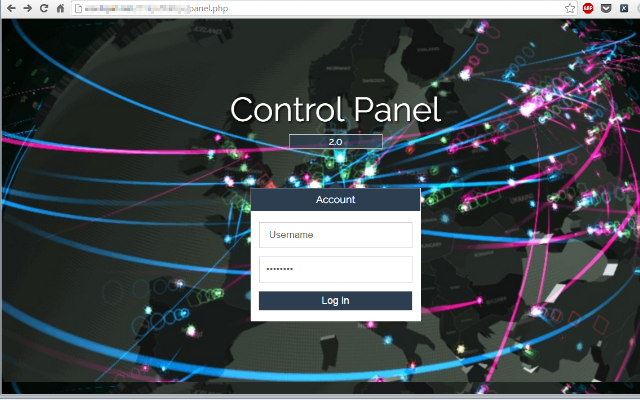
The command and control (C&C) server address can be easily obtained based on this malware sample through reverse engineering or analyzing their communications. This is the main page of the control panel; it requires a username and password to get access:

pandasecurity-punkeypos-1

Follow the Trail to the Digital Pickpocketers

The cyber-criminals behind this attack haven’t been very careful. Since the server was not configured correctly, PandaLabs was able to access it without credentials.

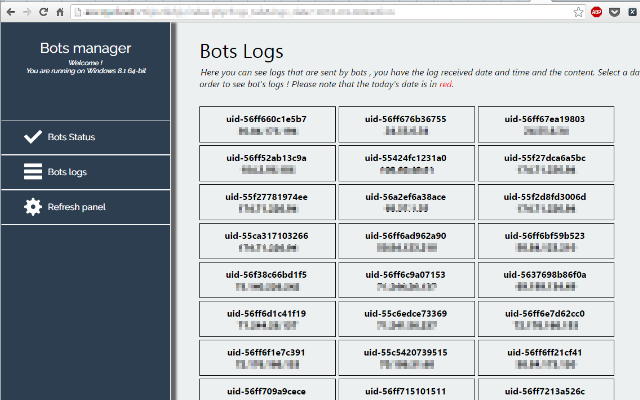
Because of their neglect, PandaLabs was able to see where PunkeyPOS sends the stolen information. In addition to being in front of a panel that is used to access the stolen data, from this panel cybercriminals can reinfect or update current clients (POS bots).

pandasecurity-punkeypos-2

The version of the analyzed PunkeyPOS sample is hardcoded: “2016-04-01”. If we compare this sample with older versions, some from 2014, we can barely see any difference in the way it operates (in the References section of this article you can find links that will go further into detail about how it works.)

PandaLabs has been able to gain access to the control panel of PunkeyPOS, and has geolocated around 200 Point of Sale terminals that were compromised by this specific malware variant. We can see that virtually all the victims are in the United States:

pandasecurity-punkeypos-3

Taking into account how easy it is to sell this information on the black market, and how convenient it is to compromise these POS terminals anonymously through the internet, we are certain that cyber-criminals will be increasingly drawn to these terminals.

Protect your devices proactively from these types of attacks with an advanced cyber-security solution like Adaptive Defense. Real-time control of all inappropriate user operations is in your hands.

References:

http://krebsonsecurity.com/2016/06/slicing-into-a-point-of-sale-botnet/

https://www.trustwave.com/Resources/SpiderLabs-Blog/New-POS-Malware-Emerges—Punkey/


The post POS and Credit Cards: In the Line of Fire with “PunkeyPOS” appeared first on Panda Security Mediacenter.

Antivirus For Mac: Is It Really Necessary?

pandasecurity-mac-antivirus

The last few days have been intense for Apple fans. Last week, Apple’s Worldwide Developers Conference took place, where they presented the company’s new hardware and software. The “bitten apple” went into depth about their new operating systems for iPhone, Mac, Apple Watch and Apple TV but… what about security-related updates?

Following the horrible San Bernardino attack from last December, a controversial topic stemmed regarding the attacker’s iPhone. Apple’s case against the FBI initiated a dispute between user privacy and government access to personal data.

Meanwhile, other giants in the sector, like Facebook and Google, showed their support for Apple by promising to implement more effective encryption tools in the future. WhatsApp was the first to use end-to-end encryption.

Now Tim Cook presents a new file system called APFS, the Apple File System, which incorporates a new encryption system that gives developers multiple options like leave something unencrypted, encrypt it with a unique password, or encrypt it with multiple passwords. The Apple File System is already available online for developers and the new version will leave HFS system and improve security and data encryption.

Why is my Mac vulnerable to advanced threats?

Despite efforts of large security companies, the truth is that no operating system is 100% reliable. Apple computers are not the Macintosh systems that we once knew. Years ago, they had a safety-guarenteed reputation, with a different and solid operating system than others. At that time, hackers targeted computers with Windows operating systems, however, as Apple’s popularity has grown, so have the malicious-code-making hackers. Mac OS X is no longer impregnable and needs mac antivirus software.

In the recent PandaLabs’ Q1 report, experts discussed the latest threats directed specifically towards Apple operating systems. One example of this is the highly powerful ransomware based on Encoder, called KeRanger, which managed to infect Apple users at the beginning of 2016. We all remember the major Trojan attacker flashback and Browlock, also known as the Police Virus or Shellshock. All of the previously mentioned examples confirm that attacks on Mac OS X are growing.

While it is true that the number of threats in the Mac’s operating system are lower than other platforms (such as Windows) we must be aware of the importance of an effective antivirus for Mac in order to fully enjoy our Apple computers. Enough excuses, let’s start preventing viruses!

The post Antivirus For Mac: Is It Really Necessary? appeared first on Panda Security Mediacenter.

If You Add Extras to Your Web Browser = Extra Danger for You

pandasecurity-browser-1

Web browsers are full of dangerous options that nobody uses. Most computers come with pre-loaded web browsers like Microsoft Internet Explorer, Mozilla Firefox, and Apple Safari, but these default web browsers are not configured for secure web browsing.

Anytime users are surfing the web, there can be a “variety of computer problems caused by anything from spyware being installed without your knowledge to intruders taking control of your computer”, as stated on the US-Cert website.

What may seem like a cool option for your Web Browser, could actually be a gateway for cyber-attackers that goes unseen to the average computer user. Sometimes “less is more”, and when it comes to computer security, the less entry-points a cyber-criminal has, the less we have to worry about defending ourselves.

There needs to be a complex balance between having freedom to use new technology functionalities, like web browser options, while at the same time, keeping the door shut to cyber-criminals.

But why download options if they are pointless? 83% of the latest browser functionalities are completely unnecessary, as revealed in a study from the University of Illinois. In fact, only 1% of the 10,000 most popular web pages use these features in some way, many of which do not even prove that they are useful.

83% of the latest browser functionalities are completely unnecessary.

A good example of this are the Ambient Light Events (ALS) that are designed so that websites perform differently depending on the levels of light that surround the device, and adapt the computer brightness to it. Although it sounds helpful, only 14 of the 10,000 websites that were cited in the study implement this and very few users are even aware that it exists.


pandasecurity-browser-2


Iframes is another story. It has become a very popular HTML element that is used in many different types of websites; interactive spaces on a web page allow users to insert part of another page onto their website (this is known as embedding). At least half of the most popular websites use this technology, and yet it is blocked 77% of the time due to security reasons. In 2013, hackers seeded Internet searches with malicious iframe code, leading to iframe overlay attacks on many prominent networks.” The majority of social networks have stopped using this program.


Something else that has caught our attention is vibrate API, which enables websites to manage features on devices… if they decided to use them. Today, only 1 out of the 10,000 most popular websites does this, but still, the features remain available, not only for legitimate developers but also for potential attackers who could use it for their own benefit, for example to spy your conversations (like they did here).


A cybercriminal could use the vibration of your Smartphone to spy your conversations


The difficult balance of taking advantage of available options while maintaining security seems is difficult to have, at least in regard to the browsers. To be protected, users better have a good anti-virus that is capable of stopping assailants if they get through these online-cracks.

The post If You Add Extras to Your Web Browser = Extra Danger for You appeared first on Panda Security Mediacenter.