Tag Archives: Social Media

Facebook strengthens its app for Android, allowing for anonymous browsing with Tor

smartphone facebook

It’s been a while now since Tor became the go-to option for those who wanted to ensure their privacy while browsing online. If you still haven’t heard of it, it’s a network that allows you to browse the Internet anonymously, integrated by nodes all over the planet. Each one of this points is actually a computer belonging to a member of the project, which was launched in 2002.

Every one of the machines that is connected to this network sends information securely – all communications are encrypted and the messages pass through random nodes, which makes it very difficult to intercept them or find their origin.

Luckily for lovers of this system, Facebook has announced that it will add Tor to its Android app, which means that those who use it can surf the social network in a more secure manner.
facebook tor

The first steps towards the integration of Tor were seen in 2014, when Facebook launched its onion address. It was an historic move which allowed Tor users to connect to the platform anonymously. “It provides end-to-end communication, from your browser directly into a Facebook datacenter,” explained Facebook.

Back then, Facebook also mentioned that they would enable a platform with the same .onion extension for those that chose to connect via their mobile device.

In little more than a year, the number of people who use the Tor service on their computer to enter Facebook has exploded. This, along with the numerous petitions that Facebook received requesting new security features, has brought about this enabling of the system for smartphones.

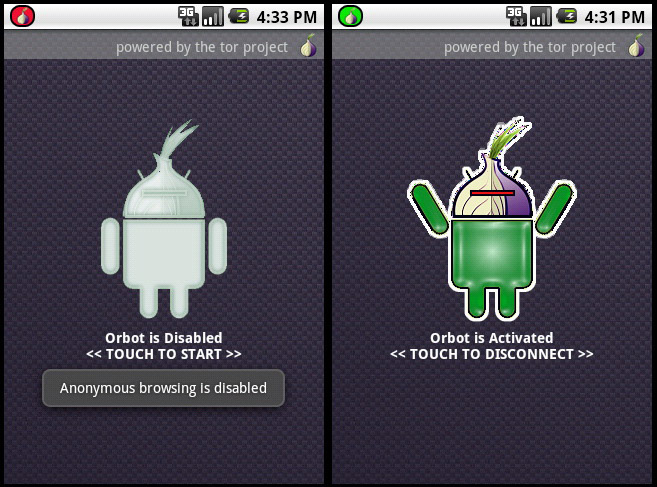
Accessing Tor from a mobile device is done via the Orbot app, which allows the user to send encrypted information via the anonymous network every time that they connect to the Internet on their mobile.
android tor

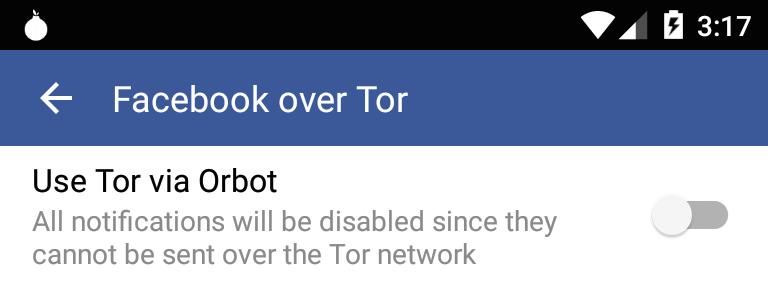
Therefore, whoever wants to enjoy this new service will have to install Orbot on their device. After that, they must enable access to this tool in the settings of their Facebook application so that it can open via Tor.

“We’re releasing this feature over the next few days to seek feedback which will help us create a great experience for using Facebook over Tor on Android,” claimed Facebook on their website.

The project, as they’ve indicated, started thanks to an intern who worked at Facebook for a summer. The Care and Protection team based in London continued with the initiative, which will soon be available to try out by all of us.

The post Facebook strengthens its app for Android, allowing for anonymous browsing with Tor appeared first on MediaCenter Panda Security.


What to do when someone steals your identity on Facebook

facebook

During the last few months of 2015, a generous promotion by Primark (the well-known Irish clothing giant) started to do the rounds on Facebook in Spain, whereby users were promised the chance of winning a gift-card worth €500 by clicking like on a publication. The year previous also saw a similar offer by Zara, another clothing giant, which saw the company raffling off store credit if you invited friends to attend an event. However, neither of these pages, offers, or events were related to the store in question, nor to any of their employees.

It turns out that these were fraudulent offers created by fake profiles, which used social engineering techniques to take advantage of users. Although these cases involved well-known stores, any of Facebook’s users could see their profile copied and stolen.

If you do ever come across a profile that is passing itself off as your own, or your company’s, then there is luckily a way to have it removed, as Facebook has a mechanism in place to report and stop the imposter in its tracks.

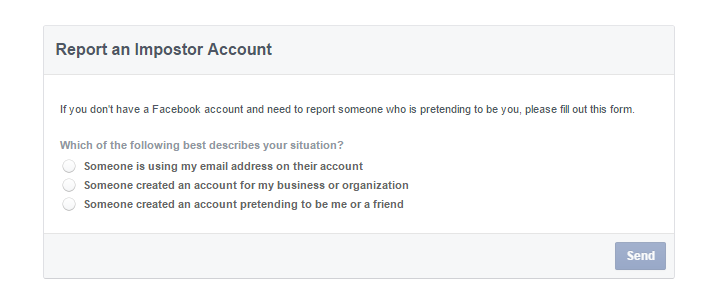
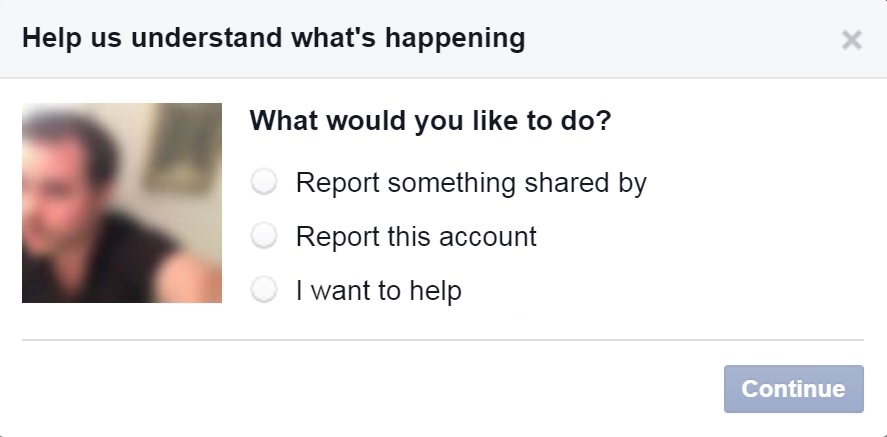
The first thing that you need to do is enter the fraudulent page (you can’t raise the alarm from your own profile), click on the button located to the right of the cover photo, and choose “report”. In the following window, which will open automatically, you have to select “report this account” and, later, follow the instructions on the screen.

facebook impostor account

However, there is also a chance that the imposter has blocked you, so that you can’t access the account. If this happens, you will have to ask a friend to report the false account. The friend will receive a message with a link to continue to process.

It is also possible that the person whose identity has been stolen doesn’t have a Facebook account. If this is the case, the social network has a section for events such as this in its help center.

Anyway, no matter what the situation, Facebook advises that you get in touch with a lawyer or a regulator before viewing the content that the imposter has posted on the page. The aim is to be informed fully of the situation and the legal options available to the affected party.

The social media website doesn’t just offer help to its users, but also provides information to the authorities to help them better understand how to act. What’s more, there is also a special section where they can present their own requests relating to an investigation.

report facebook

The repercussions that an imposter may face depend on what the false account was being used for. In Spain, for example, identity theft over a prolonged period of time (to the point where others are tricked into believing the false identity) is considered a crime that is punishable by up to three years in prison.

If the profile is used to gain personal information on other users with the aim of committing a crime, the situation is even more serious.

We all hope that this never happens to us, or to anyone that we know, but as always it pays to be prepared to act quickly if it should arise.

The post What to do when someone steals your identity on Facebook appeared first on MediaCenter Panda Security.
Facebook hoax promises giveaway of 4.5 million company shares

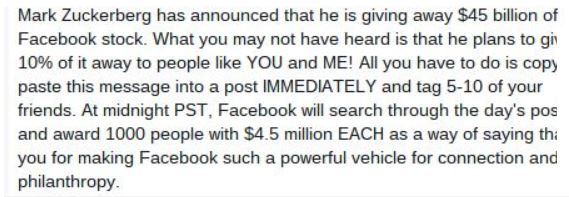
When I was checking my Facebook News Feed this morning, I found this message.

Facebook newsfeed hoax

Facebook newsfeed hoax

It seems one of my friends was very excited because Facebook founder, Mark Zuckerberg, was scheduled to give away 4.5 million shares of Facebook stock at midnight. To enter this lottery-like giveaway, all you had to do was copy and paste the message to your own news feed. The message, and variations like it, go on to say that the winners will be announced  live on today’s Good Morning America. Other variations look like this,

Facebook newsfeed hoax Metro

Facebook hoax image via metro.co.uk

Like others before it, this viral Facebook message is a hoax. You will not be entered by copying and pasting a message. And Mr. Zuckerberg is not giving away 4.5 billion dollars to 1,000 random Facebook users. If this message makes its way to your News Feed, please do not copy and paste it or share with your friends. The best action is to delete it and maybe go buy yourself a lottery ticket. The odds will be a little better. ;-)

Using surveys to better understand viral stories

Facebook is actually doing something about these hoaxes. Early in December, the Facebook newsroom published a News Feed FYI: Using Surveys to Better Understand Viral Stories. In the article they described how they have started using surveys to improve the news feed experience. Every day they ask thousands of people to rate their experience, share suggestions for improvement, and help them infer what might be an interesting story so they can work their algorithms to take that into account when ranking. Here’s what they say about that,

People also take story surveys where they see two stories that could be in their News Feed and answer which they’d most want to see. We compare their answer to the order we would have put these stories in their News Feed. If the story picked is the one News Feed would have shown higher up, that’s a good sign that things are working well. If the story picked is the one we would have put lower down, this highlights an area for improvement.

So if you receive one of these surveys, make sure you fill it out – your feedback will help to eliminate this type of clutter in everyone’s News Feed. :-)


Follow Avast on FacebookTwitterYouTube, and Google+ where we keep you updated on cybersecurity news every day.

Santa’s Security Secrets

We all think we know Santa – where he lives (to the nearest Pole!), what he likes to wear (on one day of the year!) – but what do we really know about this mysterious character? What does he do during the rest of the year, what are his hobbies, where does he work on the other 364 days of the year,  what is his ‘real’ name, and more importantly – who is on his naughty list?! None of these personal details have ever been revealed, and even in today’s connected world, Santa has managed to keep his identity a closely guarded secret – but how, and what best practices can we learn from our favorite festive character?

 He wears the AVG Invisibility glasses
Santa saw AVG’s Invisibility Glasses in February and sent us a letter saying “Dear AVG, those Invisibility Glasses are just what I need to keep me invisible during the year. I have been a good Santa, and I hope you can help me out.”

The glasses make it difficult for cameras or other facial recognition technologies to get a clear view of Santa’s identity, so Facebook can’t automatically tag him in that embarrassing picture under the mistletoe, for example! We, of course, agreed to provide a pair, enabling Santa to travel the world without being tracked, seeing sights that would have been difficult to visit due to the number of people taking pictures to post online. Santa has provided us some pictures from his travels that we can share with you here…XXXX.
Cameron, Obama and Santa

Bono and Santa

Taj Mahal and Santa

Eiffel Tower and Santa

While not generally available yet, unless you’re Santa, the concept serves as a reminder to protect your privacy online. There are, of course, many other methods Santa uses to stay private – he has shared a few of them with us in this exclusive interview!

He stays away from social media
“There are hundreds of Santa impersonators on Facebook, but I – the real Santa – am nowhere to be found,” says Santa. Staying away from social media completely might be a challenge for the rest of us, but it’s worth thinking about the information we share via these channels at this time of year. Make sure to check your security and privacy settings to ensure you’re not exposing any information you’d rather not be. “You may want to think twice about posting those pictures of the latest high-tech gadgets you’ve been gifted too – you never know who might be looking!”

He still uses a POLARoid camera
“I never take selfies,” says Santa, “they may get leaked online and that could be awkward.” But with most of us now using our smartphones to take pictures, there are privacy issues you may not have considered. Aside from pictures getting into the wrong hands – the recent VTech hack which may have enabled hackers to steal children’s photos is an example – you might not know that smartphone photos are also oftengeotagged’, meaning that others can find out exactly where your pictures were taken.

His sleigh is Wi-Fi free and disconnected
“Checking out if you have been good or bad is now even easier with people posting so much of their lives on their online profiles. I avoid being located, tracked or leaving things to chance by using an encrypted Virtual Private Network (VPN) when using the Internet,” says Santa. But It would be impractical for most of us to avoid the Internet completely. There are ways to make sure you’re surfing securely and privately though.

Secure your home Wi-Fi with encryption using a strong password. Also avoid public Wi-Fi hotspots when transferring personal details online during bank transfers for example, or follow Santa’s example and use a VPN. Phishing emails also tend to spike around the festive season as cybercriminals try to tempt us with too good to be true deals. If at any point you think the email is spam and fraudulent then do not open or click on any links, just delete the email!

He pays for everything with toys
Santa told us that his “route and present list is a closely guarded secret. I use very strong passwords and a reindeer for two-factor authentication”. If you’re doing last minute shopping online this year, it’s worth taking to time to remember good password practice – to save time, and a potential headache, later! This means using strong passwords that are different for each account, along with additional security codes or the ‘two-factor authentication’ Santa refers to where available.

So now you know a bit more about Santa and his security secrets – hopefully they’ll also help you to stay safe and secure this Christmas. Happy Holidays!


Image sources:
The British Foreign and Commonwealth OfficeErik (HASH) HersmanTANAKA Juuyoh (田中十洋)Sreejith KBrian Burk


The security review: Risky wearables, #CyberChoices and holiday shopping safety

You might already have mince pies on the mind as we countdown to Christmas, but cybercrime doesn’t sleep and neither should your security solutions. Here is this week’s security review – our recap of the biggest, most interesting stories and opinions from the past seven days.

The post The security review: Risky wearables, #CyberChoices and holiday shopping safety appeared first on We Live Security.

Beware of the hackers hiding behind fake LinkedIn profiles

linkedin

There has been news lately highlighting a trend in hackers using LinkedIn, the popular social media platform for professionals looking to connect with like-minded individuals, to dupe unwitting victims. This includes the creation of fake profiles with the aim of stealing personal information. The fake profiles pose as recruiters and quickly begin to add contacts in the field of their chosen victim. Once they have what appears to be a reputable profile, they then add their victim as a contact having gained their trust as they usually have lots of common contacts in the related sector.

The text that is used for the fake profiles is usually copy and pasted directly from other sources, usually genuine profiles. The accompanying profile photo, which is generally of a woman, is also taken from other professional profiles or, in some cases, a stock photo. It is also revealed that they use keywords such as “reservoir engineer”, “exploration manager” and “cargo securement training” which are likely to help them to attract visibility through the site’s built-in search engine. The majority of the terms relate to the logistics, information security and oil and gas industries.

Boasting over 400 million users worldwide, LinkedIn is seen as a way for professionals to create circles of similar workers in their sector with the aim of using the platform as a form of self-promotion, doing away with the traditional methods of job hunting. It has also become a valuable tool for businesses, who are able to head hunt top talent as well as posting content relating to their company.

In response to the fears of its many users, LinkedIn said: “We investigate suspected violations of our Terms of Service, including the creation of false profiles, and take immediate action when violations are uncovered. We have a number of measures in place to confirm authenticity of profiles and remove those that are fake. We encourage members to utilize our Help Center to report inaccurate profiles and specific profile content to LinkedIn.”

Some advice for users who may be concerned that they are at risk include doing a reverse image search by dragging and dropping the profile picture into Google Images and seeing what it brings up. You can also copy and paste the job information in Google to reveal whether it has been taken from somewhere else.

Seeing as this isn’t the first time that there have been concerns over fake profiles and spamming on LinkedIn, it might be worth your while to do a quick bit of research before you accept a new contact. As always, it pays to be careful with information that you share online as it can save you many potential problems in the future.

The post Beware of the hackers hiding behind fake LinkedIn profiles appeared first on MediaCenter Panda Security.
Is Facebook‘s “Most used words” quiz a privacy thief?

The “Most used words” app became a Facebook hit within days of its launch. At the moment of writing this article, it has been used by nearly 18 million users globally. There are many controversies about user privacy in relation to data that is collected by the app.

“Most Used Words“ is an unexpected privacy nightmare. Source http://en.vonvon.me/

“Most Used Words“ is an unexpected privacy nightmare. Source http://en.vonvon.me/

Earlier this week, the British company Comparitech published a blog post about the privacy nightmare caused by this innocent-looking Facebook app. “Most used words” is presented as a simple, playful quiz in which Facebook scans through and analyzes users‘ posts in order to generate a collection of words they use most frequently on Facebook. Sounds like fun, right? Before you try it yourself, take a closer look at this data-hungry wolf in sheep’s clothing – after some analysis of the app, it has turned out to be a privacy thief. When using the app, users give away following details:

First, the app asks for a couple basic pieces of information:

1. Name

2. Everything you’ve ever posted on your timeline

But then, it asks users to agree to give away the following personal details:

3. Profile picture, age, sex, birthday,and other public info

4. Entire friend list

5. All of the photos and photos you’re tagged in

6. Education history

7. Hometown and current city

8. Everything you’ve ever liked

9. IP address

10. Information about the device you’re using, including browser and language

Let’s face it — our concept of the privacy has  unarguably changed in the age of the Internet and social media. In the digital world, we leave our fingerprints on a daily basis while browsing, shopping, playing, and chatting on multiple devices. Regardless of our online activities, there should be limits as to how companies collect, store and process our personal data. In this case, the owner of the app, South Korean company vovon.me, can be accused of a serious breach of user privacy.

What do you give away when installing “Most used words”?

According to Vonvon’s official terms and conditions, you agree to your personal information being used in the following ways:

1. Used after the termination of your membership to the website and/or use of Vonvon’s services, for any reason whatsoever. (This basically means that you already gave away your data if you used the app.)

2. Stored on any of Vonvon’s servers at any location, including the countries that have little to no legal regulations regarding data privacy.

3. Sold to the third parties, which you agreed to according to this statement: […] We do not share your Personal Information with third parties unless We have received your permission to do so, or given you notice thereof (such as by telling you about it in this Privacy Policy) […]

4. Used in any manner by the third parties, as Vonvon doesn’t take any responsibility for it: […] this Privacy Policy does not apply to the practices of entities Vonvon does not own or control, or to individuals whom Vonvon does not employ or manage, including any third parties to whom Vonvon may disclose Personal Information[…]

How to protect yourself?

We have good and bad news for you. The bad one is that if you have already installed any of Vonvon’s apps, it’s unfortunately no longer possible to protect your privacy. (See point 1 in the paragraph above.)

If you haven’t used it yet, let this be a lesson to you. The same lack of privacy concerns can also be seen in other permission-hungry apps – this is why a weather forecast app would like to have access to your pictures and a cooking app requests your IP address.

We also advise you to review the current list of apps that you have already installed on Facebook, determine if you use them on a regular basis and pinpoint what kind of data the apps are requesting from you. You can do this by doing the following:

1. Select Settings in the top right of Facebook

2. Click Apps in the left menu

3. Hover over an app or game and click to edit its settings

You can find out more about Facebook apps‘ privacy and security in the About Apps section of the Help Center.

If you are an Avast user, log in into your Avast account and go to Social Media Security > Apps — we will guide you how to analyze each of your apps‘ security.

You might be surprised how many apps you have installed throughout the years, so don’t forget to make an audit of your apps on a regular basis.


Follow Avast on FacebookTwitterYouTube, and Google+ where we keep you updated on cybersecurity news every day.